USA
USA UAE
UAESmall Business
Designed for startups and growing businesses


See More



Brand: Eilisys Technologies Private Limited
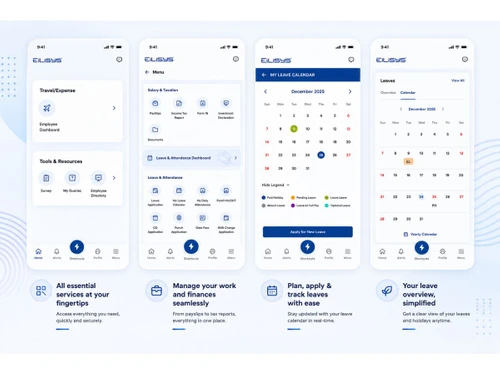
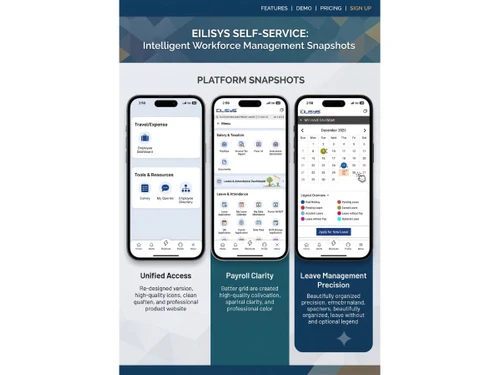
Ascent Workforce Management helps enterprises streamline contract labour management, attendance, payroll inputs, compliance, leave, and workforce operations through a unified platform.
See MoreHave you used Ascent Workforce Management before?
Share your insights for better experience
Brand: Eilisys Technologies Private Limited
Founded Year: 2006
Product company with experience & expertise in delivering Workforce Management Solutions to Enterprise Customers across various Industry Segments, PAN India
Looking for The Right Pricing?
Share your requirements and get a plan built around your business.
Price Available on Request
Get personalised Ascent Workforce Management pricing that fits your needs. Our team will connect with you.
 Contract Labour Management Contractor Management Compliance Management Document Management Attendance Management Time Tracking Leave Management Overtime Management Shift Management Exit Management Analytics & Reporting Performance Management Onboarding Management Payroll Input Management Policy Management Biometric Integration Workforce Deployment Management Approval Workflow
  Windows
  iOS
iOS  Android MacOS
  Desktop
  Mobile
  Cloud-Based
  Perpetual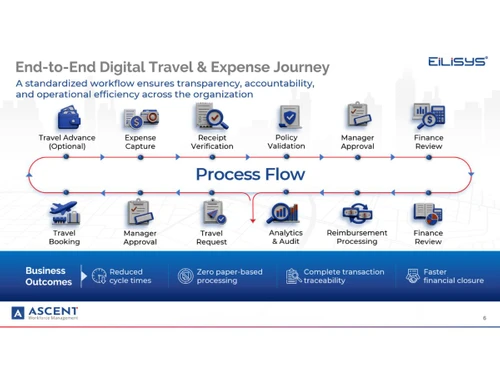
Small Business
Designed for startups and growing businesses
Medium Business
Built for business growth and flexibility
Enterprises
Designed for complex and large-scale business needs
4.3
Out of 5

Overall Rating
Based on
10 Verified Reviews
Rating Breakdown
86% Recommend this Product
Add ReviewOverall, users express positive sentiments towards Ascent Workforce Management, highlighting its efficiency in payroll processing and performance reviews, with many noting significant time savings and accuracy. The dedicated support team receives commendations for their responsiveness, while the user-friendly interface is appreciated for its simplicity. However, some users mention limitations such as a lack of advanced customization options, outdated visuals, and the absence of a mobile app. Additionally, larger enterprises may find the tool lacking in advanced features needed for complex needs.

Jun 25, 2026
Techjockey Verified
“Payroll Used to Take 10 Days—Now It’s Done in 2!”
I switched from my old payroll system that took forever sometimes 10 days to do a full salary run. With Ascent, it’s down to just 2 days! Payslips, TDS, tax calculators, PF all automated and super smooth. It's reliable, though I'd love seamless syncing with my ATS and attendance systems.
Pros
Payroll is fast, accurate, and largely error-free
Cons
Needs more integrations with other HR tools
Reason to switch
Wanted faster, automated payroll and compliance handling.
Jun 25, 2026
Techjockey Verified
“Performance Reviews Finally Organized”
I moved from using Google Forms for appraisals to Ascent's built-in performance module. It reminds me automatically, tracks goals, and requires no chasing. The only downside? The review forms are out-of-box and need more customization for specialized roles.
Pros
Robust performance management system
Cons
Templates aren’t super customizable
Reason to switch
Needed structured, reliable performance workflows.
Jun 25, 2026
Techjockey Verified
“Error-Free Payslips with Dynamic Tax Calculations”
I switched from a simpler payroll tool to Ascent, and I’ve been impressed by how payslips generate—accurate, detailed, with built-in tax calculations. My only issue? The interface looks old-school compared to modern tools.
Pros
Payslips, tax history, dynamic calculators are excellent
Cons
UI feels dateda
Reason to switch
Wanted reliable tax tools and payslip accuracy.
Ascent Workforce Management
Price On Request
Desktop
Mobile
Web based
On Premises
Windows
Mac OS

Workstatus
₹ 399
Desktop
Mobile
Web based
On Premises
Windows
Mac OS
Payoneer WFM
Price On Request
Desktop
Mobile
Web based
On Premises
Windows
Mac OS

GoodDay
Price On Request
Desktop
Mobile
Web based
On Premises
Windows
Mac OS

ProHance
Price On Request
Desktop
Mobile
Web based
On Premises
Windows
Mac OS
Jolt
Price On Request
Desktop
Mobile
Web based
On Premises
Windows
Mac OS

Trackforce
Price On Request
Desktop
Mobile
Web based
On Premises
Windows
Mac OS

WorkMax
Price On Request
Desktop
Mobile
Web based
On Premises
Windows
Mac OS

TeamWise
Price On Request
Desktop
Mobile
Web based
On Premises
Windows
Mac OS

T3Workforce
₹ 80
Desktop
Mobile
Web based
On Premises
Windows
Mac OS

Fieldmobi
Price On Request
Desktop
Mobile
Web based
On Premises
Windows
Mac OS
(0) Product(s) selected
Available
Price on Request
Starting Price:
$6
Available
Price on Request
Available
Price on Request
Available
Price on Request
Available
Price on Request
Starting Price:
₹30 /Month
Available
Price on Request

Available
Price on Request

Starting Price:
$8 /Month

Available
Price on Request
Ascent is built for Indian enterprises managing multi-location operations, shifts, approvals layers, and contractor-heavy workforce environments. It’s designed for teams that need consistent execution across HR, payroll, and operations.
Ascent is used across the buying and execution teams like HR Operations/Time Office, Payroll/Finance, Plant HR/Operations, and IT/HRIT. It supports daily workflows for users and provides governance and visibility for leadership.
Ascent helps reduce payroll errors by connecting attendance, leave, overtime, approvals and employee data before payroll processing. This gives payroll teams cleaner inputs and reduces last-minute corrections.
Ascent centralizes workforce data across plants, branches, offices and sites so HR, payroll and operations teams can track attendance, approvals, payroll inputs and workforce activity more clearly.
Yes, Ascent supports contractor attendance, deployment, documentation and vendor-linked workforce records, helping enterprises manage contract workforce operations with better visibility and control.
Ascent price is available upon request at techjockey.com.
20,000+ Software Listed
Best Price Guranteed
Free Expert Consultation
2M+ Happy Customers
Terms and Condtions

Users with registered businesses can purchase goods from merchants on the platform to satisfy their business needs. Users are not permitted to utilize any products acquired through the platform for resale, advertising, business, or further distribution.
For each purchase made, users will receive a Tax Invoice (or 'GST invoice') that includes specific details such as:
the GSTIN of the user associated with their registered business, and
the specified Entity Name for their business.
It should be noted that not all products are eligible for GST Invoice. Only the products displayed by participating sellers with the 'GST-based Invoice Available' callout on the product description page would qualify.
Certain goods and services are not eligible to get a GST Invoice, including items with VAS, i.e., Value Added Services (e.g., Total Mobile Protection/Assured Buyback) and those involving an exchange offer at the time of purchase.
Users must ensure the accuracy of the GSTIN, and business entity name provided for the GST Invoice. Requests for corrections into GST Invoice would not be accommodated by Techjockey.com or any Seller, and any issues arising from user-provided information are the sole responsibility of users.
Techjockey.com is not liable for the GST Invoice or any associated input tax credit. To efficiently claim an input tax credit, users should select the registered place of business address as per the GST authority's data and follow the provisions of the GST Act and rules.
To claim an input tax credit, the delivery and billing addresses must match. Furthermore, input tax credits will not be granted if the delivery address and GSTIN on the invoice are from different states. In case of incorrect GST details provided during the order placement, the order will be canceled automatically.