 USA
USA UAE
UAESmall Business
Designed for startups and growing businesses


See More




Brand: CelAction
CelAction2D is a professional 2D animation software that helps studios and animators create high-quality animations for TV series, films, commercials, and digital content.
See MoreHave you used CelAction2D before?
Share your insights for better experience
Brand: CelAction
Founded Year: 2000
Celaction provides animators with the most powerful tools possible to create 2D animation.
 Rigging & Animation Asset Library Management Hybrid Graphics Support Non-Destructive Editing Advanced Timeline Control Inverse Kinematics Lip Sync Automation Multi-Plane Camera System Scene Management External Asset Import Multi-Monitor Support High-Quality Rendering Procedural Animation Tools Real-Time Previews Scalable Workflow Management

Watch the demo video to explore key features, real workflows, and how the software fits your business needs.
 Windows
  Desktop
  Perpetual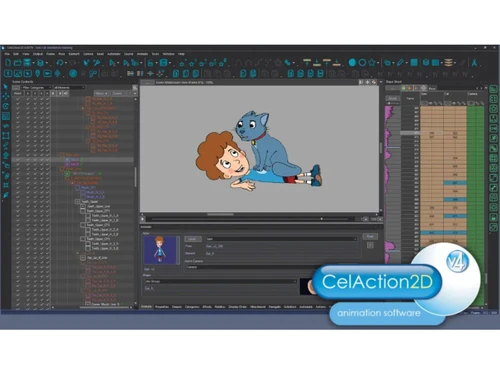

Small Business
Designed for startups and growing businesses
Medium Business
Built for business growth and flexibility
Enterprises
Designed for complex and large-scale business needs
Techjockey Trusted Reviews from Verified Users
No reviews are currently available for CelAction2D. Discover similar Animation Software reviews

Animaker
Whats great - I started using Animaker because of a sudden influx of assignments during my career’s initial video editing career. Today, th... read more

VideoScribe
Whats great - First of all, Videoscribe is great for making animated presentations. Just in case, you forgot to save the recent changes, wo... read more
Autodesk Maya
Whats great - Autodesk Maya is the best tool to convert your ideas into reality. You have a lot of possibilies with this software. If you w... read more
CelAction2D
Price On Request
Desktop
Mobile
Web based
On Premises
Windows
Mac OS
Autodesk Maya
₹ 16520
Desktop
Mobile
Web based
On Premises
Windows
Mac OS

Autodraft
₹ 833
Desktop
Mobile
Web based
On Premises
Windows
Mac OS
VideoScribe
Price On Request
Desktop
Mobile
Web based
On Premises
Windows
Mac OS

LottieFiles
Price On Request
Desktop
Mobile
Web based
On Premises
Windows
Mac OS

Jitter
Price On Request
Desktop
Mobile
Web based
On Premises
Windows
Mac OS

Animation Desk
Price On Request
Desktop
Mobile
Web based
On Premises
Windows
Mac OS

Immersity AI
Price On Request
Desktop
Mobile
Web based
On Premises
Windows
Mac OS

Toonly
Price On Request
Desktop
Mobile
Web based
On Premises
Windows
Mac OS

ImagetoCartoon
Price On Request
Desktop
Mobile
Web based
On Premises
Windows
Mac OS

Lordicon
Price On Request
Desktop
Mobile
Web based
On Premises
Windows
Mac OS
(0) Product(s) selected
Starting Price:
$240 /User/Year
Starting Price:
$5 /Month
Starting Price:
$49
Starting Price:
$6 /Month
Starting Price:
$16

Starting Price:
$15 /Month
Starting Price:
$69 /Quantity $99

Starting Price:
$96 /Year

Starting Price:
$11 /Month

Starting Price:
$10 /Month

Starting Price:
$80 /Year

CelAction2D is ideal for animation studios, independent animators, production houses, advertising agencies, educational institutions, and professional animators creating 2D animated films, TV series, commercials, and digital content.
No, CelAction2D is not free.
CelAction2D price starts at USD 70 at techjockey.com.
Animators from any animation background, drawn, stop-motion or 3D CGI, can use CelAction 2D to quickly produce perfect work. The software is designed to make animation faster than ever before through automation and efficient workflows. Additionally, CelAction2D offers extensive support and learning resources, including Tutorials, E-mail and Live Support, Forums, and dedicated Courses, to help users master the software.
CelAction2D is a powerful 2D animation software used for high-quality, high-volume production in various media. It is the software of choice for many leading animators and studios, creating award-winning and commercially successful films, TV series, and advertising. Its applications include animating character models using vectors and/or bitmaps, rigging characters into skeletons for easy reuse and inbetweening, and producing hand-crafted quality animation with modern efficiency. The software is utilized for series, short films, pilots, feature films, music videos, student films, title sequences, and commercials.
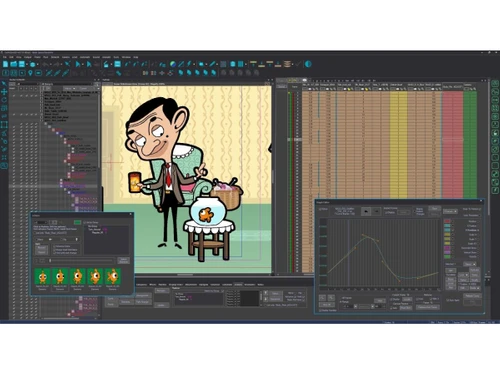
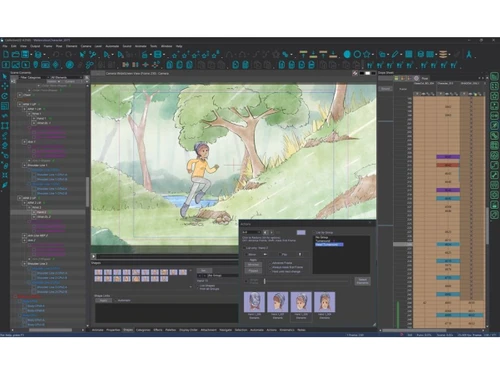
CelAction2D offers a robust animation workflow with several key features. These include skeletal rigging of characters for reusable animation setups, automatic inbetweening and deformation, and the ability to import assets from various external software. It also provides an Asset Library Management system for reusable elements, Hybrid Graphics Support for mixing vector and bitmap artwork, Non-Destructive Editing, Advanced Timeline Control for precise animation, Inverse Kinematics for automated joint movement, Lip Sync Automation, and a Multi-Plane Camera System for depth and parallax effects.
CelAction2D offers significant flexibility in asset handling. Users can import assets from their preferred software, such as Photoshop, TV Paint, Illustrator, or Adobe Animate/Flash, allowing them to maintain their chosen image creation style. It supports a wide range of asset types, including vectors, scanned paintings, photos, and even 3D CGI, all of which can be easily imported and animated. The software also features Hybrid Graphics Support, enabling artists to seamlessly mix both vector and bitmap artwork within a single animation project.
CelAction2D provides comprehensive support and learning resources for its users. These include a dedicated Support section offering Tutorials, E-mail and Live Support, and access to Forums for community interaction and problem-solving. Additionally, the website lists Courses as a resource, indicating structured learning opportunities are available to help users master the software.
CelAction2D is designed for high-volume animation production by streamlining workflows and enhancing efficiency. It allows for the rigging of character models into skeletons, enabling animation to be easily changed and reused, eliminating the need to draw the same thing twice. The software separates drawing from animation, allowing teams to specialize into designers (asset creation) and animators (posing and timing). Features like Asset Library Management centralize reusable elements, while automation tools provide amazingly fast ways of animating, ensuring high-quality output on model with consistent textures and line quality, even at scale.
20,000+ Software Listed
Best Price Guranteed
Free Expert Consultation
2M+ Happy Customers
Terms and Condtions

Users with registered businesses can purchase goods from merchants on the platform to satisfy their business needs. Users are not permitted to utilize any products acquired through the platform for resale, advertising, business, or further distribution.
For each purchase made, users will receive a Tax Invoice (or 'GST invoice') that includes specific details such as:
the GSTIN of the user associated with their registered business, and
the specified Entity Name for their business.
It should be noted that not all products are eligible for GST Invoice. Only the products displayed by participating sellers with the 'GST-based Invoice Available' callout on the product description page would qualify.
Certain goods and services are not eligible to get a GST Invoice, including items with VAS, i.e., Value Added Services (e.g., Total Mobile Protection/Assured Buyback) and those involving an exchange offer at the time of purchase.
Users must ensure the accuracy of the GSTIN, and business entity name provided for the GST Invoice. Requests for corrections into GST Invoice would not be accommodated by Techjockey.com or any Seller, and any issues arising from user-provided information are the sole responsibility of users.
Techjockey.com is not liable for the GST Invoice or any associated input tax credit. To efficiently claim an input tax credit, users should select the registered place of business address as per the GST authority's data and follow the provisions of the GST Act and rules.
To claim an input tax credit, the delivery and billing addresses must match. Furthermore, input tax credits will not be granted if the delivery address and GSTIN on the invoice are from different states. In case of incorrect GST details provided during the order placement, the order will be canceled automatically.
