linkedin
ChatPic logo
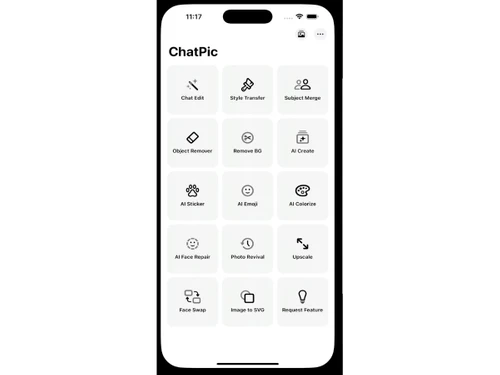
ChatPic-dashboard
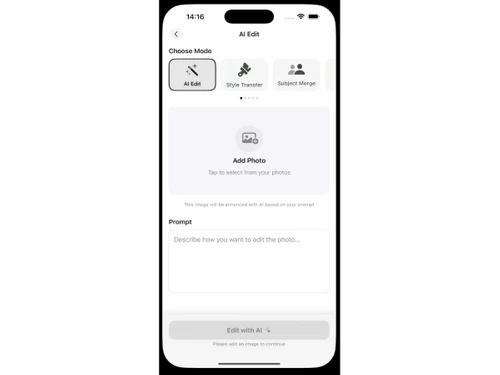
ChatPic-ai edit
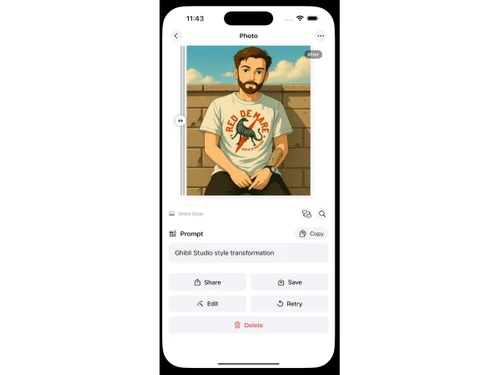
ChatPic-prompt

ChatPic

Brand: CoreMoose

  • 4.3

  • 4 Ratings

ChatPic is an AI photo editing software that supports photo editing, restoration, and generation through simple chat prompts.

See More

Have you used ChatPic before?

Share your insights for better experience

Add a Review

Price Available on Request

Questions about pricing or customization? We’re here to help, just a click away.

100% Genuine
Products
Best Price
Guaranteed
Safe & Secure
Payment
  • Description

  • Pricing

  • Features

  • Specification

  • Review

  • FAQ

ChatPic Software Overview

What is ChatPic?

ChatPic is an AI photo editing software. It uses AI technology to enhance the images based on user input text prompts. The user just needs to describe the desired changes, and the system's powerful AI engine applies those changes to the image.

ChatPic provides numerous editing options like chat-based editing, making anime characters, Ghibli-style characters, face swap, subject merge, and artistic style transfers such as anime, oil painting, and pixel art. It revives old photographs, colorizes monochrome shots, and sharpens facial details with precision.

With this photo editing software, users can remove unwanted objects offline, upscale resolution, and apply auto corrections for light and color. It also provides options of light corrections, text overlays, sticker additions, and portrait retouching, giving creative flexibility across personal, professional, and artistic projects.

Why Choose ChatPic?

  • Photo editing via chat: Transform images instantly by describing desired changes in plain language, eliminating complex tools and manual adjustments.
  • Enhancement: Improve resolution, sharpen details, and correct lighting automatically, producing professional-quality visuals from ordinary or low-quality photographs.
  • Restoration: Revive old, damaged, or faded pictures by repairing cracks, colorizing monochrome shots, and restoring clarity with advanced AI technology.
  • Face swap: Replace faces seamlessly in photos, maintaining natural expressions and realistic blending for creative, entertaining, or professional visual projects.
  • Artistic styling: Apply anime, oil painting, or pixel art effects, turning everyday photos into unique, imaginative, and visually striking artworks.

Benefits of ChatPic Photo Editing Software

  • Chat-based editing: Make instant photo changes using simple text instructions, avoiding complicated tools or manual adjustments.
  • Rich edit options: Access diverse effects, filters, and artistic styles to personalize visuals with creative flexibility.
  • Restoration options: Repair old, damaged, or faded images by reviving clarity, color, and detail through advanced AI.
  • All-in-one app: Combine editing, enhancement, restoration, and styling features in one streamlined, easy-to-use platform.
  • Quality photos: Produce polished, professional-grade results suitable for personal keepsakes, social sharing, or business presentations.

ChatPic Pricing

ChatPic Price starts at INR 1799 at techjockey.com.

ChatPic comes with multiple pricing plans and caters to a diverse customer base. For subscription-related details and offers on premium packages, please request a call back from our product experts.

Read more

ChatPic Pricing & Plans

Looking for The Right Pricing?

Share your requirements and get a plan built around your business.

  • Define your business needs
  • Get customised pricing
  • Choose features that fit your workflow

Price Available on Request

Get personalised ChatPic pricing that fits your needs. Our team will connect with you.

ChatPic Features

  • icon_check Chat-Based Editing
    Edit your photos simply by typing instructions—no manual controls or complex tools required.
  • icon_check AI Photo Generation
    Generate new photos from text prompts in styles like anime, oil painting, sketch, pixel art, and more.
  • icon_check Style Transfer
    Transform your images with artistic filters including GPT-Ghibli, cartoon, vintage, cinematic, and 3D looks.
  • icon_check Photo Restoration
    Restore old or damaged photos with colorization, sharpness enhancement, and clarity improvement tools.
  • icon_check Face Swap & Retouching
    Easily swap faces in photos or apply beauty filters and facial enhancements for a polished appearance.
  • icon_check Background & Object Removal
    Erase unwanted objects or people from photos, with some tools available offline for privacy protection.
  • icon_check Image Upscaling
    Sharpen and upscale low-resolution images using AI to improve detail and clarity without distortion.
  • icon_check User-Friendly Interface
    No technical skills needed—chat-based UI is easy for beginners while still offering creative control.

ChatPic Specifications

Supported Platforms
iOS iOS MacOS MacOS
Devices
Desktop Desktop Mobile Mobile iPad iPad
Deployment
Perpetual Perpetual
Suitable For
All Industries
Business Specific
All Businesses
Business Size
Small Business Startups Medium Business Enterprises
Customer Support
Email
Language
English
AI Features
AI Integrated

ChatPic Review

4.3

Out of 5

img

Overall Rating

Based on
4 Verified Ratings

Rating Breakdown

  • Features 4.5
  • Value for Money 4.2
  • Ease of Use 4.3
  • Customer Support 4.5

80% Recommend this Product

Add Review

Techjockey Trusted Reviews from Verified Users

No reviews are currently available for ChatPic. Discover similar Photo Editing Software reviews

  • Canva

    4.3

    Whats great - I enjoy how quickly and simply one can choose the template and begin tweaking. read more

  • Adobe Photoshop

    4.6

    Whats great - What I love most about Adobe Photoshop is its amazing editing capabilities. It's versatile, not just for photos but also for ... read more

  • Luminar Neo

    4.9

    Whats great - The interface is clean and easy to get around, so I’m not wasting time looking for tools. Sky AI, Relight AI, and portrait to... read more


Articles for ChatPic

See All Related Articles

How much does ChatPic cost?

ChatPic pricing starts from INR 1799 at techjockey.com.

Who uses ChatPic?

ChatPic is used by individuals, content creators, businesses, and professionals for editing, restoring, enhancing, and generating creative visuals.

How does ChatPic Photo Editing Software work?

ChatPic works through conversational AI users type instructions, and the software instantly applies edits, enhancements, or generates new images.

Which operating systems are compatible with ChatPic Software?

ChatPic Photo Editing Software runs smoothly on OS like iOS, iPadOS, macOS (M1 or later), and visionOS for smooth performance.

Is a free demo available for ChatPic Photo Editing Software?

Yes, a free demo is available, allowing users to explore features before use.

Can ChatPic restore old or damaged photos?

Yes, ChatPic revives faded or cracked images by repairing details, colorizing monochrome shots, and enhancing clarity.

Does ChatPic support artistic style transfers?

Yes, ChatPic Photo Editing Software applies anime, oil painting, pixel art, and other creative filters to transform ordinary photos into unique artworks.

Can ChatPic remove unwanted objects from photos?

Yes, ChatPic includes an on-device remover that erases people, text, or objects without needing cloud processing.

Does ChatPic improve photo resolution?

ChatPic Photo Editing Software uses AI upscaling to sharpen details and boost resolution, producing high-quality, professional-grade images.

20,000+ Software Listed

Best Price Guranteed

Free Expert Consultation

2M+ Happy Customers

Terms and Condtions

close

Users with registered businesses can purchase goods from merchants on the platform to satisfy their business needs. Users are not permitted to utilize any products acquired through the platform for resale, advertising, business, or further distribution.

For each purchase made, users will receive a Tax Invoice (or 'GST invoice') that includes specific details such as:

  • the GSTIN of the user associated with their registered business, and

  • the specified Entity Name for their business.

It should be noted that not all products are eligible for GST Invoice. Only the products displayed by participating sellers with the 'GST-based Invoice Available' callout on the product description page would qualify.

Certain goods and services are not eligible to get a GST Invoice, including items with VAS, i.e., Value Added Services (e.g., Total Mobile Protection/Assured Buyback) and those involving an exchange offer at the time of purchase.

Users must ensure the accuracy of the GSTIN, and business entity name provided for the GST Invoice. Requests for corrections into GST Invoice would not be accommodated by Techjockey.com or any Seller, and any issues arising from user-provided information are the sole responsibility of users.

Techjockey.com is not liable for the GST Invoice or any associated input tax credit. To efficiently claim an input tax credit, users should select the registered place of business address as per the GST authority's data and follow the provisions of the GST Act and rules.

To claim an input tax credit, the delivery and billing addresses must match. Furthermore, input tax credits will not be granted if the delivery address and GSTIN on the invoice are from different states. In case of incorrect GST details provided during the order placement, the order will be canceled automatically.