linkedin
Contlo logo
play Contlo - Email, SMS & Web Push
Contlo order
Contlo email

Contlo

Brand: Contlo

  • 3.7

  • 11 Ratings & 11 Reviews

AI powered marketing automation and customer data management platform that helps in boosting the revenue of the company.

See More

Have you used Contlo before?

Share your insights for better experience

Add a Review
Starting Price
$250

View plans

100% Genuine
Products
Best Price
Guaranteed
Safe & Secure
Payment
  • Description

  • Pricing

  • Features

  • Specification

  • Review

  • Compare

  • Alternatives

  • FAQ

  • Questions

Starting at $250

Contlo Software Overview

What is Contlo?

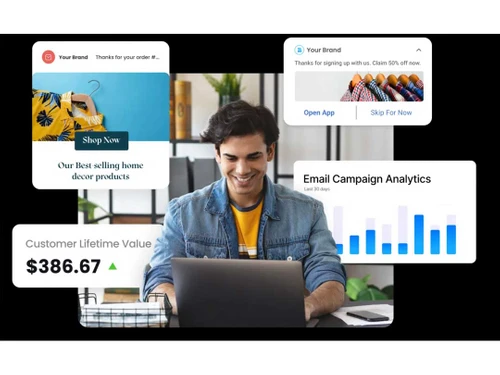
An AI-powered marketing automation software that provides customer data management. It helps e-commerce stores and D2C stores improve their customer engagement and online presence. Using Contlo, organizations can improve their conversion rate and automate the process of campaign creation using omnichannel marketing.

Contlo offers several functionalities, like social media automation, lead conversion, advanced report generation, and much more, that help marketers streamline their workflow.

Why Choose Contlo?

There are several reasons why a user should invest in Contlo marketing automation software, some of the reasons have been mentioned below:

  • Efficient Customer Management: Contlo's customer management feature allows users to track customer engagement, predict demographics, and perform cross-channel marketing that enhances customer reliability for the user.
  • Catalog Management: It allows businesses to organize their customers’ catalogs with ease. Catalog administration is a crucial component as it involves functionalities like visitor monitoring, developing, and updating product descriptions.
  • Lead Generation and Lead Nurture: Increases client engagement by sending them campaigns via different channels like emails, SMS, and ads.
  • AI enrichment: Contlo is an advanced marketing tool with numerous AI functionalities like an advanced customer journey builder, predicting the demographic, smart recommendation, and more.

Additional Features of Contlo?

Contlo differentiates itself from its competitors as it is stacked with several functionalities that make it unique. Some of them are listed below:

  • Brand AI: Contlo has a self-learning AI model that assists its users in developing customized marketing campaigns. It can analyze a brand's identity, voice, tone, and messaging. It has been trained over a dataset of 100 million brands, making it an asset to the user.
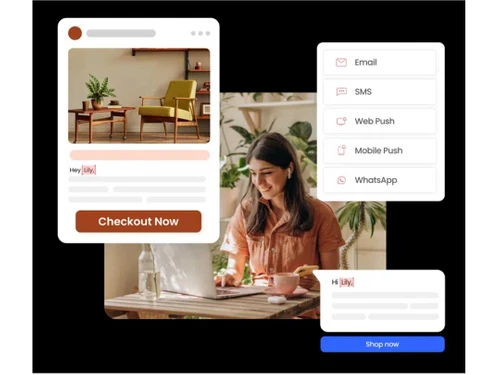
  • Diverse Marketing Channel: Uses a wide range of marketing channels to promote the users’ data. Campaigns are promoted via emails, SMS, WhatsApp, etc.
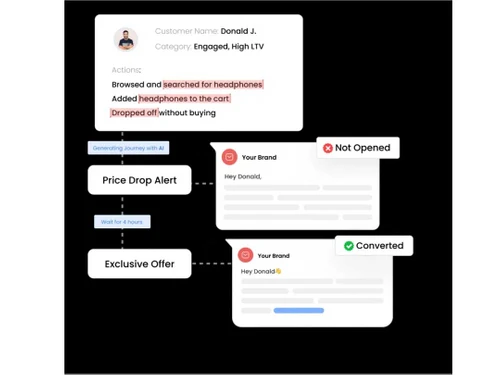
  • LLM-powered customer journey: Contlo makes use of its advanced AI technologies to make attractive customer engagement workflows and customer journeys in accordance with their recent activity over the platform. This results in enhanced ROI value.
  • Conversational Support: Club all your supporting channels email, SMS, voice calls, chat widget, and social media over a single platform. Users can get a complete 360° view of their customers’ activity, preferences, and engagement with the platform.

Who are the Potential Users of Contlo?

Contlo is becoming popular across various industries. Here are some well-known sectors that use Contlo:

  • E-commerce Industries: Using Contlo marketers to uplift their online presence with the help of highly personalized campaigns, that results in upselling. Eventually increases the revenue intake.
  • Healthcare Centers: Patients are helped with getting onboard and exiting the center. While the staff members are assisted with handling the hospital’s data with utmost efficiency.
  • Banking Firms: Contlo is necessary for financial advisers as, it assists with revenue management tools, compliance capabilities, and strong security measures.
  • Media and Entertainment: It helps the organization maintain and market its brand appropriately.
  • Gaming Industries: Contlo is used by the gaming industry, as demographic promotion is crucial for effective marketing. It helps them to achieve their targeted marketing strategies.

Key Takeaways of Contlo

Some of the important takeaways of Contlo are as follows:

  • Contlo's capability of segmenting its customers based on their activity has made it easy to segregate them and then target them with appropriate campaigns.
  • It provides various functionalities like automated email marketing, social media automation, social media marketing, etc., providing the audience with a helping hand.
  • According to a customer's life-cycle, businesses can customize interactions, personalize ads, and provide assistance as required.
  • Contlo offers a wide range of functionalities that help an individual in social media marketing, automated email marketing, and social media automation.
  • People may easily generate reports and dashboards with Klaviyo.

Contlo Pricing

Customers can avail themselves of the service of Contlo by selecting either of the three subscription packages. The Growth Pack costs $250/month. It offers all the fundamental functionalities that are necessary for a user to get comfortable with the platform.

The second pack is the Pro pack, which costs $500/month and provides a good number of features that are usually recommended for start-ups.

The final option is the Enterprise package, which gives the user accessibility to all the features that Contlo has to offer.

Read more

Contlo Company Details

Founded Year:  2021

AI Marketing Platform - Powered by Brand AI Model™ for Fast Growing Modern Businesses

Director/Founders Ishaan Bhola, Mukunda Srinivasagowda
Company Size 1-100 Employees

Contlo Pricing & Plans

Growth
Starting at $250
    • Licenses

      Licenses
      Licenses
    • Monthly

      Monthly
      Monthly

Key Features

  • 15 Live Segments

  • 10 Live Automation

  • Content Generation using Brand AI

  • Email and Chat Support

  • Email, SMS, WhatsApp, Web push

  • WhatsApp catalogue & Bot

  • Facebook & Google audience sync

  • Drag-n-drop Email & Form builder

  • 360° view of customer activity

Pro
Starting at $500
    • Licenses

      Licenses
      Licenses
    • Monthly

      Monthly
      Monthly

Key Features

  • 50 live Segments

  • 30 Live Automation

  • Content Generation using Brand AI

  • Priority Support

  • Includes EVERYTHING in Growth, plus

  • Voice call integration

  • Basic analytics + RFM + Cohorts

  • Omnichannel agent inbox

  • Advance onboarding assistance

Enterprise
Starting at $1000
    • Licenses

      Licenses
      Licenses
    • Monthly

      Monthly
      Monthly

Key Features

  • Unlimited Segments

  • Unlimited Automation

  • Content Generation using Brand AI

  • White Glove Support

  • Includes EVERYTHING in Pro, plus

  • Integration with third party mobile app builder

  • Standard analytics + Event tracking + Conversion f

  • Advance onboarding assistance + 1 month Campaign a

  • Content & design benchmarking

Contlo Features

Core Functionalities

  • icon_check Templates
    Ready-to-use email and campaign templates
  • icon_check SMS Marketing
    Facilitates the users with a strategy that uses text messages to engage customers and generate sales.
  • icon_check Automated Workflow Optimization
    Helps in boosting marketing efficiency by automating repetative tasks.
  • icon_check A/B Testing
    Enables you to compare two versions of your page using the same URL making it easier for you to select the superior version.
  • icon_check Customer Journey Mapping
    Enables marketers to design and oversee automated customer journeys through a variety of media.
  • icon_check Social Media Automation
    Process via which content gets scheduled on social media in an automated manner.
  • icon_check Contact Management
    Automatically organize, track, and nurture leads and contacts for personalized marketing outreach.
  • icon_check Compliance Management
    Ensure all marketing campaigns follow legal and industry regulations with automated compliance checks.
  • icon_check User Access Management
    Allotting access to a specified user, as per their level of importance in the workflow
  • icon_check Behavioral Targeting
    Delivers messages and advertisements based on the users' activity.
  • icon_check Visual Editor
    Helps in quickly assembling campaigns by dragging and dropping elements.
  • icon_check Cart Recovery Automation
    A tactic that sends automated messages to users who abandon their online shopping carts.
  • icon_check Behaviour Management
    A marketing technique that targets consumers with personalized content based on their past activity.
  • icon_check Content Marketing Automation
    Automate content creation, scheduling, and distribution to engage audiences across channels.
  • icon_check Custom Workflows
    Allows the user to streamline their workflow and educates them about the sections that need attention.
  • icon_check Dynamic Content
    Produces personalized campaigns as per users' interests, behavior, and preferences.
  • icon_check Landing Page / Web Forms
    Helps the user create attractive landing pages which further helps them attract new customers.
  • icon_check Loyalty Management
    Allows the users to strategize design patterns, manage, and analyze loyalty programs.
  • icon_check Progressive Profiling
    It collects the information from the user over time to create efficient consumer profiles.
  • icon_check Through Channel Marketing Automation (TCMA)
    Helps companies with automated marketing activities across various channels.

Campaign Management

  • icon_check Campaign Optimization
    Improve conversion rates, enhance user engagement and increase ROI.
  • icon_check Omnichannel
    Omnichannel enhances customer experience across all platforms, boosting engagement, satisfaction, and conversions.
  • icon_check Performance Analytics
    Enables marketers to track, analyze, and optimize marketing campaign performance across different channels in real-time
  • icon_check Conversion Rate Optimization (CRO)
    Boost conversions by automating A/B testing, user behavior analysis, and performance improvements.
  • icon_check Multichannel
    To plan, execute, and measure marketing tasks across multiple channels.
  • icon_check Channel Optimization
    Analyze and optimize marketing channels to maximize ROI with real-time performance insights.
  • icon_check Data Driven Optimization
    Uses analytical tools and data to enhance systems, procedures, and decision-making capabilities
  • icon_check Landing Page Optimization
    It assists the users with improving the design and layout of web pages and increases conversions.
  • icon_check Channel Management
    Manage multiple marketing channels seamlessly for consistent messaging and performance tracking.
  • icon_check Advertising Management
    Process that involves planning and executing campaigns to promote a product or service

Lead Management

  • icon_check Lead Generation
    It helps in attrracting new potential customers
  • icon_check Lead Nurturing
    It engages with the potential customers to encourage them to make further purchases
  • icon_check Segmentation
    Helps in separating customers as per their choice, behaviour and their pattern.
  • icon_check Lead Qualification
    Helps the users in identify and prioritize the best leads.
  • icon_check Lead Scoring
    It uplifts potential customers based on their likelihood of becoming customers.
  • icon_check Leads Conversion
    It helps organization in converting potential client to prominent customers
  • icon_check List Management
    Helps in organizing, maintaining, and optimizing lists of potential customers or leads

Email Marketing

  • icon_check Drip Campaigns
    Sends personalized promotional emails at predetermined intervals, as per the user's demographic
  • icon_check Email Optimization
    Segments your email in an optimal manner
  • icon_check Behavioral Targeting
    Delivers messages and advertisements based on the users' activity.
  • icon_check Cart Recovery Automation
    A tactic that sends automated messages to users who abandon their online shopping carts.
  • icon_check Auto - Responders
    Send predefined messages to customers based on the choices that they make

WhatsApp Marketing

  • icon_check Drip Campaigns
    Sends personalized promotional emails at predetermined intervals, as per the user's demographic
  • icon_check Segmentation
    Helps in separating customers as per their choice, behaviour and their pattern.
  • icon_check Behavioral Targeting
    Delivers messages and advertisements based on the users' activity.
  • icon_check Cart Recovery Automation
    A tactic that sends automated messages to users who abandon their online shopping carts.
  • icon_check Auto - Responders
    Send predefined messages to customers based on the choices that they make
  • icon_check Bulk Messaging
    Facilitating the user with the feature of sending a huge number of text messages on multiple channels and individuals in one go.

Integrations Supported

  • icon_check CRM Integration
    Integrate CRM systems to automate lead nurturing, sales processes, and track customer interactions.
  • icon_check API Integration
    Ability to connect two or more applications via APIs.
  • icon_check Third Party Integration
    Allows the user to integrate with several thrid party applications with ease.
  • icon_check Webhooks
    Messages that are sent from one application to another, when the trigger is set.
  • icon_check Barcode Integration
    Deliver clients prewritten messages depending on specified triggers.
  • icon_check Event Marketing
    Method via which particular behaviours or occurrences cause an automated reaction
  • icon_check Influencer Marketing
    It helps in building a partnership between influencers and brands that benefits both parties
  • icon_check Project Management
    With the help of AI, organizations can manage thier projects with utmost efficiency.

Analytics and Reporting

  • icon_check Predictive Analytics
    Helps the users with analyzing the data using advance ML algorithms.
  • icon_check Visitor Tracking
    Users can analyze and track customer's activity over the platform.
  • icon_check Real-Time & Actionable Insights
    Real-time data analysis with immediate data-driven recommendations for action.
  • icon_check Heatmaps
    Helps marketers spectate their visitor's activity on their page.
  • icon_check Live View
    It offers real-time insight into your audience's interactions with your marketing materials.
  • icon_check PDF Report
    Allows the user to export the data in PDF format
  • icon_check Session Recording
    Records visitor's interaction with the platform (including mouse movement as well)
  • icon_check Web Form Tracking
    Allows the user to track the activities of the users once they submit the form.
  • icon_check Dashboards
    Projects the user's data in a visual format

Alerts & Notifications

  • icon_check SMS Notification
    Keeps the customer notified of the changes via text messages.
  • icon_check Email Notifications
    You would be notified of the alterations that takes place in the campaign onto your email
  • icon_check Push Notifications
    A powerful tool that helps in converting clients to prominent customers
  • icon_check In-App Notifications
    Facilitates the user with notification with-in the app as well.
  • icon_check Desktop Notification
    Gives you a pop-up notification on your desktop itself.
  • icon_check Real-Time Alerts
    Allows companies to instantly send clients tailored and pertinent marketing messages.

AI Capabilities

  • icon_check Predictive Analytics
    Helps the users with analyzing the data using advance ML algorithms.
  • icon_check Customer Journey Mapping
    Enables marketers to design and oversee automated customer journeys through a variety of media.
  • icon_check Generative AI
    The system automates creating emails, ads, social media posts, images and product descriptions.
  • icon_check Smart Recommendations
    Provides the user with engaging content that could uplift the organization's revenue and reputation.
  • icon_check Subject Line Helper
    Assists the users with engaging email subjet lines
Contlo Demo Video play icon

Get Contlo Demo

Watch the demo video to explore key features, real workflows, and how the software fits your business needs.

Understand
Key Features
Personal
Demo Insights
Interactive
Demo Support

Contlo Specifications

Supported Platforms
Ubuntu Ubuntu Windows Windows MacOS MacOS Linux Linux
Devices
Desktop Desktop
Deployment
Cloud-Based Cloud-Based
Suitable For
All Industries
Business Specific
All Businesses
Business Size
Small Business Startups Medium Business Enterprises
Customer Support
Email Live Chat Communities
Language
English
Integration
API Integration
Training Resources
Documentation Videos
AI Features
AI Integrated

Explore the Best Alternative Solutions Similar to Your Business Size and Needs

Contlo Reviews

3.7

Out of 5

img

Overall Rating

Based on
11 Verified Reviews

Rating Breakdown

  • Features 3.6
  • Value for Money 3.7
  • Ease of Use 3.8
  • Customer Support 3.6

82% Recommend this Product

Add Review

Pros

  • "With Contlo’s it’s very easy to create and manage campaigns and automations."

    Ashish AnandAug 13, 2024

  • "Contlo is easy to use and has a smooth implementation process."

    Divya KhandelwalAug 13, 2024

  • "The customer support team is responsive and solves issues very quickly."

    Anant Kumar TiwaryAug 12, 2024

Cons

  • "Overall, it is great software, I haven’t faced any issues so far."

    TA DeepakAug 22, 2024

  • "The customer support team is responsive and solves issues very quickly. "

    Anant Kumar TiwaryAug 12, 2024

  • "The product did not perform well with emails, and onboarding took a long time."

    Anjan Jul 16, 2024

Contlo Video Review

youtubeVideoId

4.1

“Unlocking success stories with Contlo - SAADAA”

Review by: Akshay shivpuri

Ashish Anand

Project Manager

Industry: E-commerce User since: 1-2 years

3.6

Reviewed on: Aug 13, 2024

Techjockey Verified

“Manages all my automation tasks from follow ups to customer segmentation”

Contlo offers a user-friendly experience for managing marketing campaigns and automations.

Pros

With Contlo’s it’s very easy to create and manage campaigns and automations.

Cons

It is a bit difficult to understand in the beginning.

Switched from Pardot

Reason to switch

I Chose Contlo because of its simpler interface and ease of creating marketing campaigns.

Divya Khandelwal

Chief Operating Officer

Industry: E-commerce User since: 6-12 months

3.6

Reviewed on: Aug 13, 2024

Techjockey Verified

“Contlo provides easy and smooth user experience”

Contlo has been easy to use and implement.

Pros

Contlo is easy to use and has a smooth implementation process.

Cons

No cons having a smooth experience so far.

Switched from Pardot

Reason to switch

Contlo’s features, and user-friendly design makes it a better option.

Nishikant Mangela

Project Manager

Industry: SAAS User since: 6-12 months

3.7

Reviewed on: Jul 10, 2024

Techjockey Verified

“Contlo is Good for Segmentation”

Contlo’s segmentation tool is user-friendly and doesn’t require technical knowledge. However, the platform should consider adding new features to stay current with market trends.

Pros

The segmentation feature in Contlo is really good because it allows you to create segments easily without needing technical skills.

Cons

Contlo needs to update its features to keep up with current market trends.

Reason to switch

I was looking for change.

See All Contlo Reviews

Compare Contlo With other Marketing Automation Software

Products
Ratings
Pricing
Device Supported
Deployment
Supported Platforms
  • img

    Contlo

  • 3.7

  • Price On Request

  • Desktop

    Mobile

  • Web based

    On Premises

  • Windows

    Mac OS

  • img

    Retner

  • 4.0

  • ₹ 999

  • Desktop

    Mobile

  • Web based

    On Premises

  • Windows

    Mac OS

  • img

    Cronberry

  • 4.1

  • ₹ 2000

  • Desktop

    Mobile

  • Web based

    On Premises

  • Windows

    Mac OS

  • img

    ActiveCampaign

  • 4.4

  • Price On Request

  • Desktop

    Mobile

  • Web based

    On Premises

  • Windows

    Mac OS

  • img

    Brevo

  • 4.1

  • ₹ 625

  • Desktop

    Mobile

  • Web based

    On Premises

  • Windows

    Mac OS

  • img

    Zepic

  • 4.0

  • Price On Request

  • Desktop

    Mobile

  • Web based

    On Premises

  • Windows

    Mac OS

  • img

    InSider

  • 3.9

  • Price On Request

  • Desktop

    Mobile

  • Web based

    On Premises

  • Windows

    Mac OS

  • img

    Dotdigital

  • 4.9

  • Price On Request

  • Desktop

    Mobile

  • Web based

    On Premises

  • Windows

    Mac OS

  • img

    Freshmarketer

  • 4.5

  • ₹ 1499

  • Desktop

    Mobile

  • Web based

    On Premises

  • Windows

    Mac OS

(0) Product(s) selected

Contlo Alternatives

See All Contlo Alternatives

Available

Price on Request

Available

Price on Request

Starting Price:

$20 /month

Starting Price:

$1,250 /Month

Starting Price:

$24 /Month

Available

Price on Request

Articles for Contlo

See All Related Articles

How does Contlo work?

Contlo uses smart technology to check text, pictures, and videos and finds any bad or unsafe content immediately.

What types of content can Contlo check?

Contlo can check text comments, pictures, videos, and user profiles to see if they have bad words, hate speech, or anything else.

Can Contlo work with other systems and platforms?

Yes, Contlo can work with many different systems and places online, such as websites, social media, and other tools, so everything works together smoothly.

Is there a free trial for Contlo?

Contlo offers a free trial for businesses to try out its services before committing.

Which businesses can use Contlo?

Contlo can help many different businesses, such as social media, online stores, games, and places where people share things, by making sure everything is safe.

How does Contlo keep things safe and follow the rules?

Contlo follows strict rules and keeps people's information private, so it's safe and follows the law.

Does Contlo understand different languages?

Yes, Contlo can understand many languages, so it can help businesses worldwide keep things safe.

Can Contlo learn new things to do its job better?

Contlo can learn new things to do its job better, like getting better at finding bad stuff or following special rules.

Contlo Questions

A:

To create an Abandoned Checkout Email Automation in Contlo, follow the steps given below:

  • Open your Contlo account
  • Form the sidebar, go to the Automations section
  • Press the Create Automation button
  • You will be redirected to a ‘choose a template’ page
  • Find and choose the Abandoned Checkout - Email template
  • On the template preview modal, press Use Template
  • An Automation editor which is already loaded with the selected template will open
  • Set up each block according to your requirements
Aibanisha Lyngdoh Aug 12, 2024
Q:

How to integrate WooCommerce with Contlo?

Mohd. Imran Aug 12, 2024
A:

To integrate WooCommerce with Contlo, follow the steps given below:

  • Open your WooCommerce account
  • Access the WooCommerce dashboard
  • Launch the WordPress Admin Panel
  • Navigate to Plugins
  • Press the Add New option
  • Find the Contlo plugin and click Install Now
  • Once the plugin has been installed
  • Press the Activate option
  • Launch the Contlo page from the sidebar
  • Press the Connect your account option
  • Open your Contlo account
  • Press Approve to allow the required permissions for Contlo integration
  • You will be taken to the WooCommerce setup page on Contlo
  • Press the Verify setup option to establish the connection.
Md Mushfique Alam Aug 12, 2024
Q:

How to integrate Shopify with Contlo?

Jagdish Aug 12, 2024
A:

To integrate Shopify with Contlo, follow the steps given below:

  • Open your Contlo account
  • Access your dashboard
  • Go to Account Setup
  • Link your Store on the Get Started page
  • Choose Shopify from the list of platforms
  • Press the Connect Now option
  • Input the Shopify store URL in the given input field
  • Press Connect now
  • You will now be taken to the Shopify login for authentication
  • Input your credentials
  • After logging in, on the Install page, provide the required permissions for Contlo integration
  • Press Install to integrate Contlo with your Shopify store.
Mukesh Kumar Aug 12, 2024
Q:

How to setup mobile push on Contlo?

Jagdish Aug 12, 2024
A:

To setup mobile push on Ontlo, follow the steps given below:

  • Open your Contlo account
  • Go to the Contlo dashboard
  • Navigate to the App Market
  • Select Channels
  • Click on Mobile Push
  • Install the Mobile Push application
  • Launch the Mobile Push application
  • Configure the following settings depending on your OS type:
    • Android: Access the Firebase dashboard and input the necessary details to allow push notifications on the Android device
    • iOS: Access the Apple dashboard input the necessary details to allow push notifications on the iOS device
  • Press Save Settings
  • After the mobile push has been successfully configured, go to the campaigns section to make a mobile push campaign.
Nilankur Das Aug 12, 2024
Q:

How to create a segment from scratch in Contlo?

Yunus Mohammed Aug 12, 2024
A:

To create a segment from scratch in Contlo, follow the steps below:

  • Open your Contlo account
  • Press on the Create segment option on the Segments tab
  • From the ‘Choose a segment type modal’, select a segment type
  • Press Proceed
  • A create a live segment screen will be opened
  • Input the required details
  • Press Create Segment.
Sajjad Gazikhan Aug 12, 2024
See All Contlo Questions

20,000+ Software Listed

Best Price Guranteed

Free Expert Consultation

2M+ Happy Customers

Terms and Condtions

close

Users with registered businesses can purchase goods from merchants on the platform to satisfy their business needs. Users are not permitted to utilize any products acquired through the platform for resale, advertising, business, or further distribution.

For each purchase made, users will receive a Tax Invoice (or 'GST invoice') that includes specific details such as:

  • the GSTIN of the user associated with their registered business, and

  • the specified Entity Name for their business.

It should be noted that not all products are eligible for GST Invoice. Only the products displayed by participating sellers with the 'GST-based Invoice Available' callout on the product description page would qualify.

Certain goods and services are not eligible to get a GST Invoice, including items with VAS, i.e., Value Added Services (e.g., Total Mobile Protection/Assured Buyback) and those involving an exchange offer at the time of purchase.

Users must ensure the accuracy of the GSTIN, and business entity name provided for the GST Invoice. Requests for corrections into GST Invoice would not be accommodated by Techjockey.com or any Seller, and any issues arising from user-provided information are the sole responsibility of users.

Techjockey.com is not liable for the GST Invoice or any associated input tax credit. To efficiently claim an input tax credit, users should select the registered place of business address as per the GST authority's data and follow the provisions of the GST Act and rules.

To claim an input tax credit, the delivery and billing addresses must match. Furthermore, input tax credits will not be granted if the delivery address and GSTIN on the invoice are from different states. In case of incorrect GST details provided during the order placement, the order will be canceled automatically.