linkedin

Get Free Advice

Get Quote

DenchClaw logo DenchClaw-workspace DenchClaw-autonomy DenchClaw-integrations DenchClaw-benefits
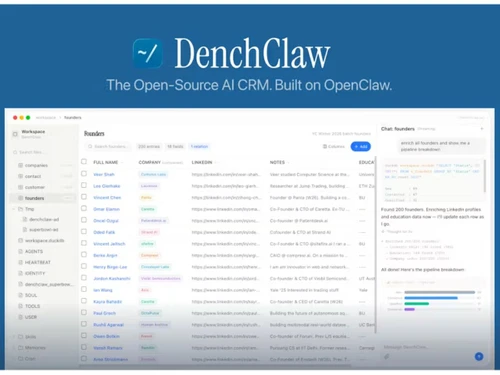
DenchClaw-workspace
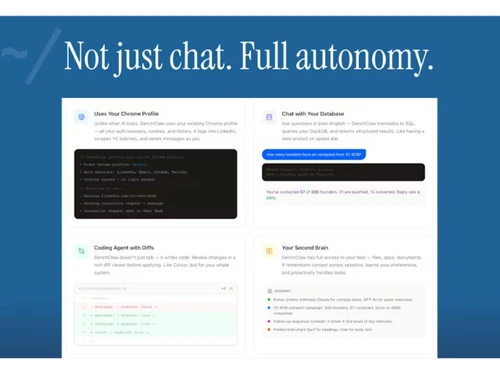
DenchClaw-autonomy
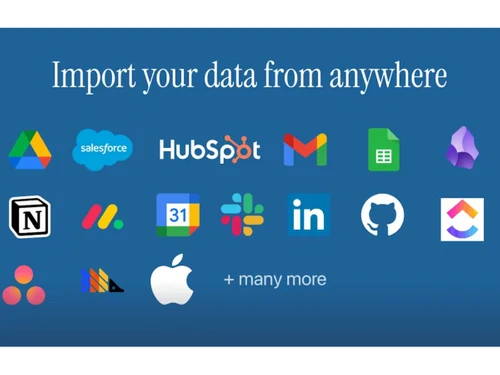
DenchClaw-integrations
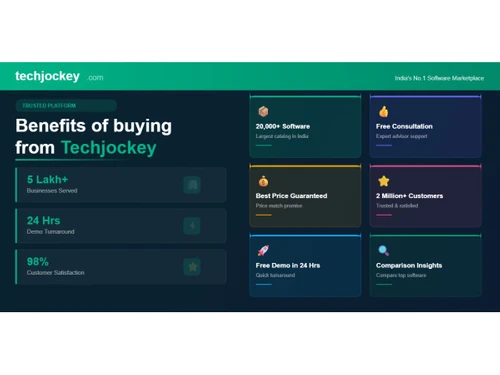
DenchClaw-benefits

DenchClaw

Brand : Merse Originals

FREE

Save Extra with 2 Offers

  • offer_icon Save upto 18%, Get GST Invoice on your business purchase |
  • offer_icon Buy Now & Pay Later, Check offer on payment page.

A free open-source AI CRM that runs locally on your Mac and automates lead discovery and outreach. ...Read more

  • AdviceGet Instant Expert
    Advice
  • PaymentSafe & Secure
    Payment
  • GuaranteedAssured Best Price
    Guaranteed

DenchClaw Software Pricing, Features & Reviews

What is DenchClaw?

DenchClaw is a free CRM software that runs locally on your Mac and uses AI to automate sales tasks. This business software leverages your existing browser sessions to perform autonomous actions like LinkedIn outreach, lead enrichment, and pipeline management.

Built on the OpenClaw framework with DuckDB for local storage, it keeps all your data private on your machine. You interact with it using plain English commands to query your database, discover leads, and send personalized messages at scale without complex API setups.

Why Choose DenchClaw?

  • Local-First and Private: All data stays in the local DuckDB database on your Mac, never leaving your machine.
  • Agentic AI: Acts as an active agent, not just chatbot, browsing web and managing pipeline autonomously.
  • Browser-Based Automation: Uses your existing Chrome profile with logged-in sessions for LinkedIn and email.
  • Natural Language Querying: Interact with CRM using plain English commands like 'show me all founders who haven't responded.'
  • Lead Discovery and Enrichment: Autonomously scrapes LinkedIn and pulls YC batch data to build lead lists.
  • Personalized Outreach at Scale: Drafts and sends personalized messages through your LinkedIn or email sessions.
  • Pipeline Tracking: Visual Kanban-style interface that updates automatically when prospects reply or deals close.
  • Chat with Your Database: Translates natural language into SQL for structured actionable insights.

Benefits of DenchClaw

  • Eliminates Monthly CRM Costs: Free open-source with no per-seat subscription fees.
  • Ensures Maximum Data Privacy: Customer data never leaves your local machine.
  • Automates Manual Data Entry: AI handles prospecting and enrichment without manual work.
  • Uses Existing Logins: No complex API setups or OAuth authentication required.
  • Deploys via Simple Terminal: Install with npx denchclaw command, requires Node.js 22 or later.
  • Integrates with Any Website: Browser automation works with any logged-in platform, not just limited APIs.
  • Provides AI-Native Experience: AI is the primary interface, not just an added chatbot feature.
  • Offers MIT Open Source License: Free to use, modify, and distribute.

DenchClaw Pricing

DenchClaw is available as a free open-source download at techjockey.com. The pricing model is based on different parameters, including extra features, deployment type, and the total number of users. For further queries related to the product, you can contact our product team and learn more about the pricing and offers.

DenchClaw Pricing & Plans

This product is available Free Forever.
Start using it instantly — no charges, no commitments.

  • Full access to basic version available
  • No credit card required

Free Forever Plan

Get started immediately at no cost.
Upgrade anytime if your business needs grow.

DenchClaw Features

Customer Data Management (CDM)

  • icon_check Contact Management Centralizes customer data, enabling easy access, updates, and relationship tracking across teams.
  • icon_check Account Management Manages company accounts, tracks interactions, and maintains detailed business relationships.
  • icon_check Customer Profiles Builds unified profiles combining contact data, activity history, and engagement insights.
  • icon_check Contact Segmentation Segments contacts based on behavior, demographics, and engagement for targeted outreach.
  • icon_check Activity History Logs all interactions and activities, giving full visibility into customer engagement.

Sales Management

  • icon_check Lead Management Captures, tracks, and organizes leads through lifecycle stages with AI-assisted prioritization.
  • icon_check Sales Forecasting Provides AI-driven forecasts based on pipeline data, trends, and historical performance.
  • icon_check Sales Automation Automates repetitive sales tasks like follow-ups, updates, and reminders to boost productivity.
  • icon_check Workflow Automation and Management Automates workflows with triggers, rules, and actions to streamline sales processes.
  • icon_check Opportunity & Pipeline Management Visualizes pipelines and tracks opportunities through stages for better deal visibility.
  • icon_check Quote Management Generate accurate, branded quotes and proposals to accelerate sales processes.
  • icon_check Order Management Track and manage orders from customers to ensure timely fulfillment and accurate billing.
  • icon_check Contract Management Managing contracts from their creation, execution, and performance tracking to their eventual termination.
  • icon_check Territory Management Assign, monitor, and optimize sales territories to improve regional sales efforts.
  • icon_check Deal Management Organize, prioritize, and manage deals, ensuring timely follow-up and closure.

Marketing Automation

  • icon_check Lead Nurturing Enables automated follow-ups and workflows to engage and convert leads effectively.
  • icon_check Customer Journey Tracking Maps and tracks customer interactions across touchpoints for better engagement insights.
  • icon_check Customer Segmentation Groups customers into segments for personalized engagement and analytics insights.
  • icon_check Event-Triggered Workflows Automates actions based on user events like lead creation or deal stage changes.
  • icon_check Email Marketing Design and send personalized email campaigns, track opens, clicks, and conversions.
  • icon_check Campaign Management Plan, execute, and monitor marketing campaigns across channels and touchpoints.
  • icon_check Automated Campaigns Automatically trigger campaigns based on customer behavior, interests, or milestones.

Data Sourcing / Integrations

  • icon_check API Access Provides API support for integrations with external systems and custom workflows.
  • icon_check Calendar Integration Syncs meetings, schedules, and reminders with external calendar tools for better planning.
  • icon_check Third Party Integrations Integrates with external tools like CRMs, communication apps, and data platforms.
  • icon_check Email Marketing Tools Integration Connects with external email platforms to enable marketing campaigns and outreach.
  • icon_check Marketing Tools Integration Supports integration with marketing platforms for extended campaign capabilities.
  • icon_check Data Import/Export Easily import/export customer and business data in bulk or via integration with other systems.
  • icon_check Social Media Integration Manage social media accounts and track customer engagement directly within the CRM.
  • icon_check eCommerce Integrations Sync CRM with eCommerce platforms like Shopify, WooCommerce for a unified customer experience.
  • icon_check Interactive Voice Response (IVR) Integration Integrate CRM with IVR systems to manage customer calls and enhance support.

Collaboration Tools

  • icon_check Team Communication Enables collaboration through shared notes, updates, and internal communication tools.
  • icon_check Task / Activity Management Tracks tasks, calls, meetings, and activities to ensure timely follow-ups and execution.
  • icon_check Document Sharing & File Storage Allows storing and sharing documents linked to contacts, deals, and accounts.
  • icon_check Omnichannel Support & Engagement Supports multi-channel engagement via integrations and unified communication tracking.

Security & Compliance

  • icon_check Audit Trail Tracks user activities and changes, ensuring transparency and accountability across workflows.
  • icon_check Data Encryption Ensures secure handling of customer data through encryption and secure storage practices.
  • icon_check Role-Based Access Control (RBAC) Controls user permissions to ensure secure and role-specific data access.
  • icon_check Backup & Disaster Recovery Ensures data backup and recovery mechanisms for business continuity and safety.
  • icon_check GDPR & Data Privacy Complies with privacy standards and regulations for secure handling of user data.

AI & Machine Learning

  • icon_check Predictive Analytics Uses AI to predict customer behavior, lead conversion likelihood, and sales opportunities.
  • icon_check Lead Scoring Automatically scores leads using AI signals like engagement, behavior, and fit criteria.
  • icon_check Chatbots Includes AI-driven chatbot capabilities for lead capture and customer interaction.

Reporting & Analytics

  • icon_check Predictive Analytics Uses AI to predict customer behavior, lead conversion likelihood, and sales opportunities.
  • icon_check Real Time Analytics Offers live dashboards and insights to monitor performance and pipeline changes instantly.
  • icon_check Custom Dashboards Offers customizable dashboards to visualize KPIs, pipelines, and performance metrics.
  • icon_check Sales Performance Reports Generates reports to analyze team performance, revenue trends, and sales activities.
  • icon_check Customer Insights Provides actionable insights derived from customer behavior and interaction data.
  • icon_check Forecasting & Trends Identifies sales trends and future projections using AI-driven analytics models.
  • icon_check Performance Tracking Tracks KPIs, sales targets, and team productivity in real time dashboards.
  • icon_check Campaign Performance Measure the effectiveness of marketing campaigns, including ROI, reach, and conversion rates.

Alerts & Notifications

  • icon_check Event-Triggered Notifications Sends alerts based on actions like lead updates, deal changes, or task completions.
  • icon_check Custom Workflow Alerts Allows custom alerts tied to workflow triggers for better operational awareness.
  • icon_check System Errors/Failures Monitors system health and alerts users about failures or operational disruptions.
  • icon_check Customer Interaction Alerts Notifies teams when customers engage, ensuring timely responses and follow-ups.
  • icon_check Workflow Trigger Alerts Alerts users when predefined workflow conditions are activated or completed.
  • icon_check Lead Activity Alerts Sends alerts on lead actions like opens, clicks, or engagement spikes.
  • icon_check SLA Violations Receive notifications when service level agreements are breached or approaching deadlines.

DenchClaw Specifications

  • Supported Platforms :
  • Device:
  • Deployment :
  • Suitable For :
  • Business Specific:
  • Business Size:
  • Customer Support:
  • Training:
  • Language:
  • AI Features:
  • Windows MacOS
  • Desktop
  • Web-Based
  • All Industries
  • All Businesses
  • Small Business, Startups, Medium Business, Enterprises
  • Email, Communities
  • Videos
  • English
  • AI Integrated

DenchClaw Reviews and Ratings

banner

Would you like to review this product?

Submit Reviews

DenchClaw FAQ

A DenchClaw is available as a free open-source download at Techjockey.com, with only LLM API costs for heavy use.
A You install via terminal using npx denchclaw, it runs locally on your Mac at localhost:3100, uses your Chrome sessions for automation, and lets you query your CRM using plain English.
A It is used by startup founders, independent sales professionals, developers, and privacy-conscious technical teams.
A Currently, the documentation focuses on Mac deployment for local-first operation.
A Yes, basic knowledge of Terminal and npx commands is required for installation and setup.
A Yes, it uses your existing logged-in Chrome profile to send personalized LinkedIn outreach automatically.
A All data is stored locally in a DuckDB database on your Mac, never sent to the cloud.
A It is the underlying framework that powers DenchClaw's agentic AI and automation capabilities.
A As a local-first tool, team sharing is more complex than cloud solutions; it is ideal for solo users.
A It is a newer, fast-evolving tool that may have some bugs compared to mature SaaS platforms.

DenchClaw Alternatives

See All
Why Choose Techjockey?

Software icon representing 20,000+ Software Listed 20,000+ Software Listed

Price tag icon for best price guarantee Best Price Guaranteed

Expert consultation icon Free Expert Consultation

Happy customer icon representing 2 million+ customers 2M+ Happy Customers