linkedin
Dragonframe logo
play Dragonframe 5 Stop Motion Software - Basics
Dragonframe-animation
Dragonframe-stop motion

Dragonframe

Brand: Dragonframe

  • No Ratings & Reviews

Dragonframe is a stop-motion animation software that helps animators, filmmakers, and studios capture, edit, and produce professional-quality stop-motion animations.

See More

Have you used Dragonframe before?

Share your insights for better experience

Add a Review
Starting Price
$295

View plans

100% Genuine
Products
Best Price
Guaranteed
Safe & Secure
Payment
  • Description

  • Pricing

  • Features

  • Specification

  • Review

  • FAQ

Starting at $295

Dragonframe Software Overview

What is Dragonframe?

Dragonframe is a professional-grade software application widely recognized as the industry standard for creating stop motion animation. Available for Windows, macOS, and Linux, it provides a comprehensive suite of tools that empower animators to capture and assemble high-resolution still images into fluid, cinematic sequences. Used by major film studios for blockbuster features and by independent creators for unique projects, Dragonframe bridges the gap between the camera and the computer, offering an integrated and powerful workflow. It transforms the meticulous process of frame-by-frame animation into a streamlined and intuitive digital experience, giving artists precise control over every aspect of their production.

Why Choose Dragonframe?

Choosing Dragonframe means investing in a toolset trusted by professionals for its stability, precision, and efficiency. The software's primary advantage lies in its direct integration with a vast range of digital cameras, allowing animators to control settings like ISO, shutter speed, aperture, and focus directly from the user interface. This remote control ensures frame-to-frame consistency, which is critical for high-quality animation. Its robust workflow features, such as onion skinning and live view preview, enable animators to make confident decisions on character movement and positioning. By centralizing capture, review, and basic editing, Dragonframe minimizes technical friction and allows creators to focus on the art of animation, making it the definitive choice for both small-scale projects and large studio productions.

Advanced Features of Dragonframe

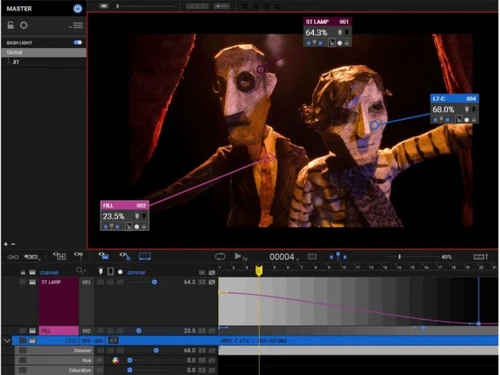
Beyond its core animation capabilities, Dragonframe offers a range of advanced features that elevate it to a complete production hub. Its integrated DMX lighting control is a standout, enabling animators to program and automate complex lighting setups directly within the timeline. This allows for dynamic effects like flickering lights, gradual sunsets, or subtle mood shifts that are perfectly synchronized with the animation. Furthermore, Dragonframe can interface with motion control hardware, allowing for the execution of precise, repeatable camera movements for sophisticated shots. For character animation, the software includes an advanced audio workspace with comprehensive lip-sync tools. Animators can import dialogue, break it down into phonemes, and map mouth shapes frame-by-frame, achieving highly accurate and expressive character performances.

Key Capabilities of Dragonframe

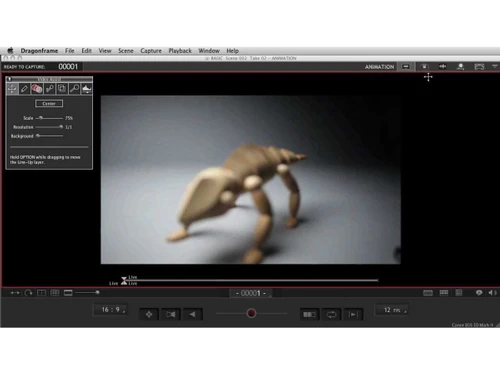
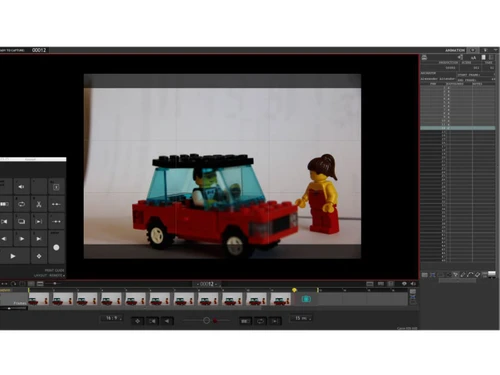
  • Animation Workspace: This is the central hub for capturing frames. It features a high-resolution live view from your camera, configurable onion skinning to compare previous and upcoming frames, and drawing tools for creating motion paths or composition guides directly over the image.
  • Cinematography Tools: Gain full remote control over your camera's settings. Adjust focus, aperture, shutter speed, and ISO with precision to maintain perfect exposure and depth of field throughout a shot. The software also includes tools for testing different camera settings and viewing histograms.
  • Timeline Management: All captured frames appear in a visual, drag-and-drop timeline. Here, you can easily reorder, delete, duplicate, or reshoot frames. The timeline supports holding frames and creating multiple takes, providing a non-destructive editing environment.
  • Audio and Lip-Sync: Import multiple audio tracks and perform detailed track readings to align animation with sound cues, music, or dialogue. The graphical face set interface simplifies the complex task of lip-syncing for character animation.

How to Use Dragonframe?

The typical workflow in Dragonframe follows a logical, step-by-step process. First, you connect a compatible DSLR or mirrorless camera to your computer. Within the software, you configure camera and project settings, such as resolution and aspect ratio. Using the live view, you position your character or object for the first frame. You then capture the image using the software interface or a dedicated controller. After capture, you make a small adjustment to your subject, use the onion skinning overlay to gauge the movement, and capture the next frame. This process is repeated, with animators able to play back the sequence in real-time to check their progress. Once the animation is complete, the high-resolution image sequence is exported for final editing and post-production.

Dragonframe Pricing

Dragonframe price starts at USD 295 at techjockey.com.

The pricing model is based on different parameters, including extra features, deployment type, and the total number of users. For further queries related to the product, you can contact our product team and learn more about the pricing and offers.

Read more

Dragonframe Company Details

Founded Year:  1993

Dragonframe is an e-commerce store that offers dragonframe software, Bluetooth, USB controller, lighting and motion control products.

Director/Founders Jamie Calir and Dyami Caliri
Company Size 1-100 Employees

Dragonframe Pricing & Plans

Dragonframe 2026
Key Features
  • Frame Capture
  • Camera Control
  • Onion Skinning
  • Live View Preview
  • Timeline Management
  • Frame Editing
Starting at $295
    • Licenses (One Time)

      Licenses (One Time)
      Licenses (One Time)

Key Features

  • Frame Capture

  • Camera Control

  • Onion Skinning

  • Live View Preview

  • Timeline Management

  • Frame Editing

Dragonframe Features

  • icon_check Frame Capture
    Capture high-resolution frames directly from DSLR or mirrorless cameras with full manual control and precision.
  • icon_check Camera Control
    Adjust ISO, shutter speed, aperture, and focus remotely within the software for consistent shot accuracy.
  • icon_check Onion Skinning
    Overlay previous and next frames to visualize motion changes and ensure smooth animation transitions.
  • icon_check Live View Preview
    View real-time camera feed with exposure, focus, and composition adjustments before capturing each frame.
  • icon_check Timeline Management
    Organize, reorder, and edit captured frames in a visual timeline for efficient animation sequencing.
  • icon_check Frame Editing
    Delete, duplicate, reshoot, or move frames easily without disrupting the animation workflow structure.
  • icon_check Drawing Tools
    Use built-in drawing overlays to sketch guides, motion paths, and positioning references directly on frames.
  • icon_check Audio Sync
    Import audio tracks and align animation frames precisely for lip-sync and dialogue-driven scenes.
  • icon_check Lip Sync Tools
    Break down dialogue into phonemes and match mouth shapes frame-by-frame for realistic character animation.
  • icon_check DMX Lighting Control
    Control lighting setups frame-by-frame using DMX systems to create dynamic lighting effects and consistency.
  • icon_check Motion Control Integration
    Integrate with motion control rigs to automate camera movements and achieve complex cinematic shots.
  • icon_check Export Options
    Export animations into industry-standard video formats for editing, sharing, or professional production use.
  • icon_check File Management
    Automatically organize captured frames and projects into structured folders for easy access and backup.
  • icon_check Color Correction
    Adjust color balance, contrast, and brightness directly within the software for consistent visual output.
Dragonframe Demo Video play icon

Get Dragonframe Demo

Watch the demo video to explore key features, real workflows, and how the software fits your business needs.

Understand
Key Features
Personal
Demo Insights
Interactive
Demo Support

Dragonframe Specification

Supported Platforms
Windows Windows MacOS MacOS Linux Linux
Devices
Desktop Desktop
Deployment
Perpetual Perpetual
Suitable For
All Industries
Business Specific
All Businesses
Business Size
Individual Small Business Startups Medium Business Enterprises SMBs SMEs MSMEs Freelancers
Customer Support
Email Communities Forums
Language
English
Integration
API Integration
Training Resources
Documentation Videos
Technology
Next Generation

Dragonframe Review

Techjockey Trusted Reviews from Verified Users

No reviews are currently available for Dragonframe. Discover similar Animation Software reviews

  • Animaker

    4.5

    Whats great - I started using Animaker because of a sudden influx of assignments during my career’s initial video editing career. Today, th... read more

  • VideoScribe

    4.4

    Whats great - First of all, Videoscribe is great for making animated presentations. Just in case, you forgot to save the recent changes, wo... read more
  • Autodesk Maya

    4.8

    Whats great - Autodesk Maya is the best tool to convert your ideas into reality. You have a lot of possibilies with this software. If you w... read more
Articles for Dragonframe

See All Related Articles

What is Dragonframe?

Dragonframe is the industry-standard stop motion animation software, providing the essential interface for creating professional stop motion films. It is the choice of major movie studios and independent filmmakers.

What operating systems does Dragonframe support?

Dragonframe is available for Mac, Windows, and Linux operating systems, ensuring broad compatibility for animators.

What are the key features of Dragonframe?

Dragonframe offers a comprehensive suite of features including high-resolution frame capture, precise camera control, onion skinning, live view preview, timeline management, frame editing, drawing tools, audio sync, lip sync tools, and DMX lighting control.

Does Dragonframe offer a dedicated hardware controller?

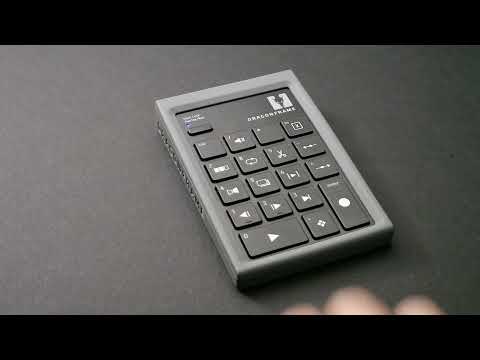
Yes, Dragonframe offers a dedicated Controller with Bluetooth and USB connectivity, housed in a shock-resistant case for precise control during animation.

How much does Dragonframe software cost?

Dragonframe price starts at USD 295 at techjockey.com.

Can I try Dragonframe before purchasing?

Yes, a free demo of Dragonframe is available for users to experience its features and functionality.

Is Dragonframe suitable for both professional studios and independent filmmakers?

Yes, Dragonframe is widely recognized as the industry standard and is utilized by both major movie studios and independent filmmakers for their stop motion projects.

Is educational pricing available for Dragonframe?

Yes, Dragonframe offers special educational pricing for eligible students and institutions.

Who can use Drafonframe?

Dragonframe is ideal for professional animation studios, independent filmmakers, educators, students, and stop-motion enthusiasts who need advanced tools for creating high-quality stop-motion animations.

20,000+ Software Listed

Best Price Guranteed

Free Expert Consultation

2M+ Happy Customers

Terms and Condtions

close

Users with registered businesses can purchase goods from merchants on the platform to satisfy their business needs. Users are not permitted to utilize any products acquired through the platform for resale, advertising, business, or further distribution.

For each purchase made, users will receive a Tax Invoice (or 'GST invoice') that includes specific details such as:

  • the GSTIN of the user associated with their registered business, and

  • the specified Entity Name for their business.

It should be noted that not all products are eligible for GST Invoice. Only the products displayed by participating sellers with the 'GST-based Invoice Available' callout on the product description page would qualify.

Certain goods and services are not eligible to get a GST Invoice, including items with VAS, i.e., Value Added Services (e.g., Total Mobile Protection/Assured Buyback) and those involving an exchange offer at the time of purchase.

Users must ensure the accuracy of the GSTIN, and business entity name provided for the GST Invoice. Requests for corrections into GST Invoice would not be accommodated by Techjockey.com or any Seller, and any issues arising from user-provided information are the sole responsibility of users.

Techjockey.com is not liable for the GST Invoice or any associated input tax credit. To efficiently claim an input tax credit, users should select the registered place of business address as per the GST authority's data and follow the provisions of the GST Act and rules.

To claim an input tax credit, the delivery and billing addresses must match. Furthermore, input tax credits will not be granted if the delivery address and GSTIN on the invoice are from different states. In case of incorrect GST details provided during the order placement, the order will be canceled automatically.