linkedin
GSAP logo
play Observer for GSAP
GSAP-animate
GSAP-accessibility

GSAP

Brand: Webflow

  • No Ratings & Reviews

GSAP is a JavaScript animation library that helps developers create high-performance, smooth animations for web interfaces and interactive experiences.

See More

Have you used GSAP before?

Share your insights for better experience

Add a Review

Free Forever

Get started immediately at no cost. Upgrade anytime if your business demand more.

100% Genuine
Products
Best Price
Guaranteed
Safe & Secure
Payment
  • Description

  • Pricing

  • Features

  • Specification

  • Review

  • Compare

  • Alternatives

  • FAQ

GSAP Software Overview

What is GSAP?

GSAP (GreenSock Animation Platform) is a high-performance, professional-grade JavaScript animation library designed for modern web development. It empowers developers and designers to create complex, robust, and silky-smooth animations for any interactive project. GSAP is not a monolithic tool but a flexible and modular suite of utilities that can animate anything JavaScript can touch.

Whether you are animating simple UI elements, creating intricate SVG graphics, or building immersive WebGL experiences, GSAP provides a consistent and intuitive API to handle the task. It is engineered to overcome browser inconsistencies and deliver flawless performance, making it the trusted choice for countless award-winning websites and digital experiences created by professionals and major brands worldwide.

Why Choose GSAP?

  • Unmatched Performance: GSAP is obsessively optimized for speed and smoothness. It intelligently manages property updates and browser rendering to ensure animations are fluid and jank-free, even on less powerful devices.
  • Ultimate Flexibility: Animate CSS properties, SVG attributes, canvas objects, or any generic JavaScript object property. This versatility means you can use a single, familiar toolset across a vast range of projects without being locked into a specific framework.
  • Precise Control: GSAP's timeline functionality is a cornerstone feature, allowing for the intricate choreography of animation sequences. You can easily play, pause, reverse, speed up, slow down, and seek specific points in complex animations with simple commands.
  • Rich Ecosystem of Plugins: The core library is extended by a powerful set of official plugins that handle specialized tasks like scroll-driven animations (ScrollTrigger), physics-based interactions (Draggable), morphing SVGs (MorphSVG), and advanced text effects (SplitText).
  • Exceptional Support and Stability: Maintained by a dedicated team and backed by Webflow, GSAP offers stability that many open-source projects lack. It is complemented by detailed documentation, active community forums, and a reputation for reliability built over more than a decade.

Advanced Features of GSAP

  • Scroll-Based Storytelling: With the ScrollTrigger plugin, you can create stunning animations that are triggered and controlled by the user's scroll position. This is perfect for parallax effects, revealing content, or building narrative-driven landing pages. ScrollSmoother enhances this by providing silky-smooth scrolling on the page.
  • Complex SVG Animation: GSAP offers unparalleled control over SVG. The MorphSVG plugin allows you to seamlessly transition between different SVG shapes, while DrawSVG lets you animate the stroke of an SVG path to create "line drawing" effects.
  • Physics-Based Interactions: Draggable lets users interact with elements through mouse or touch, while InertiaPlugin can add momentum-based movement and smooth deceleration after a drag or flick.
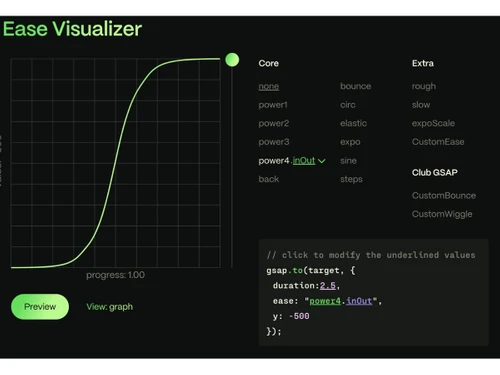
  • Expressive Easing: Add personality to your animations with a massive library of built-in easing functions. For complete control, you can create your own custom easing curves or use specialized tools like CustomWiggle and CustomBounce for unique motion effects.
  • FLIP Animation Technique: The Flip plugin simplifies the complex task of animating layout changes. It seamlessly calculates the difference in an element's state (First, Last, Invert, Play) to create smooth transitions when elements change position, size, or parent container in the DOM.

Modules of GSAP

  • ScrollTrigger: Create scroll-based animations with precision.
  • Draggable: Make DOM elements draggable with support for touch and pointer interactions.
  • Flip: Animate state changes smoothly (e.g., from one layout to another).
  • MorphSVG: Seamlessly transition one SVG shape into another.
  • DrawSVG: Animate the drawing or erasing of SVG strokes.
  • SplitText: Animate text by splitting it into characters, words, and lines.
  • ScrambleText: Apply scrambling effects to text content.
  • MotionPath: Animate any object along a custom SVG path.
  • Inertia: Complements Draggable to provide natural, momentum-based movement.
  • Observer: A utility for easily detecting user interactions like scroll, touch, and pointer events.

How to Use GSAP?

  1. Installation: First, include the GSAP library in your project. This can be done by linking to a CDN, installing it via a package manager like NPM, or downloading the files directly.
  2. Targeting Elements: Using standard CSS selectors, you select the HTML or SVG element(s) you wish to animate. GSAP's utility functions make it easy to target single or multiple elements.
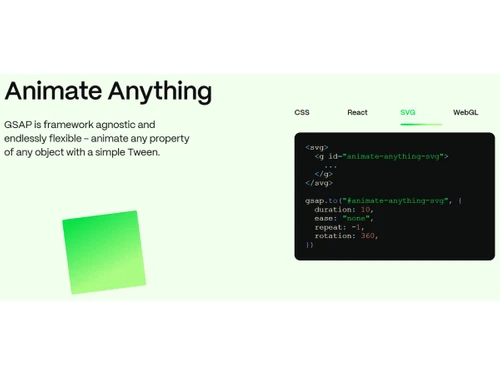
  3. Creating a Tween: A "tween" is the fundamental building block of a GSAP animation. You create a tween by defining the target element, the duration of the animation, and an object of properties you want to animate (e.g., opacity, x/y position, scale, color).
  4. Building a Timeline: For more complex, multi-step animations, you use a GSAP Timeline. This powerful feature allows you to sequence multiple tweens, making them play one after another or overlap with precise timing, all within a single controllable instance.

With its comprehensive documentation, numerous demos, and an active support community, developers of all skill levels can quickly learn to create sophisticated animations.

GSAP Pricing

GSAP is available for free on techjockey.com.

The pricing model is based on different parameters, including extra features, deployment type, and the total number of users. For further queries related to the product, you can contact our product team and learn more about the pricing and offers.

Read more

Webflow Company Details

Founded Year:  2012

Webflow is the way to design, build, and launch powerful websites visually — without coding.

Director/Founders Vlad Magdalin Sergie Magdalin Bryant Chou
Company Size 501-1000 Employees

GSAP Pricing & Plans

This Product is Available Free Forever.

Start instantly with no fees, no subscriptions, and no commitments.

  • Full access to basic version available
  • No credit card or sign-up required

Free Forever Plan

Get started immediately at no cost. Upgrade anytime if your business demand more.

Free Forever

GSAP Features

  • icon_check Timeline Management
    Create, organize, and control multiple animations using reusable timelines with precise sequencing and playback controls.
  • icon_check Tween Animations
    Animate CSS properties, JavaScript objects, SVG elements, and DOM attributes with smooth transitions and accurate timing.
  • icon_check ScrollTrigger
    Build interactive scroll-based animations that activate, pause, pin, and synchronize content during page scrolling.
  • icon_check Motion Path Animation
    Animate elements along custom SVG paths or predefined motion trajectories for engaging visual experiences.
  • icon_check SVG Animation
    Transform, morph, rotate, scale, and animate SVG graphics with high precision while maintaining smooth performance.
  • icon_check Stagger Effects
    Apply sequential animation delays to multiple elements for visually appealing entrances, exits, and interactive effects.
  • icon_check Easing Functions
    Choose from numerous easing presets to create natural, realistic, and polished animation movements and transitions.
  • icon_check Responsive Animations
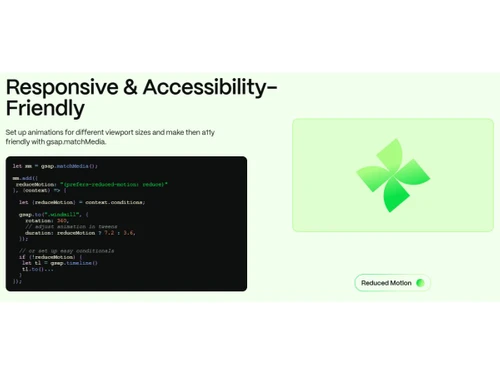
    Build animations that automatically adapt to different screen sizes, layouts, and responsive web environments.
  • icon_check Transform Controls
    Animate translation, scaling, rotation, skewing, opacity, and other CSS transforms with fine-grained control.
  • icon_check Animation Playback
    Play, pause, reverse, restart, seek, repeat, and control animation progress through intuitive API methods.
  • icon_check Framework Integration
    Integrate seamlessly with React, Vue, Angular, Svelte, and other modern JavaScript frameworks and libraries.
  • icon_check High Performance Rendering
    Optimize rendering with GPU acceleration and efficient updates to deliver smooth animations across modern browsers.
  • icon_check Plugin Support
    Extend functionality using official plugins for scrolling, morphing, text animation, dragging, and advanced effects.
  • icon_check Cross-Browser Compatibility
    Ensure consistent animation behavior across major desktop and mobile browsers without requiring browser-specific code.
  • icon_check Zero Dependency Library
    Operate as a lightweight standalone JavaScript library without relying on external frameworks or dependencies.
GSAP Demo Video play icon

Get GSAP Demo

Watch the demo video to explore key features, real workflows, and how the software fits your business needs.

Understand
Key Features
Personal
Demo Insights
Interactive
Demo Support

GSAP Specifications

Supported Platforms
Ubuntu Ubuntu Windows Windows MacOS MacOS Linux Linux
Devices
Desktop Desktop
Deployment
Cloud-Based Cloud-Based Perpetual Perpetual
Suitable For
All Industries
Business Specific
All Businesses
Business Size
Individual Small Business Startups Medium Business Enterprises SMBs SMEs MSMBs MSMEs Freelancers
Customer Support
Email Communities Forums
Language
English
Integration
API Integration
Training Resources
Live Online Documentation Videos
Technology
Next Generation

Explore the Best Alternative Solutions Similar to Your Business Size and Needs

GSAP Review

Techjockey Trusted Reviews from Verified Users

No reviews are currently available for GSAP. Discover similar Animation Software reviews

  • Animaker

    4.5

    Whats great - I started using Animaker because of a sudden influx of assignments during my career’s initial video editing career. Today, th... read more

  • VideoScribe

    4.4

    Whats great - First of all, Videoscribe is great for making animated presentations. Just in case, you forgot to save the recent changes, wo... read more
  • Autodesk Maya

    4.8

    Whats great - Autodesk Maya is the best tool to convert your ideas into reality. You have a lot of possibilies with this software. If you w... read more
Compare GSAP With other Animation Software

Products
Ratings
Pricing
Device Supported
Deployment
Supported Platforms
  • img

    GSAP

  • FREE

  • Desktop

    Mobile

  • Web based

    On Premises

  • Windows

    Mac OS

  • img

    Autodesk Maya

  • 4.7

  • ₹ 16520

  • Desktop

    Mobile

  • Web based

    On Premises

  • Windows

    Mac OS

  • img

    Autodraft

  • 4.2

  • ₹ 833

  • Desktop

    Mobile

  • Web based

    On Premises

  • Windows

    Mac OS

  • img

    VideoScribe

  • 4.4

  • Price On Request

  • Desktop

    Mobile

  • Web based

    On Premises

  • Windows

    Mac OS

  • img

    LottieFiles

  • 4.3

  • Price On Request

  • Desktop

    Mobile

  • Web based

    On Premises

  • Windows

    Mac OS

  • img

    Jitter

  • 4.4

  • Price On Request

  • Desktop

    Mobile

  • Web based

    On Premises

  • Windows

    Mac OS

  • img

    Animation Desk

  • 4.6

  • Price On Request

  • Desktop

    Mobile

  • Web based

    On Premises

  • Windows

    Mac OS

  • img

    Immersity AI

  • 4.3

  • Price On Request

  • Desktop

    Mobile

  • Web based

    On Premises

  • Windows

    Mac OS

  • img

    Toonly

  • 4.4

  • Price On Request

  • Desktop

    Mobile

  • Web based

    On Premises

  • Windows

    Mac OS

  • img

    ImagetoCartoon

  • 4.3

  • Price On Request

  • Desktop

    Mobile

  • Web based

    On Premises

  • Windows

    Mac OS

  • img

    Lordicon

  • 4.5

  • Price On Request

  • Desktop

    Mobile

  • Web based

    On Premises

  • Windows

    Mac OS

(0) Product(s) selected

GSAP Alternatives

See All GSAP Alternatives

Starting Price:

$240 /User/Year

Starting Price:

$49

Starting Price:

$16

Starting Price:

$15 /Month
Starting Price:

$69 /Quantity $99

SAVE UPTO 30%

Starting Price:

$11 /Month

Starting Price:

$10 /Month

Articles for GSAP

See All Related Articles

What is GSAP used for?

GSAP is a robust JavaScript animation library used by professionals to effortlessly animate anything JS can touch, including UI, SVG, and immersive WebGL experiences. It delivers silky-smooth performance and allows for complex animation choreography.

Is GSAP free to use?

Yes, GSAP is now 100% free for all users, thanks to the generous support from Webflow. The entire GSAP library is available without cost.

Is GSAP better than CSS?

GSAP, as a JavaScript animation library, offers advanced control, precise sequencing, and robust features like custom easings and complex choreographies that often surpass the capabilities of pure CSS for intricate web animations. It provides professional-grade performance and flexibility for a wide range of animation needs.

Is GSAP still relevant?

Yes, GSAP remains highly relevant, having been at the forefront of web animation for over 15 years and evolving into an industry-leading toolset. It is trusted by many creative developers and is now supported by Webflow, ensuring its continued innovation and stability.

How do I start with GSAP?

To start with GSAP, you would typically obtain the library, which is now 100% free, and then refer to its detailed documentation to learn its API and begin implementing animations. The platform offers various tools and plugins to explore.

Who can use GSAP?

GSAP is designed for professionals and aims to provide animation superpowers for everyone, making it suitable for a wide range of users from experienced developers to those looking to add sophisticated animations to their projects.

What types of animations can GSAP handle?

GSAP can handle a vast array of animations, including UI elements, SVG graphics, immersive WebGL experiences, scroll-based storytelling, text effects, and polished UI interactions. It provides tools and plugins for diverse animation needs.

What are some key features or plugins offered by GSAP?

GSAP offers key features like easy easings, precise animation control, and choreography, alongside powerful plugins such as ScrollTrigger for scroll-based animations, Draggable for interactive elements, SplitText for text effects, and MorphSVG for SVG transformations. It also includes tools for UI interactions and WebGL experiences.

What kind of support does GSAP offer?

GSAP offers excellent and unmatched support through comprehensive training, detailed documentation, and an active community. This commitment ensures users have the resources needed to leverage the library effectively.

How much does GSAP cost?

GSAP is available for free on techjockey.com.

21,000+ Software Listed

Best Price Guranteed

Free Expert Consultation

5M+ Happy Customers

Terms and Condtions

close

Users with registered businesses can purchase goods from merchants on the platform to satisfy their business needs. Users are not permitted to utilize any products acquired through the platform for resale, advertising, business, or further distribution.

For each purchase made, users will receive a Tax Invoice (or 'GST invoice') that includes specific details such as:

  • the GSTIN of the user associated with their registered business, and

  • the specified Entity Name for their business.

It should be noted that not all products are eligible for GST Invoice. Only the products displayed by participating sellers with the 'GST-based Invoice Available' callout on the product description page would qualify.

Certain goods and services are not eligible to get a GST Invoice, including items with VAS, i.e., Value Added Services (e.g., Total Mobile Protection/Assured Buyback) and those involving an exchange offer at the time of purchase.

Users must ensure the accuracy of the GSTIN, and business entity name provided for the GST Invoice. Requests for corrections into GST Invoice would not be accommodated by Techjockey.com or any Seller, and any issues arising from user-provided information are the sole responsibility of users.

Techjockey.com is not liable for the GST Invoice or any associated input tax credit. To efficiently claim an input tax credit, users should select the registered place of business address as per the GST authority's data and follow the provisions of the GST Act and rules.

To claim an input tax credit, the delivery and billing addresses must match. Furthermore, input tax credits will not be granted if the delivery address and GSTIN on the invoice are from different states. In case of incorrect GST details provided during the order placement, the order will be canceled automatically.