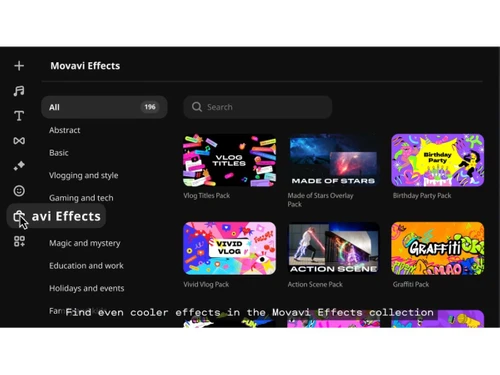
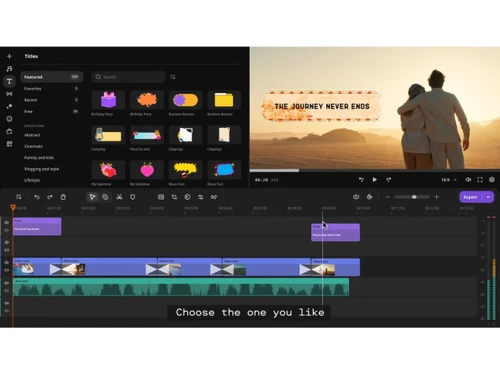
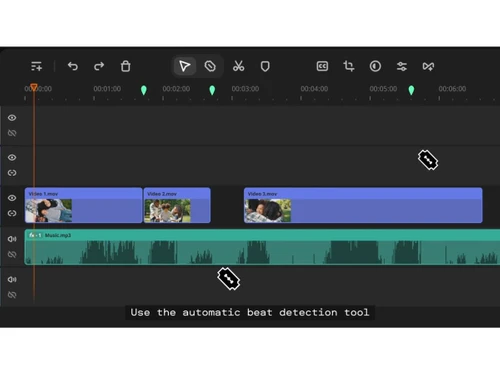
linkedin
Movavi Slideshow Maker logo
play Slideshow Maker: Create Cool Slideshow with Your Photos and Music!
Movavi Slideshow Maker-slideshow
Movavi Slideshow Maker-featured

Movavi Slideshow Maker

Brand: Movavi

  • 4.8

  • 2 Ratings & 2 Reviews

About Movavi Slideshow Maker Movavi Slideshow Maker is a slideshow creating software. Users can create captivating slideshows for their clients and personal use without having any proper training or prior experience. It features 150+ filters, 40+ titles and 100+transition effects. Users can also add...

See More

Have you used Movavi Slideshow Maker before?

Share your insights for better experience

Add a Review

Price Available on Request

Questions about pricing or customization? We’re here to help, just a click away.

100% Genuine
Products
Best Price
Guaranteed
Safe & Secure
Payment
  • Description

  • Pricing

  • Features

  • Specification

  • Review

  • Compare

  • Alternatives

  • FAQ

Movavi Slideshow Maker Software Overview

About Movavi Slideshow Maker

Movavi Slideshow Maker is a slideshow creating software. Users can create captivating slideshows for their clients and personal use without having any proper training or prior experience. It features 150+ filters, 40+ titles and 100+transition effects. Users can also add their favourite music tracks from their collection or select from the wide variety of built-in songs offered by the software.

The software allows its users to adjust pictures as per the rhythm of the music played in the background. They can even add their voiceovers and turn the video into a more personalized one. Further, by adding the Pan and Zoom effect, they can make their photos more lively and attractive as well.

How can users create captivating slideshows by using Movavi Slideshow Maker?

Movavi Slideshow Maker offers multiple tools and advanced features to help its users make a perfect slideshow for their audience.

  1. Smooth Transitions: Users can add smooth transitions in-between multiple photos and give a professional look to their slideshows.
  2. Multiple Filters: Movavi Slideshow Maker offers multiple fun filters like vignette, heart, retro, flying and more, enabling its users to jazz up their whole creation.
  3. Animated Titles: Users can create stylish and super attractive intros and outros by using various animated titles provided by Movavi Slideshow Maker.
  4. Image Adjustment: With Movavi Slideshow Maker users can adjust the colours of the images in their slideshows and add some shine within them.
  5. Sample Media: The software offers a wide variety of default music, photos and videos to make creative content out of them.
  6. Audio Editing: Movavi Slideshow Maker enables its users to adjust the volume, add special effects in the audio of their slideshow.

Pricing of Movavi Slideshow Maker

The software is available in two different plans:

  1. Slideshow Maker: Available for Rs.1899/ per year.
  2. Slideshow Maker Plus: Available for Rs. 2899/ for a life-time.

If you want to use the services offered by Movavi Slideshow Maker, you can send us a callback request. Our technical team will provide you with an activation key, license key, and other support.

The Latest Version of Movavi Slideshow Maker

The latest version of the software was launched in March 2020.

  1. Sort Slides: In the latest version of Movavi Slideshow Maker, users can sort out all the files according to their names.
  2. Add Background: With the latest version, users can add a background to the images that do not fit into the aspect ratio. This way, they can hide the black bars at the side of those images. 
  3. Ordering: Users can add files and set the order as per their needs and requirements. The software will not change the order.

The compatible platform of Movavi Slideshow Maker

The software is compatible with - 

  1. Windows: Windows7, Windows 8 and Windows 10 versions.
  2. Mac OS: Mac OS X 10.10 or higher versions.

What are the benefits of using Movavi Slideshow Maker?

  1. Create Captivating Slideshows: The software has a friendly user interface. It enables the users to create captivating slideshows in just three simple steps. They need to choose their favourite photos, add a theme, add music with a preferable transition style, preview the outcome in the preview tab and save the slide show or directly share it on social media.
  2. Add Music: Users get to add their favourite musical tracks within the slideshows. They can either use the default tracks or import new tracks from their hard drive into the software. They can add various tracks within one single slideshow, in case it is a long project.
  3. Adjust images as per the rhythm: The software enables its users to adjust the images within their slideshow as per the beats of the music. 
  4. Add Voice Overs: The voiceover feature of the software allows users to create more personalized videos. They also get to explain the content of their video in a more efficient way. 
  5. Compatibility: Movavi Slideshow Maker is compatible with multiple audio, video and image formats. THus, users can upload their files in multiple formats.
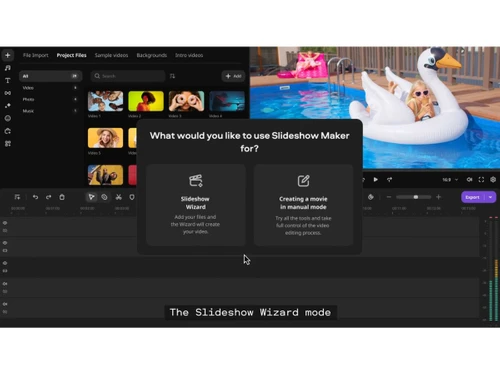
  6. Auto Creation: Users can save their time by using the montage wizard feature of the software, where the slideshows automatically get created without any need of human intervention.
Read more

Movavi Company Details

Founded Year:  2004

Movavi offers a wide variety of multimedia programs that help you have fun with your videos, music, and photos on any platform and any device.

Director/Founders Natalia Hudyakova Simonenko
Company Size 101-500 Employees

Movavi Slideshow Maker Pricing & Plans

Looking for The Right Pricing?

Share your requirements and get a plan built around your business.

  • Define your business needs
  • Get customised pricing
  • Choose features that fit your workflow

Price Available on Request

Get personalised Movavi Slideshow Maker pricing that fits your needs. Our team will connect with you.

Movavi Slideshow Maker Features

  • icon_check Drag & Drop
    Simple drag-and-drop timeline interface makes arranging clips, photos, and audio intuitive and fast.
  • icon_check Ready-made Templates
    Pre-designed themes and templates help create professional slideshows with minimal effort.
  • icon_check Transitions Library
    Provides 100+ transitions to create smooth and dynamic flow between slides.
  • icon_check Filters & Effects
    Includes 150+ filters and effects to customize visuals and improve slideshow aesthetics.
  • icon_check Text and Titles
    Add captions, titles, and subtitles with customizable fonts and styles for storytelling.
  • icon_check Timeline Editing
    Streamlined timeline enables precise control over clips, cuts, and sequence arrangement.
  • icon_check Color Correction
    Built-in tools adjust brightness, contrast, and colors for professional-quality visuals.
  • icon_check Overlay Effects
    Advanced overlay effects with blending modes enhance creative video composition.
  • icon_check Export & Sharing
    Export videos in various formats and share directly to platforms like YouTube or social media.
  • icon_check Manual & Auto Modes
    Offers both automated slideshow creation and manual editing for full customization flexibility.
  • icon_check Create Instantly
    Built-in slideshow wizard and templates let users create videos automatically in minutes without editing experience.
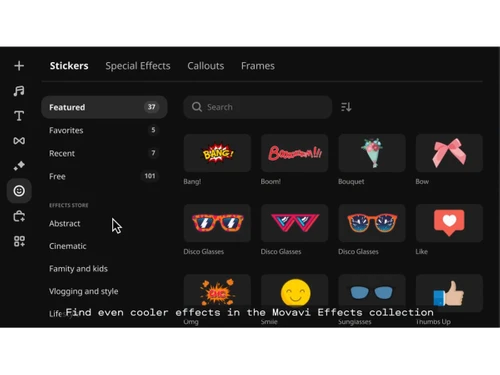
  • icon_check Enhance with artistic flair
    Offers filters, overlays, and visual effects to enhance photos and videos with cinematic and creative styles.
  • icon_check Add Soundtrack
    Built-in music library and custom audio import allow users to add background soundtracks easily to slideshows.
  • icon_check Audio Editing
    Includes tools for trimming, syncing, and adjusting audio tracks to match slideshow timing perfectly.
  • icon_check Multi Format Support
    Supports importing/exporting images, videos, and audio in multiple formats without compatibility issues.
Movavi Slideshow Maker Demo Video play icon

Get Movavi Slideshow Maker Demo

Watch the demo video to explore key features, real workflows, and how the software fits your business needs.

Understand
Key Features
Personal
Demo Insights
Interactive
Demo Support

Movavi Slideshow Maker Specifications

Supported Platforms
Windows Windows MacOS MacOS
Devices
Desktop Desktop
Deployment
Perpetual Perpetual
Suitable For
Media House
Business Specific
Media
Business Size
Individual Small Business Startups Enterprises SMBs Freelancers
Customer Support
Phone Email Live Chat Communities
Language
English
Training Resources
Documentation Videos
Technology
Next Generation

Explore the Best Alternative Solutions Similar to Your Business Size and Needs

Movavi Slideshow Maker Reviews

4.8

Out of 5

img

Overall Rating

Based on
2 Verified Reviews

Rating Breakdown

  • Features 4.3
  • Value for Money 4.7
  • Ease of Use 4.7
  • Customer Support 4.7

90% Recommend this Product

Add Review

Anand Pradhan

User

4.7

Reviewed on: Mar 6, 2019

Techjockey Verified

“Improved designs”

Pros

Movavi Slideshow Maker has the most current looking designs and movement apparatuses of any program we checked on.

Cons

NO CONS

Sushil Soni

User

4.9

Reviewed on: Jun 12, 2018

Techjockey Verified

“Highly recommended software provider”

Pros

they found us the exact software we needed.

Cons

N/A

Compare Movavi Slideshow Maker With other Productivity Software

Products
Ratings
Pricing
Device Supported
Deployment
Supported Platforms
  • img

    Movavi Slideshow Maker

  • 4.8

  • Price On Request

  • Desktop

    Mobile

  • Web based

    On Premises

  • Windows

    Mac OS

  • img

    Google Workspace

  • 4.3

  • ₹ 325

  • Desktop

    Mobile

  • Web based

    On Premises

  • Windows

    Mac OS

  • img

    Cold Turkey

  • 4.3

  • Price On Request

  • Desktop

    Mobile

  • Web based

    On Premises

  • Windows

    Mac OS

  • img

    Office 365 E3

  • 5

  • ₹ 1740

  • Desktop

    Mobile

  • Web based

    On Premises

  • Windows

    Mac OS

  • img

    InboxPro

  • 4.5

  • Price On Request

  • Desktop

    Mobile

  • Web based

    On Premises

  • Windows

    Mac OS

  • img

    Snippets AI

  • 4.4

  • Price On Request

  • Desktop

    Mobile

  • Web based

    On Premises

  • Windows

    Mac OS

  • img

    Office 365 E5

  • 4

  • ₹ 3240

  • Desktop

    Mobile

  • Web based

    On Premises

  • Windows

    Mac OS

  • img

    Microsoft 365 F3

  • 4.4

  • ₹ 996

  • Desktop

    Mobile

  • Web based

    On Premises

  • Windows

    Mac OS

  • img

    Raycast

  • 4.1

  • Price On Request

  • Desktop

    Mobile

  • Web based

    On Premises

  • Windows

    Mac OS

  • img

    Microsoft 365 F1

  • 4.2

  • ₹ 300

  • Desktop

    Mobile

  • Web based

    On Premises

  • Windows

    Mac OS

  • img

    SmartPanels

  • 4.4

  • Price On Request

  • Desktop

    Mobile

  • Web based

    On Premises

  • Windows

    Mac OS

(0) Product(s) selected

Movavi Slideshow Maker Alternatives

See All Movavi Slideshow Maker Alternatives

Starting Price:

₹2,499 /One-Time

Starting Price:

$24

Starting Price:

$6 /User/Month

Starting Price:

$10 /Month

Starting Price:

$4 /Monthly

Starting Price:

$7 /Month

Starting Price:

$8 /Monthly

Starting Price:

$60
Articles for Movavi Slideshow Maker

See All Related Articles

What is a Montage Wizard in Movavi Slideshow Maker?

Montage Wizard is a feature within Movavi Slideshow Maker. It saves a lot of the users time by creating slideshows for them in an automatic manner.

Does Movavi Slideshow Maker offer default effects and media files?

The software offers 100+ transition effects, 150+ filters, 40+ titles and multiple sample videos, music and images to its users.

Can I get a demo of Movavi Slideshow Maker?

Yes, Techjockey provides an online software demo of Movavi Slideshow Maker. You need to send us a demo request mentioning your preferred time and date.

What system requirements do I need for installing Movavi Slideshow Maker?

Windows: RAM: The system needs to have a 2GB RAM. Processor: Dual Core 1.5GHz Intel, AMD or any other compatible processors are recommended. Hard Drive: The software needs 250MB of the total space available within the hard disk and 500MB is needed for later operations. Graphics Card: HD Graphics 2000, GeForce, AMD Radeon R600 or higher versions are recommended. MacOS: RAM: The device needs to have a 256MB RAM. Processor: 64- bit Intel Processor is needed. Hard Drive: 200MB of the available space is needed for installation and 500MB is needed for the software to run smoothly.

Does Movavi Slideshow Maker have a mobile app?

Currently, the software is not compatible with mobile devices.

20,000+ Software Listed

Best Price Guranteed

Free Expert Consultation

2M+ Happy Customers

Terms and Condtions

close

Users with registered businesses can purchase goods from merchants on the platform to satisfy their business needs. Users are not permitted to utilize any products acquired through the platform for resale, advertising, business, or further distribution.

For each purchase made, users will receive a Tax Invoice (or 'GST invoice') that includes specific details such as:

  • the GSTIN of the user associated with their registered business, and

  • the specified Entity Name for their business.

It should be noted that not all products are eligible for GST Invoice. Only the products displayed by participating sellers with the 'GST-based Invoice Available' callout on the product description page would qualify.

Certain goods and services are not eligible to get a GST Invoice, including items with VAS, i.e., Value Added Services (e.g., Total Mobile Protection/Assured Buyback) and those involving an exchange offer at the time of purchase.

Users must ensure the accuracy of the GSTIN, and business entity name provided for the GST Invoice. Requests for corrections into GST Invoice would not be accommodated by Techjockey.com or any Seller, and any issues arising from user-provided information are the sole responsibility of users.

Techjockey.com is not liable for the GST Invoice or any associated input tax credit. To efficiently claim an input tax credit, users should select the registered place of business address as per the GST authority's data and follow the provisions of the GST Act and rules.

To claim an input tax credit, the delivery and billing addresses must match. Furthermore, input tax credits will not be granted if the delivery address and GSTIN on the invoice are from different states. In case of incorrect GST details provided during the order placement, the order will be canceled automatically.