USA
USA UAE
UAESmall Business
Designed for startups and growing businesses

See More


Brand: Google
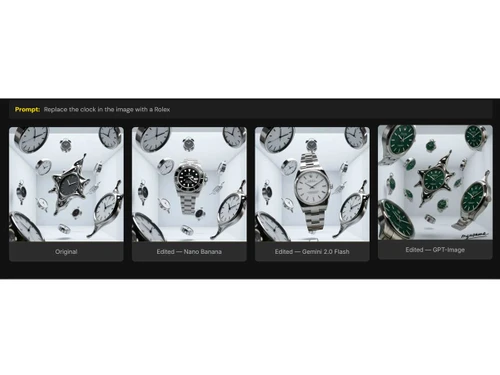
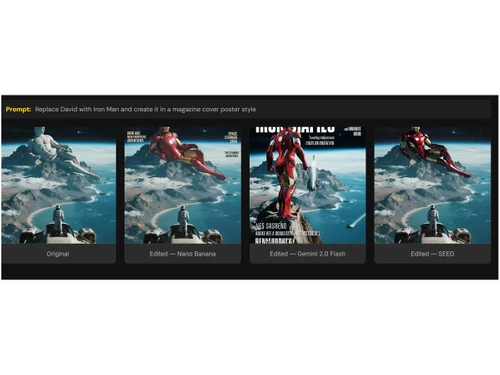
A photo editing software that lets you easily edit or transform images just by typing simple instructions instead of using complex design tools.
See MoreHave you used Nano Banana before?
Share your insights for better experience
Brand: Google
Founded Year: 1998
Google is a multinational corporation that specializes in Internet-related services and products.
 Advanced AI Reasoning 3D Object Editing Intelligent Image Generation Consistency Preservation Deep Prompt Understanding Context-Aware Editing Content Creation Multi-Image Support Style Remix & Blend Photo Restoration & Enhancement Iterative Editing Support
  Windows
  MacOS
MacOS  Linux
Linux  Desktop
  Cloud-Based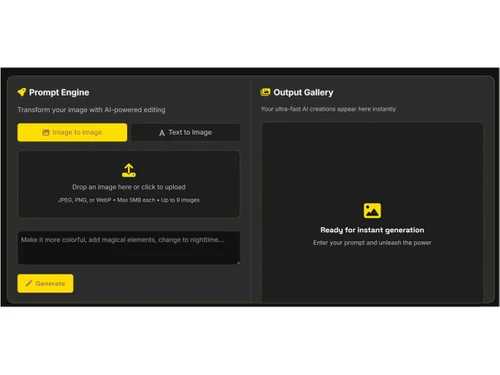
Small Business
Designed for startups and growing businesses
Medium Business
Built for business growth and flexibility
Enterprises
Designed for complex and large-scale business needs
4.1
Out of 5

Overall Rating
Based on
1 Verified Review
Rating Breakdown
80% Recommend this Product
Add Review

Nano Banana
Price On Request
Desktop
Mobile
Web based
On Premises
Windows
Mac OS

Adobe Photoshop
Price On Request
Desktop
Mobile
Web based
On Premises
Windows
Mac OS

Karizma Album
₹ 3500
Desktop
Mobile
Web based
On Premises
Windows
Mac OS
Affinity Photo
₹ 619
Desktop
Mobile
Web based
On Premises
Windows
Mac OS

Luminar Neo
₹ 4999
Desktop
Mobile
Web based
On Premises
Windows
Mac OS

Cutout Pro
₹ 247
Desktop
Mobile
Web based
On Premises
Windows
Mac OS
darktable
Price On Request
Desktop
Mobile
Web based
On Premises
Windows
Mac OS

AfterShot Pro 3
₹ 5966
Desktop
Mobile
Web based
On Premises
Windows
Mac OS

Lensa AI
Price On Request
Desktop
Mobile
Web based
On Premises
Windows
Mac OS

Adobe Photoshop Elements
Price On Request
Desktop
Mobile
Web based
On Premises
Windows
Mac OS
Evoto AI
Price On Request
Desktop
Mobile
Web based
On Premises
Windows
Mac OS
(0) Product(s) selected
Available
Price on Request
Starting Price:
$36 /Year
Starting Price:
$100 /Year
Starting Price:
$80 /year

Starting Price:
$10 /Month

Starting Price:
$35 /Lifetime

Starting Price:
$8 /Month
Starting Price:
$15 /Month

Starting Price:
$810 /Year

Starting Price:
$12 /month






Nano Banana is available starting at USD 29 on Techjockey.com.
No, Nano Banana apps are not available for iOS and Android devices.
Nano Banana works on Windows, MacOS and Linux platforms.
Yes, Nano Banana offers a free trial.
Nano Banana lets you upload a photo or start from scratch, then you type what change you want in simple language and it uses AI to edit or generate the image accordingly.
Anyone from casual users, content creators, social-media users to designers and marketers, basically anyone needing easy photo edits or AI-generated images.
Yes, you can use Nano Banana for free inside the official Gemini app under its free tier, though there are limits on usage.
Yes, there is a free tier that allows limited image generation and editing, more advanced or high-volume use requires paid access.
20,000+ Software Listed
Best Price Guranteed
Free Expert Consultation
2M+ Happy Customers
Terms and Condtions

Users with registered businesses can purchase goods from merchants on the platform to satisfy their business needs. Users are not permitted to utilize any products acquired through the platform for resale, advertising, business, or further distribution.
For each purchase made, users will receive a Tax Invoice (or 'GST invoice') that includes specific details such as:
the GSTIN of the user associated with their registered business, and
the specified Entity Name for their business.
It should be noted that not all products are eligible for GST Invoice. Only the products displayed by participating sellers with the 'GST-based Invoice Available' callout on the product description page would qualify.
Certain goods and services are not eligible to get a GST Invoice, including items with VAS, i.e., Value Added Services (e.g., Total Mobile Protection/Assured Buyback) and those involving an exchange offer at the time of purchase.
Users must ensure the accuracy of the GSTIN, and business entity name provided for the GST Invoice. Requests for corrections into GST Invoice would not be accommodated by Techjockey.com or any Seller, and any issues arising from user-provided information are the sole responsibility of users.
Techjockey.com is not liable for the GST Invoice or any associated input tax credit. To efficiently claim an input tax credit, users should select the registered place of business address as per the GST authority's data and follow the provisions of the GST Act and rules.
To claim an input tax credit, the delivery and billing addresses must match. Furthermore, input tax credits will not be granted if the delivery address and GSTIN on the invoice are from different states. In case of incorrect GST details provided during the order placement, the order will be canceled automatically.