USA
USA UAE
UAESmall Business
Designed for startups and growing businesses


See More




Brand: Kofax Inc.
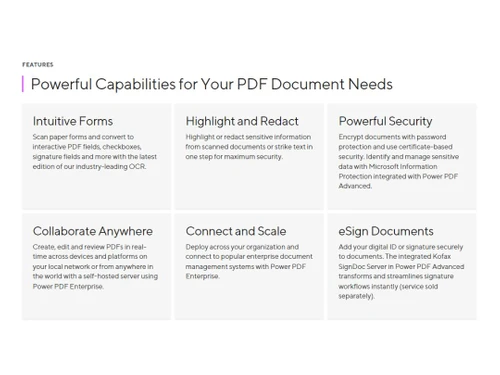
Robust solution to create, edit, convert, as well as manage PDF documents with a user-friendly interface and advanced features.
See MoreHave you used Nuance Power PDF before?
Share your insights for better experience
Brand: Kofax Inc.
Founded Year: 1985
Our intelligent automation software platform and solutions digitally transform information-intensive business workflows.
 Convert from PDF Convert to PDF Document Management PDF Editor Easy to Use Manages Multiple Items Convert PDFs and Scans

Watch the demo video to explore key features, real workflows, and how the software fits your business needs.
 Windows
  MacOS
MacOS  Desktop
  Mobile
  Perpetual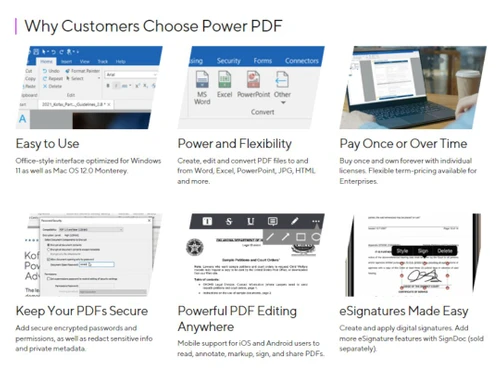
Small Business
Designed for startups and growing businesses
Medium Business
Built for business growth and flexibility
Enterprises
Designed for complex and large-scale business needs
4.2
Out of 5

Overall Rating
Based on
11 Verified Reviews
Rating Breakdown
83% Recommend this Product
Add ReviewUsers generally appreciate Nuance Power PDF for its robust editing tools, reliable security features, and efficiency in managing documents, particularly in accounting and legal contexts. Many find it cost-effective, especially with its one-time purchase model. However, common complaints include a dated interface, occasional compatibility issues, and a learning curve due to hidden features. Some users also note challenges with the electronic signature process and limited customer support after the initial period. Overall, it is viewed as a dependable choice for various professional needs.
Pros
"The interface is intuitive and resembles Microsoft Office, making it easy to navigate."
"Comprehensive feature set, good editing and conversion, versatile usability."
"Nuance Power PDF offers a wide range of features at a fraction of the cost of competitors."
Cons
"Price points might be high compared to competitors with similar features and usability."
"Some features are buried in menus and not immediately obvious."
"The forms signing options are not as intuitive as some other PDF tools."

May 14, 2025
Techjockey Verified
“Enhances Document Management”
Managing documents has become more efficient with Nuance Power PDF. The editing tools are robust, and I feel confident in the security features when handling sensitive information. However, the interface feels a bit dated, and I'd appreciate more customization options. Still, it's a dependable choice for document management.
Pros
Robust editing tools and secure document handling.
Cons
Interface could be more modern and customizable.
Reason to switch
I was looking for more advanced editing tools and better security features in my PDF software.
Mar 20, 2025
Techjockey Verified
“Streamlines Accounting Tasks”
As an accountant, Nuance Power PDF has streamlined many of my tasks. Creating forms and extracting data is efficient, saving me valuable time. However, converting PDFs to Excel isn't always smooth and sometimes requires manual adjustments. Nonetheless, it's a powerful tool in my accounting toolkit.
Pros
Efficient form creation and data extraction.
Cons
Converting PDFs to Excel can be challenging.
Reason to switch
I needed better form creation tools and more efficient data extraction capabilities.
Feb 12, 2025
Techjockey Verified
“Reliable for Legal Documents”
In the legal field, precision is crucial. Nuance Power PDF's OCR is accurate, making digitizing documents straightforward. Assembling documents is also seamless. However, I've encountered compatibility issues when sharing files with colleagues using different PDF software. Despite this, its reliability makes it my go-to tool.
Pros
Accurate OCR and easy document assembly.
Cons
Occasional compatibility issues with other PDF programs.
Reason to switch
I required more accurate OCR capabilities and better document assembly features.

Nuance Power PDF
Price On Request
Desktop
Mobile
Web based
On Premises
Windows
Mac OS

Foxit PDF Editor
₹ 12000
Desktop
Mobile
Web based
On Premises
Windows
Mac OS

Gravity PDF
Price On Request
Desktop
Mobile
Web based
On Premises
Windows
Mac OS

Zoho PDF Editor
Price On Request
Desktop
Mobile
Web based
On Premises
Windows
Mac OS

PDF Expert
₹ 7200
Desktop
Mobile
Web based
On Premises
Windows
Mac OS

Adobe Acrobat Pro DC for teams
₹ 23864
Desktop
Mobile
Web based
On Premises
Windows
Mac OS
JOPDF
Price On Request
Desktop
Mobile
Web based
On Premises
Windows
Mac OS

Hybiscus
Price On Request
Desktop
Mobile
Web based
On Premises
Windows
Mac OS

Soda PDF
₹ 1111
Desktop
Mobile
Web based
On Premises
Windows
Mac OS

BentoPDF
Price On Request
Desktop
Mobile
Web based
On Premises
Windows
Mac OS

Systweak PDF Editor
₹ 2499
Desktop
Mobile
Web based
On Premises
Windows
Mac OS
(2) Product(s) selected
Nuance Power PDF Productivity Software is compatible with Windows operating systems.
Nuance Power PDF Productivity Software app is not available.
Nuance Power PDF Productivity Software supports Perpetual.
Nuance Power PDF Productivity Software pricing starts at Rs 7599.99.
Nuance Power PDF Productivity Software is typically used in All Industries.
Nuance Power PDF Productivity Software demo is available for free at Techjockey.
Nuance Power PDF Productivity Software offers a free trial. However, the premium plan with advanced features available at Techjockey.
For Nuance Power PDF Productivity Software installation, insert the given CD/USB flash storage in your system and open the Setup Wizard to get started.
Nuance Power PDF Productivity Software helps with Easy to Use,Manages Multiple Items,Convert PDFs and Scans and Convert from PDF. It's a complete solution for Convert to PDF,Document Management and PDF Editor.
20,000+ Software Listed
Best Price Guranteed
Free Expert Consultation
2M+ Happy Customers
Terms and Condtions

Users with registered businesses can purchase goods from merchants on the platform to satisfy their business needs. Users are not permitted to utilize any products acquired through the platform for resale, advertising, business, or further distribution.
For each purchase made, users will receive a Tax Invoice (or 'GST invoice') that includes specific details such as:
the GSTIN of the user associated with their registered business, and
the specified Entity Name for their business.
It should be noted that not all products are eligible for GST Invoice. Only the products displayed by participating sellers with the 'GST-based Invoice Available' callout on the product description page would qualify.
Certain goods and services are not eligible to get a GST Invoice, including items with VAS, i.e., Value Added Services (e.g., Total Mobile Protection/Assured Buyback) and those involving an exchange offer at the time of purchase.
Users must ensure the accuracy of the GSTIN, and business entity name provided for the GST Invoice. Requests for corrections into GST Invoice would not be accommodated by Techjockey.com or any Seller, and any issues arising from user-provided information are the sole responsibility of users.
Techjockey.com is not liable for the GST Invoice or any associated input tax credit. To efficiently claim an input tax credit, users should select the registered place of business address as per the GST authority's data and follow the provisions of the GST Act and rules.
To claim an input tax credit, the delivery and billing addresses must match. Furthermore, input tax credits will not be granted if the delivery address and GSTIN on the invoice are from different states. In case of incorrect GST details provided during the order placement, the order will be canceled automatically.