USA
USA UAE
UAESmall Business
Designed for startups and growing businesses


See More




Brand: Avanquest Software
PDFescape is a PDF editor and form filler that offers various ways to view as well as manage PDF files online. This online PDF editor just requires an internet connection to work flawlessly. PDFescape PDF editor can create and edit PDF documents easily. It has modules for accessing and reviewing documents as well. PDFescape online is especially useful for mobile workforce as it has the ability t...
See MoreHave you used PDFescape before?
Share your insights for better experience
Brand: Avanquest Software
Founded Year: 1984
Avanquest is one of the world’s top 10 leading software publishers operating in three segments (PDF, Security, Photo) with its SodaPDF, Adaware and inPixio brands.
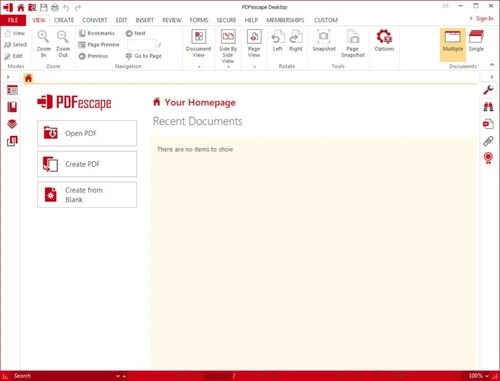
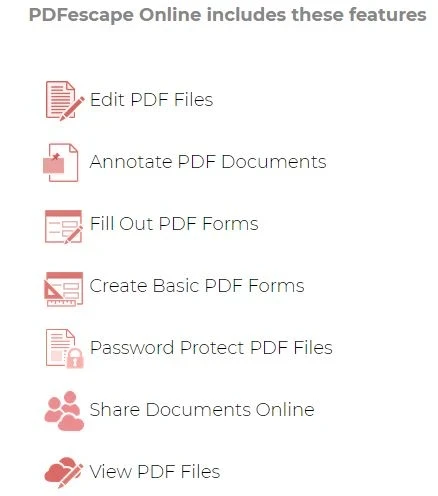
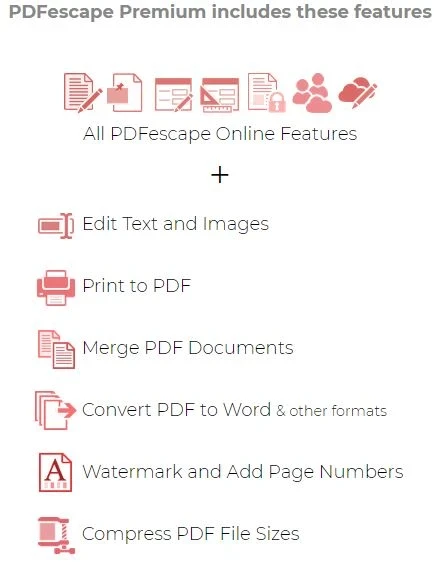
 Edit PDF Files Fill Out PDF Forms Password Protect PDF Files Edit Text and Images Merge Convert PDF to Microsoft Office 365 formats Watermark Remover Share Document Online Compress PDF Size View PDF Files

Watch the demo video to explore key features, real workflows, and how the software fits your business needs.
 Windows
  MacOS
MacOS  Desktop
  Mobile
  Cloud-Based
  Perpetual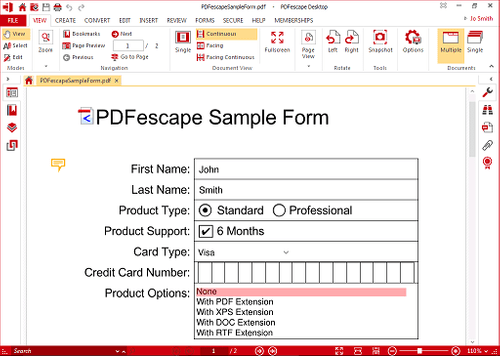
Small Business
Designed for startups and growing businesses
Medium Business
Built for business growth and flexibility
Enterprises
Designed for complex and large-scale business needs
4.5
Out of 5

Overall Rating
Based on
5 Verified Reviews
Rating Breakdown
94% Recommend this Product
Add ReviewUsers generally appreciate PDFescape for its versatility as both an online and desktop application, making it convenient for on-the-go editing. The software is praised for its robust editing capabilities, effective spellcheck, and ease of document signing, with collaborative features enhancing user experience. However, while the reviews are predominantly positive, there are no significant complaints noted, suggesting a solid overall satisfaction among users.

Mar 20, 2021
Techjockey Verified
“Best online application”
Pros
The best part about using PDFescape is it is both online and desktop based. I use the online version while on the go. This is one standard feature that I couldn’t find in the last product that I was using
Cons
NO CONS
Mar 20, 2021
Techjockey Verified
“Robust PDF editor”
Pros
PDFescape offers powerful pdf file editing and duplication capabilities. The software is even better when used for doing spellchecks.
Cons
NO CONS
Mar 15, 2021
Techjockey Verified
“Easy document signing”
Pros
PDFescape is best for signing PDF documents. You can also add collaborators to such documents.
Cons
NO CONS

PDFescape
Price On Request
Desktop
Mobile
Web based
On Premises
Windows
Mac OS

Soda PDF
₹ 1111
Desktop
Mobile
Web based
On Premises
Windows
Mac OS

Expert PDF
₹ 2999
Desktop
Mobile
Web based
On Premises
Windows
Mac OS

Foxit PDF Editor
₹ 12000
Desktop
Mobile
Web based
On Premises
Windows
Mac OS

Gravity PDF
Price On Request
Desktop
Mobile
Web based
On Premises
Windows
Mac OS

Zoho PDF Editor
Price On Request
Desktop
Mobile
Web based
On Premises
Windows
Mac OS

PDF Expert
₹ 7200
Desktop
Mobile
Web based
On Premises
Windows
Mac OS

Adobe Acrobat Pro DC for teams
₹ 23864
Desktop
Mobile
Web based
On Premises
Windows
Mac OS
JOPDF
Price On Request
Desktop
Mobile
Web based
On Premises
Windows
Mac OS

Hybiscus
Price On Request
Desktop
Mobile
Web based
On Premises
Windows
Mac OS

BentoPDF
Price On Request
Desktop
Mobile
Web based
On Premises
Windows
Mac OS
(2) Product(s) selected
Yes, PDFescape demo is available on Techjockey. Please request a call and our sales team will get in touch with you.
PDFescape is a web-based tool, it does not require any extra hardware and software requirement to run.
PDFescape has a lot of great features. For example document management, application security, document conversation, PDF conversion.
Mobile app of PDFescape is currently not available. However, you can use the browser in the phone to use PDFescape online.
PDFescape is available for free, but with limited features. However, PDF Premium & PDF Ultimate plans include all essential tools for managing PDF files.
PDFescape is safe to use as it follows strict privacy policies and it retains your data only till you are using its services.
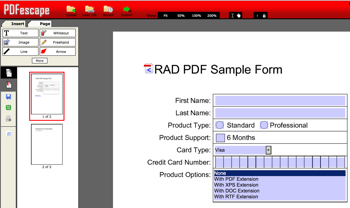
To edit PDF files in PDFescape, you have to go to its Online PDF Editor feature. This feature allows you to add text, shapes and annotations. You can also encrypt PDF content, add PDF information tags, add images and digital signatures.
To uninstall PDFescape PDF editor desktop version, you have to go to the Start Menu and choose all the apps. The, go to the PDFescape Desktop folder, right click on it and click on ‘Uninstall’.
PDFescape online PDF editor is available for free and you can use it directly on your browser. If required, you move to PDFescape premium plan and enjoy features like print and merge PDF documents, edit text and image, add page numbers and watermark and convert PDF to Word.
In order to use PDFescape online PF editor, you can choose between PDFescape free online editor and PDFescape for Windows. Its online version is available for free and can be accessed directly on your browser. However, you need to install PDFescape editor for Windows on your device.
Yes, PDFescape online PDF editor is free on Chrome, Safari 2+, Firefox 3+, Edge, Opera 9.5+ and IE 6+.
PDFescape Premium pricing starts at Rs 218. For more details, you can request a call back on Techjockey.
On the PDFescape website, you are directly connect with PDFescape support team for all your queries.
20,000+ Software Listed
Best Price Guranteed
Free Expert Consultation
2M+ Happy Customers
Terms and Condtions

Users with registered businesses can purchase goods from merchants on the platform to satisfy their business needs. Users are not permitted to utilize any products acquired through the platform for resale, advertising, business, or further distribution.
For each purchase made, users will receive a Tax Invoice (or 'GST invoice') that includes specific details such as:
the GSTIN of the user associated with their registered business, and
the specified Entity Name for their business.
It should be noted that not all products are eligible for GST Invoice. Only the products displayed by participating sellers with the 'GST-based Invoice Available' callout on the product description page would qualify.
Certain goods and services are not eligible to get a GST Invoice, including items with VAS, i.e., Value Added Services (e.g., Total Mobile Protection/Assured Buyback) and those involving an exchange offer at the time of purchase.
Users must ensure the accuracy of the GSTIN, and business entity name provided for the GST Invoice. Requests for corrections into GST Invoice would not be accommodated by Techjockey.com or any Seller, and any issues arising from user-provided information are the sole responsibility of users.
Techjockey.com is not liable for the GST Invoice or any associated input tax credit. To efficiently claim an input tax credit, users should select the registered place of business address as per the GST authority's data and follow the provisions of the GST Act and rules.
To claim an input tax credit, the delivery and billing addresses must match. Furthermore, input tax credits will not be granted if the delivery address and GSTIN on the invoice are from different states. In case of incorrect GST details provided during the order placement, the order will be canceled automatically.