linkedin
Rewind logo
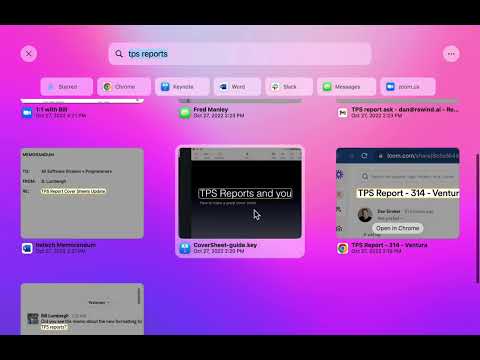
play Rewind Demo
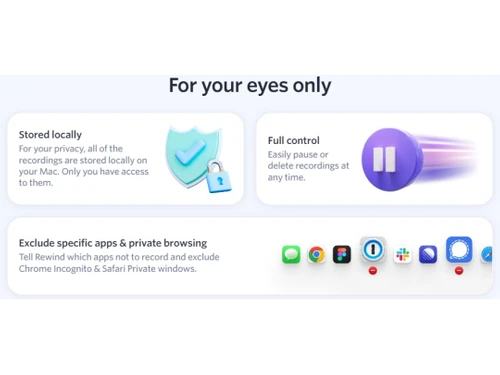
Rewind Stored locally
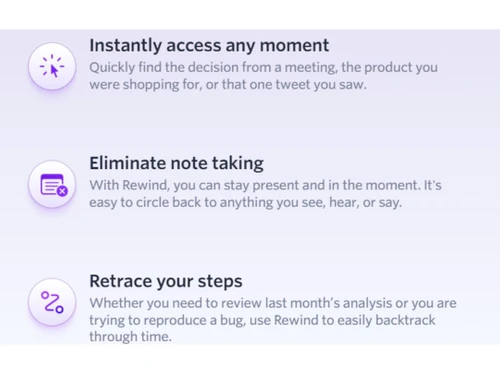
Rewind Note Taking

Rewind

Brand: Rewind AI

  • 4.4

  • 6 Ratings & 1 Review

Rewind allows you to instantly access any moment, whether a critical decision made during a meeting, a specific product you researched, or a tweet that caught your attention.

See More

Have you used Rewind before?

Share your insights for better experience

Add a Review
Starting Price
$12

View plans

100% Genuine
Products
Best Price
Guaranteed
Safe & Secure
Payment
  • Description

  • Pricing

  • Features

  • Specification

  • Review

  • Compare

  • Alternatives

  • FAQ

Starting at $12

Rewind Software Overview

What is Rewind?

Rewind screen recording software is a cutting-edge, modern-day tool that empowers you with “perfect memory.” Say goodbye to the frustration of forgetting important details and the need for extensive note-taking.

Rewind works by capturing and indexing all the content you encounter on your screen, in conversations, or through audio. The powerful technology behind Rewind enables seamless searchability, allowing you to easily find any moment. Simply enter a keyword or phrase; this software retrieves the exact information you're looking for.

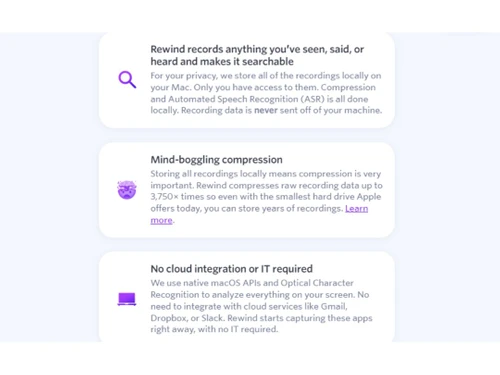
All recordings are securely stored locally on your Mac, ensuring only you can access them. The platform employs advanced compression techniques that can reduce raw recording data by up to 3,750 times, enabling you to store years of recordings even on the smallest hard drives available.

Unlike other solutions that rely on cloud integration and require IT setup, Rewind operates natively on macOS, utilizing the system's APIs and Optical Character Recognition (OCR) capabilities. This means you don't have to worry about integrating with various cloud services or compromising your data security. It seamlessly captures content from popular apps like Gmail, Dropbox, Slack, and more right out of the box. No IT expertise or configuration is needed.

Why Choose Rewind?

Rewind is the ultimate solution for anyone seeking a perfect memory and enhanced productivity.

Benefits of Rewind

  • Rewind allows you to remember anything you've seen, said, or heard, giving you access to a perfect memory whenever needed.
  • Identify specific moments, decisions, conversations, or information from your recorded data.
  • All recordings are stored locally on your Mac, ensuring complete privacy and control over your data. You have full control over what gets recorded and can easily pause or delete recordings at any time.
  • You can stay fully present now without taking extensive notes. Simply rely on your recorded data to revisit and recall important details.
  • Effortlessly retrace your steps and backtrack through time, whether for reviewing past analyses, reproducing a bug, or recollecting a specific event.
  • Rewind's advanced compression technology allows you to store years of recordings on even the smallest hard drives, maximizing storage efficiency.
  • Share recordings with colleagues or collaborators for enhanced teamwork, communication, and knowledge sharing.
  • The Pro version offers unlimited rewinds, allowing you to access and search your recorded data without limitations. Even with the Basic version of Rewind, you receive 50 free rewinds to explore and experience the app's benefits.

Pricing of Rewind

Rewind is priced at $12.00 on TechJockey.

The overall pricing model is based on different factors such as personalization, extra features required, total users, and deployment type. Please feel free to request a call from our product experts if you want to learn more about our subscription plans or premium package deals.

Read more

Rewind AI Company Details

Founded Year:  2020

Rewind is a search engine macOS app that enables users to record, store and rewind their work at anytime.

Director/Founders Dan Siroker
Company Size 1-100 Employees

Rewind Pricing & Plans

Rewind Basic
Key Features
  • 10 Rewinds Per Month
  • Unlimited Recordings
  • Unlimited Transcription
  • Unlimited Devices
  • Automatic Updates (~11 per day)
  • Basic Customer Support
Starting at $12
    • Licenses

      Licenses
      Licenses
    • Monthly

      Monthly
      Monthly

Key Features

  • 10 Rewinds Per Month

  • Unlimited Recordings

  • Unlimited Transcription

  • Unlimited Devices

  • Automatic Updates (~11 per day)

  • Basic Customer Support

Rewind Features

  • icon_check AI Productivity
    Boost your efficiency and output with the power of artificial intelligence.
  • icon_check Screen Recording
    Capture and save your screen activities for future reference or sharing.
  • icon_check Audio Capture
    Record high-quality audio alongside your screen recordings for comprehensive documentation.
  • icon_check Speech-to-Text Analysis
    Automatically transcribe spoken words into text, saving time and effort.
  • icon_check Annotations
    Mark up your screen recordings with text, drawings, and highlights to emphasize key points.
  • icon_check Screen Capture
    Capture still images of your screen to capture important moments or information.
  • icon_check Multi-Screen Recording
    Record multiple screens simultaneously, ensuring a complete capture of your workflow.
  • icon_check Collaboration Tools
    Collaborate seamlessly with others by sharing recordings and exchanging feedback.
  • icon_check File Sharing
    Easily share your recordings, allowing for seamless collaboration and communication.
  • icon_check Optimization Tools
    Properly optimize your content and recordings with the robust optimization tools feature. 
Rewind Demo Video play icon

Get Rewind Demo

Watch the demo video to explore key features, real workflows, and how the software fits your business needs.

Understand
Key Features
Personal
Demo Insights
Interactive
Demo Support

Rewind Specifications

Supported Platforms
MacOS MacOS
Devices
Desktop Desktop
Deployment
Cloud-Based Cloud-Based
Suitable For
All Industries
Business Specific
All Businesses
Business Size
Small Business Startups Medium Business Enterprises
Customer Support
Email Live Chat
Language
English
Training Resources
Documentation
AI Features
AI Integrated

Explore the Best Alternative Solutions Similar to Your Business Size and Needs

Rewind Review

4.4

Out of 5

img

Overall Rating

Based on
1 Verified Review

Rating Breakdown

  • Features 4.7
  • Value for Money 4.3
  • Ease of Use 4.2
  • Customer Support 4.5

90% Recommend this Product

Add Review

Rewind Video Review

youtubeVideoId

4.3

“Rewind Demo and Review | Easily Backup and Restore Your Site”

Review by: eCommerce Tech

Compare Rewind With other Screen Recording Software

Products
Ratings
Pricing
Device Supported
Deployment
Supported Platforms
  • img

    Rewind

  • 4.4

  • Price On Request

  • Desktop

    Mobile

  • Web based

    On Premises

  • Windows

    Mac OS

  • img

    Camtasia

  • 4.5

  • ₹ 7099

  • Desktop

    Mobile

  • Web based

    On Premises

  • Windows

    Mac OS

  • img

    ScreenPal

  • 4.2

  • Price On Request

  • Desktop

    Mobile

  • Web based

    On Premises

  • Windows

    Mac OS

  • img

    Fraps

  • 4.3

  • Price On Request

  • Desktop

    Mobile

  • Web based

    On Premises

  • Windows

    Mac OS

  • img

    Fluvid

  • 4.2

  • Price On Request

  • Desktop

    Mobile

  • Web based

    On Premises

  • Windows

    Mac OS

  • img

    Screen Studio

  • 4.3

  • Price On Request

  • Desktop

    Mobile

  • Web based

    On Premises

  • Windows

    Mac OS

  • img

    Macro Recorder

  • 4.1

  • ₹ 9376

  • Desktop

    Mobile

  • Web based

    On Premises

  • Windows

    Mac OS

  • img

    TechSmith Snagit

  • 4.6

  • ₹ 1499

  • Desktop

    Mobile

  • Web based

    On Premises

  • Windows

    Mac OS

(2) Product(s) selected

Rewind Alternatives

See All Rewind Alternatives

Starting Price:

$3 /Month

Starting Price:

$37 /Quantity

Articles for Rewind

See All Related Articles

Which operating system does Rewind support?

Rewind is compatible with Windows and MacOS operating systems.

Is there any Rewind app?

Rewind is not available for mobile devices.

What is the deployment type of Rewind?

Rewind supports cloud-based deployment.

How much does Rewind cost?

Rewind is priced at USD 12 on TechJockey.

Who are the potential users of Rewind?

Rewind is typically used by small, medium, and large-scale employees.

Is there any free trial or demo for Rewind?

The Rewind demo is available for free with techjockey.com.

Is Rewind free?

Rewind offers a free trial. Please request a call back for subscription-related details and to avail of offers on premium packages.

How can you download Rewind?

For Rewind installation, download the installation file on your system and open the Setup Wizard to get started.

How does Rewind work?

Rewind helps with automatically transcribing spoken words into text, saving you time and effort. It captures still images of your screen to capture important moments or information. Users can collaborate seamlessly with others by sharing recordings and exchanging feedback.

20,000+ Software Listed

Best Price Guranteed

Free Expert Consultation

2M+ Happy Customers

Terms and Condtions

close

Users with registered businesses can purchase goods from merchants on the platform to satisfy their business needs. Users are not permitted to utilize any products acquired through the platform for resale, advertising, business, or further distribution.

For each purchase made, users will receive a Tax Invoice (or 'GST invoice') that includes specific details such as:

  • the GSTIN of the user associated with their registered business, and

  • the specified Entity Name for their business.

It should be noted that not all products are eligible for GST Invoice. Only the products displayed by participating sellers with the 'GST-based Invoice Available' callout on the product description page would qualify.

Certain goods and services are not eligible to get a GST Invoice, including items with VAS, i.e., Value Added Services (e.g., Total Mobile Protection/Assured Buyback) and those involving an exchange offer at the time of purchase.

Users must ensure the accuracy of the GSTIN, and business entity name provided for the GST Invoice. Requests for corrections into GST Invoice would not be accommodated by Techjockey.com or any Seller, and any issues arising from user-provided information are the sole responsibility of users.

Techjockey.com is not liable for the GST Invoice or any associated input tax credit. To efficiently claim an input tax credit, users should select the registered place of business address as per the GST authority's data and follow the provisions of the GST Act and rules.

To claim an input tax credit, the delivery and billing addresses must match. Furthermore, input tax credits will not be granted if the delivery address and GSTIN on the invoice are from different states. In case of incorrect GST details provided during the order placement, the order will be canceled automatically.