linkedin
Saola Animate logo
play How to use Saola Animate?
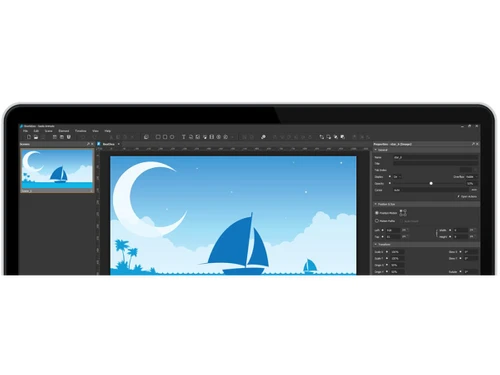
Saola Animate-intuitive editor
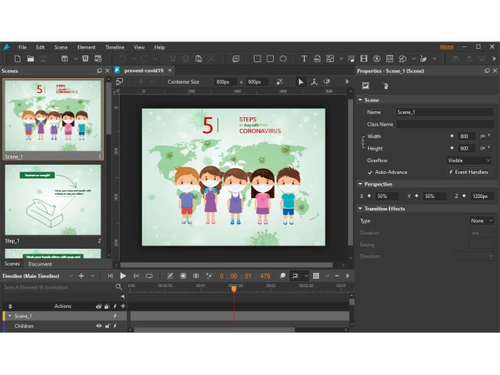
Saola Animate-Scenes

Saola Animate

Brand: Atomi Systems

  • 4.1

  • 4 Ratings

Saola Animate is a top-notch solution to create HTML5 animations and various other types of interactive web content. It allows users to produce highly interactive animations that are responsive to the mouse click or flash-styled video games. Animators can unleash their creativity with an intuitive HTML5 editor. It has a WYSIWYG (what you see is what you get) interface, which means that the softw...

See More

Have you used Saola Animate before?

Share your insights for better experience

Add a Review
Starting Price
$79

View plans

100% Genuine
Products
Best Price
Guaranteed
Safe & Secure
Payment
  • Description

  • Pricing

  • Features

  • Specification

  • Review

  • Compare

  • Alternatives

  • FAQ

Starting at $79

Saola Animate Software Overview

What is Saola Animate? 

Saola Animate is a top-notch solution to create HTML5 animations and various other types of interactive web content. It allows users to produce highly interactive animations that are responsive to the mouse click or flash-styled video games. Animators can unleash their creativity with an intuitive HTML5 editor. It has a WYSIWYG (what you see is what you get) interface, which means that the software requires no coding skills for HTML5 animations. It offers a designing interface which is like that of a video editing software with special effects accessible through dashboard. 

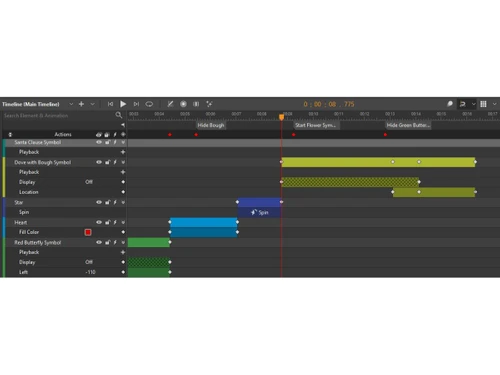
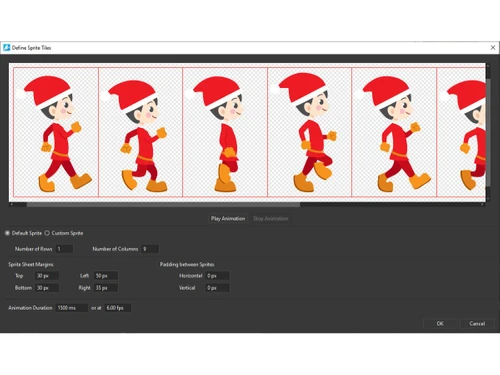
The timeline offered by Saola Animate works as a container for animations and time measuring ruler. Animators can set up every scene to have numerous timelines to edit and add a wide range of interactive responses and other visual elements. Another key editing feature offered by Saola Animate is – Sprite Sheet. The sprite sheet is a continuous arrangement of multiple graphics positioned in a single bitmap image file to create an animated character move. It helps the animated character to represent one or more than one animation sequences while requiring a single load file. 

Responsive design with Saola Animate Professional

Saola Animate offers a unique feature – Responsive scaling. This feature allows users to automatically scale the document without changing its proportion to fit in the browser window. The responsive scaling feature ensures that the document layout is not compromised during the scaling process. It works very similar to the zoom in zoom out function on a video or image. While uploading the document, users only have to check the “AutoFit” option to ensure that the responsive design feature is active, and the rest is done automatically. 

What are the features offered by Saola animation software? 

Here are some key features offered by Saola Animate: 

  1. Creating multiple projects 
  2. Backup and recovery 
  3. Responsive scaling 
  4. Flexible layout
  5. Element addition and editing 
  6. Widget creation
  7. Keyframe animation 
  8. Motion paths 
  9. Sprite sheet
  10. Timeline triggers and labels 

What is the price for Saola Animation software downloads? 

The price for Saola Animate is available at USD 79 at techjockey.com. Please request a call back from our product experts for further inquiries regarding the price.

Read more

Saola Animate Pricing & Plans

Saola Animate 3 Pro
Key Features
  • Export in HTML5
  • Interactive Web Content
  • Scene Management
  • Timeline Editor
  • Auto-Keyframe Mode
  • Preset Effects Library
Starting at $79
    • Quantity

      Quantity
      Quantity

Key Features

  • Export in HTML5

  • Interactive Web Content

  • Scene Management

  • Timeline Editor

  • Auto-Keyframe Mode

  • Preset Effects Library

Saola Animate Features

  • icon_check Scene Management
    Animators can create scenes in a PowerPoint manner to control the flow of their animation projects and deliver amazing visual
  • icon_check Sprite Sheets
    Sprite sheets allow animators to create animated characters with multiple movements.
  • icon_check Auto Keyframe
    This animation software provides automated keyframing which automatically generates keyframes when animations are created. It
  • icon_check Motion Path
    The motion path feature helps the animator to create movement of the characters in the project. It allows users to design complex
  • icon_check Easing Methods
    The software offers up to 40 different easing methods which helps in specifying the speed at which the transition progresses.
  • icon_check Shapes & Freeform
    Animators get a wide range of pre-defined shapes which can be directly imported to their animation projects and lightweight
  • icon_check Interactivity
    Animators can create interactive HTML5 games and visual pieces which are responsive to keystrokes and mouse clicks to create
  • icon_check Flexible Layout
    This animation software supports flexible layout to ensure that the size of a document automatically adapts to the browser window
  • icon_check Responsive Design
    UI/UX designers can make their designs respond to the browser size for optimum viewing experience across different devices and
  • icon_check Google & System Fonts
    Typography tools offered by Saola Animate are powered by Google Fonts library and system fonts already present in the computer.
  • icon_check HTML5
    All the animations and games created in Saola Animate are in HTML5 format.
  • icon_check Timeline Management
    The timeline works as a container where animators can place their audio, video, and image files to make edits and render the
Saola Animate Demo Video play icon

Get Saola Animate Demo

Watch the demo video to explore key features, real workflows, and how the software fits your business needs.

Understand
Key Features
Personal
Demo Insights
Interactive
Demo Support

Saola Animate Specifications

Supported Platforms
Windows Windows
Devices
Desktop Desktop
Deployment
Cloud-Based Cloud-Based Perpetual Perpetual
Suitable For
Media House
Business Specific
Media
Business Size
Individual Small Business Startups Medium Business SMBs SMEs MSMBs MSMEs Freelancers
Customer Support
Email
Language
English
Training Resources
Live Online Documentation Videos

Explore the Best Alternative Solutions Similar to Your Business Size and Needs

Saola Animate Review

4.1

Out of 5

img

Overall Rating

Based on
4 Verified Ratings

Rating Breakdown

  • Features 4.2
  • Value for Money 4.3
  • Ease of Use 3.7
  • Customer Support 4.2

92% Recommend this Product

Add Review

Techjockey Trusted Reviews from Verified Users

No reviews are currently available for Saola Animate. Discover similar Animation Software reviews

  • Animaker

    4.5

    Whats great - I started using Animaker because of a sudden influx of assignments during my career’s initial video editing career. Today, th... read more

  • VideoScribe

    4.4

    Whats great - First of all, Videoscribe is great for making animated presentations. Just in case, you forgot to save the recent changes, wo... read more
  • Autodesk Maya

    4.8

    Whats great - Autodesk Maya is the best tool to convert your ideas into reality. You have a lot of possibilies with this software. If you w... read more

Compare Saola Animate With other Animation Software

Products
Ratings
Pricing
Device Supported
Deployment
Supported Platforms
  • img

    Saola Animate

  • 4.1

  • Price On Request

  • Desktop

    Mobile

  • Web based

    On Premises

  • Windows

    Mac OS

  • img

    Autodesk Maya

  • 4.7

  • ₹ 16520

  • Desktop

    Mobile

  • Web based

    On Premises

  • Windows

    Mac OS

  • img

    Autodraft

  • 4.2

  • ₹ 833

  • Desktop

    Mobile

  • Web based

    On Premises

  • Windows

    Mac OS

  • img

    VideoScribe

  • 4.4

  • Price On Request

  • Desktop

    Mobile

  • Web based

    On Premises

  • Windows

    Mac OS

  • img

    LottieFiles

  • 4.3

  • Price On Request

  • Desktop

    Mobile

  • Web based

    On Premises

  • Windows

    Mac OS

  • img

    Jitter

  • 4.4

  • Price On Request

  • Desktop

    Mobile

  • Web based

    On Premises

  • Windows

    Mac OS

  • img

    Animation Desk

  • 4.6

  • Price On Request

  • Desktop

    Mobile

  • Web based

    On Premises

  • Windows

    Mac OS

  • img

    Immersity AI

  • 4.3

  • Price On Request

  • Desktop

    Mobile

  • Web based

    On Premises

  • Windows

    Mac OS

  • img

    Toonly

  • 4.4

  • Price On Request

  • Desktop

    Mobile

  • Web based

    On Premises

  • Windows

    Mac OS

  • img

    ImagetoCartoon

  • 4.3

  • Price On Request

  • Desktop

    Mobile

  • Web based

    On Premises

  • Windows

    Mac OS

  • img

    Lordicon

  • 4.5

  • Price On Request

  • Desktop

    Mobile

  • Web based

    On Premises

  • Windows

    Mac OS

(2) Product(s) selected

Saola Animate Alternatives

See All Saola Animate Alternatives

Starting Price:

$240 /User/Year

Starting Price:

$49

Starting Price:

$16

Starting Price:

$15 /Month
Starting Price:

$69 /Quantity $99

SAVE UPTO 30%

Starting Price:

$11 /Month

Starting Price:

$10 /Month

Articles for Saola Animate

See All Related Articles

What are the system requirements for Saola Animate?

Here are the system requirements for Saola Animate: 1. Operating System: Windows 7 or higher (64-bit only for Windows 10); Mac OS 10.11 or above 2. Processor: Pentium 4 or higher 3. Memory: 4 GB or above

Where does Saola Animate save the data?

Saola Animate saves all the information in the animator’s PC.

Can I render the animation in video format through Saola Animate?

No, Saola Animate only supports HTML5 format for final rendering.

Can I use Saola Animate on mobile phones?

No, Saola Animate is not available for smartphones yet.

Can I get a demo for Saola Animate?

Saola Animate is available for a demo at Techjockey. Please request a call to get the demo scheduled.

How much does Saola Animate cost?

The price for Saola Animate is available at USD 79 at techjockey.com.

20,000+ Software Listed

Best Price Guranteed

Free Expert Consultation

2M+ Happy Customers

Terms and Condtions

close

Users with registered businesses can purchase goods from merchants on the platform to satisfy their business needs. Users are not permitted to utilize any products acquired through the platform for resale, advertising, business, or further distribution.

For each purchase made, users will receive a Tax Invoice (or 'GST invoice') that includes specific details such as:

  • the GSTIN of the user associated with their registered business, and

  • the specified Entity Name for their business.

It should be noted that not all products are eligible for GST Invoice. Only the products displayed by participating sellers with the 'GST-based Invoice Available' callout on the product description page would qualify.

Certain goods and services are not eligible to get a GST Invoice, including items with VAS, i.e., Value Added Services (e.g., Total Mobile Protection/Assured Buyback) and those involving an exchange offer at the time of purchase.

Users must ensure the accuracy of the GSTIN, and business entity name provided for the GST Invoice. Requests for corrections into GST Invoice would not be accommodated by Techjockey.com or any Seller, and any issues arising from user-provided information are the sole responsibility of users.

Techjockey.com is not liable for the GST Invoice or any associated input tax credit. To efficiently claim an input tax credit, users should select the registered place of business address as per the GST authority's data and follow the provisions of the GST Act and rules.

To claim an input tax credit, the delivery and billing addresses must match. Furthermore, input tax credits will not be granted if the delivery address and GSTIN on the invoice are from different states. In case of incorrect GST details provided during the order placement, the order will be canceled automatically.