 USA
USA UAE
UAE
Small Business
Designed for startups and growing businesses


See More


Brand: SiteCRM
SiteCRM is a CRM platform that combines team chat, AI automation, and customizable workflows to help sales teams manage customer relationships and streamline sales processes.
See More
16+ people visited in last 30 minutes
Looking for The Right Pricing?
Share your requirements and get a plan built around your business.
Price Available on Request
Get personalised SiteCRM pricing that fits your needs. Our team will connect with you.
Customer Data Management (CDM)
 Contact Management Account Management Customer Profiles Contact Segmentation Activity History
 Sales Management
Lead Management Territory Management Contract Management Deal Management Sales Automation Workflow Automation and Management Opportunity & Pipeline Management Quote Management Order Management Sales Forecasting Marketing Automation
Campaign Management Lead Nurturing Customer Journey Tracking Customer Segmentation Event-Triggered Workflows Automated Campaigns Email Marketing Data Sourcing / Integrations
Social Media Integration Data Import/Export API Access Calendar Integration Third Party Integrations Marketing Tools Integration Interactive Voice Response (IVR) Integration Email Marketing Tools Integration eCommerce Integrations Collaboration Tools
Team Communication Task / Activity Management Document Sharing & File Storage Omnichannel Support & Engagement Security & Compliance
Audit Trail Data Encryption Role-Based Access Control (RBAC) Backup & Disaster Recovery GDPR & Data Privacy AI & Machine Learning
Lead Scoring Chatbots Predictive Analytics Reporting & Analytics
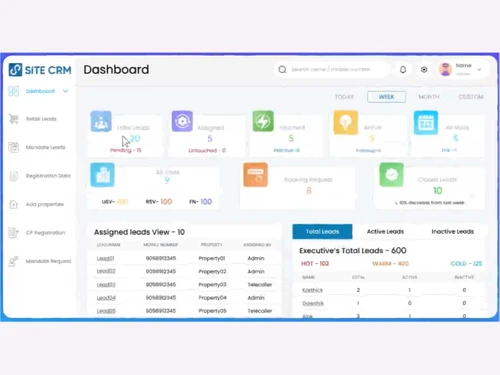
Real Time Analytics Campaign Performance Custom Dashboards Sales Performance Reports Customer Insights Performance Tracking Predictive Analytics Forecasting & Trends Alerts & Notifications
Event-Triggered Notifications Custom Workflow Alerts System Errors/Failures Customer Interaction Alerts Workflow Trigger Alerts Lead Activity Alerts SLA Violations  Windows
  Android
  MacOS
MacOS  Desktop
  Mobile
  Cloud-Based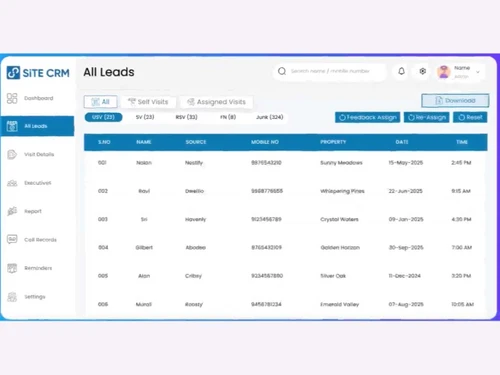
Small Business
Designed for startups and growing businesses
Medium Business
Built for business growth and flexibility
Enterprises
Designed for complex and large-scale business needs
Techjockey Trusted Reviews from Verified Users
No reviews are currently available for SiteCRM. Discover similar CRM Software reviews

Kylas CRM
Whats great - Allowed me to track everything I needed to succeed. With Kylas, I now have all the information at hand and can use that data ... read more

NCH Reflect CRM
Whats great - The fields you require can be modified by adding additional fields and can customize them. read more

Salesforce CRM
Whats great - Salesforce CRM’s beat notification feature ensures timely updates, helping sales teams stay on top of their schedules and cli... read more
SiteCRM
Price On Request
Desktop
Mobile
Web based
On Premises
Windows
Mac OS

Zoho CRM
₹ 1300
Desktop
Mobile
Web based
On Premises
Windows
Mac OS

Odoo CRM
₹ 760
Desktop
Mobile
Web based
On Premises
Windows
Mac OS

CrmOne
Price On Request
Desktop
Mobile
Web based
On Premises
Windows
Mac OS

Solid Performers CRM
₹ 500
Desktop
Mobile
Web based
On Premises
Windows
Mac OS
Kylas CRM
₹ 12999
Desktop
Mobile
Web based
On Premises
Windows
Mac OS

Zendesk Sell
Price On Request
Desktop
Mobile
Web based
On Premises
Windows
Mac OS

Cleomitra
₹ 999
Desktop
Mobile
Web based
On Premises
Windows
Mac OS

In-Sync CRM
₹ 5000
Desktop
Mobile
Web based
On Premises
Windows
Mac OS
Salesforce CRM
Price On Request
Desktop
Mobile
Web based
On Premises
Windows
Mac OS

LeadSquared CRM
Price On Request
Desktop
Mobile
Web based
On Premises
Windows
Mac OS
(0) Product(s) selected
Starting Price:
$99 /Month
Starting Price:
$19 /Agent/Month
Starting Price:
₹999 /Month ₹2,000
Starting Price:
₹5,000 /Month

Starting Price:
$97 /Month
Starting Price:
€300 /User/Year
Starting Price:
₹3,900 /Year ₹4,900

Starting Price:
₹1,299 /Month

Starting Price:
$10 /User/Month

Available
Price on Request

Starting Price:
₹500







To access SiteCRM, you can start a free trial, watch a demo, or download the software directly from its official website.
SiteCRM offers a free trial for users to experience its features. For detailed pricing information and subscription plans beyond the trial, contact techjockey.com.
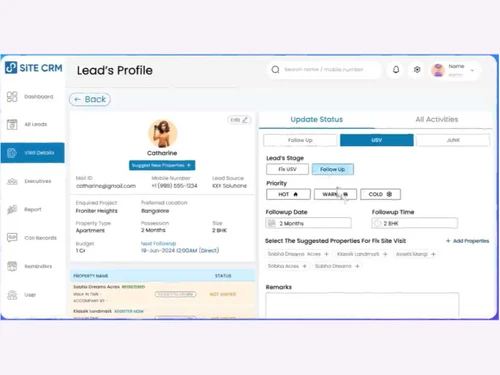
SiteCRM is designed with an intuitive UX/UI to be fast and effortless, allowing users to customize workflows, dashboards, and reminders to match their specific processes. It also includes AI-powered assistance for tasks like lead scoring and follow-up reminders, and built-in team chat for collaboration.
SiteCRM is designed for a wide range of professionals, from field agents to managers, and is particularly beneficial for real estate professionals looking to manage leads, site visits, and deals efficiently.
SiteCRM features a built-in team chat that allows users to collaborate in real-time, share updates, and coordinate on leads directly within the CRM without needing to switch applications.
SiteCRM leverages AI as an integrated assistant to enhance user experience by providing features such as follow-up reminders, lead scoring, and task automation, helping users stay productive.
Yes, SiteCRM is highly customizable, allowing users to adapt workflows, dashboards, and reminders to precisely match their team's processes and pace, rather than forcing them into rigid templates.
For real estate professionals, SiteCRM provides comprehensive tools from lead capture to final closing, including features like hourly reports, SIM & Cloud Calling, and a powerful dashboard to track leads, site visits, and deals.
SiteCRM pricing details are available on request on techjockey.com.
20,000+ Software Listed
Best Price Guranteed
Free Expert Consultation
2M+ Happy Customers
Terms and Condtions

Users with registered businesses can purchase goods from merchants on the platform to satisfy their business needs. Users are not permitted to utilize any products acquired through the platform for resale, advertising, business, or further distribution.
For each purchase made, users will receive a Tax Invoice (or 'GST invoice') that includes specific details such as:
the GSTIN of the user associated with their registered business, and
the specified Entity Name for their business.
It should be noted that not all products are eligible for GST Invoice. Only the products displayed by participating sellers with the 'GST-based Invoice Available' callout on the product description page would qualify.
Certain goods and services are not eligible to get a GST Invoice, including items with VAS, i.e., Value Added Services (e.g., Total Mobile Protection/Assured Buyback) and those involving an exchange offer at the time of purchase.
Users must ensure the accuracy of the GSTIN, and business entity name provided for the GST Invoice. Requests for corrections into GST Invoice would not be accommodated by Techjockey.com or any Seller, and any issues arising from user-provided information are the sole responsibility of users.
Techjockey.com is not liable for the GST Invoice or any associated input tax credit. To efficiently claim an input tax credit, users should select the registered place of business address as per the GST authority's data and follow the provisions of the GST Act and rules.
To claim an input tax credit, the delivery and billing addresses must match. Furthermore, input tax credits will not be granted if the delivery address and GSTIN on the invoice are from different states. In case of incorrect GST details provided during the order placement, the order will be canceled automatically.
