linkedin
Slidebean logo
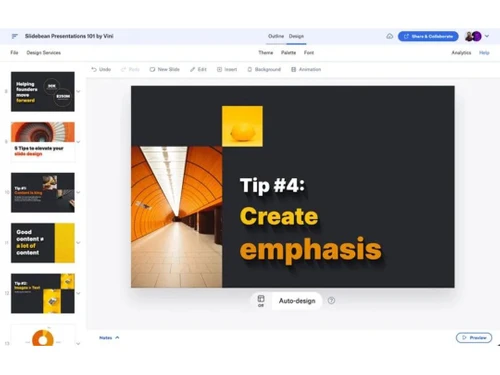
play Slidebean demo
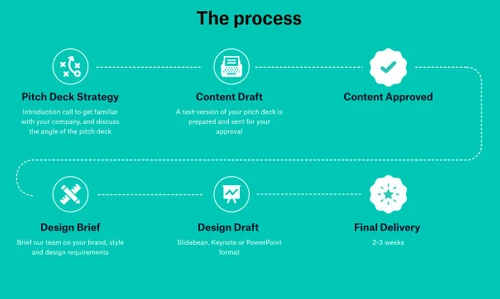
Slidebean the process
Slidebean

Slidebean

Brand: Slidebean

  • 4.7

  • 3 Ratings & 3 Reviews

Sliebean Presentation software empowers users to create captivating slideshows with a wide range of templates, multimedia integration, and seamless collaboration.

See More

Have you used Slidebean before?

Share your insights for better experience

Add a Review
Starting Price
$12

View plans

100% Genuine
Products
Best Price
Guaranteed
Safe & Secure
Payment
  • Description

  • Pricing

  • Features

  • Specification

  • Review

  • Compare

  • Alternatives

  • FAQ

Starting at $12

Slidebean Software Overview

What is Slidebean Software?

Slidebean is a cutting-edge presentation software that revolutionizes creating and delivering presentations. Designed to elevate presentations to new heights, it strongly emphasizes collaboration, empowering users to seamlessly share ideas and work with different stakeholders, fostering a creative and dynamic environment for impactful presentations.

With Slidebean, users can enjoy the benefits of seamless collaboration, allowing them to share ideas and collaborate effectively with various stakeholders, ensuring effective teamwork and knowledge exchange. The software also enables users to share presentations with prospects without screen sharing, making a lasting impression during interviews or client meetings. Slidebean prioritizes data security, giving users full control over their presentations without compromising confidentiality. With robust privacy settings, users can protect their files and presentation documents against security leaks and data thefts.

This pitch deck software offers seamless exporting of presentations to PDF format, ensuring compatibility and easy sharing with the audience. Users can personalize their presentations by adding custom logos, establishing authority, and protecting their work with copyright features. With priority support for software-related challenges, users can expect a seamless and hassle-free presentation experience.

Why Choose Slidebean?

Slidebean provides a wealth of free templates to enhance presentations with stunning visual aesthetics, making it an ideal choice for individual professionals, business executives, and team leaders seeking to effortlessly create captivating and professional presentations. With Slidebean, users can harness the power of seamless collaboration, control, and creativity, making it the ultimate presentation software for anyone looking to make a lasting impact with their presentations.

Slidebean boasts an intuitive and user-friendly interface, making it easy for users of all levels to create engaging ppts with minimal effort. The vast collection of free templates available in Slidebean accelerates the design process, providing a solid foundation for eye-catching projects tailored to specific needs. It allows users to share presentations with prospects without screen sharing, making a lasting impression during interviews or client meetings.

Benefits of Slidebean Presentation Software

  • Elevate presentations effortlessly with intuitive collaboration tools for seamless idea-sharing and effective teamwork.
  • Impress prospects without screen sharing, delivering professionally crafted presentations for impactful client interactions.
  • Maintain full control and data safety, safeguarding valuable content with robust privacy settings.
  • Export presentations to PDF formats for easy sharing and compatibility with diverse audiences.
  • Personalize ppts with custom logos, establishing authority and protecting your creative work.
  • Access priority support for swift resolution of software-related challenges, ensuring a seamless presentation experience.

Slidebean Pricing

Slidebean presentation solution pricing starts from $12 per month at techjockey.com.

The pricing model is based on different parameters, including extra features, deployment type, and total users. For further queries related to the product, you can contact our product team and learn more about the pricing and offers.

Read more

Slidebean Company Details

Founded Year:  2013

Slidebean is an online platform that designs and creates presentations on demand with user provided content.

Director/Founders Jose Cayasso (Caya), Jose Enrique Bolanos, Vinicio Chanto
Company Size 1-100 Employees

Slidebean Pricing & Plans

Starter
Starting at $12
    • Licenses

      Licenses
      Licenses
    • Monthly

      Monthly
      Monthly

Key Features

  • Unlimited AI Pitch Deck Builder access

  • 100+ startup Pitch Deck templates

  • Track views when sharing your Pitch Deck

  • Track views when sharing your Pitch Deck

  • Cap Table Tool

  • Unlimited AI Pitch Deck reviews

Accelerate
Starting at $99
    • Licenses

      Licenses
      Licenses
    • Monthly

      Monthly
      Monthly

Key Features

  • Everything in Starter, plus...

  • Strategy call with Caya, our CEO

  • Investor Finder + CRM tools

  • Access to our Financial Modeling Bootcamp

  • Pre-populated Financial Model templates

  • Monthly Investor Prep with our Team

Slidebean Features

  • icon_check Collaboration
    Share ideas and work seamlessly with various stakeholders, fostering a dynamic environment for impactful collaboration.
  • icon_check Template Library
    Access 120+ professionally designed templates optimized for startup, business, and investor presentations.
  • icon_check Control and Safety
    Retain full control over your presentations without compromising security, ensuring confidentiality.
  • icon_check Export Data in PDF
    Effortlessly convert your files to PDF formats for easy sharing and compatibility.
  • icon_check Add Your Logo
    Personalize presentations by adding your logo, establishing authority, and protecting your work with copyright features.
  • icon_check Engagement Analytics
    Track deck performance with data on views, slide time, and engagement for better investor insights.
  • icon_check Investor Management
    Manage outreach, track investor activity, and organize communication in one centralized system.
  • icon_check Custom Branding
    Apply brand colors, logos, and fonts automatically across all slides for consistent visual identity.
  • icon_check Multi Format Support
    Export your deck easily to PDF or PowerPoint formats, or share via online presentation link.
  • icon_check Online Deck Sharing
    Share your pitch deck through a unique link and allow investors to view it directly in their browser.
  • icon_check Version Control
    Automatically save every deck version, allowing rollback or restoration of previous edits.
Slidebean Demo Video play icon

Get Slidebean Demo

Watch the demo video to explore key features, real workflows, and how the software fits your business needs.

Understand
Key Features
Personal
Demo Insights
Interactive
Demo Support

Slidebean Specifications

Supported Platforms
Ubuntu Ubuntu Windows Windows MacOS MacOS Linux Linux
Devices
Desktop Desktop Mobile Mobile
Deployment
Cloud-Based Cloud-Based
Suitable For
All Industries
Business Specific
All Businesses
Business Size
Small Business Startups Medium Business Enterprises SMBs SMEs MSMBs MSMEs
Customer Support
Phone Email Live Chat Communities Forums
Language
English
Training Resources
In Person Live Online Webinars Documentation Videos
AI Features
AI Integrated

Explore the Best Alternative Solutions Similar to Your Business Size and Needs

Slidebean Reviews

4.7

Out of 5

img

Overall Rating

Based on
3 Verified Reviews

Rating Breakdown

  • Features 4.8
  • Value for Money 4.6
  • Ease of Use 4.6
  • Customer Support 4.8

83% Recommend this Product

Add Review

Slidebean Video Reviews

youtubeVideoId

4.8

“Slidebean Lifetime Deal Review - Premium Presentation App”

Review by: Alston Antony

youtubeVideoId

4.8

“Slidebean Review”

Review by: ask bethz

youtubeVideoId

4.8

“How to Build a Pitch Deck in Minutes (Slidebean Review)”

Review by: AlexBerman

Compare Slidebean With other Presentation Software

Products
Ratings
Pricing
Device Supported
Deployment
Supported Platforms
  • img

    Slidebean

  • 4.7

  • Price On Request

  • Desktop

    Mobile

  • Web based

    On Premises

  • Windows

    Mac OS

  • img

    Tome AI

  • 4.5

  • Price On Request

  • Desktop

    Mobile

  • Web based

    On Premises

  • Windows

    Mac OS

  • img

    Napkin AI

  • 4.3

  • Price On Request

  • Desktop

    Mobile

  • Web based

    On Premises

  • Windows

    Mac OS

  • img

    Pop AI

  • 4.3

  • Price On Request

  • Desktop

    Mobile

  • Web based

    On Premises

  • Windows

    Mac OS

  • img

    Plus AI

  • 4.3

  • Price On Request

  • Desktop

    Mobile

  • Web based

    On Premises

  • Windows

    Mac OS

  • img

    Slidesgo

  • 4.1

  • Price On Request

  • Desktop

    Mobile

  • Web based

    On Premises

  • Windows

    Mac OS

  • img

    Presentations AI

  • 4.1

  • Price On Request

  • Desktop

    Mobile

  • Web based

    On Premises

  • Windows

    Mac OS

  • img

    Prezi

  • 4.5

  • Price On Request

  • Desktop

    Mobile

  • Web based

    On Premises

  • Windows

    Mac OS

  • img

    PPT AI

  • 4.1

  • Price On Request

  • Desktop

    Mobile

  • Web based

    On Premises

  • Windows

    Mac OS

  • img

    Mentimeter

  • 4.7

  • Price On Request

  • Desktop

    Mobile

  • Web based

    On Premises

  • Windows

    Mac OS

  • img

    Zoho Show

  • 4.3

  • ₹ 140

  • Desktop

    Mobile

  • Web based

    On Premises

  • Windows

    Mac OS

(0) Product(s) selected

Slidebean Alternatives

See All Slidebean Alternatives

Starting Price:

$12 /User/Month

Starting Price:

$15 /Month

Starting Price:

₹189 /Month

SAVE UPTO 60%

Starting Price:

$10 /Month

Starting Price:

$3 /Month

Starting Price:

$29 /Month

Starting Price:

$12 /Month

Available

Price on Request

Starting Price:

$10 /Month

Articles for Slidebean

See All Related Articles

Which operating system does Slidebean Software Support?

Slidebean software is compatible with Windows and macOS operating systems.

Is there any Slidebean App?

Slidebean app is unavailable on Android and iOS devices.

What is the deployment type of the Slidebean?

Slidebean supports web-based deployment.

How much does the Slidebean Presentation Software cost?

Slidebean Presentation Software pricing starts from $12 per month at techjockey.com.

Who are the potential users of the Slidebean Presentation Software?

Slidebean Presentation can be used by students, institutions, teachers, businesses and individuals needing presentation software.

Is there any free trial or demo for Slidebean Presentation?

Slidebean Presentation demo is available for free with techjockey.com.

Is Slidebean Presentation Software free?

Slidebean Presentation Software does not offer a free trial.

How can you download Slidebean Presentation Software?

Slidebean is a web-based software. So, you need not download any software or tools to use it.

How does Slidebean Presentation Software work?

Slidebean is a user-friendly presentation software designed to assist startup founders in creating investor-ready pitch decks and presentations. It offers ready-made templates, an investor suite, and the option to collaborate with their team for personalized support.

20,000+ Software Listed

Best Price Guranteed

Free Expert Consultation

2M+ Happy Customers

Terms and Condtions

close

Users with registered businesses can purchase goods from merchants on the platform to satisfy their business needs. Users are not permitted to utilize any products acquired through the platform for resale, advertising, business, or further distribution.

For each purchase made, users will receive a Tax Invoice (or 'GST invoice') that includes specific details such as:

  • the GSTIN of the user associated with their registered business, and

  • the specified Entity Name for their business.

It should be noted that not all products are eligible for GST Invoice. Only the products displayed by participating sellers with the 'GST-based Invoice Available' callout on the product description page would qualify.

Certain goods and services are not eligible to get a GST Invoice, including items with VAS, i.e., Value Added Services (e.g., Total Mobile Protection/Assured Buyback) and those involving an exchange offer at the time of purchase.

Users must ensure the accuracy of the GSTIN, and business entity name provided for the GST Invoice. Requests for corrections into GST Invoice would not be accommodated by Techjockey.com or any Seller, and any issues arising from user-provided information are the sole responsibility of users.

Techjockey.com is not liable for the GST Invoice or any associated input tax credit. To efficiently claim an input tax credit, users should select the registered place of business address as per the GST authority's data and follow the provisions of the GST Act and rules.

To claim an input tax credit, the delivery and billing addresses must match. Furthermore, input tax credits will not be granted if the delivery address and GSTIN on the invoice are from different states. In case of incorrect GST details provided during the order placement, the order will be canceled automatically.