 USA
USA UAE
UAESmall Business
Designed for startups and growing businesses

See More





Brand: Zeta
Zeta HRMS software is a cutting-edge solution designed to smoothen the daily operations of HR teams. This HR software is developed to offers competitive advantage in terms of functionality for workforce management over other solutions in the market. The USP of Zeta HRMS is “core functionality.” It enables HR teams to comprehend the operational errors and allows them to start working on it im...
See MoreHave you used Zeta HRMS before?
Share your insights for better experience
Brand: Zeta
Founded Year: 1998
Zeta Softwares is an ISO certified Business Applications Software developer, developing& marketing ERP, HRMS, CRM, & POS software globally.
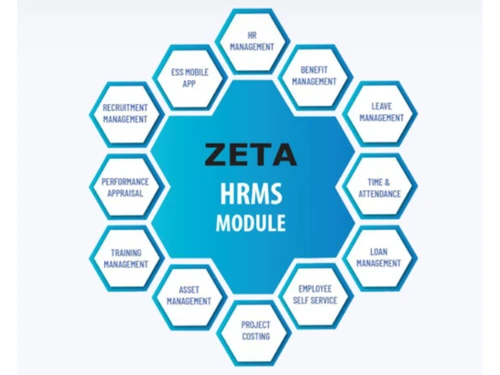
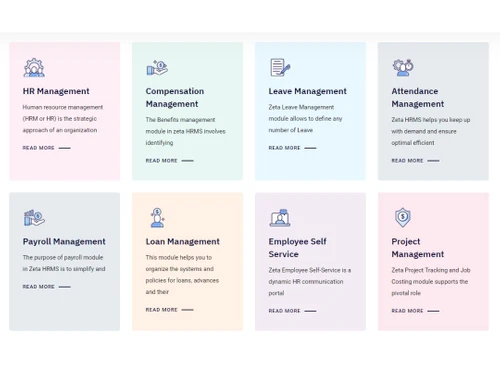
 Shift Management MIS Reports Appraisal Management Benefit Management Loan Management Leave Management Attendance Management Payroll Management Document Management Asset Management Project Management Employee Self Service Performance Management Learning Management Recruitment Management Employee Lifecycle Management

Watch the demo video to explore key features, real workflows, and how the software fits your business needs.
 Windows
  iOS
iOS  Android MacOS
  Desktop
  Mobile
  Tablet
  iPad
iPad  Cloud-Based
  Perpetual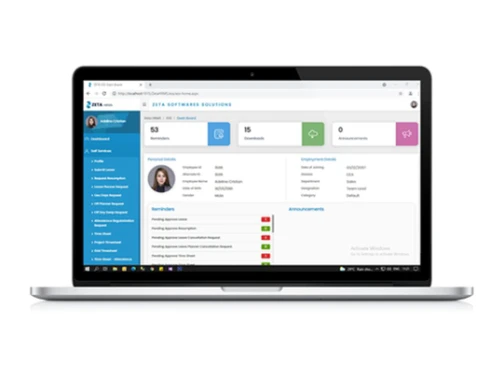
Small Business
Designed for startups and growing businesses
Medium Business
Built for business growth and flexibility
Enterprises
Designed for complex and large-scale business needs
4.4
Out of 5

Overall Rating
Based on
4 Verified Reviews
Rating Breakdown
95% Recommend this Product
Add ReviewUsers generally express high satisfaction with Zeta HRMS, highlighting its effective web-based payroll system and excellent customer support. Many appreciate the biometric integration and mobile app features, which enhance usability. The service team is frequently praised for their helpfulness and guidance, especially for new businesses. While the majority of feedback is positive, there are no significant complaints noted, indicating a strong overall experience with the product.

Apr 16, 2019
Techjockey Verified
“Web based solution”
Pros
This web based payroll with biometric integration does a great job for my business. Also includes ESS portal and mobile app with GPS support that is superb.
Cons
NO CONS
Aug 13, 2016
Techjockey Verified
“could not ask for more help”
Pros
What a fantastic service 10/10 I've since signed up with them.
Cons
N/A
Aug 6, 2016
Techjockey Verified
“A good experience”
Pros
I was very pleased with the help, advice and information that Techjockey pro Sorabh gave me for my new small business. He was extremely helpful and sent me information on three different software programs that were applicable to my business. I did end up choosing one of the companies and am very pleased!! Thank you!!
Cons
N/A

Zeta HRMS
Price On Request
Desktop
Mobile
Web based
On Premises
Windows
Mac OS

Spine HR
Price On Request
Desktop
Mobile
Web based
On Premises
Windows
Mac OS

ClusterHR
₹ 40
Desktop
Mobile
Web based
On Premises
Windows
Mac OS

Fix HR
₹ 600
Desktop
Mobile
Web based
On Premises
Windows
Mac OS

Zfour HRMS
₹ 45
Desktop
Mobile
Web based
On Premises
Windows
Mac OS

WeekMate
₹ 3999
Desktop
Mobile
Web based
On Premises
Windows
Mac OS

SignalHRM
₹ 648
Desktop
Mobile
Web based
On Premises
Windows
Mac OS

WoCo
₹ 50
Desktop
Mobile
Web based
On Premises
Windows
Mac OS

Presence360
₹ 2999
Desktop
Mobile
Web based
On Premises
Windows
Mac OS

TruHR
₹ 2200
Desktop
Mobile
Web based
On Premises
Windows
Mac OS

Keka HR
Price On Request
Desktop
Mobile
Web based
On Premises
Windows
Mac OS
(0) Product(s) selected
Starting Price:
₹40 /Month
Starting Price:
₹600 /Month ₹900
Starting Price:
₹3,999
Starting Price:
₹2,200 /Month

Starting Price:
₹49 /Month

Starting Price:
₹890 /Month

Available
Price on Request

Starting Price:
₹1,499 /Month

Starting Price:
$49 /Month
Available
Price on Request
Starting Price:
₹5,000 /Month










Zeta HRMS is a web application that can be accessed through a web browser.
Zeta HRMS uses cloud-based storage system for workflows.
The price of Zeta HRMS starts from Rs. 1,00,000/- per year at techjoceky.com. The prices are subject to change based on customer requirements and customizations.
Yes, please request a call to avail the demo for Zeta HRMS at Techjockey.
Zeta HRMS is designed for organizations with a minimum of 100 employees.
20,000+ Software Listed
Best Price Guranteed
Free Expert Consultation
2M+ Happy Customers
Terms and Condtions

Users with registered businesses can purchase goods from merchants on the platform to satisfy their business needs. Users are not permitted to utilize any products acquired through the platform for resale, advertising, business, or further distribution.
For each purchase made, users will receive a Tax Invoice (or 'GST invoice') that includes specific details such as:
the GSTIN of the user associated with their registered business, and
the specified Entity Name for their business.
It should be noted that not all products are eligible for GST Invoice. Only the products displayed by participating sellers with the 'GST-based Invoice Available' callout on the product description page would qualify.
Certain goods and services are not eligible to get a GST Invoice, including items with VAS, i.e., Value Added Services (e.g., Total Mobile Protection/Assured Buyback) and those involving an exchange offer at the time of purchase.
Users must ensure the accuracy of the GSTIN, and business entity name provided for the GST Invoice. Requests for corrections into GST Invoice would not be accommodated by Techjockey.com or any Seller, and any issues arising from user-provided information are the sole responsibility of users.
Techjockey.com is not liable for the GST Invoice or any associated input tax credit. To efficiently claim an input tax credit, users should select the registered place of business address as per the GST authority's data and follow the provisions of the GST Act and rules.
To claim an input tax credit, the delivery and billing addresses must match. Furthermore, input tax credits will not be granted if the delivery address and GSTIN on the invoice are from different states. In case of incorrect GST details provided during the order placement, the order will be canceled automatically.



