 USA
USA UAE
UAESmall Business
Designed for startups and growing businesses


See More





Brand: Zoho Corporation
Zoho Showtime is collaboration software, suitable for training institutes, HR training departments and individual mentors. You can create multiple learner-centric courses and offer in-person virtual assistance using Zoho Showtime. Institutes can also choose to offer self-paced learning courses by recording the live sessions and making them available to individual learners as per their convenient ...
See MoreHave you used Zoho Showtime before?
Share your insights for better experience
View plans
 Save upto 18%, Get GST Invoice on your business purchase T&C Buy Now & Pay Later, Check offer on payment page.
 Brand: Zoho Corporation
Founded Year: 1996
Zoho Corporation is an Indian multinational company that specialises in software development, cloud computing, and web-based business tools. It is best known for Zoho Office suite and its enterprise IT management division, ManageEngine
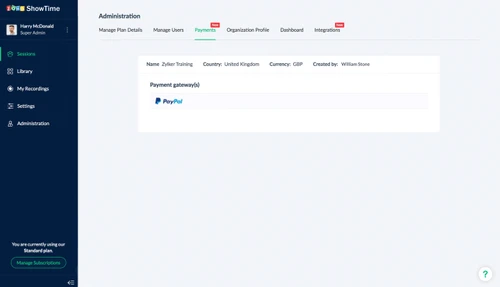
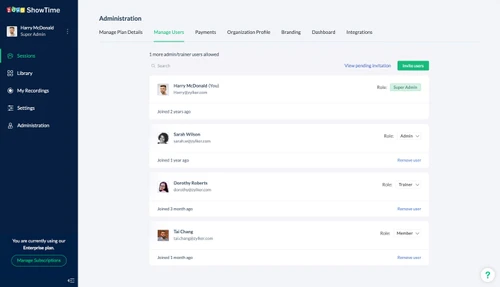
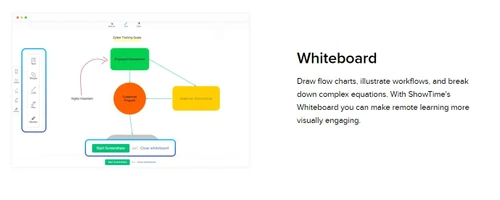
 Session Recording Screen Sharing Interactive Whiteboard Open Mic Evaluation Survey Engagement Analytics Recurring Session Audience Management Content Library On Demand Training Zoho CRM Integration Monetize Co-Trainers

Watch the demo video to explore key features, real workflows, and how the software fits your business needs.
 Windows
  iOS
iOS  Android
  Desktop
  Mobile
  Tablet
  iPad
iPad  Cloud-Based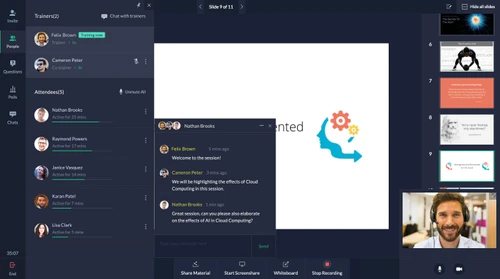
Small Business
Designed for startups and growing businesses
Medium Business
Built for business growth and flexibility
Enterprises
Designed for complex and large-scale business needs
4.4
Out of 5

Overall Rating
Based on
7 Verified Reviews
Rating Breakdown
90% Recommend this Product
Add ReviewUsers generally appreciate Zoho Showtime for its ease of use and effectiveness in managing training programs and communication within teams. Many highlight its ability to streamline scheduling and track progress, making it particularly beneficial for small businesses and trainers. However, some users have noted minor connectivity issues and a lack of advanced features, which could limit its functionality for more complex needs. Overall, the sentiment is positive, with many recommending the platform for its straightforward approach to online training and collaboration.
Pros
"The platform is easy to use and allows me to schedule calls, send reminders and track my team's progress in their training"
"It allows me to manage our training program in a more efficient way and We create customized modules to help our clients learn the skills needed to get organized."
"This service was professional and incredibly fast in providing recommendations and booking appointments for reviewing demo packages of software."
Cons
"It's not easy to navigate through the different features, and I Found some parts of the process too confusing otherwise, it's good."
"I test that sometimes the software has problems connecting to the internet."
"For the moment, nothing has happened to me or I have not experienced something that I do not like. Zoho always adapts to the user's needs."

May 5, 2022
Techjockey Verified
“Manage team's training progress with Zoho Showtime”
Pros
The platform is easy to use and allows me to schedule calls, send reminders and track my team's progress in their training
Cons
No cons found yet.
Reason to switch
I analyze results with Showtime's is easy to use and perfectly meets the needs of trainers and participants.
Apr 12, 2022
Techjockey Verified
“Speed up my team's Productivity”
Pros
It allows me to manage our training program in a more efficient way and We create customized modules to help our clients learn the skills needed to get organized.
Cons
No cons Found yet
Reason to switch
The best part is that I can use this Software online or offline.
May 3, 2022
Techjockey Verified
“The Easiest Way to Communicate with the Teams”
Pros
I'm a business owner who uses this product to manage my trainers. This product makes it easy for me to communicate with my team, send them notifications, track their progress and even schedule follow-up calls.
Cons
I test that sometimes the software has problems connecting to the internet.
Reason to switch
This product makes it easy for me to communicate with my team, send them notifications, and track their progress.

Zoho Showtime
₹ 1500.00 excl. GST
Desktop
Mobile
Web based
On Premises
Windows
Mac OS

WrkTalk
₹ 250
Desktop
Mobile
Web based
On Premises
Windows
Mac OS

Microsoft Teams
₹ 138
Desktop
Mobile
Web based
On Premises
Windows
Mac OS

Zoom Meetings
₹ 1449
Desktop
Mobile
Web based
On Premises
Windows
Mac OS

Pyngyn
₹ 999
Desktop
Mobile
Web based
On Premises
Windows
Mac OS

Wokay
₹ 14999
Desktop
Mobile
Web based
On Premises
Windows
Mac OS

Volley
Price On Request
Desktop
Mobile
Web based
On Premises
Windows
Mac OS
Convo AI
Price On Request
Desktop
Mobile
Web based
On Premises
Windows
Mac OS

Google Meet
₹ 720
Desktop
Mobile
Web based
On Premises
Windows
Mac OS

Troop Messenger
₹ 199
Desktop
Mobile
Web based
On Premises
Windows
Mac OS

Brity Works
Price On Request
Desktop
Mobile
Web based
On Premises
Windows
Mac OS
(2) Product(s) selected
Starting Price:
₹250
Starting Price:
₹14,999 /Month
Starting Price:
$29 /Month $49
Available
Price on Request

Starting Price:
$89 /Month

Available
Price on Request

Starting Price:
$15 /Monthly

Starting Price:
$15 /Member/Month

Available
Price on Request

Starting Price:
$7 /User/Month






Yes, You can configure Zoho Showtime by incorporating multiple elements related to your brand and offer a detailed preview of your training sessions to trainees.
Yes, the software offers detailed insights about email-based campaigns, allowing you to predict the total number of participants for a particular session based on the click rate and open rate of a specific email.
Yes, we offer an online demo for Zoho Showtime. You can request an online demo session along with a fixed time schedule and our in-house product experts will get back to you.
Yes, you can pass on control to another mentor, let them interact with the audience and present slides to them.
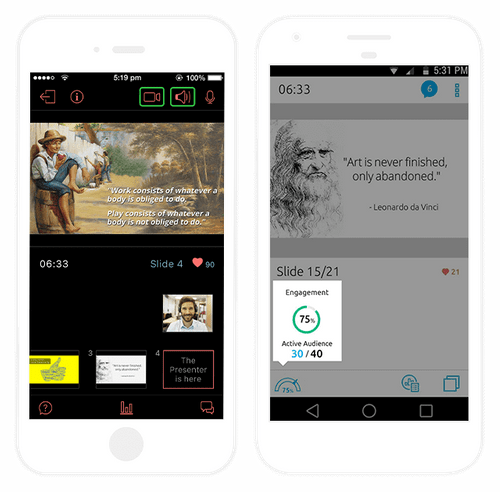
Yes, the software has a dedicated mobile app for Android and iOS devices.
20,000+ Software Listed
Best Price Guranteed
Free Expert Consultation
2M+ Happy Customers
Terms and Condtions

Users with registered businesses can purchase goods from merchants on the platform to satisfy their business needs. Users are not permitted to utilize any products acquired through the platform for resale, advertising, business, or further distribution.
For each purchase made, users will receive a Tax Invoice (or 'GST invoice') that includes specific details such as:
the GSTIN of the user associated with their registered business, and
the specified Entity Name for their business.
It should be noted that not all products are eligible for GST Invoice. Only the products displayed by participating sellers with the 'GST-based Invoice Available' callout on the product description page would qualify.
Certain goods and services are not eligible to get a GST Invoice, including items with VAS, i.e., Value Added Services (e.g., Total Mobile Protection/Assured Buyback) and those involving an exchange offer at the time of purchase.
Users must ensure the accuracy of the GSTIN, and business entity name provided for the GST Invoice. Requests for corrections into GST Invoice would not be accommodated by Techjockey.com or any Seller, and any issues arising from user-provided information are the sole responsibility of users.
Techjockey.com is not liable for the GST Invoice or any associated input tax credit. To efficiently claim an input tax credit, users should select the registered place of business address as per the GST authority's data and follow the provisions of the GST Act and rules.
To claim an input tax credit, the delivery and billing addresses must match. Furthermore, input tax credits will not be granted if the delivery address and GSTIN on the invoice are from different states. In case of incorrect GST details provided during the order placement, the order will be canceled automatically.



