linkedin
eComp logo
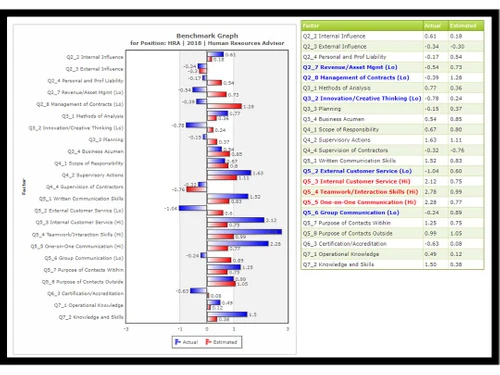
ecomp graph
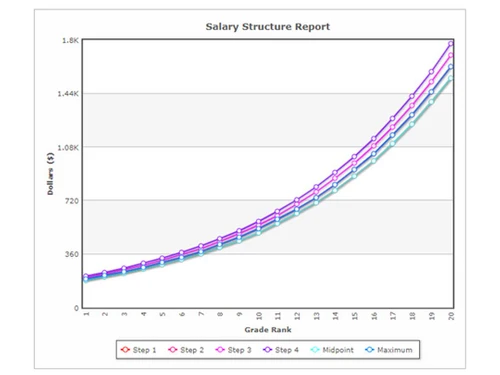
ecomp salary
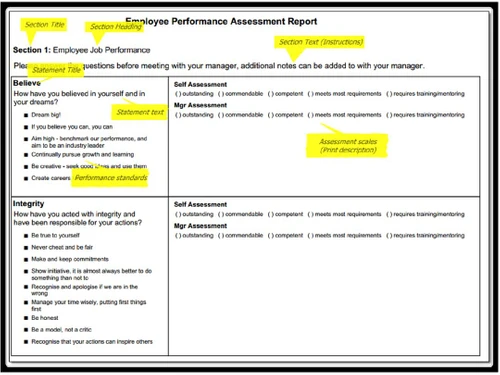
ecomp performance

eComp

Brand: OO-Soft

  • 4.1

  • 3 Ratings

Streamline everything from employee data and diverse salary structures to payroll with eComp, the easy-to-use, all-in-one HR solution for your business.

See More

Have you used eComp before?

Share your insights for better experience

Add a Review

Price Available on Request

Questions about pricing or customization? We’re here to help, just a click away.

100% Genuine
Products
Best Price
Guaranteed
Safe & Secure
Payment
  • Description

  • Pricing

  • Features

  • Specification

  • Review

  • Compare

  • Alternatives

  • FAQ

eComp Software Overview

What is eComp?

eComp is a comprehensive, all-in-one HR Software solution developed by OO-Soft. Designed as a web-based platform, it offers a simplified and intuitive interface to manage complex human resources tasks. eComp provides end-to-end functionality for a wide range of businesses, from startups to established enterprises. The software centralizes critical HR operations, streamlining everything from employee data management and payroll processing to administrative reporting and job evaluation, making it a versatile tool for modern HR departments.

Why Choose eComp?

  • Unified Platform: Consolidates multiple HR functions like payroll, employee data, and reporting into a single, easy-to-navigate system.
  • User-Friendly Interface: Designed for simplicity, eComp allows HR managers and staff to quickly adopt the software with minimal training.
  • Scalability: The solution is engineered to support businesses of all sizes, from small startups and SMEs to larger agencies and enterprises.
  • Accessibility: As a web-based application, it offers secure access to your HR data from any desktop device with an internet connection.
  • Dedicated Support: eComp provides robust customer support and training options, including in-person sessions and video tutorials, to ensure a smooth implementation.

Advanced Features of eComp

  • Employee Data Management: A centralized repository for all employee information, from personal details and contact information to employment history and performance records.
  • Diverse Salary Structure: Flexible tools to create and manage complex and varied salary structures, accommodating different roles, departments, and compensation plans.
  • Comprehensive Reports: Generate detailed reports on payroll, employee demographics, attendance, and other key HR metrics to support data-driven decision-making.
  • Administration Tools: Streamline administrative tasks with features for managing company policies, documents, and internal communications.
  • Human Resource Management: Core HR functionalities to manage onboarding, offboarding, benefits administration, and compliance.
  • Integrated Payroll: An efficient payroll processing module that integrates with salary structures and employee data to ensure accurate and timely payments.
  • Automated Backup: Provides peace of mind with automated data backups, ensuring your critical HR information is secure and recoverable.
  • Job Evaluation: Tools to systematically assess and rate job roles within the organization, aiding in fair compensation and organizational structuring.

Key Capabilities of eComp

  1. Workforce Administration: At its core, eComp excels at managing your entire workforce. This includes maintaining detailed employee records, handling job card management, and overseeing daily administrative duties through a centralized dashboard.
  2. Compensation and Payroll: This capability combines a flexible salary structuring tool with a powerful payroll engine. It allows businesses to handle diverse compensation models and automates the entire payroll process, reducing errors and saving time.
  3. Data and Analytics: With its built-in reporting engine and automated backup system, eComp ensures that your data is not only secure but also actionable. Generate insightful reports to track key performance indicators and inform strategic planning.
  4. System and Integration: The platform supports API integration, allowing it to connect with other business systems. Its web-based nature ensures easy deployment and maintenance across Windows devices.

How to Use eComp?

  1. Deployment: As a web-based application, there is no complex software to install. Access is granted through a secure web portal, making deployment quick and hassle-free. The system is optimized for Windows desktop environments.
  2. Onboarding and Data Migration: The eComp team assists with initial setup and data migration. You can easily import existing employee data to populate the system.
  3. Training and Adoption: OO-Soft offers multiple training options to ensure your team can leverage the full potential of the software. This includes personalized in-person training sessions and a library of instructional videos for self-paced learning.
  4. Ongoing Management: Once set up, you can manage all HR functions through the intuitive online dashboard. The platform's API capabilities also allow for integration with other essential business tools.

eComp Price

eComp price is available on request at Techjockey. The pricing model is based on different parameters, including extra features, deployment type, and the total number of users. For further queries related to the product, you can contact our product expert and learn more about the pricing and offers.

Read more

eComp Pricing & Plans

Looking for The Right Pricing?

Share your requirements and get a plan built around your business.

  • Define your business needs
  • Get customised pricing
  • Choose features that fit your workflow

Price Available on Request

Get personalised eComp pricing that fits your needs. Our team will connect with you.

eComp Features

  • icon_check Employee Data
  • icon_check Salary Structure
  • icon_check Reports
  • icon_check Administration
  • icon_check Human Resource
  • icon_check Payroll
  • icon_check Automated Backup
  • icon_check Job Evaluation

eComp Specifications

Supported Platforms
Windows Windows
Devices
Desktop Desktop
Deployment
Cloud-Based Cloud-Based
Suitable For
All Industries
Business Specific
All Businesses
Business Size
Small Business Enterprises SMEs
Customer Support
Email
Language
English
Integration
API Integration
Training Resources
In Person Videos

Explore the Best Alternative Solutions Similar to Your Business Size and Needs

eComp Review

4.1

Out of 5

img

Overall Rating

Based on
3 Verified Ratings

Rating Breakdown

  • Features 4.1
  • Value for Money 4.3
  • Ease of Use 4.1
  • Customer Support 4

90% Recommend this Product

Add Review

Techjockey Trusted Reviews from Verified Users

No reviews are currently available for eComp. Discover similar HR Software reviews

  • Zfour HRMS

    4.9

    Whats great - The service is professional, user-friendly, and genuinely helpful. Highly recommend to anyone looking for quality and trust. read more

  • HROne

    4.8

    Whats great - None read more

  • factoHR

    4.6

    Whats great - Get real-time HR insights! Data-driven reports help you make faster, smarter decisions for workforce management read more

Compare eComp With other HR Software

Products
Ratings
Pricing
Device Supported
Deployment
Supported Platforms
  • img

    eComp

  • 4.1

  • Price On Request

  • Desktop

    Mobile

  • Web based

    On Premises

  • Windows

    Mac OS

  • img

    ClusterHR

  • 5

  • ₹ 40

  • Desktop

    Mobile

  • Web based

    On Premises

  • Windows

    Mac OS

  • img

    Fix HR

  • 4.9

  • ₹ 600

  • Desktop

    Mobile

  • Web based

    On Premises

  • Windows

    Mac OS

  • img

    Zfour HRMS

  • 4.9

  • ₹ 45

  • Desktop

    Mobile

  • Web based

    On Premises

  • Windows

    Mac OS

  • img

    SignalHRM

  • 4.6

  • ₹ 648

  • Desktop

    Mobile

  • Web based

    On Premises

  • Windows

    Mac OS

  • img

    WeekMate

  • 4.6

  • ₹ 3999

  • Desktop

    Mobile

  • Web based

    On Premises

  • Windows

    Mac OS

  • img

    Spine HR

  • 4.3

  • Price On Request

  • Desktop

    Mobile

  • Web based

    On Premises

  • Windows

    Mac OS

  • img

    WoCo

  • 4.8

  • ₹ 50

  • Desktop

    Mobile

  • Web based

    On Premises

  • Windows

    Mac OS

  • img

    Presence360

  • 4.9

  • ₹ 2999

  • Desktop

    Mobile

  • Web based

    On Premises

  • Windows

    Mac OS

  • img

    TruHR

  • 4.9

  • ₹ 2200

  • Desktop

    Mobile

  • Web based

    On Premises

  • Windows

    Mac OS

  • img

    Keka HR

  • 4.4

  • Price On Request

  • Desktop

    Mobile

  • Web based

    On Premises

  • Windows

    Mac OS

(0) Product(s) selected

eComp Alternatives

See All eComp Alternatives

Starting Price:

₹600 /Month ₹900

SAVE UPTO 33%

Starting Price:

₹2,200 /Month

Starting Price:

₹49 /Month

Starting Price:

₹890 /Month

Starting Price:

₹1,499 /Month

Starting Price:

$49 /Month

Available

Price on Request

Starting Price:

₹5,000 /Month

Articles for eComp

See All Related Articles

Which operating system does Ecomp support?

Ecomp HR Software is compatible with Windows operating systems.

Is there any Ecomp app?

Ecomp HR Software app is not available.

What is deployment type of Ecomp?

Ecomp HR Software supports Web-Based.

Who are the potential users of Ecomp?

Ecomp HR Software is typically used in All Industries.

Is there any Ecomp demo or free trial?

Ecomp demo is available for free with Techjockey.com. Please request a call back.

Is Ecomp free?

Ecomp HR Software offers a free trial. However, the premium plan with advanced features available at Techjockey.com.

How can you download Ecomp?

For Ecomp installation, insert the given CD/USB flash storage in your system and open the Setup Wizard to get started. The web-based version can be accessed directly through Ecomp portal.

How does Ecomp work?

Ecomp HR Software helps with Employee Data,Diverse Salary Structure,Reports and Administration. It's a complete solution for Human Resource,Payroll,Automated Backup and Job Card Management.

Are there any hidden charges for Ecomp updates?

Ecomp regular updates are available free of cost. There are no hidden software update charges.

What is Ecomp used for?

Ecomp HR Software used for Employee Data,Diverse Salary Structure,Reports and Administration.

How do I contact Ecomp support?

You can directly visit Ecomp portal and get in touch with Ecomp customer support for any software-related query.

How to get Ecomp lifetime deal?

Please contact our product experts to get Ecomp lifetime deal with exclusive offers.

What is eComp in HR?

eComp is an all-in-one, web-based HR software designed to provide end-to-end human resource management solutions for startups, SMBs, and agencies.

How does eComp work?

eComp works as a centralized platform that allows businesses to manage core HR functions, such as employee data, payroll, and reporting, through a simple, easy-to-use interface.

What does eComp do?

eComp helps businesses manage employee data, handle diverse salary structures, administer payroll, generate reports, and perform job evaluations, while also providing automated data backups.

How much does eComp cost?

eComp price is available on request at Techjockey.com.

What kind of businesses can use eComp?

eComp is designed to be suitable for all business sizes and industries, including startups, small to medium-sized businesses (SMEs), and large enterprises.

Is eComp a cloud-based software?

Yes, eComp is a web-based software, which means it can be accessed from desktop devices through a web browser without requiring complex local installations.

Can eComp integrate with other software?

Yes, eComp supports integration with other software systems through its available API, allowing for a more connected and streamlined workflow.

What training options are available for new eComp users?

eComp offers training for new users through both in-person sessions and instructional videos to ensure a smooth onboarding process.

20,000+ Software Listed

Best Price Guranteed

Free Expert Consultation

2M+ Happy Customers

Terms and Condtions

close

Users with registered businesses can purchase goods from merchants on the platform to satisfy their business needs. Users are not permitted to utilize any products acquired through the platform for resale, advertising, business, or further distribution.

For each purchase made, users will receive a Tax Invoice (or 'GST invoice') that includes specific details such as:

  • the GSTIN of the user associated with their registered business, and

  • the specified Entity Name for their business.

It should be noted that not all products are eligible for GST Invoice. Only the products displayed by participating sellers with the 'GST-based Invoice Available' callout on the product description page would qualify.

Certain goods and services are not eligible to get a GST Invoice, including items with VAS, i.e., Value Added Services (e.g., Total Mobile Protection/Assured Buyback) and those involving an exchange offer at the time of purchase.

Users must ensure the accuracy of the GSTIN, and business entity name provided for the GST Invoice. Requests for corrections into GST Invoice would not be accommodated by Techjockey.com or any Seller, and any issues arising from user-provided information are the sole responsibility of users.

Techjockey.com is not liable for the GST Invoice or any associated input tax credit. To efficiently claim an input tax credit, users should select the registered place of business address as per the GST authority's data and follow the provisions of the GST Act and rules.

To claim an input tax credit, the delivery and billing addresses must match. Furthermore, input tax credits will not be granted if the delivery address and GSTIN on the invoice are from different states. In case of incorrect GST details provided during the order placement, the order will be canceled automatically.