linkedin
EliteHRMS logo
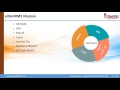
play eliteHRMS Presentation V1 0 demo
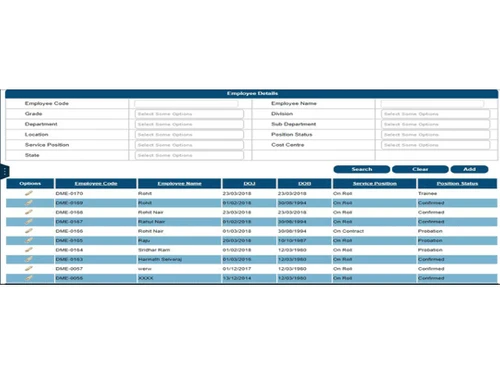
elitehrms employee management
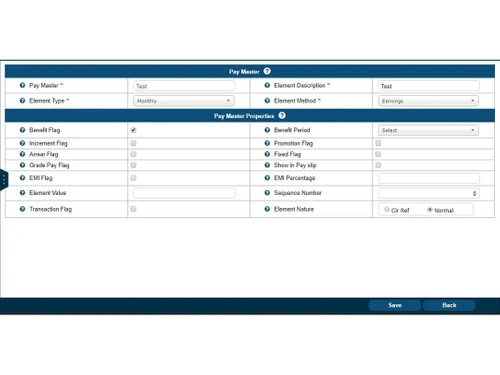
elitehrms paymaster

EliteHRMS

Brand: 3M Infosoft Pvt. Ltd.

  • 4.4

  • 5 Ratings

eliteHRMS is a holistic HRMS that helps companies manage employees and their data in an effective and efficient manner. The solution has been tested across different verticals IT/ITES, Production, Food and beverage industries, etc. The solution is aimed at serving the HR of an organization in mana...

See More

Have you used EliteHRMS before?

Share your insights for better experience

Add a Review

Price Available on Request

Questions about pricing or customization? We’re here to help, just a click away.

100% Genuine
Products
Best Price
Guaranteed
Safe & Secure
Payment
  • Description

  • Pricing

  • Features

  • Specification

  • Review

  • Compare

  • Alternatives

  • FAQ

EliteHRMS Software Overview


eliteHRMS is a holistic HRMS that helps companies manage employees and their data in an effective and efficient manner. The solution has been tested across different verticals IT/ITES, Production, Food and beverage industries, etc. The solution is aimed at serving the HR of an organization in managing the various activities pertaining to managing employees starting from hiring them till their retirement/exit. The solution has the core goal to fit with the corresponding industries without or less customization. It provides end to end HR Operations with huge cost benefits for the organization.
 
 
Product Features
 
eliteHRMS is a user friendly edition of HR/Payroll operation with high benefits in comprehensive cost. The solution focuses on enabling scalability, reliability, and security with next generation features for the users to make their life easier. The software is a hire-to-retire solution that caters to the various needs of HR department of a company and helps them operate in an effective and efficient manner. Below are certain specific features of the solution:

  • Admin:
    • Company and group of company:
      • Define companies and details of the company like addresses
      • Attach locations to companies
      • Define roles, attach one or more roles a user & set default role
  • Administration & Security:
    • Define the menu applicable for each role
    • Define access permissions for users for the process, as well as for actions within the process like Add, Edit, View and Delete.
    • Define & assign alerts to roles, specific employee or for all users
    • On login automatic setting of menus, processes, security rights and default values
    • Limit viewing of data to the level to which one belongs e.g. Specific Group Company, company, employee or location
  • Views:
    • Views show details of processes in a list view form
    • Views can also have one too many details, in which case the data can be seen in broken down form
    • Filters are provided to quickly arrive at the transaction one is looking for
    • Data can be exported to Excel
    • Data security norms based on the log in permissions apply for the output data Payroll & Statutory
  • Payroll Processing:
    • Payroll can be processed for a selected Payroll for a period & Pay group
    • Payroll monthly inputs to be finalized can be manage
    • Payroll processing report generation
    • Payroll processed will incorporate the Statutory Process of (PF, ESI, PT, LWF, Bonus, IT)
    • Provides option to process settlement payroll for relieving employees with hold payroll operation
    • Generate the pay slips, Bank statement & payroll process sheet for the salary verification
  • Benefits (PF & ESI, PT, LWF, Gratuity):
    • Model PF and ESI Elements
    • Load current rules applicable for the Indian environment with relevant minimum and maximum values
    • Map Employees to the respective PF/ESI/PT/LWF payment authorities Process PF/ESI
    • Generate Online Statutory Reports for PF/ESI
  • Income Tax processing:
  • A user can:
    • Make the declaration by the employees and deduct their taxes monthly against their annual income value
    • Generate the Form 16, Form 24 Q, Form 16 and etc.
    • Issue monthly tax statements to employees
  • Payroll rule builder:
  • A user can:
    • Manage calculation sequence by defining the Priority Level
    • Assign calculation types like Direct, Rule Based and Conditional
    • Calculations can be defined in Payroll Rule Builder or by Rules
    • Rules modifiable based on statutory changes
    • Define more complex rules for pay element, benefits or tax calculations
    • Attach the rule to relevant pay Elements and Pay groups hire to Retire
  • Job Offer/Induction:
  • A user can:
    • Create Job Offer
    • Confirm induction of applicant in a single click
    • On induction, auto creation of employee master
    • Generate Offer & Appointment letters by the selection in the system
  • Transfers/Promotions/Movements:
    • Transfer employee from one Location to another
    • Promote employee from one position to another
    • Upgrade employee Grade /Pay Level from one to another
    • Grade/Pay Level change automatically changes Employee Base Pay
    • Maintain Movement Types like Temporary Deputation, Permanent Transfer, etc.
    • Permanent Transfer details will be automatically updated in Employee master
    • Employee Promotions and Increments will lead the auto update of Employee salaries and calculation of movements (Inter month movements, beginning of the month & Retrospective date movements)
    • Auto generate movement letter from the system against the Increments or promotions
  • Separation:
    • Record employee separation with separation type
    • Record assets to be recovered from employee
    • Set the status of the employee whether he/she is relieved, not relieved or in notice period
    • Issue/receive assets to & from employees
    • On relieving employee, system will prompt for asset recovery, if any
    • Automatically employee master will be updated once employee is relieved HR Data
  • Org Structure & Org Tree Definition:
  • Allows user to:
    • Map multiple Locations to a Company
    • Map multiple users to Locations
    • Define & assign Alerts to Roles, specific Employee or for all users
    • Define Positions, Grades, Departments, and Divisions within the company – location structure
  • HR code:
    • Define Positions, Grades, Departments, Divisions within the company – location structure
    • Specify multiple base pay levels for grades and set values for these base levels 
  • HR Data & Report Views:
    • Maintain 200+ pieces of Employee information
    • Employee self-service - Assign login ID to employee(s)
    • Set Service Status like On Roll, Sabbatical, etc.
    • Set Position Status as Probation, Confirmed, etc.
    • Fix Grade & Pay Level to Employees
    • Record employee’s address, skills, statutory details, nominee details, asset details, personal details, salary details, official details, education& family, awards detail.

 
About The Company
 
Experts IN Solutions Pvt. Ltd. provides end-to-end solutions in Information Technology and has its Head Quarters and Delivery center in Chennai, TamilNadu, India. The company has a team with expertise of more than 25 years of experience in IT industry. The motto of the company is Delivering IT Solutions On-time, Cost-effective, Quality in an Innovative way. The company deliver software products, consulting, customized software projects etc. for Small and Medium size business segments. The team at Experts IN Solutions follows the industry leading best practices and has expertise in delivering the solutions to the customers on-time and within budget.

Read more

3M Infosoft Pvt. Ltd. Company Details

Founded Year:  2006

3M Infosoft Pvt. Ltd. has it Head Quarters and Delivery center in Chennai, TamilNadu, India.

Director/Founders Gopinath Muthukrishnan
Company Size 1-100 Employees

EliteHRMS Pricing & Plans

Looking for The Right Pricing?

Share your requirements and get a plan built around your business.

  • Define your business needs
  • Get customised pricing
  • Choose features that fit your workflow

Price Available on Request

Get personalised EliteHRMS pricing that fits your needs. Our team will connect with you.

EliteHRMS Features

  • icon_check Payroll Management
    We are providing the very useful system for the Payroll/Finance users. Normally doing the payroll process for the companies is
  • icon_check Employee Self Service
    We have a trendy and powerful ESS & MSS services which are integrated with the system. And it provides the Operations
  • icon_check 360 Degree Feedback
  • icon_check Attendance Management
  • icon_check Leave Management
  • icon_check Recruitment Management
  • icon_check Shift Management
  • icon_check MIS Reports
  • icon_check Performance Management
  • icon_check Training Management
  • icon_check Compensation Management
  • icon_check Document Management
  • icon_check Learning Management
  • icon_check Asset Management
EliteHRMS Demo Video play icon

Get EliteHRMS Demo

Watch the demo video to explore key features, real workflows, and how the software fits your business needs.

Understand
Key Features
Personal
Demo Insights
Interactive
Demo Support

EliteHRMS Specification

Supported Platforms
Windows Windows iOS iOS Android Android Linux Linux
Devices
Desktop Desktop
Deployment
Web-Based Web-Based Perpetual Perpetual
Suitable For
All Industries
Business Specific
All Businesses
Business Size
Small Business Startups Medium Business SMBs SMEs
Language
English

Explore the Best Alternative Solutions Similar to Your Business Size and Needs

EliteHRMS Review

4.4

Out of 5

img

Overall Rating

Based on
5 Verified Ratings

Rating Breakdown

  • Features 4.1
  • Value for Money 4.5
  • Ease of Use 4.6
  • Customer Support 4.4

90% Recommend this Product

Add Review

Techjockey Trusted Reviews from Verified Users

No reviews are currently available for EliteHRMS. Discover similar HR Software reviews

  • Zfour HRMS

    4.9

    Whats great - The service is professional, user-friendly, and genuinely helpful. Highly recommend to anyone looking for quality and trust. read more

  • HROne

    4.8

    Whats great - None read more

  • factoHR

    4.6

    Whats great - Get real-time HR insights! Data-driven reports help you make faster, smarter decisions for workforce management read more

Compare EliteHRMS With other HR Software

Products
Ratings
Pricing
Device Supported
Deployment
Supported Platforms
  • img

    EliteHRMS

  • 4.4

  • Price On Request

  • Desktop

    Mobile

  • Web based

    On Premises

  • Windows

    Mac OS

  • img

    Spine HR

  • 4.3

  • Price On Request

  • Desktop

    Mobile

  • Web based

    On Premises

  • Windows

    Mac OS

  • img

    ClusterHR

  • 5

  • ₹ 40

  • Desktop

    Mobile

  • Web based

    On Premises

  • Windows

    Mac OS

  • img

    Fix HR

  • 4.9

  • ₹ 600

  • Desktop

    Mobile

  • Web based

    On Premises

  • Windows

    Mac OS

  • img

    Zfour HRMS

  • 4.9

  • ₹ 45

  • Desktop

    Mobile

  • Web based

    On Premises

  • Windows

    Mac OS

  • img

    WeekMate

  • 4.7

  • ₹ 3999

  • Desktop

    Mobile

  • Web based

    On Premises

  • Windows

    Mac OS

  • img

    SignalHRM

  • 4.6

  • ₹ 648

  • Desktop

    Mobile

  • Web based

    On Premises

  • Windows

    Mac OS

  • img

    WoCo

  • 4.8

  • ₹ 50

  • Desktop

    Mobile

  • Web based

    On Premises

  • Windows

    Mac OS

  • img

    Presence360

  • 4.9

  • ₹ 2999

  • Desktop

    Mobile

  • Web based

    On Premises

  • Windows

    Mac OS

  • img

    TruHR

  • 4.9

  • ₹ 2200

  • Desktop

    Mobile

  • Web based

    On Premises

  • Windows

    Mac OS

  • img

    Keka HR

  • 4.4

  • Price On Request

  • Desktop

    Mobile

  • Web based

    On Premises

  • Windows

    Mac OS

(2) Product(s) selected

EliteHRMS Alternatives

See All EliteHRMS Alternatives

Starting Price:

₹600 /Month ₹900

SAVE UPTO 33%

Starting Price:

₹2,200 /Month

Starting Price:

₹49 /Month

Starting Price:

₹890 /Month

Starting Price:

₹1,499 /Month

Starting Price:

$49 /Month
Available

Price on Request

Starting Price:

₹5,000 /Month

Articles for EliteHRMS

See All Related Articles

What kind of reports can I take from eliteHRMS? Do these reports cover all the permutation combination?

eliteHRMS provides dynamic reports satisfying all the requirements in pdf and excel formats.

Does eliteHRMS cover the Employee Life cycle activities?

Yes, eliteHRMS cover the Employee Life cycle activities.

Does eliteHRMS have upload provision when employee information are in bulk?

Yes, eliteHRMS have upload provision when employee information are in bulk.

Is eliteHRMS having the functionality to migrate the existing system information easily as upload or it involves any complex process?

Yes, eliteHRMS offers simple process to migrate the information from existing system.

Who are your customers and how long they have been using eliteHRMS?

Some of our customers are Sampoorna Catering Services, Mazaak Motors, Toranna Motors, Supreme Consultancy, Vernal Soft, Annai Dates and many others.

20,000+ Software Listed

Best Price Guranteed

Free Expert Consultation

2M+ Happy Customers

Terms and Condtions

close

Users with registered businesses can purchase goods from merchants on the platform to satisfy their business needs. Users are not permitted to utilize any products acquired through the platform for resale, advertising, business, or further distribution.

For each purchase made, users will receive a Tax Invoice (or 'GST invoice') that includes specific details such as:

  • the GSTIN of the user associated with their registered business, and

  • the specified Entity Name for their business.

It should be noted that not all products are eligible for GST Invoice. Only the products displayed by participating sellers with the 'GST-based Invoice Available' callout on the product description page would qualify.

Certain goods and services are not eligible to get a GST Invoice, including items with VAS, i.e., Value Added Services (e.g., Total Mobile Protection/Assured Buyback) and those involving an exchange offer at the time of purchase.

Users must ensure the accuracy of the GSTIN, and business entity name provided for the GST Invoice. Requests for corrections into GST Invoice would not be accommodated by Techjockey.com or any Seller, and any issues arising from user-provided information are the sole responsibility of users.

Techjockey.com is not liable for the GST Invoice or any associated input tax credit. To efficiently claim an input tax credit, users should select the registered place of business address as per the GST authority's data and follow the provisions of the GST Act and rules.

To claim an input tax credit, the delivery and billing addresses must match. Furthermore, input tax credits will not be granted if the delivery address and GSTIN on the invoice are from different states. In case of incorrect GST details provided during the order placement, the order will be canceled automatically.