linkedin
Mixamo logo
play Made with Mixamo: GDC 2015
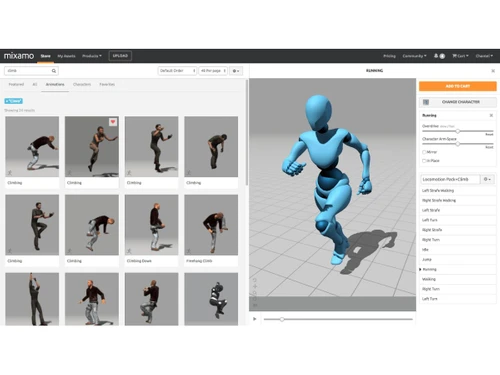
Mixamo-store
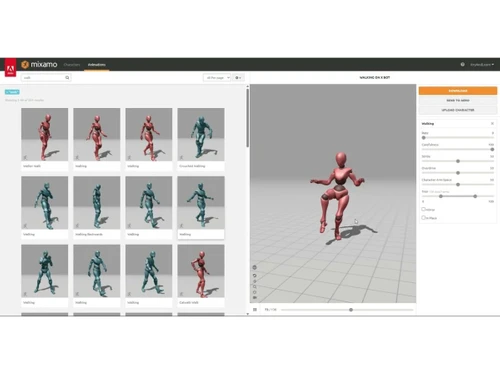
Mixamo-animations

Mixamo

Brand: Adobe

  • No Ratings & Reviews

Quickly bring 3D characters to life with mixamo, offering effortless auto-rigging and a vast library of animations for your creative projects.

See More

Have you used Mixamo before?

Share your insights for better experience

Add a Review

Price Available on Request

Questions about pricing or customization? We’re here to help, just a click away.

100% Genuine
Products
Best Price
Guaranteed
Safe & Secure
Payment
  • Description

  • Pricing

  • Features

  • Specification

  • Review

  • Compare

  • Alternatives

Mixamo Software Overview

What is Mixamo?

Mixamo is a web-based service provided by Adobe that offers a streamlined workflow for 3D character animation. It is designed to empower developers, artists, and designers to rig and animate 3D characters with remarkable speed and ease, eliminating the traditionally complex and time-consuming processes involved. The platform provides an extensive library of ready-to-use 3D characters and a vast collection of high-quality, motion-captured animations.

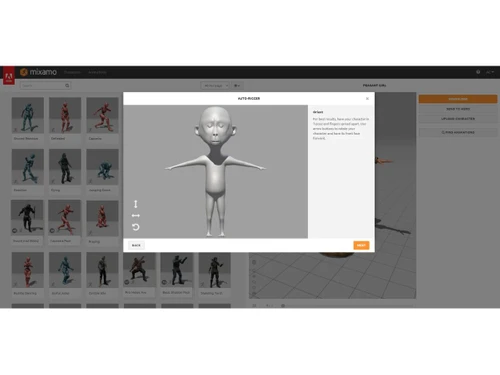
The core of mixamo's technology is its groundbreaking Auto-Rigger. This tool can take a static, un-rigged 3D character model and automatically generate a full skeletal rig, making it ready for animation in minutes. This accessibility makes it an invaluable tool for rapid prototyping in game development, creating character-driven visualizations, and for artists who want to bring their creations to life without needing specialized technical rigging skills. It serves as a bridge between static 3D modeling and dynamic, life-like animation.

Why Choose Mixamo?

  • Unmatched Speed: The Auto-Rigger can generate a production-quality character rig in under two minutes. This dramatically accelerates project timelines, allowing creators to move from a static model to an animated character faster than with any traditional workflow.
  • Ease of Use: The platform features a highly intuitive, browser-based interface. Users do not need to install complex software or possess deep knowledge of character rigging. The guided, marker-based process for the Auto-Rigger is simple enough for beginners to master quickly.
  • Extensive Asset Library: mixamo hosts a large and diverse library of fully-rigged characters and thousands of motion-captured animations. These assets are categorized and searchable, covering everything from realistic locomotion and combat maneuvers to expressive gestures and dances.
  • Seamless Integration: Assets downloaded from mixamo are configured for maximum compatibility. They can be easily imported into leading game engines like Unity and Unreal Engine, as well as major 3D software packages such as Blender, Autodesk Maya, and 3ds Max.
  • Cost-Free Access: The entire mixamo service, including its characters, animations, and the Auto-Rigger, is available completely free of charge for anyone with an Adobe ID. This removes financial barriers and makes powerful animation tools accessible to everyone.

Advanced Features of Mixamo

  • The Auto-Rigger: This is mixamo's flagship feature. Users can upload a custom 3D model (in .FBX or .OBJ format) and place a few simple markers on key joints like the chin, wrists, knees, and groin. The algorithm then analyzes the mesh topology to build a customized, properly weighted skeletal rig. It even supports models with varying proportions and styles.
  • In-Depth Animation Customization: Once an animation is applied to a character, users can fine-tune it using a set of intuitive sliders. These parameters include:
    • Overdrive: Increases or decreases the speed and energy of the animation.
    • Character Arm-Space: Adjusts the distance of the character's arms from the body to prevent clipping with bulky models.
    • Trim: Allows you to shorten the animation clip to use only the specific frames you need.
    • Mirror: Flips the animation horizontally for greater versatility.
  • Flexible Download Options: When exporting a character and animation, mixamo provides several key settings to tailor the output file for specific pipelines. Users can select the file format (FBX, DAE), frames per second (24, 30, 60 fps), and whether to include the 3D model's mesh (skin) or just the skeleton. It also offers a keyframe reduction option to optimize the animation data for performance in real-time applications.

Key Capabilities of Mixamo

  1. Character Library: A curated selection of stylized and realistic 3D characters that are pre-rigged and ready for immediate use. This is ideal for users who need a placeholder character or do not have a custom model.
  2. Automatic Character Rigging: The ability to upload a custom, static 3D character mesh and have mixamo automatically generate a robust skeletal rig and apply skin weighting.
  3. Animation Library: A massive, searchable database of professional, motion-captured animations. Users can browse categories, search for specific actions, and preview any animation on their selected character in real-time within the browser.
  4. Animation Retargeting: The core technology that allows any animation in the library to be seamlessly applied to any character, whether it's from the mixamo library or a custom uploaded model. The system automatically adjusts the animation to fit the character's unique proportions.

How to use Mixamo?

  1. Select a Character: Begin by either choosing a character from the "Characters" tab or uploading your own 3D model by clicking the "Upload Character" button.
  2. Rig Your Character (If Uploaded): If you uploaded a custom model, you will be guided through the Auto-Rigger process. Place the circular markers on the corresponding points of your character (chin, wrists, elbows, knees, groin) and confirm. mixamo will then process and rig your model.
  3. Find and Apply Animations: Navigate to the "Animations" tab. Use the search bar or browse categories to find a suitable motion. Clicking on an animation will instantly apply it to your character in the preview window.
  4. Customize the Animation: Use the sliders on the right side of the screen to adjust the animation's parameters to better suit your character and needs.
  5. Download Your Asset: Once you are satisfied, click the "Download" button. In the download settings dialog, choose your preferred format, skin option, frame rate, and keyframe reduction. Click "Download" again to receive your ready-to-use animated character file.

Mixamo Price

Mixamo price is available on request at Techjockey. The pricing model is based on different parameters, including extra features, deployment type, and the total number of users. For further queries related to the product, you can contact our product expert and learn more about the pricing and offers.

Read more

Adobe Company Details

Founded Year:  1982

Adobe is the global leader in digital media and digital marketing solutions.

Director/Founders Charles Geschke, Jason Lemkin
Company Size 1000+ Employees

Mixamo Pricing & Plans

Looking for The Right Pricing?

Share your requirements and get a plan built around your business.

  • Define your business needs
  • Get customised pricing
  • Choose features that fit your workflow

Price Available on Request

Get personalised Mixamo pricing that fits your needs. Our team will connect with you.

Mixamo Features

  • icon_check Character Rigging
    Automatically generates a skeletal structure for uploaded humanoid 3D models without manual setup.
  • icon_check Motion Capture Library
    Provides a large collection of motion-captured animations for games, films, and digital projects.
  • icon_check Animation Retargeting
    Applies selected animations to different character models while preserving natural movement.
  • icon_check Character Upload
    Allows users to upload custom 3D characters for rigging and animation processing workflows.
  • icon_check Animation Preview
    Enables real-time preview of animations before downloading or exporting final assets.
  • icon_check Customization
    Allows adjustment of speed, looping, arm spacing, and movement parameters for animations.
  • icon_check FBX Export
    Exports animated characters in FBX format for use in major game engines and 3D software.
  • icon_check Auto Skin Weighting
    Automatically assigns skin weights to character meshes for realistic body deformation.
  • icon_check Cross-Platform Compatibility
    Generated assets can be used across multiple engines and content creation platforms.
  • icon_check Cloud-Based
    Performs rigging and animation processing online without requiring local hardware resources.
  • icon_check Game Engines Integration
    Supports smooth integration with popular engines used for game and simulation projects.
  • icon_check Character Pose Adjustment
    Enables modifications to poses and positioning before exporting animation assets.
Mixamo Demo Video play icon

Get Mixamo Demo

Watch the demo video to explore key features, real workflows, and how the software fits your business needs.

Understand
Key Features
Personal
Demo Insights
Interactive
Demo Support

Mixamo Specifications

Supported Platforms
Windows Windows MacOS MacOS Linux Linux
Devices
Desktop Desktop
Deployment
Cloud-Based Cloud-Based
Suitable For
All Industries
Business Specific
All Businesses
Business Size
Individual Small Business Startups Medium Business Enterprises SMBs SMEs Freelancers
Customer Support
Email Communities Forums
Language
English
Integration
API Integration
Training Resources
Documentation Videos

Explore the Best Alternative Solutions Similar to Your Business Size and Needs

Mixamo Review

Techjockey Trusted Reviews from Verified Users

No reviews are currently available for Mixamo. Discover similar Animation Software reviews

  • Animaker

    4.5

    Whats great - I started using Animaker because of a sudden influx of assignments during my career’s initial video editing career. Today, th... read more

  • VideoScribe

    4.4

    Whats great - First of all, Videoscribe is great for making animated presentations. Just in case, you forgot to save the recent changes, wo... read more
  • Autodesk Maya

    4.8

    Whats great - Autodesk Maya is the best tool to convert your ideas into reality. You have a lot of possibilies with this software. If you w... read more
Compare Mixamo With other Animation Software

Products
Ratings
Pricing
Device Supported
Deployment
Supported Platforms
  • img

    Mixamo

  • Price On Request

  • Desktop

    Mobile

  • Web based

    On Premises

  • Windows

    Mac OS

  • img

    Adobe Animate

  • 4.3

  • Price On Request

  • Desktop

    Mobile

  • Web based

    On Premises

  • Windows

    Mac OS

  • img

    Autodesk Maya

  • 4.7

  • ₹ 16520

  • Desktop

    Mobile

  • Web based

    On Premises

  • Windows

    Mac OS

  • img

    Autodraft

  • 4.2

  • ₹ 833

  • Desktop

    Mobile

  • Web based

    On Premises

  • Windows

    Mac OS

  • img

    VideoScribe

  • 4.4

  • Price On Request

  • Desktop

    Mobile

  • Web based

    On Premises

  • Windows

    Mac OS

  • img

    LottieFiles

  • 4.3

  • Price On Request

  • Desktop

    Mobile

  • Web based

    On Premises

  • Windows

    Mac OS

  • img

    Jitter

  • 4.4

  • Price On Request

  • Desktop

    Mobile

  • Web based

    On Premises

  • Windows

    Mac OS

  • img

    Animation Desk

  • 4.6

  • Price On Request

  • Desktop

    Mobile

  • Web based

    On Premises

  • Windows

    Mac OS

  • img

    Immersity AI

  • 4.3

  • Price On Request

  • Desktop

    Mobile

  • Web based

    On Premises

  • Windows

    Mac OS

  • img

    Toonly

  • 4.4

  • Price On Request

  • Desktop

    Mobile

  • Web based

    On Premises

  • Windows

    Mac OS

  • img

    ImagetoCartoon

  • 4.3

  • Price On Request

  • Desktop

    Mobile

  • Web based

    On Premises

  • Windows

    Mac OS

(0) Product(s) selected

Mixamo Alternatives

See All Mixamo Alternatives

Starting Price:

$240 /User/Year

Starting Price:

$49

Starting Price:

$16

Starting Price:

$15 /Month
Starting Price:

$69 /Quantity $99

SAVE UPTO 30%

Starting Price:

$11 /Month

Starting Price:

$10 /Month
Articles for Mixamo

See All Related Articles

20,000+ Software Listed

Best Price Guranteed

Free Expert Consultation

2M+ Happy Customers

Terms and Condtions

close

Users with registered businesses can purchase goods from merchants on the platform to satisfy their business needs. Users are not permitted to utilize any products acquired through the platform for resale, advertising, business, or further distribution.

For each purchase made, users will receive a Tax Invoice (or 'GST invoice') that includes specific details such as:

  • the GSTIN of the user associated with their registered business, and

  • the specified Entity Name for their business.

It should be noted that not all products are eligible for GST Invoice. Only the products displayed by participating sellers with the 'GST-based Invoice Available' callout on the product description page would qualify.

Certain goods and services are not eligible to get a GST Invoice, including items with VAS, i.e., Value Added Services (e.g., Total Mobile Protection/Assured Buyback) and those involving an exchange offer at the time of purchase.

Users must ensure the accuracy of the GSTIN, and business entity name provided for the GST Invoice. Requests for corrections into GST Invoice would not be accommodated by Techjockey.com or any Seller, and any issues arising from user-provided information are the sole responsibility of users.

Techjockey.com is not liable for the GST Invoice or any associated input tax credit. To efficiently claim an input tax credit, users should select the registered place of business address as per the GST authority's data and follow the provisions of the GST Act and rules.

To claim an input tax credit, the delivery and billing addresses must match. Furthermore, input tax credits will not be granted if the delivery address and GSTIN on the invoice are from different states. In case of incorrect GST details provided during the order placement, the order will be canceled automatically.