 USA
USA UAE
UAE
Small Business
Designed for startups and growing businesses

See More


Brand: Payroll Plus HCM
Payroll Plus HCM streamlines payroll and HR services with real-time, accurate processing and support.
See More
10+ people visited in last 30 minutes
Looking for The Right Pricing?
Share your requirements and get a plan built around your business.
Price Available on Request
Get personalised Payroll Plus HCM pricing that fits your needs. Our team will connect with you.
 Applicant Tracking Employee Information System Scheduling Time and Attendance HR & Payroll Benefits Compliance Management

Watch the demo video to explore key features, real workflows, and how the software fits your business needs.
 Ubuntu
  Windows
  MacOS
MacOS  Linux
Linux  Desktop
  Cloud-Based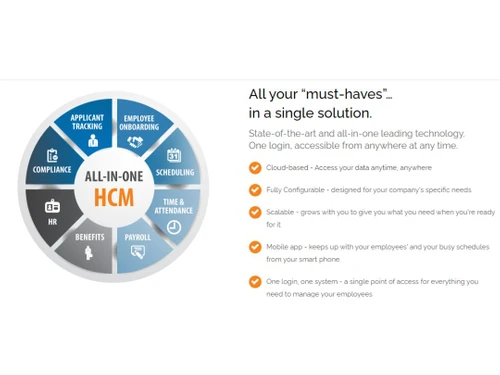
Small Business
Designed for startups and growing businesses
Medium Business
Built for business growth and flexibility
Enterprises
Designed for complex and large-scale business needs
4.0
Out of 5

Overall Rating
Based on
10 Verified Reviews
Rating Breakdown
88% Recommend this Product
Add ReviewCustomers generally appreciate Payroll Plus HCM for its all-in-one approach to managing payroll, taxes, and employee information, which significantly reduces manual work and enhances efficiency. The real-time payroll previews and automated tax filings are frequently highlighted as valuable features that help prevent errors and ensure compliance. However, users have noted challenges with the learning curve associated with custom reporting, benefits enrollment, and time-off management, indicating that these areas could benefit from improved user-friendliness. Overall, the platform is viewed positively, with many recommending it for its organizational benefits.

Jul 25, 2024
Techjockey Verified
“Payroll Plus HCM Takes the Stress Out of Managing Payroll”
Payroll Plus HCM has been a life-saver for managing payroll and taxes. The platform automates tax filings and makes it easy to stay compliant with both federal and local laws. The time-off management feature is also helpful for tracking employee leave, and the system’s integration with my accounting software saves me from manual data entry. It’s a comprehensive tool that simplifies a lot of the daily tasks I used to struggle with.
Pros
What I really enjoy about using Payroll Plus HCM is that it takes away a lot of the stress involved in payroll management. I no longer have to worry about tax filings because the system handles everything automatically. The real-time payroll previews make sure I don’t make any mistakes before processing, and the added security features ensure sensitive data stays protected.
Cons
While I love most of the features, I had a hard time with the custom reporting function. It took some time to figure out how to generate reports tailored to my business needs. It wasn’t as user-friendly as I would have liked, but with some practice, it became easier.
Reason to switch
I switched because I needed a solution that could automatically handle tax filings and integrate with my accounting software to reduce manual work.
Sep 20, 2024
Techjockey Verified
“Payroll and Benefits Management in One Easy Platform”
Payroll Plus HCM has been a great solution for managing my business’s payroll and benefits. It allows me to automate payroll, taxes, and even manage employee benefits in one place. I also like the time-off management feature, which helps me keep track of employee leave requests.
Pros
I really like how Payroll Plus HCM simplifies managing payroll and benefits in one place. The system makes it easy to handle employee information, track hours, and run payroll without having to switch between different programs. The real-time payroll previews also help me catch mistakes before they happen, which has saved me a lot of time.
Cons
One downside is that the benefits enrollment feature wasn’t as straightforward as I expected. It took me a while to figure out how to properly set it up for my employees. But after some trial and error, I finally got it working.
Reason to switch
I switched because I needed a system that could handle both payroll and employee benefits management in one place without the hassle of juggling different software.
Sep 13, 2024
Techjockey Verified
“Managing Payroll and Employee Information Is Much Simpler Now”
Payroll Plus HCM has been a huge help in managing all aspects of payroll, taxes, and employee information. I love that everything is integrated, and I don’t need multiple platforms to keep track of payroll and benefits. The security features are also a plus, ensuring my employees' data is safe. With time-off management and the ability to track employee hours, it’s made my job much easier.
Pros
I’m happy with how Payroll Plus HCM has streamlined managing both payroll and employee information. I don’t have to go back and forth between different systems anymore since everything is in one place. The time-off tracking and benefits enrollment features are also really helpful, and their customer service has always been responsive when I needed help with something.
Cons
The reporting feature, while powerful, is not the easiest to use. Setting up custom reports took longer than expected, and it felt a bit tricky at first. I had to watch a few tutorials to get the hang of it.
Reason to switch
I switched to Payroll Plus HCM because I needed a system that would let me manage both payroll and employee benefits more efficiently.

Payroll Plus HCM
Price On Request
Desktop
Mobile
Web based
On Premises
Windows
Mac OS

ClusterHR
₹ 40
Desktop
Mobile
Web based
On Premises
Windows
Mac OS

Fix HR
₹ 600
Desktop
Mobile
Web based
On Premises
Windows
Mac OS

SignalHRM
₹ 648
Desktop
Mobile
Web based
On Premises
Windows
Mac OS

WeekMate
₹ 3999
Desktop
Mobile
Web based
On Premises
Windows
Mac OS

Spine HR
Price On Request
Desktop
Mobile
Web based
On Premises
Windows
Mac OS

TankhaPay
₹ 40
Desktop
Mobile
Web based
On Premises
Windows
Mac OS

WoCo
₹ 50
Desktop
Mobile
Web based
On Premises
Windows
Mac OS

Zfour HRMS
₹ 45
Desktop
Mobile
Web based
On Premises
Windows
Mac OS

Keka HR
Price On Request
Desktop
Mobile
Web based
On Premises
Windows
Mac OS

TruHR
₹ 2200
Desktop
Mobile
Web based
On Premises
Windows
Mac OS
(0) Product(s) selected
Starting Price:
₹40 /Month
Starting Price:
₹600 /Month ₹900
Starting Price:
₹3,999
Starting Price:
₹2,200 /Month

Starting Price:
₹49 /Month

Starting Price:
₹890 /Month
Starting Price:
₹5,000 /Month

Available
Price on Request

Starting Price:
₹1,499 /Month

Starting Price:
$49 /Month










Payroll Plus HCM provides payroll processing, tax filing, time tracking, applicant tracking, and benefits enrollment services, all integrated into a unified platform.
Yes, Payroll Plus HCM offers a general ledger interface that integrates with accounting systems for seamless data transfer.
Yes, Payroll Plus HCM can process payroll for employees in multiple states, ensuring compliance with varying tax laws.
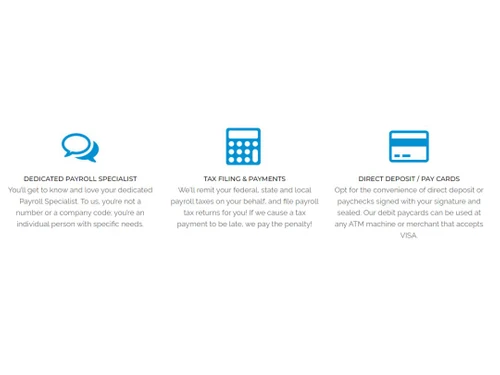
Payroll Plus offers direct deposit, pay cards, and physical checks, giving businesses and employees multiple options.
Yes, the platform allows for real-time payroll previews, ensuring accuracy before final submission.
The platform offers both standard and custom reporting options to meet specific business needs.
Yes, Payroll Plus HCM manages wage garnishments, ensuring compliance with court orders and timely payments.
Yes, you can get a free demo of Payroll Plus HCM at techjockey.com.
No, Payroll Plus HCM does not offer a free trial to the users.
20,000+ Software Listed
Best Price Guranteed
Free Expert Consultation
2M+ Happy Customers
Terms and Condtions

Users with registered businesses can purchase goods from merchants on the platform to satisfy their business needs. Users are not permitted to utilize any products acquired through the platform for resale, advertising, business, or further distribution.
For each purchase made, users will receive a Tax Invoice (or 'GST invoice') that includes specific details such as:
the GSTIN of the user associated with their registered business, and
the specified Entity Name for their business.
It should be noted that not all products are eligible for GST Invoice. Only the products displayed by participating sellers with the 'GST-based Invoice Available' callout on the product description page would qualify.
Certain goods and services are not eligible to get a GST Invoice, including items with VAS, i.e., Value Added Services (e.g., Total Mobile Protection/Assured Buyback) and those involving an exchange offer at the time of purchase.
Users must ensure the accuracy of the GSTIN, and business entity name provided for the GST Invoice. Requests for corrections into GST Invoice would not be accommodated by Techjockey.com or any Seller, and any issues arising from user-provided information are the sole responsibility of users.
Techjockey.com is not liable for the GST Invoice or any associated input tax credit. To efficiently claim an input tax credit, users should select the registered place of business address as per the GST authority's data and follow the provisions of the GST Act and rules.
To claim an input tax credit, the delivery and billing addresses must match. Furthermore, input tax credits will not be granted if the delivery address and GSTIN on the invoice are from different states. In case of incorrect GST details provided during the order placement, the order will be canceled automatically.


