linkedin
Phot AI logo
phot ai images
phot ai editor
phot ai photoshoot

Phot AI

Brand: Phot AI

  • 3.9

  • 3 Ratings

A smart photo editing software that uses AI to enhance, fix, and transform images easily with no design skills needed.

See More

Have you used Phot AI before?

Share your insights for better experience

Add a Review
Starting Price
₹2,999 excl.GST
₹ 3,539 incl. GST

View plans

offer Save upto 18%, Get GST Invoice on your business purchase T&C
offer Buy Now & Pay Later, Check offer on payment page.
Buy Now
100% Genuine
Products
Best Price
Guaranteed
Safe & Secure
Payment
  • Description

  • Pricing

  • Features

  • Specification

  • Review

  • Compare

  • Alternatives

  • FAQ

Starting at ₹2,999
Buy Now

Phot AI Software Overview

What is Phot AI?

Phot AI is an online photo editing software that allows you to edit and create photos on a large scale with the help of artificial intelligence. Phot AI makes the process of editing easy with a few clicks whether you are a beginner or one who normally uses photos.

It is aimed at individuals that need to enhance their visuals without any special technical or designing knowledge. It is readily accessible using your browser or mobile phone, so you may access it wherever and whenever you want.

It can be used by students, bloggers, and small business owners to try to make their photos and images look more elegant. It is designed in such a way that it can save time, effort and facilitate photo editing experience to be smooth, smart and stress free.

Why Choose Phot AI?

  • Wide Range of Tools: Offers over 40 smart tools to cover every photo editing and design need easily.
  • No Design Skills Needed: Anyone can create stunning visuals without knowing editing or design. Just upload and start editing.
  • Fast Visual Creation: Create ads banners or product photos in seconds using AI templates and ready made tools.
  • Works on All Devices: Edit and create visuals from mobile desktop or tablet anytime without installing anything at all.
  • API Integration for Developers: Easily connect AI tools into apps or websites using Phot AI’s developer friendly API system.

Benefits of Phot AI

  • Perfect for Business Needs: Improves product photos for sellers helping attract more clicks customers and conversions online.
  • Boosts Ad Performance: Enhances images used in ads leading to better engagement reach and sales for campaigns.
  • Improves SEO with Images: Optimized images can increase visibility in search results and attract more visitors to websites.
  • Saves Time and Money: No need for editors or software as Phot AI completes tasks faster and at lower cost.
  • Trusted by Professionals: Widely used by creators and businesses who need high quality visuals without extra time or cost.

Phot AI Pricing

Phot AI price starts at INR 899 per month at Techjockey.com.

The pricing model is based on different parameters, including extra features, deployment type, and the total number of users. For further queries related to the product, you can contact our product team and learn more about the pricing and offers.

Read more

Phot AI Pricing & Plans

Starter

Calculated Price

2999 Exclusive of all taxes
    • Licenses

      Licenses
      Licenses
    • Monthly

      Monthly
      Monthly

Key Features

  • 500 Credits/month

  • 1 Listing

  • AI Photo Editor

  • AI Art Generator

  • Object Replacer

  • Background Generator

  • Text to Image

  • Reverse Image prompt

Pro+

Calculated Price

9999 Exclusive of all taxes
    • Licenses

      Licenses
      Licenses
    • Monthly

      Monthly
      Monthly

Key Features

  • 1500 Credits/month

  • 4 Listings or 30 Ad Creatives

  • AI Photo Editor-Unlimited

  • AI Art Generator-Unlimited

  • Object Replacer-Unlimited

  • Background Generator-Unlimited

  • Text to Image-Unlimited

  • Reverse Image prompt-Unlimited

Phot AI Features

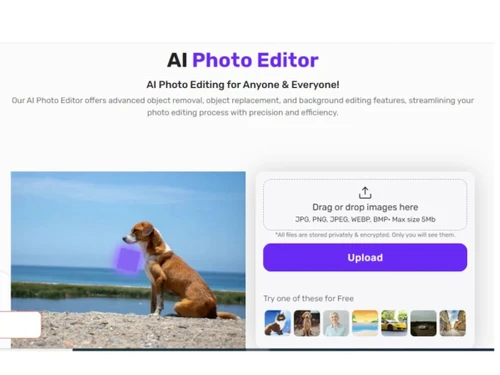
  • icon_check AI Photo Editor
    Utilizes artificial intelligence to enhance and edit photos, offering advanced editing capabilities.
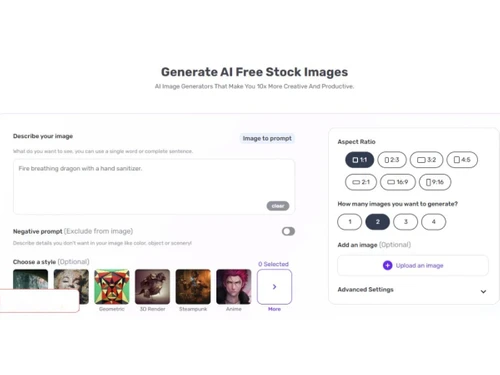
  • icon_check AI Art Generator
    Generates artistic creations from photos using AI algorithms, providing unique and creative outputs.
  • icon_check Object Replacer
    Seamlessly replaces objects in images, allowing users to effortlessly modify and customize their photos.
  • icon_check Background Generator
    Automatically generates backgrounds for images, enhancing visual appeal and creativity.
  • icon_check Text to Image
    Converts text into images, enabling users to incorporate text-based elements into their photos.
  • icon_check Reverse Image Prompt
    Provides suggestions and prompts based on uploaded images, inspiring creativity and exploration.
  • icon_check Image Upscaler
    Increases the resolution and quality of images using AI technology, allowing for better enlargement and printing.
  • icon_check Object Remover
    Removes unwanted objects or elements from photos, providing clean and polished final images.
  • icon_check Photo Restoration
    Restores old or damaged photos to their original quality, preserving precious memories for future generations.
  • icon_check Image Colorizer
    Adds colour to black and white or grayscale images, bringing them to life with vibrant hues and tones.
  • icon_check Background Removal
    Automatically removes image backgrounds and creates clean subject cutouts with transparent or custom backgrounds.
  • icon_check AI Image Generator
    Creates original images from text prompts or reference images with selectable styles, ratios, and output variations.
  • icon_check Video Enhancement
    Upscales and sharpens video footage while reducing blur and improving overall video quality up to higher resolutions.

Phot AI Specifications

Supported Platforms
Ubuntu Ubuntu Windows Windows MacOS MacOS Linux Linux
Devices
Desktop Desktop Mobile Mobile Tablet Tablet iPad iPad
Deployment
Cloud-Based Cloud-Based
Suitable For
All Industries
Business Specific
All Businesses
Business Size
Small Business Startups Medium Business Enterprises
Customer Support
Email Communities
Language
English
Integration
API Integration
Training Resources
Videos
AI Features
AI Integrated

Explore the Best Alternative Solutions Similar to Your Business Size and Needs

Phot AI Review

3.9

Out of 5

img

Overall Rating

Based on
3 Verified Ratings

Rating Breakdown

  • Features 3.5
  • Value for Money 4.3
  • Ease of Use 4.1
  • Customer Support 3.8

90% Recommend this Product

Add Review

Techjockey Trusted Reviews from Verified Users

No reviews are currently available for Phot AI. Discover similar Photo Editing Software reviews

  • Canva

    4.3

    Whats great - I enjoy how quickly and simply one can choose the template and begin tweaking. read more

  • Adobe Photoshop

    4.6

    Whats great - What I love most about Adobe Photoshop is its amazing editing capabilities. It's versatile, not just for photos but also for ... read more

  • Luminar Neo

    4.9

    Whats great - The interface is clean and easy to get around, so I’m not wasting time looking for tools. Sky AI, Relight AI, and portrait to... read more

Compare Phot AI With other Photo Editing Software

Products
Ratings
Pricing
Device Supported
Deployment
Supported Platforms
  • img

    Phot AI

  • 3.9

  • ₹ 2999.00 excl. GST

  • Desktop

    Mobile

  • Web based

    On Premises

  • Windows

    Mac OS

  • img

    Adobe Photoshop

  • 4.5

  • Price On Request

  • Desktop

    Mobile

  • Web based

    On Premises

  • Windows

    Mac OS

  • img

    Karizma Album

  • 4.4

  • ₹ 3500

  • Desktop

    Mobile

  • Web based

    On Premises

  • Windows

    Mac OS

  • img

    Affinity Photo

  • 4.2

  • ₹ 619

  • Desktop

    Mobile

  • Web based

    On Premises

  • Windows

    Mac OS

  • img

    Luminar Neo

  • 4.7

  • ₹ 4999

  • Desktop

    Mobile

  • Web based

    On Premises

  • Windows

    Mac OS

  • img

    darktable

  • 4.0

  • Price On Request

  • Desktop

    Mobile

  • Web based

    On Premises

  • Windows

    Mac OS

  • img

    Cutout Pro

  • 4.8

  • ₹ 247

  • Desktop

    Mobile

  • Web based

    On Premises

  • Windows

    Mac OS

  • img

    Lensa AI

  • 4.1

  • Price On Request

  • Desktop

    Mobile

  • Web based

    On Premises

  • Windows

    Mac OS

  • img

    AfterShot Pro 3

  • 4.5

  • ₹ 5966

  • Desktop

    Mobile

  • Web based

    On Premises

  • Windows

    Mac OS

  • img

    Evoto AI

  • 4.6

  • Price On Request

  • Desktop

    Mobile

  • Web based

    On Premises

  • Windows

    Mac OS

(2) Product(s) selected

Phot AI Alternatives

See All Phot AI Alternatives

Available

Price on Request

Starting Price:

$36 /Year

Starting Price:

$80 /year

Starting Price:

$35 /Lifetime

Starting Price:

$10 /Month

Starting Price:

$8 /Month

Starting Price:

$15 /Month

Starting Price:

$810 /Year

Articles for Phot AI

See All Related Articles

What is the pricing of Phot AI Software?

The starting price of Phot AI in India is INR 899 per month on techjockey.com.

Is there a Phot AI Software application available?

No, there is no application of Phot AI.

Which operating systems does Phot AI Software support?

Operating system support for Phot AI Software is Ubuntu, Windows, MacOS and Linux.

Does Phot AI offer a free trial?

Phot AI Software does offer a free trial.

How does Phot AI Software function?

Phot AI Software uses AI technology to edit photos by giving text instructions.

Who can benefit from using Phot AI Software?

Phot AI Software can benefit photographers, digital creators, and all industries who work with images.

Can I change a male to a female in an image using a Phot AI editor?

Phot.AI's AI photo editor can easily change a male to a female in an image. Simply upload the image, input the instruction (e.g., 'change the man to a woman'), and click generate to get the edited image.

How do I change the color of an object in an image using the AI Photo editor?

Upload the image to Phot.AI's AI photo editor, input text instructions (e.g., 'change the girl's t-shirt to red'), and click generate. The AI will apply the changes automatically.

20,000+ Software Listed

Best Price Guranteed

Free Expert Consultation

2M+ Happy Customers

Terms and Condtions

close

Users with registered businesses can purchase goods from merchants on the platform to satisfy their business needs. Users are not permitted to utilize any products acquired through the platform for resale, advertising, business, or further distribution.

For each purchase made, users will receive a Tax Invoice (or 'GST invoice') that includes specific details such as:

  • the GSTIN of the user associated with their registered business, and

  • the specified Entity Name for their business.

It should be noted that not all products are eligible for GST Invoice. Only the products displayed by participating sellers with the 'GST-based Invoice Available' callout on the product description page would qualify.

Certain goods and services are not eligible to get a GST Invoice, including items with VAS, i.e., Value Added Services (e.g., Total Mobile Protection/Assured Buyback) and those involving an exchange offer at the time of purchase.

Users must ensure the accuracy of the GSTIN, and business entity name provided for the GST Invoice. Requests for corrections into GST Invoice would not be accommodated by Techjockey.com or any Seller, and any issues arising from user-provided information are the sole responsibility of users.

Techjockey.com is not liable for the GST Invoice or any associated input tax credit. To efficiently claim an input tax credit, users should select the registered place of business address as per the GST authority's data and follow the provisions of the GST Act and rules.

To claim an input tax credit, the delivery and billing addresses must match. Furthermore, input tax credits will not be granted if the delivery address and GSTIN on the invoice are from different states. In case of incorrect GST details provided during the order placement, the order will be canceled automatically.