linkedin
Servitium CRM logo
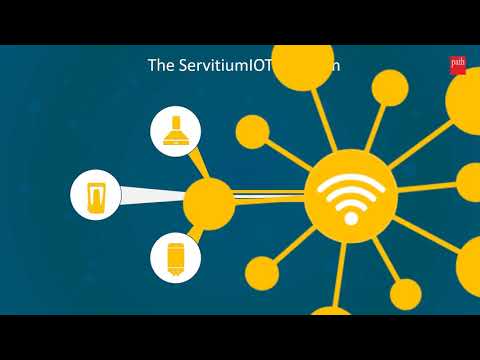
play ServitiumIOT - Seamlessly integration with IoT devices and CRM solutions
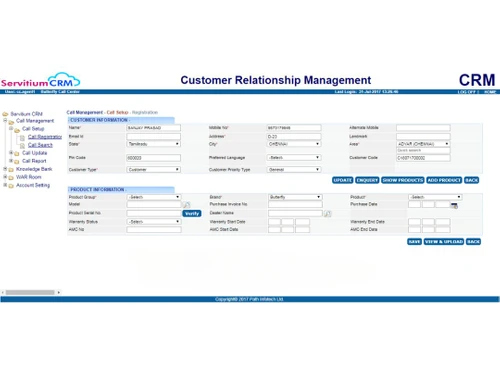
servitium crm-callmanagement
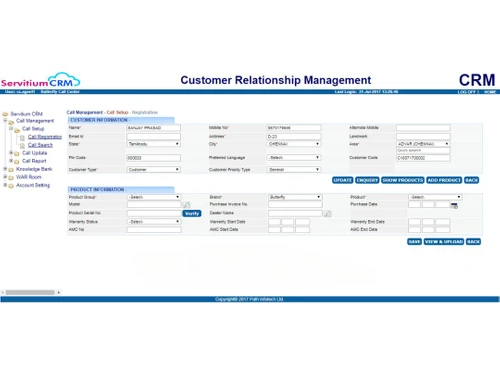
servitium crm-information

Servitium CRM

Brand: Path Infotech Limited

  • 4.2

  • 17 Ratings & 11 Reviews

This CRM software provide solutions to call centre, field service, inventory and franchise payout companies.

See More

Have you used Servitium CRM before?

Share your insights for better experience

Add a Review

Price Available on Request

Questions about pricing or customization? We’re here to help, just a click away.

100% Genuine
Products
Best Price
Guaranteed
Safe & Secure
Payment
  • Description

  • Pricing

  • Features

  • Specification

  • Review

  • Compare

  • Alternatives

  • FAQ

  • Questions

Servitium CRM Software Overview

What is Servitium CRM?

Servitium CRM is designed to support the after-sales processes of an organization. It serves customers across a range of geographical locations with multiple sales automation tools. This CRM Software is mapped with different service processes across industries to drive efficiency and responsiveness.

The industries it caters to include home appliances, consumer durables, sanitaryware, water technologies, etc. Some of the places it excels are the call-centre industry, inventory management, customer and product management, franchise payout, lead management, and others. Servitium provides insightful reports and analytics on business operations.

Why Choose Servitium CRM Software?

  • Business Accelerators and Strategy: Servitium CRM provides business accelerators for order to cash, procure to pay and finance operations. It enables users to discover new opportunities.
  • Efficiency in Operations: Servitium CRM lets you equip tools to ramp up efficiency. Teams can manage invoicing and quotes, control quality, and process sales orders and client records—all in one place
  • Multi-platform Support: The platforms supported by Servitium CRM are SaaS, PaaS, AWS, Oracle, etc. It easily integrates with third-party apps SAP, ERP, etc. for streamlining your business operations at single platform.
  • AI-Driven Insights: It performs robotic test and cloning automation. The Opkey (AI-driven accelerated testing of Oracle) help users to bring virtualization and automation insights together.

Features of Servitium CRM Software

  • Customer Management: Consolidate and monitor client interactions, profiles, and service records in a single location.
  • Lead Management: Users can leverage Servitium CRM to efficiently capture, nurture, and turn leads into customers.
  • Centralised Customer Data: Keep and retrieve all client data on a single, manageable platform.
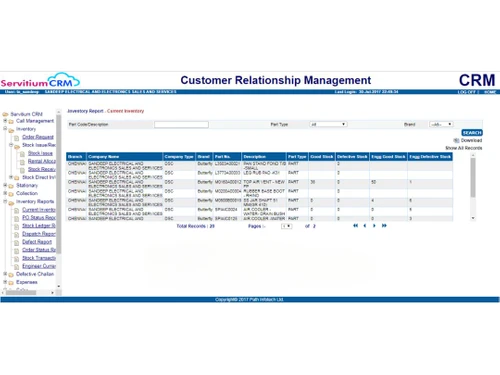
  • Inventory Management: Businesses can monitor, control, and manage stock levels to guarantee the best possible inventory flow.
  • Call Registrations: Keep track of consumer calls, questions, and service requests so that they may be promptly followed up on and resolved.
  • Customer Query Management: Provide quick assistance by enabling customers to voice concerns or questions by email, phone, SMS, or WhatsApp.
  • Follow-ups, Escalations, and Reminders: To guarantee prompt responses, automatically schedule reminders and escalate outstanding concerns.
  • General Lead/Enquiry: Gather and handle general leads or enquiries for potential future interaction and conversion.
  • CSAT Reports: Customer satisfaction, or CSAT, can be measured and monitored to improve customer loyalty and service quality.
  • Assignment Allocation: To ensure effective management, assign duties or service requests to designated groups or individuals.
  • Dashboard Customisation: Adapt your dashboard to show pertinent metrics, insights, and actions quickly.
  • Real-time Analytics: Make data-driven decisions by gaining real-time insights into performance, operations, and customer interactions.
  • Activity Management and Reporting: To maximise team performance, monitor activities, oversee workflows, and provide reports.
  • Performance and Tracking: Keep an eye on individual and team performance indicators to make sure KPIs and objectives are being fulfilled.
  • Third-party Integration: To improve functionality and automate workflows, easily integrate with outside products and platforms.

Servitium CRM Pricing

The cost of Servitium CRM is available on request. You can contact us through the “request a callback” option on our website. We will provide you with the license and activation key so that you can start using the software. In case you want a renewal of any of your chosen plans, you can contact our customer care team without any hesitation.

Read more

Path Infotech Limited Company Details

Founded Year:  2022

ServitiumCRM is a Modern Customer Service Platform that enables the Journey from Reactive to Proactive to Predictive Customer Service and Support, digitalizing end-to-end after-sales processes of organizations across industries and geographies.

Director/Founders Path Infotech Limited
Company Size 101-500 Employees

Servitium CRM Pricing & Plans

Looking for The Right Pricing?

Share your requirements and get a plan built around your business.

  • Define your business needs
  • Get customised pricing
  • Choose features that fit your workflow

Price Available on Request

Get personalised Servitium CRM pricing that fits your needs. Our team will connect with you.

Servitium CRM Features

Customer Data Management (CDM)

  • icon_check Contact Management
    Centralized platform for managing leads, contacts, and account information.
  • icon_check Account Management
    Centralized platform for managing leads, contacts, and account information.
  • icon_check Customer Profiles
    Manage customer interactions, including customer profiles and service history.
  • icon_check Contact Segmentation
    Help with customer segmentation by providing a centralized view of customer data.
  • icon_check Activity History
    Captures all customer interactions including phone calls, emails, chat sessions, and service requests.

Sales Management

  • icon_check Lead Management
    Capture leads, manage prospect details, track activities, and qualify them for sales.
  • icon_check Territory Management
    Divide customer base into geographical or market-based territories.
  • icon_check Order Management
    Manages orders from start to finish with full tracking.
  • icon_check Quote Management
    Manage customer quotes. Transition into orders, track order status, and generate invoices.
  • icon_check Sales Forecasting
    Predict customer needs and anticipate future sales by analyzing real-time data.
  • icon_check Deal Management
    Track, manage, and nurture sales opportunities (deals) throughout their lifecycle.
  • icon_check Sales Automation
    Streamline sales processes by automating repetitive tasks like lead capture, tracking sales activities, etc.
  • icon_check Workflow Automation and Management
    Tailor the CRM system to fit specific needs by adjusting stages, fields, and automation rules.
  • icon_check Opportunity & Pipeline Management
    Manage potential leads through different stages of the sales process.
  • icon_check Contract Management
    Managing contracts from their creation, execution, and performance tracking to their eventual termination.

Marketing Automation

  • icon_check Email Marketing
    Manage and send targeted email campaigns to their customers.
  • icon_check Campaign Management
    Create, manage, and track marketing campaigns across email, SMS, and social media.
  • icon_check Lead Nurturing
    Manage and cultivate leads through sales funnel by tracking activities.
  • icon_check Customer Journey Tracking
    Complete view ofcustomer journey and enabling them to improve service delivery.
  • icon_check Customer Segmentation
    Help with customer segmentation by providing a centralized view of customer data.
  • icon_check Event-Triggered Workflows
    Analyze every customer interaction at touchpoints like calls, emails, website visits, and service requests.
  • icon_check Automated Campaigns
    Set up pre-defined marketing sequences that send targeted messages to customers

Data Sourcing / Integrations

  • icon_check Data Import/Export
    Offers data import and export functionality, allowing users to transfer customer information.
  • icon_check API Access
    Offers an API for custom integrations with other tools.
  • icon_check Calendar Integration
    Sync with Google Calendar, Outlook, or other compatible options.
  • icon_check Third Party Integrations
    Track customer information, purchase history, and billing details within a single platform.
  • icon_check eCommerce Integrations
    Syncs with eCommerce platforms for smooth order management.
  • icon_check Interactive Voice Response (IVR) Integration
    Offers call tracking and recording features as part of its call center management functionality.
  • icon_check Social Media Integration
    Manage social media accounts and track customer engagement directly within the CRM.
  • icon_check Email Marketing Tools Integration
    Connect CRM with email platforms like Mailchimp or SendGrid for seamless campaigns.
  • icon_check Marketing Tools Integration
    Integrate with marketing platforms (e.g., Google Ads, HubSpot) to enhance campaign effectiveness.

Collaboration Tools

  • icon_check Team Communication
    A centralized platform for managing customer service interactions.
  • icon_check Task / Activity Management
    Track, assign, and manage sales activities including follow-ups and service calls.
  • icon_check Document Sharing & File Storage
    Store, access, and monitor documents (service manuals, contracts, warranty details, and customer records)
  • icon_check Omnichannel Support & Engagement
    Comprehensive omnichannel support for consistent customer service.

Security & Compliance

  • icon_check Role-Based Access Control (RBAC)
    Allows granular control over data visibility and actions within the platform.
  • icon_check Backup & Disaster Recovery
    Ensures data protection with regular backups and recovery.
  • icon_check GDPR & Data Privacy
    Comprehensive GDPR and CCPA compliance for data protection.
  • icon_check Audit Trail
    Track changes and updates within the system for enhanced security and transparency.
  • icon_check Data Encryption
    Encrypt data both at rest and in transit to safeguard customer information.

AI & Machine Learning

  • icon_check Predictive Analytics
    Leverage AI to predict future trends, sales, and customer behavior for better decision-making.
  • icon_check Lead Scoring
    Use AI to score leads based on their likelihood to convert, helping prioritize sales efforts.
  • icon_check Chatbots
    Automate customer interactions with AI-driven chatbots to assist or direct inquiries efficiently.

Reporting & Analytics

  • icon_check Real Time Analytics
    It allow users to access updated customer data and insights instantly.
  • icon_check Campaign Performance
    Measures campaign performance and results.
  • icon_check Custom Dashboards
    Tailor the displayed information and metrics to their specific needs.
  • icon_check Sales Performance Reports
    Provides detailed sales performance and reporting tools.
  • icon_check Customer Insights
    Predict customer needs and anticipate future sales by analyzing real-time data.
  • icon_check Forecasting & Trends
    Users can predict future customer service trends and needs based on historical data in system.
  • icon_check Performance Tracking
    Offers performance tracking features, particularly focused on field service technicians.
  • icon_check Predictive Analytics
    Leverage AI to predict future trends, sales, and customer behavior for better decision-making.

Alerts & Notifications

  • icon_check Event-Triggered Notifications
    Notifies users of key events through automated alerts.
  • icon_check Custom Workflow Alerts
    Creates custom alerts based on workflows and triggers.
  • icon_check System Errors/Failures
    Detects system errors for quick resolution and recovery.
  • icon_check Customer Interaction Alerts
    Sends alerts to users about customer interactions.
  • icon_check Workflow Trigger Alerts
    Automates workflows based on specific triggers or events.
  • icon_check SLA Violations
    Tracks SLA violations to ensure customer expectations.
  • icon_check Lead Activity Alerts
    Deliver notifications and alerts of service requests, follow-ups, escalations, reminders for warranty renewals.

Others

  • icon_check Touchpoint Monitoring
    Analyze every customer interaction at touchpoints like calls, emails, website visits, and service requests.
  • icon_check Landing Pages & Forms
    Provides templates for customer service interactions, allowing users to leverage pre-defined message.
  • icon_check Call Tracking and Recording
    Offers call tracking and recording features as part of its call center management functionality.
  • icon_check Ticketing System
    Comprehensive ticketing system for efficient support management.
Servitium CRM Demo Video play icon

Get Servitium CRM Demo

Watch the demo video to explore key features, real workflows, and how the software fits your business needs.

Understand
Key Features
Personal
Demo Insights
Interactive
Demo Support

Servitium CRM Specifications

Supported Platforms
Ubuntu Ubuntu Windows Windows MacOS MacOS Linux Linux
Devices
Desktop Desktop Mobile Mobile Tablet Tablet iPad iPad
Deployment
Cloud-Based Cloud-Based
Suitable For
All Industries
Business Specific
All Businesses
Business Size
Small Business Startups Medium Business
Customer Support
Phone Email Communities
Language
English
Training Resources
Documentation Videos

Explore the Best Alternative Solutions Similar to Your Business Size and Needs

Servitium CRM Reviews

4.2

Out of 5

img

Overall Rating

Based on
11 Verified Reviews

Rating Breakdown

  • Features 4.1
  • Value for Money 4.1
  • Ease of Use 4.3
  • Customer Support 4.4

87% Recommend this Product

Add Review

Pros

  • "It is scalable, meaning that as my business grows with me. It offers features that support my expansion."

    Surajit Patra Jan 10, 2025

  • "I can collaborate with my team by sharing notes, tasks, and updates thanks to its great collaboration tools."

    Srinivas GDec 12, 2024

  • "It provides mobile accessibility. I can access everything on my phone which is convenient when I am on the go."

    Progga AbontiNov 21, 2024

Cons

  • "There is no free trial. Not having a free trial to evaluate it out fully before committing can be a bit annoying."

    Surajit Patra Jan 10, 2025

  • "I wish they had a live chat support. The support is good but I miss having live chat available for instant help."

    Srinivas GDec 12, 2024

  • "Although the automation features are good, they sometimes feel limited. They could have made them more advanced."

    Progga AbontiNov 21, 2024

Surajit Patra

Administrator

Industry: Legal Services User since: 1-2 years

4.2

Reviewed on: Jan 10, 2025

Techjockey Verified

“Scalable CRM but Missing Free Edition”

As my company expands, I have discovered that ServitiumCRM is a perfect fit. It is scalable and allows me to grow without feeling constrained. The lack of a free trial can be a little bothersome since I was unable to thoroughly evaluate it before committing to a subscription plan.

Pros

It is scalable, meaning that as my business grows with me. It offers features that support my expansion.

Cons

There is no free trial. Not having a free trial to evaluate it out fully before committing can be a bit annoying.

Switched from Vtiger CRM

Reason to switch

I wanted a CRM that could adapt to my expanding needs and ServitiumCRM provided just that.

Srinivas G

Administrator

Industry: Software Development

4.3

Reviewed on: Dec 12, 2024

Techjockey Verified

“Great Collaboration but Missing Live Chat”

Collaborating with my team is easier because I can communicate notes, tasks, and updates with them with ease. Even though the support is decent, I do wish they had live chat because I miss having immediate assistance at my fingertips.

Pros

I can collaborate with my team by sharing notes, tasks, and updates thanks to its great collaboration tools.

Cons

I wish they had a live chat support. The support is good but I miss having live chat available for instant help.

Switched from LeadSquared CRM

Reason to switch

Leadsquared did not offer the same level of collaboration features as ServitiumCRM.

Progga Abonti

Administrator

Industry: SAAS User since: 6-12 months

4.1

Reviewed on: Nov 21, 2024

Techjockey Verified

“Convenient Mobile Access with Room for Automation Improvement”

I value the complete mobile accessibility that ServitiumCRM provides. Having access to anything on my phone is fantastic, especially while I am out. Though useful, I do wish the automated options were more sophisticated to manage some of the trickier jobs.

Pros

It provides mobile accessibility. I can access everything on my phone which is convenient when I am on the go.

Cons

Although the automation features are good, they sometimes feel limited. They could have made them more advanced.

Switched from Insightly CRM

Reason to switch

Insightly was okay but it did not offer the mobile accessibility I needed and the automation was less flexible.

See All Servitium CRM Reviews

Compare Servitium CRM With other CRM Software

Products
Ratings
Pricing
Device Supported
Deployment
Supported Platforms
  • img

    Servitium CRM

  • 4.2

  • Price On Request

  • Desktop

    Mobile

  • Web based

    On Premises

  • Windows

    Mac OS

  • img

    Bitrix24

  • 4.3

  • ₹ 2390

  • Desktop

    Mobile

  • Web based

    On Premises

  • Windows

    Mac OS

  • img

    Zoho CRM

  • 4.4

  • ₹ 1300

  • Desktop

    Mobile

  • Web based

    On Premises

  • Windows

    Mac OS

  • img

    Odoo CRM

  • 4.4

  • ₹ 760

  • Desktop

    Mobile

  • Web based

    On Premises

  • Windows

    Mac OS

  • img

    CrmOne

  • 4.9

  • Price On Request

  • Desktop

    Mobile

  • Web based

    On Premises

  • Windows

    Mac OS

  • img

    Kylas CRM

  • 4.1

  • ₹ 12999

  • Desktop

    Mobile

  • Web based

    On Premises

  • Windows

    Mac OS

  • img

    Zendesk Sell

  • 4.3

  • Price On Request

  • Desktop

    Mobile

  • Web based

    On Premises

  • Windows

    Mac OS

  • img

    Cleomitra

  • 4.8

  • ₹ 999

  • Desktop

    Mobile

  • Web based

    On Premises

  • Windows

    Mac OS

  • img

    In-Sync CRM

  • 4.2

  • ₹ 5000

  • Desktop

    Mobile

  • Web based

    On Premises

  • Windows

    Mac OS

  • img

    HighLevel

  • 4.2

  • Price On Request

  • Desktop

    Mobile

  • Web based

    On Premises

  • Windows

    Mac OS

(0) Product(s) selected

Servitium CRM Alternatives

See All Servitium CRM Alternatives

Starting Price:

$99 /Month

Starting Price:

₹999 /Month ₹2,000

SAVE UPTO 50%

Starting Price:

$97 /Month

Starting Price:

€300 /User/Year
SAVE UPTO 20%

Available

Price on Request

Articles for Servitium CRM

See All Related Articles

What is the role of reports and analytics feature of Servitium CRM?

You can generate reports from raw data, compile the products for efficient usage, thereby, helping in efficient team management. The reports and analytics feature of the software helps in producing real-time and customizable insights into daily business activities.

Is a mobile app version of Servitium CRM available for Android devices?

Servitium CRM provides Field Service Mobile App for Android smartphone if your Android version is 4.4 and above. Its key features include call allocation and reallocation, management of attendance, leave and travel expenses, geo-tracking of field workers or engineers, technical help desk, etc.

How can I purchase Servitium CRM from techjockey.com?

You can buy Servitium CRM directly from techjockey.com. Simply choose your preferred subscription plan and complete the checkout process.

What payment methods are accepted on techjockey.com?

Techjockey.com accepts a range of payment methods, including credit/debit cards, net banking, UPI, and popular digital wallets.

How will I receive my Servitium CRM license key after purchase?

After completing your purchase, the license key will be sent to your email instantly techjockey.com ensures 24-hour delivery, allowing you to activate the software immediately.

Is the Servitium CRM software purchased from techjockey.com genuine?

Yes, all software bought from techjockey.com is completely authentic and comes with a valid license.

Can I get assistance with installing Servitium CRM?

Yes, techjockey.com offers support for software installation. You can contact our customer support team for help with the installation process.

How can I renew my Servitium CRM subscription?

You can renew your subscription right on techjockey.com. We'll remind you before it expires, and you can easily extend it on our website.

Can I transfer my Servitium CRM license to another device?

Yes, you can move your license to a new device. Just uninstall the software from your current device and install it on the new one using the same license key.

Are there any special offers or discounts available for Servitium CRM on techjockey.com?

Yes, techjockey.com often has special discounts and deals on Servitium CRM. Visit our website to find the latest offers.

At what pricing Servitium CRM is available?

Servitium CRM price in India is available on request at techjockey.com. The pricing model is based on different parameters, including extra features, deployment type, and the total number of users. For further queries related to the product, you can contact our product team and learn more about the pricing and offers.

Servitium CRM Questions

Q:

How can I integrate WhatsApp with Servitium CRM?

Akshay Mishra Nov 29, 2024
A:

Integrate WhatsApp with Servitium CRM using third-party tools or APIs that connect WhatsApp to the CRM. This allows you to send and receive WhatsApp messages directly within the CRM.

farid ansari Nov 29, 2024
Q:

How can I use Servitium CRM automation in workflow?

shehnaz Khan Nov 29, 2024
A:

Use automation in workflows by setting up triggers and actions based on specific conditions. This can include sending automated emails, updating records, and assigning tasks to team members.

s kumar Nov 29, 2024
A:

You can store various types of data, including contact information, sales records, customer interactions, support tickets, and marketing campaign details.

zahid sihan sekh Nov 29, 2024
Q:

How can I use Servitium CRM data migration feature?

Manoj Sarkar Nov 29, 2024
A:

Use the data migration feature by accessing the Data Migration tool, selecting the source and destination, mapping the fields, and starting the migration process. Ensure data integrity and backup before migrating.

Jegatheesan Nov 29, 2024
Q:

Is Servitium CRM for small business?

Ganesh Nov 29, 2024
A:

Yes, Servitium CRM is suitable for small businesses as it offers scalable solutions, affordable pricing, and essential features to manage customer relationships and sales processes.

Abhishek Nov 29, 2024
See All Servitium CRM Questions

20,000+ Software Listed

Best Price Guranteed

Free Expert Consultation

2M+ Happy Customers

Terms and Condtions

close

Users with registered businesses can purchase goods from merchants on the platform to satisfy their business needs. Users are not permitted to utilize any products acquired through the platform for resale, advertising, business, or further distribution.

For each purchase made, users will receive a Tax Invoice (or 'GST invoice') that includes specific details such as:

  • the GSTIN of the user associated with their registered business, and

  • the specified Entity Name for their business.

It should be noted that not all products are eligible for GST Invoice. Only the products displayed by participating sellers with the 'GST-based Invoice Available' callout on the product description page would qualify.

Certain goods and services are not eligible to get a GST Invoice, including items with VAS, i.e., Value Added Services (e.g., Total Mobile Protection/Assured Buyback) and those involving an exchange offer at the time of purchase.

Users must ensure the accuracy of the GSTIN, and business entity name provided for the GST Invoice. Requests for corrections into GST Invoice would not be accommodated by Techjockey.com or any Seller, and any issues arising from user-provided information are the sole responsibility of users.

Techjockey.com is not liable for the GST Invoice or any associated input tax credit. To efficiently claim an input tax credit, users should select the registered place of business address as per the GST authority's data and follow the provisions of the GST Act and rules.

To claim an input tax credit, the delivery and billing addresses must match. Furthermore, input tax credits will not be granted if the delivery address and GSTIN on the invoice are from different states. In case of incorrect GST details provided during the order placement, the order will be canceled automatically.