linkedin
SmartHR logo
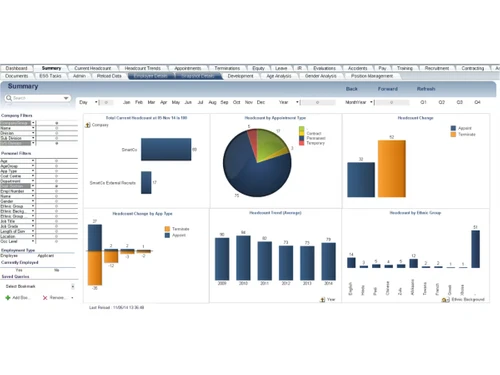
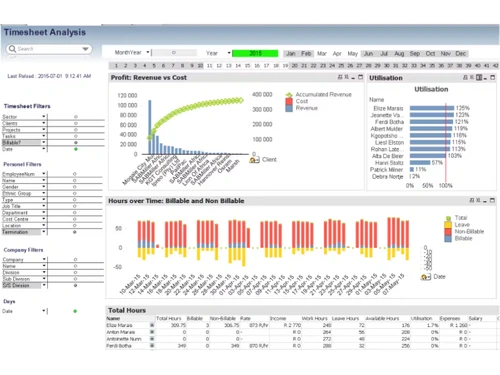
SmartHR-overview
SmartHR-summary
SmartHR-analysis

SmartHR

Brand: SmartHR

SmartHR is an advanced, user-friendly HR management software designed to simplify complex HR processes. It ensures seamless payroll processing, tax management, and employee self-service, making it ideal for businesses of all sizes. With its robust reporting capabilities and dedicated support, SmartH...

See More

Explore Alternatives
img
Mewurk

4.6

img

10+ people visited in last 30 minutes

Price Available on Request

Questions about pricing or customization? We’re here to help, just a click away.

100% Genuine
Products
Best Price
Guaranteed
Safe & Secure
Payment
  • Description

  • Pricing

  • Features

  • Specification

  • Review

  • Compare

  • Alternatives

  • FAQ

SmartHR Software Overview

What is SmartHR?

SmartHR is a modern HR management solution tailored to meet the needs of growing businesses. The software integrates critical HR functions, enabling businesses to handle payroll, taxes, employee self-service, and garnishment processing from one platform. It is designed to minimize manual intervention and ensure compliance with government regulations.

The software is built to streamline HR workflows and make employee management hassle-free. It comes with features like direct deposit, payroll processing, and reporting tools that simplify decision-making. Additionally, its intuitive interface ensures that even non-technical users can navigate the system easily, making HR tasks less time-consuming and more efficient.

Why Choose SmartHR?

  • Ease of Use: The user-friendly interface ensures effortless navigation for all employees.
  • Comprehensive Support: A dedicated partner support person is available to assist with any challenges.
  • Customizable: Adapt the software to meet the unique requirements of your business.
  • Compliance: Stay updated with the latest tax laws and regulations to avoid penalties.
  • Cost-Effective: Save money by automating repetitive HR tasks and reducing manual errors.
  • Data Security: Advanced encryption ensures that employee data remains secure and confidential.
  • Scalability: Suitable for businesses of all sizes, it grows with your organization.
  • Integration: Seamlessly integrates with other business tools for a unified HR experience.

Benefits of SmartHR

  • Improved Efficiency: Automates routine HR tasks, saving time and effort.
  • Accurate Payroll: Ensures error-free salary calculations and disbursements.
  • Employee Empowerment: Allows employees to access their records and request changes independently.
  • Enhanced Reporting: Provides actionable insights through detailed and exportable reports.
  • Compliance Assurance: Keeps your business aligned with tax laws and wage regulations.
  • Streamlined Processes: Reduces paperwork and digitizes all major HR operations.
  • Reliable Support: Dedicated assistance to resolve technical and operational issues.
  • Cost Savings: Minimizes administrative overhead by reducing manual workload.

Pricing of SmartHR

SmartHR pricing is available on request at Techjockey.com.

The pricing model is based on different parameters, including extra features, deployment type, and the total number of users. For further queries related to the product, you can contact our product team and learn more about the pricing and offers.

Read more

SmartHR Pricing & Plans

Looking for The Right Pricing?

Share your requirements and get a plan built around your business.

  • Define your business needs
  • Get customised pricing
  • Choose features that fit your workflow

Price Available on Request

Get personalised SmartHR pricing that fits your needs. Our team will connect with you.

SmartHR Features

  • icon_check Database Management
    Centralize employee profiles, contact details, job information, and documents in one secure, accessible database for HR teams.
  • icon_check Payroll Management
    Automate salary calculations, earnings, deductions, incentives, and payroll processing to reduce manual effort and calculation
  • icon_check Attendance Management
    Track employee attendance through mobile, biometric, and facial recognition options for better workforce visibility and control.
  • icon_check Leave Management
    Manage leave policies, employee requests, approval workflows, leave balances, and calendars to simplify absence administration.
  • icon_check Recruitment Management
    Organize job requisitions, candidate applications, resume screening, interview feedback, and hiring workflows in one platform.
  • icon_check Employee Onboarding
    Streamline new-hire onboarding with digital offer letters, document collection, checklists, and structured employee setup
  • icon_check Performance Management
    Set employee goals, conduct performance reviews, track key performance indicators, and support structured development discussions.
  • icon_check Time Shift Management
    Configure employee shift patterns and location-specific attendance rules to coordinate staffing across teams and work locations.
  • icon_check Expense Management
    Connect operational and financial workflows to improve expense visibility and reduce manual reconciliation across business
  • icon_check Compliance Management
    Support statutory compliance through automated regulatory updates, payroll compliance workflows, and relevant reporting
  • icon_check Document Management
    Store employee contracts, certifications, policies, and other HR documents with version control and expiration alerts.
  • icon_check Workflow Automation
    Customize HR processes, approval chains, and business rules to reduce repetitive administrative work and improve process
  • icon_check Role-Based Access Control (RBAC)
    Restrict access to sensitive employee information through role-based permissions and administrative controls for greater data
  • icon_check Multi-Location
    Manage employees across multiple offices with centralized visibility, location-specific policies, shift rules, and consolidated

SmartHR Specifications

Supported Platforms
Windows Windows MacOS MacOS
Devices
Desktop Desktop Mobile Mobile
Deployment
Cloud-Based Cloud-Based
Suitable For
All Industries
Business Specific
All Businesses
Business Size
Small Business Startups Medium Business SMBs MSMBs MSMEs
Customer Support
Phone Email Communities
Language
English
Training Resources
Documentation Videos

Explore the Best Alternative Solutions Similar to Your Business Size and Needs

SmartHR Review

4.1

Out of 5

img

Overall Rating

Based on
5 Verified Ratings

Rating Breakdown

  • Features 4.2
  • Value for Money 4
  • Ease of Use 4.1
  • Customer Support 4.1

94% Recommend this Product

Add Review

Techjockey Trusted Reviews from Verified Users

No reviews are currently available for SmartHR. Discover similar HR Software reviews

  • Zfour HRMS

    4.9

    Whats great - The service is professional, user-friendly, and genuinely helpful. Highly recommend to anyone looking for quality and trust. read more

  • HROne

    4.8

    Whats great - None read more

  • factoHR

    4.6

    Whats great - Get real-time HR insights! Data-driven reports help you make faster, smarter decisions for workforce management read more
Compare SmartHR With other HR Software

Products
Ratings
Pricing
Device Supported
Deployment
Supported Platforms
  • img

    SmartHR

  • 4.1

  • Price On Request

  • Desktop

    Mobile

  • Web based

    On Premises

  • Windows

    Mac OS

  • img

    ClusterHR

  • 5

  • ₹ 40

  • Desktop

    Mobile

  • Web based

    On Premises

  • Windows

    Mac OS

  • img

    Fix HR

  • 4.9

  • ₹ 600

  • Desktop

    Mobile

  • Web based

    On Premises

  • Windows

    Mac OS

  • img

    WeekMate

  • 4.5

  • ₹ 3999

  • Desktop

    Mobile

  • Web based

    On Premises

  • Windows

    Mac OS

  • img

    Spine HR

  • 4.3

  • Price On Request

  • Desktop

    Mobile

  • Web based

    On Premises

  • Windows

    Mac OS

  • img

    TankhaPay

  • 4.9

  • ₹ 40

  • Desktop

    Mobile

  • Web based

    On Premises

  • Windows

    Mac OS

  • img

    WoCo

  • 4.8

  • ₹ 50

  • Desktop

    Mobile

  • Web based

    On Premises

  • Windows

    Mac OS

  • img

    Zfour HRMS

  • 4.9

  • ₹ 45

  • Desktop

    Mobile

  • Web based

    On Premises

  • Windows

    Mac OS

  • img

    Keka HR

  • 4.4

  • Price On Request

  • Desktop

    Mobile

  • Web based

    On Premises

  • Windows

    Mac OS

  • img

    AionHRMS

  • 4.7

  • Price On Request

  • Desktop

    Mobile

  • Web based

    On Premises

  • Windows

    Mac OS

  • img

    TruHR

  • 4.9

  • ₹ 2200

  • Desktop

    Mobile

  • Web based

    On Premises

  • Windows

    Mac OS

(2) Product(s) selected

SmartHR Alternatives

See All SmartHR Alternatives

Starting Price:

₹600 /Month ₹900

SAVE UPTO 33%

Available

Price on Request

Starting Price:

₹2,200 /Month
Starting Price:

₹49 /Month

Starting Price:

₹890 /Month
Starting Price:

₹5,000 /Month

Starting Price:

$49 /Month

Articles for SmartHR

See All Related Articles

How does SmartHR simplify payroll processing?

SmartHR automates payroll tasks like salary calculations, deductions, and disbursements, ensuring accuracy and saving time.

Can employees access their data through SmartHR?

Yes, employees can use the self-service portal to view and update their information, download payslips, and more.

Is the software secure for handling sensitive employee data?

Yes, SmartHR uses advanced encryption and security protocols to protect all data.

Does SmartHR help with tax compliance?

SmartHR automates tax calculations, filings, and ensures adherence to the latest regulations.

Can SmartHR generate reports for analysis?

Yes, the software has robust reporting tools to create detailed and exportable reports for better decision-making.

Is SmartHR scalable for growing businesses?

Yes, SmartHR is designed to scale as your business grows, accommodating more employees and complex processes.

Does the software integrate with other tools?

Yes, SmartHR integrates seamlessly with various business tools for a unified experience.

How does the garnishment processing feature work?

It automatically calculates and manages wage garnishments, ensuring compliance with legal requirements.

What kind of support is available for users?

SmartHR provides a dedicated partner support person for personalized assistance and issue resolution.

Is there a trial version available?

Yes, you can request a trial to explore SmartHR’s features before making a purchase.

20,000+ Software Listed

Best Price Guranteed

Free Expert Consultation

2M+ Happy Customers

Terms and Condtions

close

Users with registered businesses can purchase goods from merchants on the platform to satisfy their business needs. Users are not permitted to utilize any products acquired through the platform for resale, advertising, business, or further distribution.

For each purchase made, users will receive a Tax Invoice (or 'GST invoice') that includes specific details such as:

  • the GSTIN of the user associated with their registered business, and

  • the specified Entity Name for their business.

It should be noted that not all products are eligible for GST Invoice. Only the products displayed by participating sellers with the 'GST-based Invoice Available' callout on the product description page would qualify.

Certain goods and services are not eligible to get a GST Invoice, including items with VAS, i.e., Value Added Services (e.g., Total Mobile Protection/Assured Buyback) and those involving an exchange offer at the time of purchase.

Users must ensure the accuracy of the GSTIN, and business entity name provided for the GST Invoice. Requests for corrections into GST Invoice would not be accommodated by Techjockey.com or any Seller, and any issues arising from user-provided information are the sole responsibility of users.

Techjockey.com is not liable for the GST Invoice or any associated input tax credit. To efficiently claim an input tax credit, users should select the registered place of business address as per the GST authority's data and follow the provisions of the GST Act and rules.

To claim an input tax credit, the delivery and billing addresses must match. Furthermore, input tax credits will not be granted if the delivery address and GSTIN on the invoice are from different states. In case of incorrect GST details provided during the order placement, the order will be canceled automatically.