linkedin
PDF-XChange Viewer logo
play Converting Microsoft Word Documents to/from PDF format in PDF-XChange Editor.
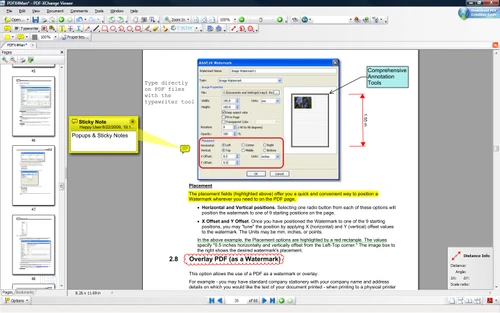
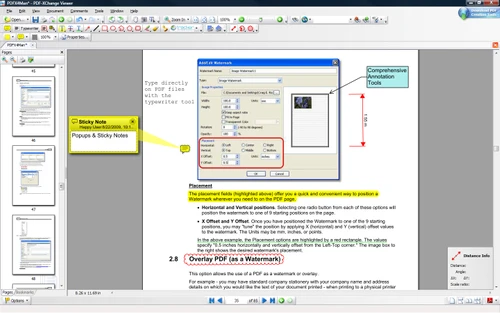
pdf-x sticky notes
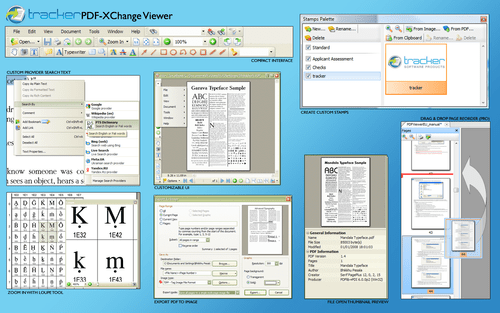
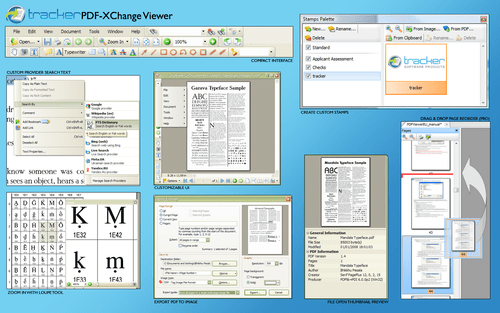
pdf-x customization

PDF-XChange Viewer

Brand: Tracker Software

  • 4.7

  • 2 Ratings & 2 Reviews

PDF-XChange Viewer is a powerful PDF reading software that features extended and markup capabilities such as highlighting, typing, making notes and callouts. It also allows users to get a preview of their PDF files in the “preview pane” of their system without locking the file. This way, users can easily set up information related to their metadata. The software also allows users to save fill...

See More

Have you used PDF-XChange Viewer before?

Share your insights for better experience

Add a Review
Starting Price
$62

View plans

100% Genuine
Products
Best Price
Guaranteed
Safe & Secure
Payment
  • Description

  • Pricing

  • Features

  • Specification

  • Review

  • Compare

  • Alternatives

  • FAQ

Starting at $62

PDF-XChange ViewerSoftware Overview

What is PDF-XChange Viewer?

PDF-XChange Viewer is a powerful PDF reading software that features extended and markup capabilities such as highlighting, typing, making notes and callouts. It also allows users to get a preview of their PDF files in the “preview pane” of their system without locking the file. This way, users can easily set up information related to their metadata. The software also allows users to save filled PDF forms and they can even import and export the form data in XFDF and FDF format.

How has PDF-Xchange Viewer made PDF creation a seamless process?

The software has made PDF creation a seamless process in the following ways.

  1. Users can mark-up pages with texts and objects.
  2. They can extract text from PDF pages or files.
  3. The software allows users to export PDF pages or entire files to any supported image format, i.e., JPEG, PNG, BMP and TIFF.
  4. It offers auto highlight features for the fillable forms.
  5. Users can move pages only by dragging and dropping them in thumbnail view.
  6. The software supports 15 different formats with which users can extract pages to a new file.
  7. The software also has comprehensive support files loaded within it. The users no longer need to download user manuals or other related files.

The latest version of PDF-XChange Viewer

The latest version of PDF-XChange is PDF-XChange Editor.

  1. This best PDF reader fully customizable software optimizes the work process of its users to an advanced level.
  2. The software can be used to create PDF files from scanned images, documents, markdown files, and text files.
  3. The software also enables users to convert Microsoft Documents into PDF files with absolute ease.
  4. The latest version of PDF-XChange comes with 100+ features and 30+ tools, thus making it advanced and user-friendly.

Compatible platforms of PDF-XChange Viewer 

Currently, the software is compatible with all the versions of the Windows operating system, starting from Windows XP to the latest version available in the market.

Are there any alternatives to PDF-XChange Viewer

In case, you are not satisfied with the features offered by the PDF-XChange Viewer and want to explore something different, you can go for PDF-Tools by the same parent company.

What are the benefits of using PDF-XChange Viewer?

  1. The software allows users to type on any PDF page directly.
  2. The ‘Loup’ and ‘Pan’ tools of the software allow users to navigate large and complex PDF files easily.
  3. PDF-XChange Viewer has a full JavaScript Engine included within it.
  4. Users can fill and save Adobe forms (including dynamic and XFA forms) in email and disk, and can post them as well.
  5. The software also allows users to store and restore all the files recently used by them within a few minutes.

Pricing of PDF-XChange Viewer

The software is priced at $.62 as a one-time payment for one user. You can request a callback to get a more customized quotation of the software as per your requirements. If you want to renew the product’s license or want to receive an activation key, our customer care team will provide you with all the necessary assistance.

Read more

Tracker Software Company Details

Founded Year:  1997

Tracker Software Products develops fast, light PDF software for viewing, converting, and editing PDF documents, support and service.

Director/Founders Liam Brennan
Company Size 1-100 Employees

PDF-XChange Viewer Pricing & Plans

PDF-XChange Editor
Starting at $62
    • Licenses (One Time)

      Licenses (One Time)
      Licenses (One Time)

Key Features

  • Edit and Comment PDFs

  • Annotations

  • Manipulate Documents

  • Enhance Documents

  • Generate Links from Barcodes

  • Per-Document JavaScript Options

  • Support for Azure Purview

  • Delete All Child Bookmarks

PDF-XChange Editor Plus
Starting at $79
    • Licenses (One Time)

      Licenses (One Time)
      Licenses (One Time)

Key Features

  • Edit and Comment PDFs

  • Annotations

  • Manipulate Documents

  • Enhance Documents

  • Generate Links from Barcodes

  • Per-Document JavaScript Options

  • Support for Azure Purview

  • Delete All Child Bookmarks

PDF-XChange Viewer Features

  • icon_check Edit and Comment PDFs
    PDF-XChange Viewer allows users to edit and add comments to any PDF file as per their needs.
  • icon_check Annotations
    Users can add annotations to any PDF document that is subject to security settings.
  • icon_check Manipulate Documents
    The software allows users to move, delete, insert new pages and files, and crop them by simple drag-and-drop operations.
  • icon_check Enhance Documents
    Users can enhance the look of their document with the various tools available within the software.
  • icon_check Secure
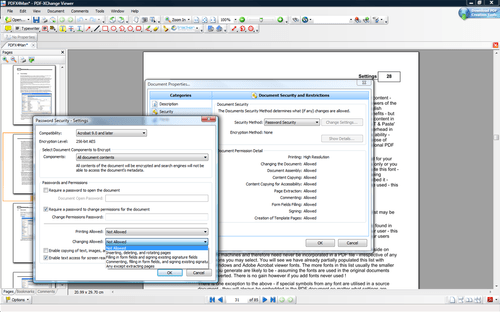
    PDF-XChange secures data with 40/128-bit RC4, 128/256-bit AES encryption, plus password editing and permission controls.
  • icon_check Customization
    The software has a customizable user interface that helps you to add custom stamps from any PDF file or Image.
  • icon_check Edit & OCR PDF
    Edit and OCR PDF lets users create fully searchable PDFs from scanned documents and images.
  • icon_check Edit PDFs. Easy, Fast and Smart PDF Solution.
    PDF-XChange allows users to edit all their PDF files easily within the software.
PDF-XChange Viewer Demo Video play icon

Get PDF-XChange Viewer Demo

Watch the demo video to explore key features, real workflows, and how the software fits your business needs.

Understand
Key Features
Personal
Demo Insights
Interactive
Demo Support

PDF-XChange Viewer Specification

Supported Platforms
Windows Windows
Devices
Desktop Desktop Mobile Mobile
Deployment
Web-Based Web-Based Perpetual Perpetual
Suitable For
All Industries
Business Specific
All Businesses
Business Size
Small Business Startups Medium Business Enterprises SMBs SMEs MSMBs MSMEs
Customer Support
Phone Email Live Chat Communities
Language
English
Integration
API Integration
Training Resources
Documentation Videos

Explore the Best Alternative Solutions Similar to Your Business Size and Needs

PDF-XChange Viewer Reviews

4.7

Out of 5

img

Overall Rating

Based on
2 Verified Reviews

Rating Breakdown

  • Features 5
  • Value for Money 4.5
  • Ease of Use 4.5
  • Customer Support 5

100% Recommend this Product

Add Review
PDF-XChange Viewer Video Reviews

youtubeVideoId

4.8

“PDF X-Change Viewer”

Review by: thelabbench

youtubeVideoId

4.8

“PDF-XChange Viewer”

Review by: UK Best Reviewer

Compare PDF-XChange Viewer With other PDF Software

Products
Ratings
Pricing
Device Supported
Deployment
Supported Platforms
  • img

    PDF-XChange Viewer

  • 4.7

  • Price On Request

  • Desktop

    Mobile

  • Web based

    On Premises

  • Windows

    Mac OS

  • img

    PDF-Tools

  • 4.2

  • Price On Request

  • Desktop

    Mobile

  • Web based

    On Premises

  • Windows

    Mac OS

  • img

    Foxit PDF Editor

  • 4.3

  • ₹ 12000

  • Desktop

    Mobile

  • Web based

    On Premises

  • Windows

    Mac OS

  • img

    Gravity PDF

  • 4.3

  • Price On Request

  • Desktop

    Mobile

  • Web based

    On Premises

  • Windows

    Mac OS

  • img

    Zoho PDF Editor

  • 4.3

  • Price On Request

  • Desktop

    Mobile

  • Web based

    On Premises

  • Windows

    Mac OS

  • img

    PDF Expert

  • 4.4

  • ₹ 7200

  • Desktop

    Mobile

  • Web based

    On Premises

  • Windows

    Mac OS

  • img

    JOPDF

  • 4.1

  • Price On Request

  • Desktop

    Mobile

  • Web based

    On Premises

  • Windows

    Mac OS

  • img

    Hybiscus

  • 4.2

  • Price On Request

  • Desktop

    Mobile

  • Web based

    On Premises

  • Windows

    Mac OS

  • img

    Soda PDF

  • 4.1

  • ₹ 1111

  • Desktop

    Mobile

  • Web based

    On Premises

  • Windows

    Mac OS

  • img

    BentoPDF

  • 4.3

  • Price On Request

  • Desktop

    Mobile

  • Web based

    On Premises

  • Windows

    Mac OS

(2) Product(s) selected

PDF-XChange Viewer Alternatives

See All PDF-XChange Viewer Alternatives

Available

Price on Request

Starting Price:

$20 /Month

Starting Price:

$49 /Lifetime

Starting Price:

$20 3 Years

Articles for PDF-XChange Viewer

See All Related Articles

Does PDF-XChange Viewer allow users to add digital signatures?

Yes, users can add digital signatures to their PDF files to secure and authenticate them.

Does PDF-XChange Viewer support Data Execution Prevention?

Yes! The software does support Data Execution Prevention in order to stop the execution of nefarious scripts from trojans and viruses.

Can I get a free demo of PDF-XChange Viewer?

Yes! We do provide live demos or tutorials to our clients. If you are interested, you can request us for a demo session as per your preferable time and date.

What are the system requirements for the PDF-Xchange Viewer?

The software is fully compatible with all the versions of Microsoft Windows. However, it is recommended that you install the latest Microsoft Windows service packs and update them before installing the software for getting the best out of it. Those who are still using Windows XP might face certain problems while using the software as it has stopped giving updates. For Windows 7 users, you must have the latest release. 32-bit or 64-bit processor.

Is there any mobile app for PDF-XChange Viewer?

Unfortunately, the current version of PDF-XChange Viewer is not compatible with mobile devices.

20,000+ Software Listed

Best Price Guranteed

Free Expert Consultation

2M+ Happy Customers

Terms and Condtions

close

Users with registered businesses can purchase goods from merchants on the platform to satisfy their business needs. Users are not permitted to utilize any products acquired through the platform for resale, advertising, business, or further distribution.

For each purchase made, users will receive a Tax Invoice (or 'GST invoice') that includes specific details such as:

  • the GSTIN of the user associated with their registered business, and

  • the specified Entity Name for their business.

It should be noted that not all products are eligible for GST Invoice. Only the products displayed by participating sellers with the 'GST-based Invoice Available' callout on the product description page would qualify.

Certain goods and services are not eligible to get a GST Invoice, including items with VAS, i.e., Value Added Services (e.g., Total Mobile Protection/Assured Buyback) and those involving an exchange offer at the time of purchase.

Users must ensure the accuracy of the GSTIN, and business entity name provided for the GST Invoice. Requests for corrections into GST Invoice would not be accommodated by Techjockey.com or any Seller, and any issues arising from user-provided information are the sole responsibility of users.

Techjockey.com is not liable for the GST Invoice or any associated input tax credit. To efficiently claim an input tax credit, users should select the registered place of business address as per the GST authority's data and follow the provisions of the GST Act and rules.

To claim an input tax credit, the delivery and billing addresses must match. Furthermore, input tax credits will not be granted if the delivery address and GSTIN on the invoice are from different states. In case of incorrect GST details provided during the order placement, the order will be canceled automatically.