linkedin
PDF-Tools logo
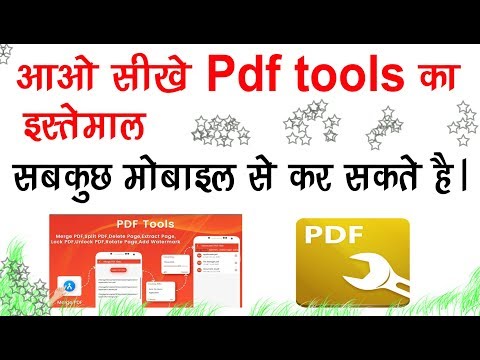
play How to use Pdf tools,A single app for All types of Pdf formation,Merge,splite,lock,watermark,etc
PDF Tools different tools
PDF tools format

PDF-Tools

Brand: Tracker Software

  • 4.2

  • 3 Ratings

PDF-Tools provides users with versatile features for creating, editing, securing, and exporting PDF files. With advanced customization options and robust security measures, PDF-Tools caters to the needs of professionals, businesses, and individuals handling large volumes of documentation.

See More

Have you used PDF-Tools before?

Share your insights for better experience

Add a Review
Starting Price
$89

View plans

100% Genuine
Products
Best Price
Guaranteed
Safe & Secure
Payment
  • Description

  • Pricing

  • Features

  • Specification

  • Review

  • Compare

  • Alternatives

  • FAQ

Starting at $89

PDF-Tools Software Overview

What is PDF-Tools?

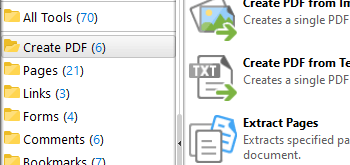
PDF-Tools is a versatile business software, utility software, and PDF software designed for managing and manipulating PDF files. The software is tailored to support a wide range of industries, including legal, education, and business. It includes more than 58 default tools, ensuring users have the flexibility to handle virtually any PDF-related task.

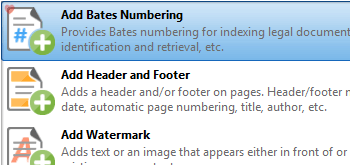
One of the standout features of PDF-Tools is its ability to integrate diverse functionalities under one platform. Users can create PDFs from scratch or convert from existing documents. Editing capabilities include adding annotations, watermarks, and Bates numbering. Additionally, its security options allow users to safeguard sensitive data through encryption and digital signatures. This versatility makes PDF-Tools a preferred choice for professionals requiring precise and secure document management.

With PDF-Tools, users can customize tools to fit their specific needs. Whether it's monitoring folders for automated processes or exporting documents into various formats like Excel or PowerPoint, the software empowers users to manage their documents seamlessly.

Why Choose PDF-Tools PDF Software?

  • Comprehensive Toolset: Offers 58 default tools to handle all document management needs, from creation to export.
  • Customizable Operations: Enables users to create and customize tools for specific tasks using the Actions Library.
  • Secure Document Management: Advanced protection tools with encryption and certificate-based digital signatures.
  • Multi-Format Compatibility: Easily converts PDF files to Excel, PowerPoint, and image formats.
  • User-Friendly Interface: Simple navigation and intuitive tools make it easy for beginners and professionals.
  • Automation Features: Folder monitoring ensures automatic processing of files for repetitive tasks.
  • Enhanced Collaboration: Annotations and comments tools improve collaboration and feedback sharing.
  • Cost-Effective: Combines multiple functions into one platform, eliminating the need for additional software.

Benefits of PDF-Tools

  • Streamlined Workflow: Perform multiple PDF-related tasks with one software, saving time and effort.
  • Improved Security: Safeguard sensitive documents with encryption and secure sharing options.
  • Enhanced Productivity: Automated processes reduce manual workload and increase efficiency.
  • Professional-Grade Features: Advanced editing and customization tools cater to professionals' needs.
  • Scalable Solution: Suitable for individual users and organizations of all sizes.
  • Accessible Anytime: Compatibility with various devices ensures users can work on the go.
  • Versatile Document Management: Edit, annotate, secure, and export PDFs effortlessly.
  • Reliable Support: Backed by excellent customer service and technical support.

Pricing of PDF-Tools

PDF-Tools price starts at $89 at techjockey.com.

The pricing model is based on different parameters, including extra features, deployment type, and the total number of users. For further queries related to the product, you can contact our product team and learn more about the pricing and offers.

Read more

Tracker Software Company Details

Founded Year:  1997

Tracker Software Products develops fast, light PDF software for viewing, converting, and editing PDF documents, support and service.

Director/Founders Liam Brennan
Company Size 1-100 Employees

PDF-Tools Pricing & Plans

PDF-Tools
Key Features
  • Tools
  • Customization
  • Create PDFs
  • Edit and Comment PDFs
  • Annotations
  • Secure
  • Export Documentation
  • General Features
Starting at $89
    • Licenses (One Time)

      Licenses (One Time)
      Licenses (One Time)

Key Features

  • Tools

  • Customization

  • Create PDFs

  • Edit and Comment PDFs

  • Annotations

  • Secure

  • Export Documentation

  • General Features

PDF-Tools Features

  • icon_check Tools
    Provides 58 default tools for creating, editing, and exporting PDFs with customizable operations.
  • icon_check Customization
    Use the Actions Library to create personalized tools and adapt workflows.
  • icon_check Create PDFs
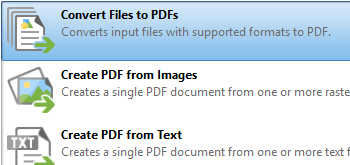
    Generate PDFs from scanned documents, text files, or image files.
  • icon_check Edit and Comment PDFs
    Add or remove watermarks, headers, footers, and annotations to improve collaboration.
  • icon_check Annotations
    Use advanced comment tools to create, delete, and manage form fields and links.
  • icon_check Secure
    Protect documents with encryption and certificate-based digital signatures.
  • icon_check Export Documentation
    Convert PDF files into Excel, PowerPoint, or plain text formats.
  • icon_check General Features
    Automate processes using the Folder Monitor feature for seamless document handling.
PDF-Tools Demo Video play icon

Get PDF-Tools Demo

Watch the demo video to explore key features, real workflows, and how the software fits your business needs.

Understand
Key Features
Personal
Demo Insights
Interactive
Demo Support

PDF-Tools Specifications

Supported Platforms
Windows Windows MacOS MacOS
Devices
Desktop Desktop Mobile Mobile
Deployment
Perpetual Perpetual
Suitable For
All Industries
Business Specific
All Businesses
Business Size
Small Business Startups Medium Business Enterprises SMBs SMEs MSMBs MSMEs
Customer Support
Phone Email Live Chat Communities
Language
English
Training Resources
Documentation Videos

Explore the Best Alternative Solutions Similar to Your Business Size and Needs

PDF-Tools Review

4.2

Out of 5

img

Overall Rating

Based on
3 Verified Ratings

Rating Breakdown

  • Features 3.8
  • Value for Money 3.8
  • Ease of Use 5
  • Customer Support 4.3

83% Recommend this Product

Add Review

Techjockey Trusted Reviews from Verified Users

No reviews are currently available for PDF-Tools. Discover similar PDF Software reviews

  • Adobe Acrobat Pro DC for teams

    4.6

    Whats great - The best thing about Acrobat Pro DC is that it is a Portable Documents Format Software which allows me to carry my creations ... read more

  • Nuance Power PDF

    4.4

    Whats great - Robust editing tools and secure document handling. read more

  • Kofax Power PDF

    4.3

    Whats great - Robust editing tools and secure document handling. read more

Compare PDF-Tools With other PDF Software

Products
Ratings
Pricing
Device Supported
Deployment
Supported Platforms
  • img

    PDF-Tools

  • 4.2

  • Price On Request

  • Desktop

    Mobile

  • Web based

    On Premises

  • Windows

    Mac OS

  • img

    PDF-XChange Viewer

  • 4.7

  • Price On Request

  • Desktop

    Mobile

  • Web based

    On Premises

  • Windows

    Mac OS

  • img

    Foxit PDF Editor

  • 4.3

  • ₹ 12000

  • Desktop

    Mobile

  • Web based

    On Premises

  • Windows

    Mac OS

  • img

    Gravity PDF

  • 4.3

  • Price On Request

  • Desktop

    Mobile

  • Web based

    On Premises

  • Windows

    Mac OS

  • img

    Zoho PDF Editor

  • 4.3

  • Price On Request

  • Desktop

    Mobile

  • Web based

    On Premises

  • Windows

    Mac OS

  • img

    PDF Expert

  • 4.4

  • ₹ 7200

  • Desktop

    Mobile

  • Web based

    On Premises

  • Windows

    Mac OS

  • img

    JOPDF

  • 4.1

  • Price On Request

  • Desktop

    Mobile

  • Web based

    On Premises

  • Windows

    Mac OS

  • img

    Hybiscus

  • 4.2

  • Price On Request

  • Desktop

    Mobile

  • Web based

    On Premises

  • Windows

    Mac OS

  • img

    Soda PDF

  • 4.1

  • ₹ 1111

  • Desktop

    Mobile

  • Web based

    On Premises

  • Windows

    Mac OS

  • img

    BentoPDF

  • 4.3

  • Price On Request

  • Desktop

    Mobile

  • Web based

    On Premises

  • Windows

    Mac OS

(0) Product(s) selected

PDF-Tools Alternatives

See All PDF-Tools Alternatives

Available

Price on Request

Starting Price:

$20 /Month

Starting Price:

$49 /Lifetime

Starting Price:

$20 3 Years

Articles for PDF-Tools

See All Related Articles

Can PDF-Tools convert PDFs to other file formats?

Yes, it allows conversion of PDFs into formats like Excel, PowerPoint, and plain text, making it versatile for various needs.

How does the Folder Monitor feature work?

The Folder Monitor automatically applies predefined tool operations to files moved into specified folders, saving time.

Is it possible to add digital signatures to documents?

Yes, PDF-Tools supports certificate-based digital signatures for secure document authentication.

What are the editing capabilities of PDF-Tools?

You can add or remove watermarks, headers, annotations, resize pages, and more, ensuring complete control over documents.

Does it support batch processing?

Yes, the software allows batch operations to handle multiple files simultaneously, improving productivity.

Can I create PDFs from scanned documents?

Absolutely! PDF-Tools enables users to create PDFs from scanned files, image files, and text files.

How secure are the documents processed with PDF-Tools?

The software provides advanced security features, including encryption and protection tools, ensuring sensitive data remains safe.

Is PDF-Tools compatible with different devices?

Yes, it is designed to work seamlessly across multiple devices, making it a flexible solution for users on the go.

What makes PDF-Tools ideal for professionals?

Its advanced features, like custom tool creation, annotations, and robust security, make it suitable for professional environments.

Can I customize tools for specific operations?

Yes, you can use the Actions Library to create and modify tools according to your specific requirements.

20,000+ Software Listed

Best Price Guranteed

Free Expert Consultation

2M+ Happy Customers

Terms and Condtions

close

Users with registered businesses can purchase goods from merchants on the platform to satisfy their business needs. Users are not permitted to utilize any products acquired through the platform for resale, advertising, business, or further distribution.

For each purchase made, users will receive a Tax Invoice (or 'GST invoice') that includes specific details such as:

  • the GSTIN of the user associated with their registered business, and

  • the specified Entity Name for their business.

It should be noted that not all products are eligible for GST Invoice. Only the products displayed by participating sellers with the 'GST-based Invoice Available' callout on the product description page would qualify.

Certain goods and services are not eligible to get a GST Invoice, including items with VAS, i.e., Value Added Services (e.g., Total Mobile Protection/Assured Buyback) and those involving an exchange offer at the time of purchase.

Users must ensure the accuracy of the GSTIN, and business entity name provided for the GST Invoice. Requests for corrections into GST Invoice would not be accommodated by Techjockey.com or any Seller, and any issues arising from user-provided information are the sole responsibility of users.

Techjockey.com is not liable for the GST Invoice or any associated input tax credit. To efficiently claim an input tax credit, users should select the registered place of business address as per the GST authority's data and follow the provisions of the GST Act and rules.

To claim an input tax credit, the delivery and billing addresses must match. Furthermore, input tax credits will not be granted if the delivery address and GSTIN on the invoice are from different states. In case of incorrect GST details provided during the order placement, the order will be canceled automatically.