USA
USA UAE
UAESmall Business
Designed for startups and growing businesses


See More


Brand: Faxtel India
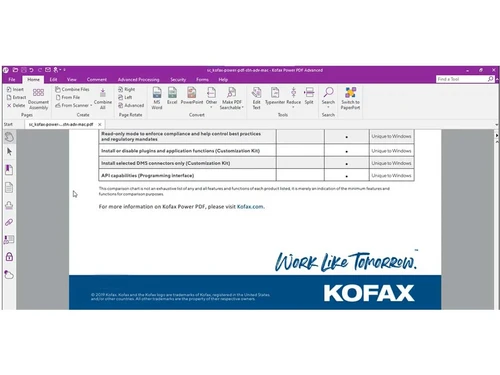
Kofax Power PDF Software delivers a robust solution for creating, editing, and securely sharing PDF files, with features like advanced document conversion and comprehensive collaboration tools.
See MoreHave you used Kofax Power PDF before?
Share your insights for better experience
View plans
 Save upto 18%, Get GST Invoice on your business purchase T&C Buy Now & Pay Later, Check offer on payment page.
 Brand: Faxtel India
Founded Year: -0001
Faxtel Systems (india) Private Limited is a Private incorporated on 11 October 1991. It is classified as Non-govt company and is registered at Registrar of Companies, Mumbai. Its authorized share capital is Rs. 16,000,000 and its paid up capital is Rs. 1,550,000.
 Intuitive Forms Highlight & Redact Powerful Security eSign Documents Collaborate Anywhere Connect & Scale PDF Editing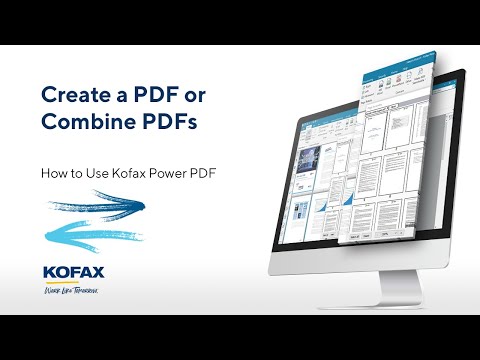

Watch the demo video to explore key features, real workflows, and how the software fits your business needs.
 Windows
  MacOS
MacOS  Desktop
  Mobile
  Cloud-Based
  Perpetual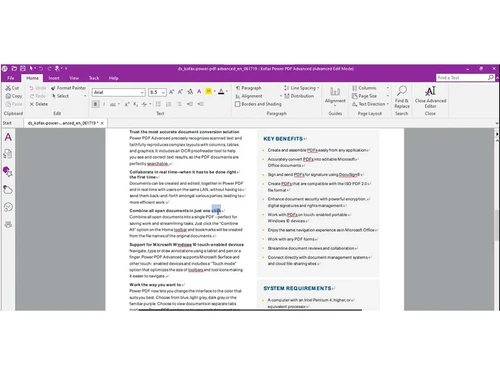
Small Business
Designed for startups and growing businesses
Medium Business
Built for business growth and flexibility
Enterprises
Designed for complex and large-scale business needs
4.3
Out of 5

Overall Rating
Based on
12 Verified Reviews
Rating Breakdown
86% Recommend this Product
Add ReviewKofax Power PDF receives positive feedback for its robust editing tools, strong security features, and efficiency in managing documents, making it a reliable choice for various professional roles. Users appreciate its one-time purchase model and the ability to create forms easily, which enhances productivity. However, common concerns include a dated interface, occasional compatibility issues with other software, and some features being difficult to locate. Despite these limitations, many find it a valuable and cost-effective tool for their PDF needs.
Pros
"Robust editing and redaction tools, strong security features, collaboration features, reliable and feature-rich"
"Kofax Power PDF offers many features at a lower cost compared to other PDF editors."
Cons
"Some features are buried in menus and not immediately obvious."


Jun 13, 2025
Techjockey Verified
“Enhances Document Management”
Managing documents has become more efficient with Kofax Power PDF. The editing tools are robust, and I feel confident in the security features when handling sensitive information. However, the interface feels a bit dated, and I'd appreciate more customization options. Still, it's a dependable choice for document management.
Pros
Robust editing tools and secure document handling.
Cons
Interface could be more modern and customizable.
Reason to switch
I was looking for more advanced editing tools and better security features in my PDF software.
Feb 26, 2025
Techjockey Verified
“Streamlines Accounting Tasks”
As an accountant, Kofax Power PDF has streamlined many of my tasks. Creating forms and extracting data is efficient, saving me valuable time. However, converting PDFs to Excel isn't always smooth and sometimes requires manual adjustments. Nonetheless, it's a powerful tool in my accounting toolkit.
Pros
Efficient form creation and data extraction.
Cons
Converting PDFs to Excel can be challenging.
Reason to switch
I needed better form creation tools and more efficient data extraction capabilities.
Mar 14, 2025
Techjockey Verified
“Reliable for Legal Documents”
In the legal field, precision is crucial. Kofax Power PDF's OCR is accurate, making digitizing documents straightforward. Assembling documents is also seamless. However, I've encountered compatibility issues when sharing files with colleagues using different PDF software. Despite this, its reliability makes it my go-to tool.
Pros
Accurate OCR and easy document assembly.
Cons
Occasional compatibility issues with other PDF programs.
Reason to switch
I required more accurate OCR capabilities and better document assembly features.

Kofax Power PDF
₹ 17818.00 excl. GST
Desktop
Mobile
Web based
On Premises
Windows
Mac OS

Foxit PDF Editor
₹ 12000
Desktop
Mobile
Web based
On Premises
Windows
Mac OS

Gravity PDF
Price On Request
Desktop
Mobile
Web based
On Premises
Windows
Mac OS

Zoho PDF Editor
Price On Request
Desktop
Mobile
Web based
On Premises
Windows
Mac OS

PDF Expert
₹ 7200
Desktop
Mobile
Web based
On Premises
Windows
Mac OS

Adobe Acrobat Pro DC for teams
₹ 23864
Desktop
Mobile
Web based
On Premises
Windows
Mac OS
JOPDF
Price On Request
Desktop
Mobile
Web based
On Premises
Windows
Mac OS

Hybiscus
Price On Request
Desktop
Mobile
Web based
On Premises
Windows
Mac OS

Soda PDF
₹ 1111
Desktop
Mobile
Web based
On Premises
Windows
Mac OS

BentoPDF
Price On Request
Desktop
Mobile
Web based
On Premises
Windows
Mac OS

Systweak PDF Editor
₹ 2499
Desktop
Mobile
Web based
On Premises
Windows
Mac OS
(0) Product(s) selected
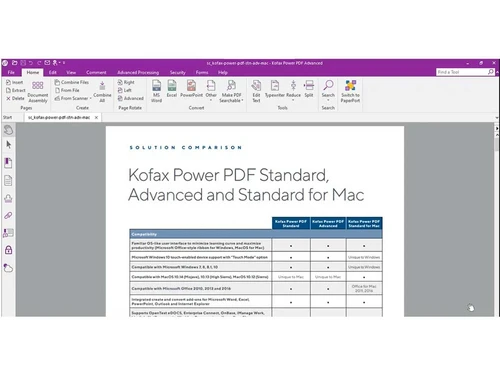
Kofax Power PDF Software is compatible with Windows and macOS operating systems.
The Kofax Power PDF app is unavailable on Android and iOS devices.
Kofax Power PDF system supports cloud-based deployment.
Kofax Power PDF software pricing starts at INR 17,818 at techjockey.com.
Kofax Power PDF can be used by businesses of all sizes and individuals who need PDF software.
Kofax Power PDF system demo is available for free with techjockey.com.
Kofax Power PDF platform does not offer a free trial.
Kofax Power PDF Software is a cloud-based platform. So, download the installation file on your system and open the Setup Wizard to get started.
Kofax Power PDF is a user-friendly and cost-effective PDF editor. It offers a familiar interface like Microsoft Office, ensuring ease of use. With robust security features, it enables efficient editing, conversion, and collaboration while maintaining the integrity of your PDF documents.
20,000+ Software Listed
Best Price Guranteed
Free Expert Consultation
2M+ Happy Customers
Terms and Condtions

Users with registered businesses can purchase goods from merchants on the platform to satisfy their business needs. Users are not permitted to utilize any products acquired through the platform for resale, advertising, business, or further distribution.
For each purchase made, users will receive a Tax Invoice (or 'GST invoice') that includes specific details such as:
the GSTIN of the user associated with their registered business, and
the specified Entity Name for their business.
It should be noted that not all products are eligible for GST Invoice. Only the products displayed by participating sellers with the 'GST-based Invoice Available' callout on the product description page would qualify.
Certain goods and services are not eligible to get a GST Invoice, including items with VAS, i.e., Value Added Services (e.g., Total Mobile Protection/Assured Buyback) and those involving an exchange offer at the time of purchase.
Users must ensure the accuracy of the GSTIN, and business entity name provided for the GST Invoice. Requests for corrections into GST Invoice would not be accommodated by Techjockey.com or any Seller, and any issues arising from user-provided information are the sole responsibility of users.
Techjockey.com is not liable for the GST Invoice or any associated input tax credit. To efficiently claim an input tax credit, users should select the registered place of business address as per the GST authority's data and follow the provisions of the GST Act and rules.
To claim an input tax credit, the delivery and billing addresses must match. Furthermore, input tax credits will not be granted if the delivery address and GSTIN on the invoice are from different states. In case of incorrect GST details provided during the order placement, the order will be canceled automatically.