linkedin
DigiDoc logo
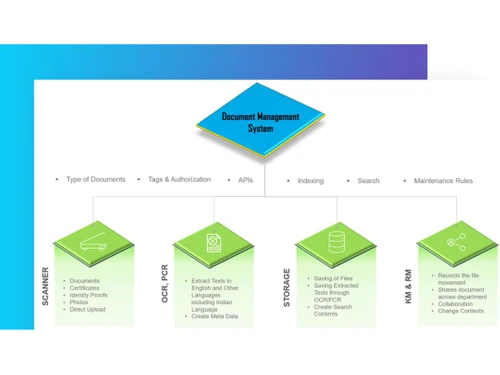
digidoc-key features
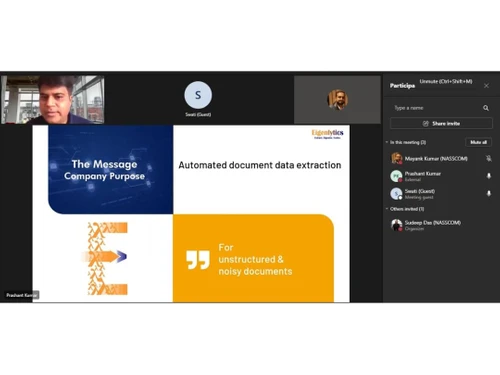
digidoc automated
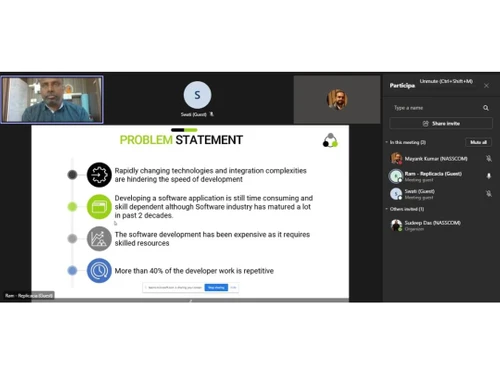
digidoc statement

DigiDoc

Brand: Eigenlytics Data Solutions

  • 4.4

  • 5 Ratings

A digital document management solution that simplifies document creation, sharing, and storage while enhancing collaboration and security for businesses.

See More

Have you used DigiDoc before?

Share your insights for better experience

Add a Review

Price Available on Request

Questions about pricing or customization? We’re here to help, just a click away.

100% Genuine
Products
Best Price
Guaranteed
Safe & Secure
Payment
  • Description

  • Pricing

  • Features

  • Specification

  • Review

  • Compare

  • Alternatives

  • FAQ

DigiDoc Software Overview

What is DigiDoc?

DigiDoc is a digital document management software designed to streamline the creation, sharing, and storage of documents for businesses. It allows users to easily generate documents using templates, ensuring consistency and efficiency in documentation processes. The platform supports collaboration by enabling multiple users to work on documents simultaneously, facilitating real-time updates and feedback.

DigiDoc also includes features for secure document sharing and storage, helping organizations protect sensitive information. With its user-friendly interface, it simplifies document workflows, making it accessible for teams of all sizes. Additionally, DigiDoc integrates with other business tools, enhancing productivity by allowing seamless data transfer between applications.

Why Choose DigiDoc Software?

  • User-Friendly Interface: It features an intuitive design that makes it easy for users to navigate and manage documents without extensive training.
  • Template-Based Document Creation: The platform allows users to create documents quickly using customizable templates, ensuring consistency and saving time.
  • Real-Time Collaboration: It enables multiple users to collaborate on documents simultaneously, facilitating efficient teamwork and immediate feedback.
  • Secure Document Storage: The software provides secure storage solutions, protecting sensitive documents with encryption and access controls.
  • Seamless Integration: It can integrate with various business applications, streamlining workflows and enhancing productivity across different tools.
  • Automated Workflows: The platform supports automation of document-related tasks, reducing manual effort and minimizing errors in processes.
  • Version Control: It offers version control features, allowing users to track changes and revert to previous versions of documents easily.
  • Mobile Access: Users can access DigiDoc on mobile devices, enabling document management on the go and increasing flexibility for remote teams.
  • Comprehensive Support: The software provides robust customer support and resources to assist users in maximizing the platform's capabilities.
  • Cost-Effective Solution: It offers a budget-friendly option for businesses looking to improve their document management processes without significant investment.

Benefits of DigiDoc Software

  • Cost Reduction in Printing: It helps healthcare organizations cut printing costs by up to 60% by transitioning to digital document management, reducing reliance on physical forms and materials.
  • Improved Patient Care: By organizing and streamlining clinical forms, it allows healthcare staff to focus more on patient care rather than administrative tasks, enhancing overall service quality.
  • Compliance with Industry Standards: The software ensures compliance with regulations like HIPAA and ABDM, making it easier for healthcare providers to meet legal and operational requirements.
  • Interoperability with National Health Systems: It integrates seamlessly with national health ecosystems, supporting broader healthcare data sharing and collaboration.
  • Error Reduction: By automating document workflows and ensuring version control, DigiDoc minimizes human errors in managing critical documents, improving accuracy and reliability.
  • Customizable for Specific Needs: The platform can be tailored to meet the unique requirements of different healthcare systems, offering flexibility for diverse use cases.
  • Enhanced Data Insights: It provides analytics tools that help organizations harness document management data to improve decision-making and operational efficiency.
  • Supports Remote Access: The cloud-based nature of DigiDoc ensures that documents are accessible remotely, enabling healthcare professionals to work from any location securely.
  • Integration with Accounts Payable Automation: It can also automate accounts payable processes by extracting and reconciling data from invoices and receipts, streamlining financial workflows.
  • Eco-Friendly Solution: By reducing paper use and transitioning to digital documentation, it promotes sustainability and environmentally friendly practices within organizations.

Pricing of DigiDoc

DigiDoc price details are available on request at techjockey.com.

The pricing model is based on different parameters, including extra features, deployment type, and the total number of users. For further queries related to the product, you can contact our product team and learn more about the pricing and offers.

Read more

Eigenlytics Data Solutions Company Details

Founded Year:  2018

A B2B / B2G data solution company solving problem of data extraction, with it's offerings focused on enabling automated document processing.

Director/Founders Dilip Mali
Company Size 1-100 Employees

DigiDoc Pricing & Plans

Looking for The Right Pricing?

Share your requirements and get a plan built around your business.

  • Define your business needs
  • Get customised pricing
  • Choose features that fit your workflow

Price Available on Request

Get personalised DigiDoc pricing that fits your needs. Our team will connect with you.

DigiDoc Features

  • icon_check Document Digitization
    Convert physical documents into digital records to reduce storage cost and improve retrieval.
  • icon_check Optical Character Recognition
    Built-in OCR extracts text from images (PDF, JPG, TIFF) so content becomes searchable.
  • icon_check Document Tagging & Metadata
    Add custom, user-defined metadata and color-coded tags for better document categorization.
  • icon_check Document Grouping
    Configurable grouping of documents (by project, department, tag) for structured organization.
  • icon_check Access Control
    Define user roles and permissions to secure documents and regulate access.
  • icon_check Version Control
    Track document versions along with user activity, timestamps, and change history.
  • icon_check Drag-and-Drop UI
    Easy-to-use interface that allows drag-and-drop for document upload and organization.
  • icon_check Document Management
    Organize, track, and manage documents efficiently.
  • icon_check Digital Records
    Store and access important records in digital format.
  • icon_check Storage
    Securely store documents with easy retrieval options.
  • icon_check Document Indexing
    Quickly search and categorize documents for better organization.
  • icon_check Faster Paperless Workflow
    Streamline processes with a fully digital document system.

DigiDoc Specifications

Supported Platforms
Ubuntu Ubuntu Windows Windows MacOS MacOS Linux Linux
Devices
Desktop Desktop
Deployment
Cloud-Based Cloud-Based
Suitable For
All Industries
Business Specific
All Businesses
Business Size
Small Business Startups Medium Business Enterprises
Customer Support
Phone Email Live Chat Communities
Language
English
Integration
API Integration
Training Resources
Documentation

Explore the Best Alternative Solutions Similar to Your Business Size and Needs

DigiDoc Review

4.4

Out of 5

img

Overall Rating

Based on
5 Verified Ratings

Rating Breakdown

  • Features 4.5
  • Value for Money 4.5
  • Ease of Use 4.3
  • Customer Support 4.4

86% Recommend this Product

Add Review

Techjockey Trusted Reviews from Verified Users

No reviews are currently available for DigiDoc. Discover similar Document Management Software reviews

  • Greenbox

    4.8

    Whats great - It is so good for reviewing, approving, assigning, tracking, approving controlled documents. read more

  • i-doc

    4.5

    Whats great - Store a lot of substance crosswise over different document types Force request on information dependent on hierarchical m... read more

  • MSB Docs

    4.5

    Whats great - Three of the five recommended vendors were viable read more

Compare DigiDoc With other Document Management Software

Products
Ratings
Pricing
Device Supported
Deployment
Supported Platforms
  • img

    DigiDoc

  • 4.4

  • Price On Request

  • Desktop

    Mobile

  • Web based

    On Premises

  • Windows

    Mac OS

  • img

    Greenbox

  • 4.8

  • Price On Request

  • Desktop

    Mobile

  • Web based

    On Premises

  • Windows

    Mac OS

  • img

    docEdge DMS

  • 4.5

  • ₹ 750000

  • Desktop

    Mobile

  • Web based

    On Premises

  • Windows

    Mac OS

  • img

    Docuventa

  • 4.6

  • Price On Request

  • Desktop

    Mobile

  • Web based

    On Premises

  • Windows

    Mac OS

  • img

    FileGenix

  • 5

  • Price On Request

  • Desktop

    Mobile

  • Web based

    On Premises

  • Windows

    Mac OS

  • img

    FileHold

  • 4.3

  • Price On Request

  • Desktop

    Mobile

  • Web based

    On Premises

  • Windows

    Mac OS

  • img

    Krystal DMS

  • 5

  • ₹ 32400

  • Desktop

    Mobile

  • Web based

    On Premises

  • Windows

    Mac OS

  • img

    NetDocuments

  • 4.4

  • Price On Request

  • Desktop

    Mobile

  • Web based

    On Premises

  • Windows

    Mac OS

  • img

    iManage

  • 4.2

  • Price On Request

  • Desktop

    Mobile

  • Web based

    On Premises

  • Windows

    Mac OS

  • img

    Worldox

  • 4.2

  • Price On Request

  • Desktop

    Mobile

  • Web based

    On Premises

  • Windows

    Mac OS

(0) Product(s) selected

DigiDoc Alternatives

See All DigiDoc Alternatives

Available

Price on Request

Available

Price on Request
Available

Price on Request

Available

Price on Request
Available

Price on Request

Starting Price:

₹4,000 /Month
Articles for DigiDoc

See All Related Articles

What is the cost of DigiDoc Software?

The price details for DigiDoc are available upon request at techjockey.com.

Is there a DigiDoc Software app available?

No, DigiDoc Software does not offer a mobile app for on-the-go access to documents.

Which operating systems are supported by DigiDoc Software?

DigiDoc Software supports Windows, MacOS, Ubuntu, and Linux.

Does DigiDoc Software offer a free trial?

No, DigiDoc does not offer a free trial.

How does DigiDoc Software function?

DigiDoc works by converting physical documents into digital format, storing them securely, and enabling easy retrieval and workflow automation.

Who can benefit from using DigiDoc Software?

Businesses, organizations, and institutions looking to manage and organize their documents efficiently can benefit from DigiDoc.

Is a free demo available for DigiDoc Software?

Yes, DigiDoc offers a free demo for potential users to experience the software's capabilities.

Is DigiDoc Software available for free?

No, DigiDoc Software is not free; it requires a subscription or purchase based on the selected plan.

What types of documents can be managed with DigiDoc Software?

DigiDoc Software can manage a wide range of document types, including PDFs, Word documents, spreadsheets, images, and scanned files.

20,000+ Software Listed

Best Price Guranteed

Free Expert Consultation

2M+ Happy Customers

Terms and Condtions

close

Users with registered businesses can purchase goods from merchants on the platform to satisfy their business needs. Users are not permitted to utilize any products acquired through the platform for resale, advertising, business, or further distribution.

For each purchase made, users will receive a Tax Invoice (or 'GST invoice') that includes specific details such as:

  • the GSTIN of the user associated with their registered business, and

  • the specified Entity Name for their business.

It should be noted that not all products are eligible for GST Invoice. Only the products displayed by participating sellers with the 'GST-based Invoice Available' callout on the product description page would qualify.

Certain goods and services are not eligible to get a GST Invoice, including items with VAS, i.e., Value Added Services (e.g., Total Mobile Protection/Assured Buyback) and those involving an exchange offer at the time of purchase.

Users must ensure the accuracy of the GSTIN, and business entity name provided for the GST Invoice. Requests for corrections into GST Invoice would not be accommodated by Techjockey.com or any Seller, and any issues arising from user-provided information are the sole responsibility of users.

Techjockey.com is not liable for the GST Invoice or any associated input tax credit. To efficiently claim an input tax credit, users should select the registered place of business address as per the GST authority's data and follow the provisions of the GST Act and rules.

To claim an input tax credit, the delivery and billing addresses must match. Furthermore, input tax credits will not be granted if the delivery address and GSTIN on the invoice are from different states. In case of incorrect GST details provided during the order placement, the order will be canceled automatically.