linkedin
Foyer logo
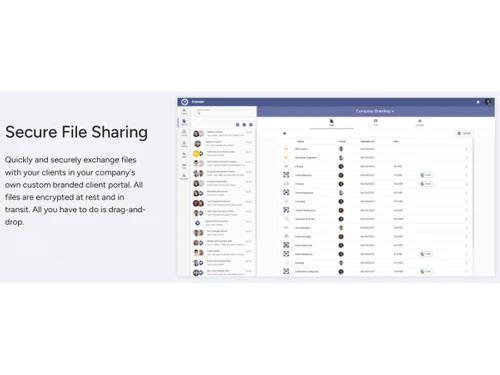
Foyer-file sharing
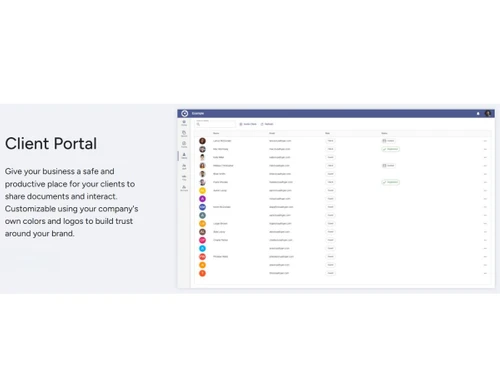
Foyer-client portal
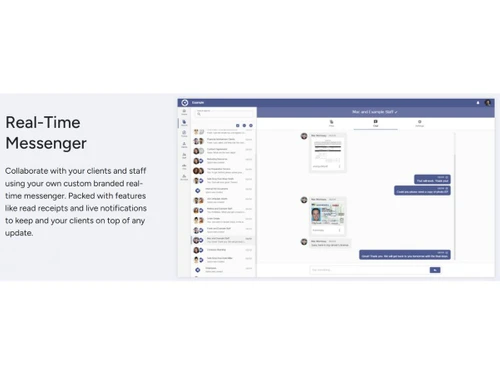
Foyer-messenger

Foyer

Brand: Foyer LLC

  • No Ratings & Reviews

Foyer provides a secure, custom-branded client portal for encrypted file sharing, messaging, and e-signatures, helping businesses streamline client communication and collaboration.

See More

Have you used Foyer before?

Share your insights for better experience

Add a Review
Starting Price
$38

View plans

100% Genuine
Products
Best Price
Guaranteed
Safe & Secure
Payment
  • Description

  • Pricing

  • Features

  • Specification

  • Review

  • Compare

  • Alternatives

  • FAQ

Starting at $38

Foyer Software Overview

What is Foyer?

Foyer is a sophisticated and secure client portal software designed for businesses to streamline document management and client communication. It provides a centralized, custom-branded platform where organizations can securely share files, exchange messages, and request electronic signatures. The software emphasizes bank-grade security, ensuring all data is protected with end-to-end encryption both in transit and at rest. With its intuitive drag-and-drop interface, Foyer simplifies the process of exchanging sensitive information, making it an ideal solution for professionals who prioritize data security and a seamless client experience.

The platform is fully customizable, allowing businesses to apply their own branding, including logos and color schemes. This ensures that the client portal feels like a natural extension of the company's brand. Accessible from any device, Foyer empowers businesses to collaborate effectively with clients and manage internal communications with equal efficiency and security.

Why Choose Foyer?

  • Uncompromising Security: Foyer protects files with encryption in transit and at rest. Advanced features such as Single Sign-On (SSO) and HIPAA compliance are available with eligible plans.
  • Seamless Brand Integration: Reinforce your brand identity at every client touchpoint. Foyer allows for complete visual customization, including custom domains, emails, logos, and color palettes, creating a professional and cohesive user experience.
  • Intuitive User Experience: The platform is designed for simplicity. A clean drag-and-drop interface for file sharing means there is no learning curve for your team or your clients. Files can be easily previewed, downloaded, and organized into folders.
  • Centralized Collaboration: Move beyond fragmented email chains. Foyer centralizes all client interactions, including file sharing, real-time messaging, and document signing, into one secure and organized space.
  • Flexible and Scalable: Foyer supports files of any type or size and offers plans designed for different business needs, with client-account limits varying by plan.

Advanced Features of Foyer

  • Enterprise-Grade Security: Foyer offers encryption in transit and at rest, Single Sign-On (SSO), HIPAA compliance on eligible plans, and data residency options across the United States, European Union, and Australia.
  • Extensive Integrations: Connect Foyer to your existing technology stack. The platform integrates with essential applications like DocuSign, Outlook, Google Drive, Microsoft OneDrive, Dropbox, and many more, creating a unified workflow. A dedicated Foyer Client Portal API is also available for custom integrations.
  • Custom Intake Forms: Design and deploy custom forms to securely collect information from clients directly within the portal, eliminating insecure email attachments and streamlining data gathering.
  • Secure Email & Templating: Utilize a secure email feature for sensitive communications and create email templates to ensure consistent and efficient messaging for common tasks and notifications.
  • Advanced User Management: Differentiate between internal users (staff) and external users (clients). The platform provides granular control over permissions and access, with no limits on the number of client accounts you can create.

Key Capabilities of Foyer

  • Secure Client Portal: The central hub for all client activity. It provides a private, branded, and secure environment for every client interaction.
  • Secure File Sharing: Effortlessly upload, share, and organize documents of any type or size using a simple drag-and-drop mechanism, all protected by robust encryption.
  • Real-Time Messenger: A built-in chat feature that allows for instant and secure communication with clients, reducing reliance on less secure third-party messaging apps.
  • Electronic Signatures: Request and manage electronic signatures on documents, enhanced by a direct integration with DocuSign for legally binding agreements.
  • Custom Forms: Build and share secure forms to efficiently collect necessary information from clients, perfect for onboarding, intake processes, and service requests.
  • Secure Email: A dedicated feature for sending and receiving sensitive information that requires a higher level of security than standard email providers offer.

How to Use Foyer?

  1. Set Up and Customize Your Portal: Begin by configuring your portal with your company's logo, brand colors, and a custom domain to create a professional and familiar environment for your clients.
  2. Manage Users: Create accounts for your internal team members (staff and admin users). Each internal user requires a license. You can then invite clients to their own secure portal accounts, with account limits depending on your plan.
  3. Share and Organize Files: Use the intuitive drag-and-drop interface to upload files and organize them into folders. You can securely share these files with specific clients or internal team members.
  4. Communicate and Collaborate: Engage with clients using the real-time messenger for quick questions or the secure email feature for more formal communication.
  5. Automate Workflows: Leverage features like custom intake forms to gather client data and request e-signatures on documents to complete agreements and approvals efficiently.

Foyer Pricing

Foyer price starts at USD 19/user/month at techjockey.com.

The pricing model is based on different parameters, including extra features, deployment type, and the total number of users. For further queries related to the product, you can contact our product team and learn more about the pricing and offers.

Read more

Foyer Pricing & Plans

Standard (USD 19 /internal user/month)
Starting at $38
    • Users

      Users
      Users
    • Monthly

      Monthly
      Monthly

Key Features

  • 100GB of storage per user

  • 50 client accounts

  • Technical support

Premium (USD 39 /internal user/month)
Starting at $78
    • Users

      Users
      Users
    • Monthly

      Monthly
      Monthly

Key Features

  • 200GB of storage per user

  • 500 client accounts

  • Custom Domain & Email

  • Technical support

Ultimate (USD 59 /internal user/month)
Starting at $118
    • Users

      Users
      Users
    • Monthly

      Monthly
      Monthly

Key Features

  • 500GB of storage per user

  • 5000 client accounts

  • Custom Domain & Email

  • HIPAA Compliance

  • Single Sign-On (SSO)

  • Technical support

Foyer Features

  • icon_check Document Management
    Store, organize, categorize, and retrieve business documents securely with centralized file management.
  • icon_check Secure File Sharing
    Share confidential files securely with clients and teams using encrypted links and permission-based access.
  • icon_check Version Control
    Track document revisions and maintain version history to prevent overwriting important business files.
  • icon_check Access Control
    Define user roles and permissions to restrict document access based on responsibilities and security needs.
  • icon_check Audit Logs
    Maintain detailed activity logs showing document access, downloads, edits, and user actions for compliance.
  • icon_check Client Portal
    Provide clients with a secure portal to upload, download, review, and manage shared business documents.
  • icon_check Workflow Automation
    Automate document requests, approvals, notifications, and repetitive tasks to improve operational efficiency.
  • icon_check Document Search
    Quickly locate files using keywords, filters, folders, tags, and document metadata across the repository.
  • icon_check Real Time File Preview
    Preview supported document formats directly in the browser without downloading files to local devices.
  • icon_check Team Collaboration
    Enable secure discussions, document sharing, and collaboration between internal teams and external clients.
  • icon_check Custom Branding
    Personalize the portal with company logo, colors, domain, and branding for a consistent client experience.
  • icon_check Multi-Factor Authentication (MFA)
    Protect user accounts with multi-factor authentication to strengthen security against unauthorized access.
  • icon_check Third Party Integrations
    Connect with popular business applications to streamline document workflows and improve productivity.
  • icon_check Alerts & Notifications
    Send automatic notifications for document uploads, requests, approvals, signatures, and important activities.

Foyer Specifications

Supported Platforms
Windows Windows iOS iOS Android Android MacOS MacOS Linux Linux
Devices
Desktop Desktop Mobile Mobile Tablet Tablet iPad iPad
Deployment
Cloud-Based Cloud-Based
Suitable For
All Industries
Business Specific
All Businesses
Business Size
Individual Small Business Startups Medium Business Enterprises SMBs SMEs MSMBs MSMEs Freelancers
Customer Support
Phone Email Live Chat
Language
English
Integration
API Integration
Training Resources
Live Online Webinars Documentation Videos
Technology
Next Generation
Compliance Regulation
HIPAA CCPA CPRA

Explore the Best Alternative Solutions Similar to Your Business Size and Needs

Foyer Review

Techjockey Trusted Reviews from Verified Users

No reviews are currently available for Foyer. Discover similar Document Management Software reviews

  • Greenbox

    4.8

    Whats great - It is so good for reviewing, approving, assigning, tracking, approving controlled documents. read more

  • i-doc

    4.5

    Whats great - Store a lot of substance crosswise over different document types Force request on information dependent on hierarchical m... read more

  • MSB Docs

    4.5

    Whats great - Three of the five recommended vendors were viable read more

Compare Foyer With other Document Management Software

Products
Ratings
Pricing
Device Supported
Deployment
Supported Platforms
  • img

    Foyer

  • Price On Request

  • Desktop

    Mobile

  • Web based

    On Premises

  • Windows

    Mac OS

  • img

    Greenbox

  • 4.8

  • Price On Request

  • Desktop

    Mobile

  • Web based

    On Premises

  • Windows

    Mac OS

  • img

    docEdge DMS

  • 4.5

  • ₹ 750000

  • Desktop

    Mobile

  • Web based

    On Premises

  • Windows

    Mac OS

  • img

    Docuventa

  • 4.6

  • Price On Request

  • Desktop

    Mobile

  • Web based

    On Premises

  • Windows

    Mac OS

  • img

    FileGenix

  • 5

  • Price On Request

  • Desktop

    Mobile

  • Web based

    On Premises

  • Windows

    Mac OS

  • img

    FileHold

  • 4.3

  • Price On Request

  • Desktop

    Mobile

  • Web based

    On Premises

  • Windows

    Mac OS

  • img

    Krystal DMS

  • 5

  • ₹ 32400

  • Desktop

    Mobile

  • Web based

    On Premises

  • Windows

    Mac OS

  • img

    NetDocuments

  • 4.4

  • Price On Request

  • Desktop

    Mobile

  • Web based

    On Premises

  • Windows

    Mac OS

  • img

    iManage

  • 4.2

  • Price On Request

  • Desktop

    Mobile

  • Web based

    On Premises

  • Windows

    Mac OS

  • img

    Worldox

  • 4.2

  • Price On Request

  • Desktop

    Mobile

  • Web based

    On Premises

  • Windows

    Mac OS

(0) Product(s) selected

Foyer Alternatives

See All Foyer Alternatives

Available

Price on Request

Available

Price on Request

Available

Price on Request

Available

Price on Request

Available

Price on Request

Starting Price:

₹4,000 /Month

Articles for Foyer

See All Related Articles

What does Foyer do?

Foyer is a customizable secure client portal software designed for businesses to securely share files, send messages, and request signatures with their clients. It provides an encrypted platform for document exchange and communication, all within a branded environment.

How much does Foyer cost?

Foyer price starts at USD 19/user/month at techjockey.com.

What are the main features of Foyer?

Foyer's main features include secure file sharing with bank-grade encryption, real-time messaging, e-signatures, and customizable branding to match your business. It also offers custom intake forms, secure email, app integrations, and advanced options like HIPAA compliance and Single Sign-On on higher-tier plans.

Is there a free trial for Foyer?

Yes, Foyer offers a free 14-day trial that does not require a credit card to get started.

Who can use Foyer?

Foyer is ideal for businesses of any size that need a secure, branded platform to manage client communications, file sharing, and document signing. It also supports internal communication among staff members within the business.

How does Foyer ensure the security of shared files?

Foyer ensures file security through bank-grade encryption, protecting all files both in transit and end-to-end. Additionally, it supports two-factor authentication (2FA) via an authenticator for enhanced user account protection.

Can I customize the client portal with my company's branding using Foyer?

Yes, Foyer allows extensive customization, enabling businesses to use their own colors and logos to fully integrate the client portal experience with their brand. Custom domains and emails are also available with Premium and Ultimate plans.

What types of files can I share using Foyer?

Foyer places no limits on the type or size of files you can upload and share, with only the total storage capacity per user being a limiting factor based on your chosen plan.

Does Foyer integrate with other business applications?

Yes, Foyer integrates with a wide range of popular business applications such as Airtable, Asana, Dropbox, Google Drive, Hubspot, Jira, and various Microsoft apps, allowing you to connect your existing tools within the client portal.

20,000+ Software Listed

Best Price Guranteed

Free Expert Consultation

2M+ Happy Customers

Terms and Condtions

close

Users with registered businesses can purchase goods from merchants on the platform to satisfy their business needs. Users are not permitted to utilize any products acquired through the platform for resale, advertising, business, or further distribution.

For each purchase made, users will receive a Tax Invoice (or 'GST invoice') that includes specific details such as:

  • the GSTIN of the user associated with their registered business, and

  • the specified Entity Name for their business.

It should be noted that not all products are eligible for GST Invoice. Only the products displayed by participating sellers with the 'GST-based Invoice Available' callout on the product description page would qualify.

Certain goods and services are not eligible to get a GST Invoice, including items with VAS, i.e., Value Added Services (e.g., Total Mobile Protection/Assured Buyback) and those involving an exchange offer at the time of purchase.

Users must ensure the accuracy of the GSTIN, and business entity name provided for the GST Invoice. Requests for corrections into GST Invoice would not be accommodated by Techjockey.com or any Seller, and any issues arising from user-provided information are the sole responsibility of users.

Techjockey.com is not liable for the GST Invoice or any associated input tax credit. To efficiently claim an input tax credit, users should select the registered place of business address as per the GST authority's data and follow the provisions of the GST Act and rules.

To claim an input tax credit, the delivery and billing addresses must match. Furthermore, input tax credits will not be granted if the delivery address and GSTIN on the invoice are from different states. In case of incorrect GST details provided during the order placement, the order will be canceled automatically.