linkedin
Icecream Slideshow Maker logo
Icecream Slideshow Maker

Icecream Slideshow Maker

Brand: Icecream Apps

  • 4.5

  • 4 Ratings

Icecream Slideshow Maker is a photo editing software that can be used to generate professional-looking video slides in just a few clicks. It features a drag and drop interface making it easy for creators to get their work done in a quick and hassle-free manner. The slideshow making software supports multiple audio, image and output file formats while allowing the creators to maintain the “Origi...

See More

Have you used Icecream Slideshow Maker before?

Share your insights for better experience

Add a Review
Starting Price
$20

View plans

100% Genuine
Products
Best Price
Guaranteed
Safe & Secure
Payment
  • Description

  • Pricing

  • Features

  • Specification

  • Review

  • Compare

  • Alternatives

  • FAQ

Starting at $20

Icecream Slideshow Maker Software Overview

What is Icecream Slideshow Maker?

Icecream Slideshow Maker is a photo editing software that can be used to generate professional-looking video slides in just a few clicks. It features a drag and drop interface making it easy for creators to get their work done in a quick and hassle-free manner. The slideshow making software supports multiple audio, image and output file formats while allowing the creators to maintain the “Original ratio” of their files, preventing the images from getting distorted. Moreover, you can add texts, transitions and audios within slideshows and can also preview the applied settings before hitting the create button. You can either upload the created project on YouTube, GoogleDrive etc or share them with others.

How to generate a slideshow using Icecream Slideshow Maker?

  1. Step 1: Creators need to download the software and get the program running within their system. 
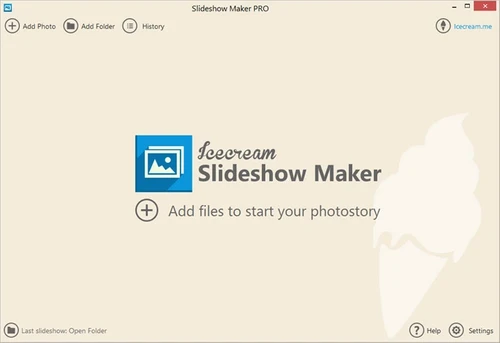
  2. Step 2: They need to add in files and folders to start working on their project. They can either choose different files one by one or press the CTRL key and hold it to select multiple files at once. Moreover, they can also add folders in the same way.
  3. Step 3: The working window gets divided into two parts once the files are added. The left side showcases the slide queues and the right side contains the preview window along with other relevant settings. 
  4. Step 4: You can customize the transition styles and time for individual files and preview the applied effects within the built-in player on the right.
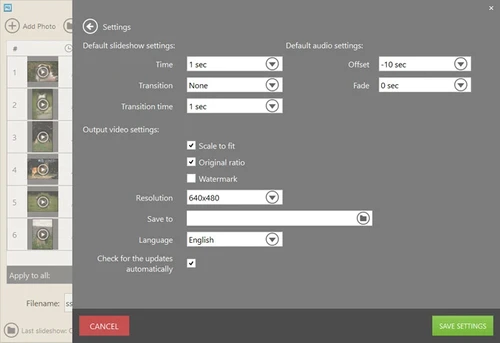
  5. Step 5: Creators can select a desired resolution for the entire slide show, specify exact durations for the transition effects and add audio of their choice. 
  6. Step 6: Once all the effects are being added, creators can preview the entire slide show to get a detailed overview of their work and press on the “Create” button.    

Pricing of Icecream Slideshow Maker

The pricing of Icecream Slideshow Maker starts from $19.95. You can request for a callback for best photo editor and our customer care executives will get back to you in real-time. 

Compatible Platforms for Icecream Slideshow Maker

Icecream Slideshow Maker is compatible with Windows, XP, Vista, 2000, 2003, 7, 8, 8.1 and 10 versions.

Benefits of Icecream Slideshow Maker

  1. Share: The slideshows generated through Icecream Slideshow Maker can be uploaded on Dropbox, YouTube, Google Drive etc. Further, you can also share the particulars with external clients as per business needs.
  2. Clear List: The advanced clear list option offered by Icecream Slideshow Maker allows you to clear all the selected files on a single click, but maintain the pre-applied settings at the same time.
Read more

Icecream Apps Company Details

Founded Year:  2014

Icecream Apps is a high quality software developing company.

Director/Founders NA
Company Size 1-100 Employees

Icecream Slideshow Maker Pricing & Plans

1 Year License
Starting at $20
    • Quantity

      Quantity
      Quantity
    • Yearly

      Yearly
      Yearly

Key Features

  • No photo number limit

  • Slideshows in MP4, AVI, MOV, WEBM

  • Videos in Full HD, 2K, 4K

  • Commercial use

  • Priority Support

Lifetime License
Starting at $40
    • Licenses (Lifetime)

      Licenses (Lifetime)
      Licenses (Lifetime)

Key Features

  • Lifetime license - Windows

  • No photo number limit

  • Slideshows in MP4, AVI, MOV, WEBM

  • Videos in Full HD, 2K, 4K

  • Commercial use

  • Priority Support

Photo PRO Package
Starting at $69
    • Licenses (Lifetime)

      Licenses (Lifetime)
      Licenses (Lifetime)

Key Features

  • Lifetime license for ALL PHOTO products by Icecrea

  • Photo Editor

  • Slideshow Maker

  • Image Resizer

Icecream Slideshow Maker Features

  • icon_check Slide Setting
    By using Icecream Slideshow Maker, you can specify the transition-related duration of each photo as per requirement.   
  • icon_check Add Music
    Icecream Slideshow Maker supports a wide variety of audio formats like M4A, MP3, WAV and more, enabling you to add multiple
  • icon_check Add Texture
    Creators can customize the texts within their slides shows. They can change the position and colour of the fonts and can even add
  • icon_check Transitions
    By using Icecream Slideshow Maker, you get access to multiple transition effects like pixelate, fade to black, flip over, zoom
  • icon_check Preview
    You can preview the entire creation before finalizing all the edits and changes applied within individual slides.  
  • icon_check Windows Slide Show Maker
    The software is compatible with Windows versions XP, Vista, 7, 8, 8.1 and 10.  
  • icon_check Resume Project
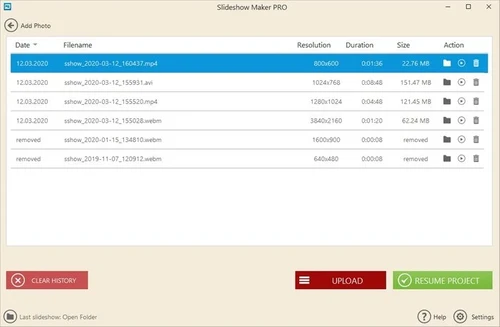
    Icecream Slideshow Maker is equipped with a history panel of its own using which creators can resume their work on previously
  • icon_check Sort Slide
    You can rearrange all the slides in a queue either by their file name or on a random basis.   
  • icon_check Burn DVD
    Slideshows can be burned to CDs or DVDs just after creating them directly from Icecream Slideshow Maker.  
  • icon_check 4k Slikdeshows
    Icecream Slideshow Maker can be used to generate slideshows having a resolution up to 3840 x 2160.  
  • icon_check Multi Format Support
    Creators can save their individual work in MP4, WEBM, AVI and MOV formats.

Icecream Slideshow Maker Specifications

Supported Platforms
Windows Windows
Devices
Desktop Desktop
Deployment
Perpetual Perpetual
Suitable For
All Industries
Business Specific
All Businesses
Customer Support
Email Communities
Language
English
Training Resources
Videos

Explore the Best Alternative Solutions Similar to Your Business Size and Needs

Icecream Slideshow Maker Review

4.5

Out of 5

img

Overall Rating

Based on
4 Verified Ratings

Rating Breakdown

  • Features 4.2
  • Value for Money 4.6
  • Ease of Use 4.7
  • Customer Support 4.7

95% Recommend this Product

Add Review

Be the First to Review

This product has no reviews yet. Be the first to leave your feedback.

Add Review

Compare Icecream Slideshow Maker With other Presentation Software

Products
Ratings
Pricing
Device Supported
Deployment
Supported Platforms
  • img

    Icecream Slideshow Maker

  • 4.5

  • Price On Request

  • Desktop

    Mobile

  • Web based

    On Premises

  • Windows

    Mac OS

  • img

    Tome AI

  • 4.5

  • Price On Request

  • Desktop

    Mobile

  • Web based

    On Premises

  • Windows

    Mac OS

  • img

    Pop AI

  • 4.3

  • Price On Request

  • Desktop

    Mobile

  • Web based

    On Premises

  • Windows

    Mac OS

  • img

    Napkin AI

  • 4.3

  • Price On Request

  • Desktop

    Mobile

  • Web based

    On Premises

  • Windows

    Mac OS

  • img

    Plus AI

  • 4.3

  • Price On Request

  • Desktop

    Mobile

  • Web based

    On Premises

  • Windows

    Mac OS

  • img

    Slidesgo

  • 4.1

  • Price On Request

  • Desktop

    Mobile

  • Web based

    On Premises

  • Windows

    Mac OS

  • img

    Presentations AI

  • 4.1

  • Price On Request

  • Desktop

    Mobile

  • Web based

    On Premises

  • Windows

    Mac OS

  • img

    Prezi

  • 4.5

  • Price On Request

  • Desktop

    Mobile

  • Web based

    On Premises

  • Windows

    Mac OS

  • img

    PPT AI

  • 4.1

  • Price On Request

  • Desktop

    Mobile

  • Web based

    On Premises

  • Windows

    Mac OS

  • img

    Mentimeter

  • 4.7

  • Price On Request

  • Desktop

    Mobile

  • Web based

    On Premises

  • Windows

    Mac OS

  • img

    Zoho Show

  • 4.3

  • ₹ 140

  • Desktop

    Mobile

  • Web based

    On Premises

  • Windows

    Mac OS

(0) Product(s) selected

Icecream Slideshow Maker Alternatives

See All Icecream Slideshow Maker Alternatives

Starting Price:

$12 /User/Month

Starting Price:

$15 /Month

Starting Price:

₹189 /Month

SAVE UPTO 60%

Starting Price:

$10 /Month

Starting Price:

$29 /Month

Starting Price:

$3 /Month

Starting Price:

$12 /Month

Available

Price on Request

Starting Price:

$10 /Month

Articles for Icecream Slideshow Maker

See All Related Articles

What type of output file resolutions are supported by Icecream Slideshow Maker?

The software supports seven different output file resolutions like 640x480, 1024x268, 800x600, 1280x720, 1600x1200, 1280x1024 and 1920x1080.

What type of image formats are supported by Icecream Slideshow Maker?

The software supports a wide variety of image formats like JPEG, BMP, JPG, PNG and GIF.

Can I get a demo of Icecream Slideshow Maker?

Yes. You can request an online demo of Icecream Slideshow Maker. Our product experts will get back to you as per the date and time mentioned in your demo schedule.

What are the system requirements for installing Icecream Slideshow Maker?

You need to have: RAM: 2GB Processor: Intel AMD or any equivalent processor running at a clock speed of 2GHz. Hard Disk: 250MB for installation and 2GB for making slideshows.

Does Icecream Slideshow Maker have a mobile app?

No, the software does not have a mobile app as of now.

How much does Icecream Slideshow Maker cost?

The pricing of Icecream Slideshow Maker starts from $19.95 at Techjockey.com.

20,000+ Software Listed

Best Price Guranteed

Free Expert Consultation

2M+ Happy Customers

Terms and Condtions

close

Users with registered businesses can purchase goods from merchants on the platform to satisfy their business needs. Users are not permitted to utilize any products acquired through the platform for resale, advertising, business, or further distribution.

For each purchase made, users will receive a Tax Invoice (or 'GST invoice') that includes specific details such as:

  • the GSTIN of the user associated with their registered business, and

  • the specified Entity Name for their business.

It should be noted that not all products are eligible for GST Invoice. Only the products displayed by participating sellers with the 'GST-based Invoice Available' callout on the product description page would qualify.

Certain goods and services are not eligible to get a GST Invoice, including items with VAS, i.e., Value Added Services (e.g., Total Mobile Protection/Assured Buyback) and those involving an exchange offer at the time of purchase.

Users must ensure the accuracy of the GSTIN, and business entity name provided for the GST Invoice. Requests for corrections into GST Invoice would not be accommodated by Techjockey.com or any Seller, and any issues arising from user-provided information are the sole responsibility of users.

Techjockey.com is not liable for the GST Invoice or any associated input tax credit. To efficiently claim an input tax credit, users should select the registered place of business address as per the GST authority's data and follow the provisions of the GST Act and rules.

To claim an input tax credit, the delivery and billing addresses must match. Furthermore, input tax credits will not be granted if the delivery address and GSTIN on the invoice are from different states. In case of incorrect GST details provided during the order placement, the order will be canceled automatically.