USA
USA UAE
UAESmall Business
Designed for startups and growing businesses


See More




Brand: Ordenado Labs
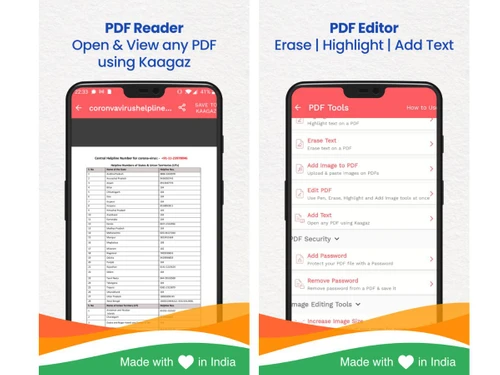
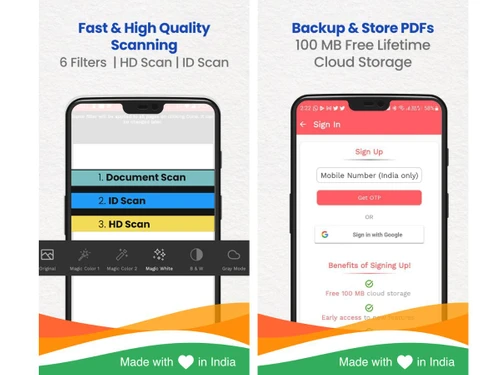
Kaagaz is a mobile document management app that lets users scan, edit, organize, and manage PDFs and other documents quickly and easily.
See MoreHave you used Kaagaz before?
Share your insights for better experience
Brand: Ordenado Labs
Founded Year: 2020
Kaagaz is a mobile office suite for Bharat Solopreneurs, including products like PDF Scanner & Editor, Poster & Video Maker, etc.
Looking for The Right Pricing?
Share your requirements and get a plan built around your business.
Price Available on Request
Get personalised Kaagaz pricing that fits your needs. Our team will connect with you.
 Document Scanning OCR Recognition PDF Creation PDF Editor Document Organization Cloud Backup Advanced Search Digital Signature PDF Compression Document Sharing Multi-Page Scanning Image Enhancement Password Protection File Transfer

Watch the demo video to explore key features, real workflows, and how the software fits your business needs.
 Windows
  iOS
iOS  Android MacOS
  Desktop
  Mobile
  Tablet
  iPad
iPad  Cloud-Based
  Perpetual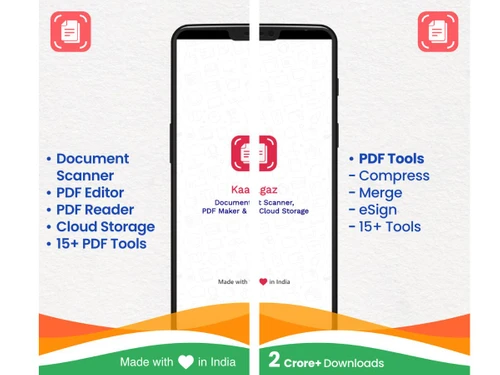
Small Business
Designed for startups and growing businesses
Medium Business
Built for business growth and flexibility
Enterprises
Designed for complex and large-scale business needs
Techjockey Trusted Reviews from Verified Users
No reviews are currently available for Kaagaz. Discover similar PDF Software reviews

Adobe Acrobat Pro DC for teams
Whats great - The best thing about Acrobat Pro DC is that it is a Portable Documents Format Software which allows me to carry my creations ... read more

Nuance Power PDF
Whats great - Robust editing tools and secure document handling. read more

Kofax Power PDF
Whats great - Robust editing tools and secure document handling. read more
Kaagaz
Price On Request
Desktop
Mobile
Web based
On Premises
Windows
Mac OS

Foxit PDF Editor
₹ 12000
Desktop
Mobile
Web based
On Premises
Windows
Mac OS

Gravity PDF
Price On Request
Desktop
Mobile
Web based
On Premises
Windows
Mac OS

Zoho PDF Editor
Price On Request
Desktop
Mobile
Web based
On Premises
Windows
Mac OS

PDF Expert
₹ 7200
Desktop
Mobile
Web based
On Premises
Windows
Mac OS
Adobe Acrobat Pro DC for teams
₹ 23864
Desktop
Mobile
Web based
On Premises
Windows
Mac OS
JOPDF
Price On Request
Desktop
Mobile
Web based
On Premises
Windows
Mac OS

Hybiscus
Price On Request
Desktop
Mobile
Web based
On Premises
Windows
Mac OS

Soda PDF
₹ 1111
Desktop
Mobile
Web based
On Premises
Windows
Mac OS

BentoPDF
Price On Request
Desktop
Mobile
Web based
On Premises
Windows
Mac OS

Systweak PDF Editor
₹ 2499
Desktop
Mobile
Web based
On Premises
Windows
Mac OS
(0) Product(s) selected
Kaagaz Scanner is used by over 35 million users across India for document management, indicating its widespread trust and reliability among its user base.
The Kaagaz PDF App, which includes scanning capabilities, is available for free download. Some specialized tools like PosterX AI operate on a Pay per use model, while others like Poster Maker are also free to download.
Kaagaz Scanner is designed for simplicity and speed with no learning curve, allowing users to just use it out of the box. As a mobile-first application, you can easily scan documents by pointing and clicking, transforming your phone into a powerful document manager.
Kaagaz Scanner is primarily used to transform your phone into a powerful document manager, enabling users to scan, edit, and manage PDFs with professional quality results. It helps individuals and businesses manage documents and become part of the digital economy effortlessly.
Kaagaz pricing details are available on request on techjockey.com.
Kaagaz is built for Everyday India and Bharat users, empowering individuals like small shop owners, freelancers, software engineers, and chartered accountants to manage documents and promote their businesses online.
Kaagaz offers two powerful suites: the Documents Suite for complete document management including scanning, PDF editing, and cloud storage, and the Growth Suite for AI-powered marketing tools like poster and video makers.
Yes, Kaagaz integrates AI into several features, including Kaagaz AI for talking to PDFs, PosterX AI for generating marketing creatives, and AI content optimization for its Resume Maker.
Yes, Kaagaz provides an AI-Powered Professional Resume Maker that helps build ATS-friendly resumes with AI content optimization, allowing users to download them as Word files without needing to log in.
Yes, Kaagaz offers secure cloud storage as part of its Documents Suite and within the Kaagaz PDF App, allowing users to store and manage their scanned and edited documents.
20,000+ Software Listed
Best Price Guranteed
Free Expert Consultation
2M+ Happy Customers
Terms and Condtions

Users with registered businesses can purchase goods from merchants on the platform to satisfy their business needs. Users are not permitted to utilize any products acquired through the platform for resale, advertising, business, or further distribution.
For each purchase made, users will receive a Tax Invoice (or 'GST invoice') that includes specific details such as:
the GSTIN of the user associated with their registered business, and
the specified Entity Name for their business.
It should be noted that not all products are eligible for GST Invoice. Only the products displayed by participating sellers with the 'GST-based Invoice Available' callout on the product description page would qualify.
Certain goods and services are not eligible to get a GST Invoice, including items with VAS, i.e., Value Added Services (e.g., Total Mobile Protection/Assured Buyback) and those involving an exchange offer at the time of purchase.
Users must ensure the accuracy of the GSTIN, and business entity name provided for the GST Invoice. Requests for corrections into GST Invoice would not be accommodated by Techjockey.com or any Seller, and any issues arising from user-provided information are the sole responsibility of users.
Techjockey.com is not liable for the GST Invoice or any associated input tax credit. To efficiently claim an input tax credit, users should select the registered place of business address as per the GST authority's data and follow the provisions of the GST Act and rules.
To claim an input tax credit, the delivery and billing addresses must match. Furthermore, input tax credits will not be granted if the delivery address and GSTIN on the invoice are from different states. In case of incorrect GST details provided during the order placement, the order will be canceled automatically.