linkedin
RevPDF logo
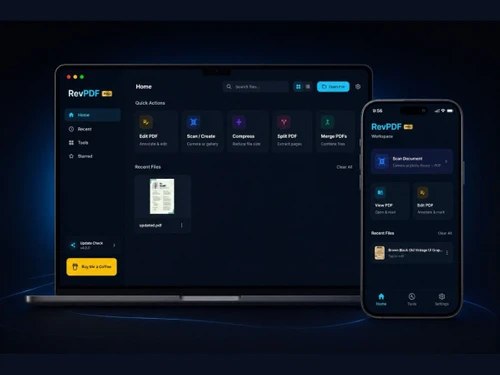
revpdf dashboard
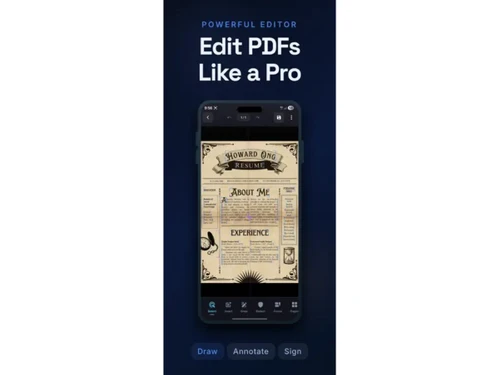
revpdf edit pdf
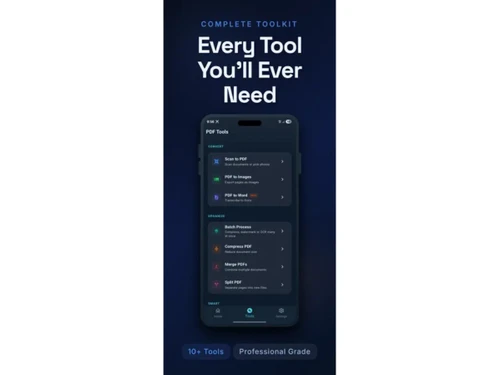
revpdf files

RevPDF

Brand: RevPDF

  • No Ratings & Reviews

RevPDF enables users to edit, convert, compress, merge, and manage PDF files securely on their devices.

See More

Have you used RevPDF before?

Share your insights for better experience

Add a Review

Free Forever

Get started immediately at no cost. Upgrade anytime if your business demand more.

100% Genuine
Products
Best Price
Guaranteed
Safe & Secure
Payment
  • Description

  • Pricing

  • Features

  • Specification

  • Review

  • FAQ

RevPDF Software Overview

What is RevPDF?

RevPDF is a PDF software that helps users create, edit, convert, and organize PDF files easily. It allows users to merge, split, and compress PDF documents. The software supports converting PDFs to other file formats and vice versa. Users can add annotations, comments, and signatures to documents. RevPDF helps improve document sharing and collaboration. It offers tools to protect files with passwords and security settings. The platform is designed to be simple and user-friendly.

It supports both personal and business document needs. Users can manage files efficiently and save time. The software works with various document formats for flexibility. It helps increase productivity when handling digital documents.

Why Choose RevPDF Software?

  • Offline PDF Processing: Edit and manage PDF files directly on your device without cloud dependency.
  • Enhanced Data Privacy: Keeps documents secure by avoiding unnecessary file uploads.
  • Easy PDF Editing: Modify text, images, and document layouts with ease.
  • Fast PDF Conversion: Convert PDFs into multiple file formats quickly.
  • PDF Compression: Reduce file sizes while maintaining document quality.
  • Merge Multiple PDFs: Combine several PDF files into one organized document.
  • Split PDF Files: Extract or separate pages efficiently.
  • Annotation Tools: Highlight, comment, and mark documents for collaboration.
  • Document Redaction: Remove sensitive information securely.

Benefits of RevPDF Software

  • User-Friendly Interface: Simple navigation suitable for all user levels.
  • Cross-Platform Compatibility: Works across desktop and mobile devices.
  • No Account Required: Start using features without lengthy registration.
  • Quick Performance: Process documents with minimal waiting time.
  • Secure Document Handling: Designed with privacy-focused workflows.
  • Paperless Workflow Support: Helps manage digital documents efficiently.
  • Reliable File Management: Organize and access PDF files conveniently.
  • Professional Editing Features: Suitable for business and personal use.
  • Flexible Document Sharing: Prepare files for easier distribution.
  • Time-Saving Automation: Simplifies repetitive PDF tasks.
  • All-in-One PDF Solution: Combines editing, conversion, compression, and management tools in one platform.

RevPDF Pricing

RevPDF is available for FREE at techjockey.com.

The pricing model is based on different parameters, including extra features, deployment type, and the total number of users. For further queries related to the product, you can contact our product team and learn more about the pricing and offers.

Read more

RevPDF Pricing & Plans

This Product is Available Free Forever.

Start instantly with no fees, no subscriptions, and no commitments.

  • Full access to basic version available
  • No credit card or sign-up required

Free Forever Plan

Get started immediately at no cost. Upgrade anytime if your business demand more.

Free Forever

RevPDF Features

  • icon_check PDF Merging
    Combine multiple PDF files into a single organized document.
  • icon_check PDF Splitting
    Split large PDF files into smaller pages or sections easily.
  • icon_check Compress PDFs
    Reduce PDF file size while maintaining document quality.
  • icon_check PDF to Word
    Convert PDF files into editable Word documents accurately.
  • icon_check Image to PDF Conversion
    Convert JPG, PNG, and images into PDF documents.
  • icon_check PDF Rotation
    Rotate PDF pages to the correct orientation effortlessly.
  • icon_check PDF Page Reordering
    Rearrange PDF pages with drag-and-drop functionality.
  • icon_check PDF Password Protection
    Secure PDF documents with password-based encryption.
  • icon_check Remove Password
    Remove password restrictions from authorised PDF documents.
  • icon_check OCR Text Recognition
    Extract editable text from scanned PDFs and images.
  • icon_check PDF Editing
    Modify text, images, and layouts within PDF documents.
  • icon_check Digital Signature Support
    Add and verify digital signatures on PDF files.
  • icon_check Batch File Processing
    Process multiple PDF files simultaneously for efficiency.

RevPDF Specifications

Supported Platforms
Ubuntu Ubuntu Windows Windows iOS iOS
Devices
Desktop Desktop Mobile Mobile Tablet Tablet iPad iPad
Deployment
Perpetual Perpetual
Suitable For
All Industries
Business Specific
All Businesses
Business Size
Individual Small Business Startups Medium Business Enterprises SMBs SMEs MSMBs MSMEs Freelancers
Customer Support
Email
Language
English
Training Resources
Documentation Videos
AI Features
AI Integrated

RevPDF Review

Techjockey Trusted Reviews from Verified Users

No reviews are currently available for RevPDF. Discover similar PDF Software reviews

  • Adobe Acrobat Pro DC for teams

    4.6

    Whats great - The best thing about Acrobat Pro DC is that it is a Portable Documents Format Software which allows me to carry my creations ... read more
  • Nuance Power PDF

    4.4

    Whats great - Robust editing tools and secure document handling. read more

  • Kofax Power PDF

    4.3

    Whats great - Robust editing tools and secure document handling. read more

Articles for RevPDF

See All Related Articles

How much does RevPDF Software cost?

RevPDF is available for FREE at techjockey.com.

Is there a mobile app available for RevPDF Software?

Yes, RevPDF offers mobile apps for iOS devices.

Which operating systems are compatible with RevPDF Software?

RevPDF supports Windows, Ubuntu and iOS.

Does RevPDF Software offer a free trial?

Yes, RevPDF offers a free trial for users to explore its features.

How does RevPDF Software function?

RevPDF helps users create, edit, convert, merge, and manage PDF documents through an easy-to-use platform.

Who uses RevPDF Software?

Individuals, businesses, professionals, and organizations use RevPDF Software.

Is a free demo available for RevPDF Software?

Yes, RevPDF provides a free demo for interested users.

Is RevPDF Software available for free?

No, RevPDF is a paid software solution, though it offers a free trial.

20,000+ Software Listed

Best Price Guranteed

Free Expert Consultation

2M+ Happy Customers

Terms and Condtions

close

Users with registered businesses can purchase goods from merchants on the platform to satisfy their business needs. Users are not permitted to utilize any products acquired through the platform for resale, advertising, business, or further distribution.

For each purchase made, users will receive a Tax Invoice (or 'GST invoice') that includes specific details such as:

  • the GSTIN of the user associated with their registered business, and

  • the specified Entity Name for their business.

It should be noted that not all products are eligible for GST Invoice. Only the products displayed by participating sellers with the 'GST-based Invoice Available' callout on the product description page would qualify.

Certain goods and services are not eligible to get a GST Invoice, including items with VAS, i.e., Value Added Services (e.g., Total Mobile Protection/Assured Buyback) and those involving an exchange offer at the time of purchase.

Users must ensure the accuracy of the GSTIN, and business entity name provided for the GST Invoice. Requests for corrections into GST Invoice would not be accommodated by Techjockey.com or any Seller, and any issues arising from user-provided information are the sole responsibility of users.

Techjockey.com is not liable for the GST Invoice or any associated input tax credit. To efficiently claim an input tax credit, users should select the registered place of business address as per the GST authority's data and follow the provisions of the GST Act and rules.

To claim an input tax credit, the delivery and billing addresses must match. Furthermore, input tax credits will not be granted if the delivery address and GSTIN on the invoice are from different states. In case of incorrect GST details provided during the order placement, the order will be canceled automatically.