linkedin
VizMan logo
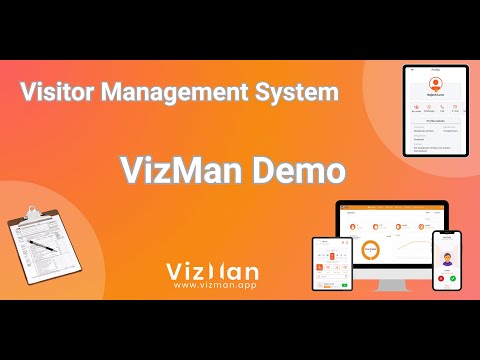
play Visitor Management System (VMS) Demo | VizMan | Admin Module
vizman-dashboardpage
VizMan-organization

VizMan

Brand: Naapbooks Limited

  • 4.7

  • 1 Rating & 1 Review

VizMan helps organizations manage visitor check-ins, meeting schedules, courier tracking, and workplace security with a comprehensive visitor management system.

See More

Have you used VizMan before?

Share your insights for better experience

Add a Review
Starting Price
₹399 excl.GST
₹ 471 incl. GST

View plans

offer Save upto 18%, Get GST Invoice on your business purchase T&C
offer Buy Now & Pay Later, Check offer on payment page.
Buy Now
100% Genuine
Products
Best Price
Guaranteed
Safe & Secure
Payment
  • Description

  • Pricing

  • Features

  • Specification

  • Review

  • Compare

  • Alternatives

  • FAQ

Starting at ₹399
Buy Now

VizMan Software Overview

What is VizMan?

VizMan is a modern Visitor Management System (VMS) designed to automate and digitize the process of tracking visitors for organizations and institutions. It replaces traditional paper logbooks with a secure, efficient, and user-friendly digital platform. The system streamlines the entire visitor journey, from pre-registration and check-in to departure, enhancing security and operational efficiency. VizMan provides a seamless experience for visitors, employees, and security personnel through a combination of web interfaces and dedicated mobile applications for both Android and iOS.

The software is built to manage not just visitors, but also meetings, events, couriers, and even facility spaces. By leveraging features like OTP verification, QR codes, and digital passes, VizMan ensures that every entry is authenticated and recorded, providing organizations with real-time insights and a complete audit trail for improved safety and compliance.

Why Choose VizMan?

  • Security & Privacy: The platform is built with cutting-edge safeguards to protect confidential information. It ensures exceptional data privacy and security for both the organization and its visitors.
  • Efficiency: By automating check-ins, notifications, and record-keeping, VizMan streamlines front-desk operations. This reduces manual effort, minimizes visitor wait times, and makes the entire management process more effective.
  • Experience: VizMan helps create a positive first impression. The smooth, quick, and professional check-in process provides a welcoming and user-friendly experience for guests, reflecting well on the host organization.
  • Management: The system centralizes all visitor-related activities into a single dashboard. This allows administrators to streamline organizational procedures, monitor traffic, and generate insightful reports with ease.
  • Verifications: VizMan enables in-depth credential validations through methods like real-time OTP authentication. This robust verification process helps create a secure and dependable environment by ensuring every visitor is properly identified.

Advanced Features of VizMan

  • OTP Verification: Secure every check-in by verifying visitors in seconds with a real-time One-Time Password (OTP) sent to their mobile device, preventing unauthorized entry.
  • Meeting Management: Effortlessly schedule, approve, and track meetings. The system sends automated notifications to hosts and visitors, saving time and preventing delays.
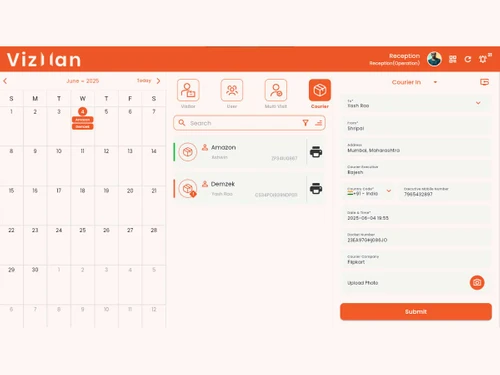
  • Courier Management: Maintain full accountability for all incoming packages. Reception or security can record, track, and confirm courier deliveries directly within the system.
  • Visitor Pass [Print/ePass]: Instantly issue professional, branded visitor badges for printing or send digital ePasses with QR codes directly to a visitor's smartphone for quick and secure entry.
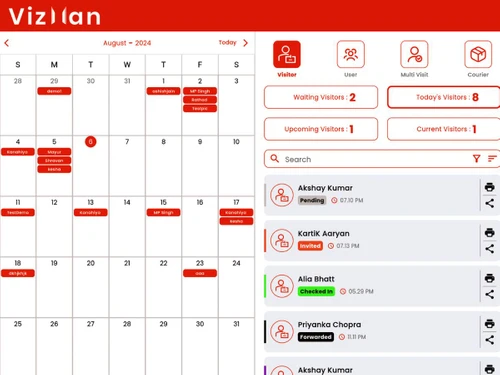
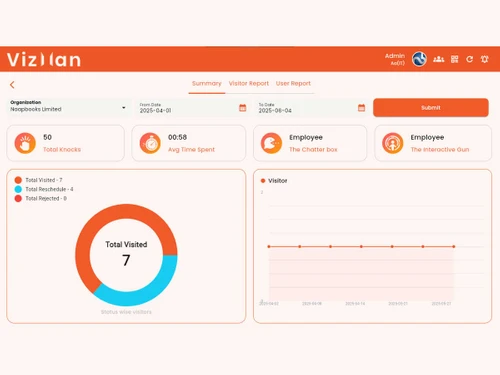
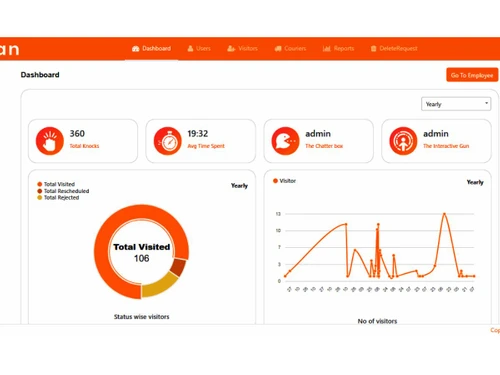
  • Dashboard & Analytics: Access a powerful dashboard that provides live visitor insights, traffic patterns, and detailed analytics. These reports help improve workplace safety, resource planning, and compliance.
  • Multi-Device Accessibility: The software can be accessed simultaneously on multiple devices, including desktops, tablets, and smartphones, ensuring flexibility for all users.

Modules of VizMan

  • Admin Module: This provides a centralized, high-level overview of all visitor activity. Administrators can configure system settings, manage users, view comprehensive analytics, and generate reports for auditing and strategic planning.
  • Security Module: Designed for gate or entry-point personnel, this module focuses on the verification and check-in process. Security staff can use it to validate appointments, capture visitor details, issue passes, and monitor entries and exits in real-time.
  • Receptionist Module: This module empowers front-desk staff to manage the visitor experience efficiently. They can pre-register guests, handle walk-in visitors, manage courier deliveries, and provide assistance, all from an intuitive interface.
  • Host/Employee Module: Employees can use this module to pre-schedule meetings with visitors, receive instant notifications when their guests arrive, and approve or deny meeting requests, streamlining communication and reducing reception workload.

How to Use VizMan?

  1. Schedule & Invite: An employee (host) schedules a meeting and invites an external visitor through the VizMan portal or app.
  2. Visitor Pre-Registration: The visitor receives an email or SMS notification with meeting details and a secure link or QR code for pre-registration.
  3. On-Site Check-In: Upon arrival, the visitor checks in at the reception or security gate using the QR code or by verifying their identity via an OTP sent to their mobile number.
  4. Host Notification: The host is automatically notified via in-app notification, SMS, or email that their guest has arrived.
  5. Visitor Pass Issuance: A digital or physical visitor pass is issued for the duration of the visit.
  6. Check-Out: The visitor completes a simple check-out process upon departure, and the system logs the exit time, completing the visit record.

VizMan Pricing

VizMan price starts at INR 399 at techjockey.com.

The pricing model is based on different parameters, including extra features, deployment type, and the total number of users. For further queries related to the product, you can contact our product team and learn more about the pricing and offers.

Read more

Naapbooks Limited Company Details

Founded Year:  2017

Naapbooks Limited is a pioneer in driving digital transformation in the financial services and e-governance sectors. With a diverse portfolio spanning ERP systems, financial management solutions

Director/Founders Abhishek Jain, Ashish Jain, Yaman Saluja
Company Size 1-100 Employees

VizMan Pricing & Plans

Basic

Calculated Price

₹ 399 Exclusive of all taxes
    • Licenses

      Licenses
      Licenses
    • Monthly

      Monthly
      Monthly

Key Features

  • 50 Invitees/Month

  • 10 Users

  • SMS Verifications

  • E-mail Notifications

  • In-app Notifications

  • Web Interface Access

Standard

Calculated Price

₹ 899 Exclusive of all taxes
    • Licenses

      Licenses
      Licenses
    • Monthly

      Monthly
      Monthly

Key Features

  • 125 Invitees/Month

  • 25 Users

  • SMS Verifications

  • E-mail Notifications

  • In-app Notifications

  • Web Interface Access

Premium

Calculated Price

₹ 1999 Exclusive of all taxes
    • Licenses

      Licenses
      Licenses
    • Monthly

      Monthly
      Monthly

Key Features

  • 300 Invitees/Month

  • 50 Users

  • SMS Verifications

  • E-mail Notifications

  • In-app Notifications

  • Web Interface Access

VizMan Features

  • icon_check Check-in & Check-out
    Streamline visitor entry/exit with QR-based self check-in and secure check-out via receptionist or security module.
  • icon_check Capture Photo
    Enhance security by capturing visitor photos and ID proofs during check-in for accurate identification and records.
  • icon_check OTP Verification
    Authenticate visitors at entry points through real-time OTP verification, ensuring authorized access only.
  • icon_check Meeting Calendar
    Efficiently schedule meetings, send invitations, and notify hosts, optimizing resources and visitor experience.
  • icon_check Accept/Reject Management
    Hosts can approve or reject visitor meetings, maintaining control over access and scheduling.
  • icon_check Visitor Analytics
    Access personalized dashboards with analytics on visitor patterns, aiding in informed decision-making.
  • icon_check Email & SMS Notification
    Receive real-time updates and alerts via email and SMS, enhancing communication and responsiveness.
  • icon_check Gate Pass
    Issue printed or electronic gate passes to visitors, streamlining authentication and access control.
  • icon_check Blacklist
    Flags unwanted individuals instantly to prevent them from entering your secure facility today.
  • icon_check Courier Manager
    Tracks incoming packages and notifies the correct recipient for a quick pickup now.
  • icon_check Health Screening Management
    Includes digital forms for visitors to declare health status before entering the building.
  • icon_check Custom Branding
    Permits you to add your company logo and colors to the check-in kiosk interface today.
  • icon_check Staff Attendance
    Tracks employee entry and exit times to simplify payroll and office hours monitoring.
VizMan Demo Video play icon

Get VizMan Demo

Watch the demo video to explore key features, real workflows, and how the software fits your business needs.

Understand
Key Features
Personal
Demo Insights
Interactive
Demo Support

VizMan Specifications

Supported Platforms
Ubuntu Ubuntu Windows Windows iOS iOS Android Android MacOS MacOS Linux Linux
Devices
Desktop Desktop Mobile Mobile
Deployment
Cloud-Based Cloud-Based Perpetual Perpetual
Suitable For
All Industries
Business Specific
All Businesses
Business Size
Small Business Startups Medium Business Enterprises SMBs SMEs MSMBs MSMEs
Customer Support
Email Communities
Language
English
Training Resources
Videos

Explore the Best Alternative Solutions Similar to Your Business Size and Needs

VizMan Review

4.7

Out of 5

img

Overall Rating

Based on
1 Verified Review

Rating Breakdown

  • Features 5
  • Value for Money 5
  • Ease of Use 4
  • Customer Support 5

100% Recommend this Product

Add Review

Khushi

Digital Marketer

Industry: Computer Networking

4.7

Reviewed on: Jan 23, 2024

Techjockey Verified

“Efficient and User-Friendly Visitor Management System”

Pros

The Visitor Management System exceeded expectations with its seamless interface and efficient functionality. Streamlining check-ins and enhancing security, it offers a user-friendly experience.

Cons

Nothing

Compare VizMan With other Visitor Management Software

Products
Ratings
Pricing
Device Supported
Deployment
Supported Platforms
  • img

    VizMan

  • 4.7

  • ₹ 399.00 excl. GST

  • Desktop

    Mobile

  • Web based

    On Premises

  • Windows

    Mac OS

  • img

    Spintly VMS

  • 4.9

  • Price On Request

  • Desktop

    Mobile

  • Web based

    On Premises

  • Windows

    Mac OS

  • img

    BelleVie

  • 5

  • Price On Request

  • Desktop

    Mobile

  • Web based

    On Premises

  • Windows

    Mac OS

  • img

    Vizitor App

  • 5

  • ₹ 19200

  • Desktop

    Mobile

  • Web based

    On Premises

  • Windows

    Mac OS

  • img

    Archie

  • 4.3

  • Price On Request

  • Desktop

    Mobile

  • Web based

    On Premises

  • Windows

    Mac OS

  • img

    EasyLobby

  • 4.3

  • Price On Request

  • Desktop

    Mobile

  • Web based

    On Premises

  • Windows

    Mac OS

  • img

    Entry2Exit

  • 4.7

  • Price On Request

  • Desktop

    Mobile

  • Web based

    On Premises

  • Windows

    Mac OS

  • img

    VAMS

  • 4.5

  • Price On Request

  • Desktop

    Mobile

  • Web based

    On Premises

  • Windows

    Mac OS

  • img

    GuestRAR

  • 4.1

  • ₹ 1999

  • Desktop

    Mobile

  • Web based

    On Premises

  • Windows

    Mac OS

(0) Product(s) selected

VizMan Alternatives

See All VizMan Alternatives

Available

Price on Request

Starting Price:

$109 /Month

Available

Price on Request

VAMS

4.5

Available

Price on Request

Available

Price on Request
Available

Price on Request
Starting Price:

$19 /Location/Month

Available

Price on Request
Articles for VizMan

See All Related Articles

What are the main features of VIZMAN?

Self Check In/Out,Capture Photo,Capture IDs,OTP Verification,Meeting Calendar,Accept/Reject Management, Reschedule Meeting, Employee Import,Visitor Import, Invite Visitor, VIP Visitor, Multibadge Templates ,Badge Printing, Visitor Pass, Gate Pass, Visitor Analytics, Real Time View

What is Vizman?

VizMan is a smart visitor management system that automates the tracking of visitors for organizations and institutions through a secure digital platform.

How do I log into Vizman?

You can access VizMan through its web interface or by using the dedicated mobile application which is available for both Android and iOS devices.

How much does VizMan cost?

VizMan price starts at INR 399 at techjockey.com.

What does VizMan do?

VizMan streamlines visitor management with features like OTP-verified check-ins, meeting and courier management, digital or printed visitor passes, and an analytics dashboard.

Does VizMan support different user roles?

Yes, VizMan provides multiple user modules with specific role-based access for Admin, Security, Reception, and Host to manage visitors effectively.

Can VizMan be used to track packages and couriers?

Yes, the software includes a Courier Management module that allows you to record, track, and confirm couriers at the reception for full accountability.

How does VizMan verify visitor identity for security?

VizMan enhances security by verifying every visitor in seconds with real-time OTP (One-Time Password) authentication sent to their mobile device during check-in.

Is there a free trial available for VizMan?

Yes, VizMan offers a 14-day free trial that provides full access to all features without requiring a credit card to register.

Who can use VizMan?

VizMan is ideal for corporates, hospitals, educational institutions, factories, warehouses, event organizers, housing societies, and government offices seeking secure and efficient visitor management.

20,000+ Software Listed

Best Price Guranteed

Free Expert Consultation

2M+ Happy Customers

Terms and Condtions

close

Users with registered businesses can purchase goods from merchants on the platform to satisfy their business needs. Users are not permitted to utilize any products acquired through the platform for resale, advertising, business, or further distribution.

For each purchase made, users will receive a Tax Invoice (or 'GST invoice') that includes specific details such as:

  • the GSTIN of the user associated with their registered business, and

  • the specified Entity Name for their business.

It should be noted that not all products are eligible for GST Invoice. Only the products displayed by participating sellers with the 'GST-based Invoice Available' callout on the product description page would qualify.

Certain goods and services are not eligible to get a GST Invoice, including items with VAS, i.e., Value Added Services (e.g., Total Mobile Protection/Assured Buyback) and those involving an exchange offer at the time of purchase.

Users must ensure the accuracy of the GSTIN, and business entity name provided for the GST Invoice. Requests for corrections into GST Invoice would not be accommodated by Techjockey.com or any Seller, and any issues arising from user-provided information are the sole responsibility of users.

Techjockey.com is not liable for the GST Invoice or any associated input tax credit. To efficiently claim an input tax credit, users should select the registered place of business address as per the GST authority's data and follow the provisions of the GST Act and rules.

To claim an input tax credit, the delivery and billing addresses must match. Furthermore, input tax credits will not be granted if the delivery address and GSTIN on the invoice are from different states. In case of incorrect GST details provided during the order placement, the order will be canceled automatically.