 USA
USA UAE
UAESmall Business
Designed for startups and growing businesses


See More




Brand: Wangxu Technology
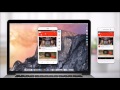
ApowerMirror screen mirror software enables users to screen mirror their smartphone’s screen directly to their desktop. Users can directly screen mirror their phones through USB or Wi-Fi for a better visual experience. With multiple features such as screen sharing, screen recording, screen monitoring, full screen display, etc., it is useful for playing games on PC, watching videos on the big sc...
See MoreHave you used ApowerMirror before?
Share your insights for better experience
Brand: Wangxu Technology
Founded Year: 2014
Wanxu is a tea brand based in China.
Looking for The Right Pricing?
Share your requirements and get a plan built around your business.
Price Available on Request
Get personalised ApowerMirror pricing that fits your needs. Our team will connect with you.
 Annotations Screen Sharing Screen Capture Screen Recording Screen Mirroring Presenter Control Management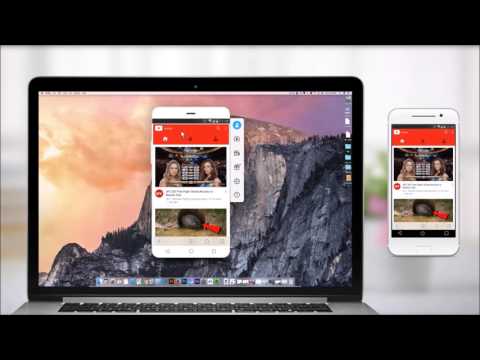

Watch the demo video to explore key features, real workflows, and how the software fits your business needs.
 Windows
  iOS
iOS  Android MacOS
  Desktop
  Mobile
  Cloud-Based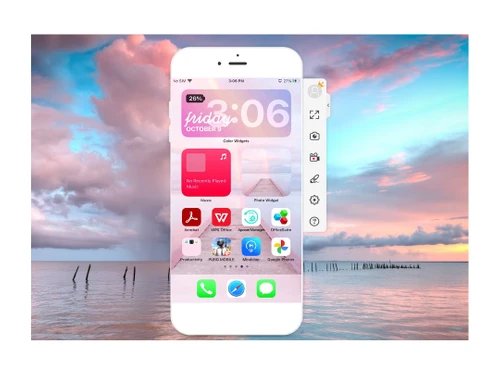
Small Business
Designed for startups and growing businesses
Medium Business
Built for business growth and flexibility
Enterprises
Designed for complex and large-scale business needs
4.8
Out of 5

Overall Rating
Based on
3 Verified Reviews
Rating Breakdown
90% Recommend this Product
Add ReviewUsers generally appreciate ApowerMirror for its effective screen mirroring, recording capabilities, and ease of use during presentations. Many find it particularly valuable for enhancing video streaming and gaming experiences on larger displays. However, some customers report challenges with the application's user-friendliness and performance issues, especially with the mobile functionality, which can be slow and prone to hanging. Overall, the sentiment is positive, with a strong recommendation from users despite noted limitations.

Oct 9, 2022
Techjockey Verified
“ApowerMirror can be used for recording videos.”
Pros
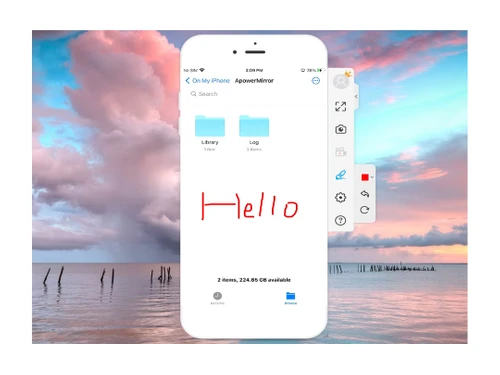
ApowerMirror has really helped me to present my presentation directly via mobile screen through screen mirror. It has also made it easy for me to draw and add notes during the live presentation directly on the big screen.
Cons
ApowerMirror is not a completely user-friendly application. I am not able to easily find its complete modules and features although it works well.
Reason to switch
Reflector worked satisfactory for me, but I liked ApowerMirror more than it because it also offers an application to manage everything from phone.
Oct 9, 2022
Techjockey Verified
“ApowerMirror helps in screen recording and taking real-time screenshots.”
Pros
The best thing about ApowerMirror is that it allows you to record your screen and take its screenshots in real time. Moreover, you can also control and monitor the screen directly from their smartphones so easily. A must have software for your screen sharing and mirroring needs.
Cons
NO CONS
Reason to switch
I chose ApowerMirror over CafeX Suite because it has the option to share screen with multiple members and is very easy to use.
Oct 9, 2022
Techjockey Verified
“ApowerMirror is an amazing tool for screen sharing.”
Pros
I have been using ApowerMirror for 2 years because its screen casting feature allows me to play video games on bigger screens. I really like how it has made it easy for me to enjoy video streaming and gaming on bigger screens. It is a great tool for screen mirroring and casting.
Cons
ApowerMirror mobile function does not work properly. Every time I navigate my phone through this feature, it loads slow. Also, it hangs a lot at the time of screen mirroring
Reason to switch
I have VideoLan to record videos for my organization however, its video recording time is slow that’s why I started using ApowerMirror because of quick loading time.

ApowerMirror
Price On Request
Desktop
Mobile
Web based
On Premises
Windows
Mac OS

Mikogo
Price On Request
Desktop
Mobile
Web based
On Premises
Windows
Mac OS

Surfly
Price On Request
Desktop
Mobile
Web based
On Premises
Windows
Mac OS

Screenleap
Price On Request
Desktop
Mobile
Web based
On Premises
Windows
Mac OS

CrankWheel
Price On Request
Desktop
Mobile
Web based
On Premises
Windows
Mac OS

AnyMeeting
Price On Request
Desktop
Mobile
Web based
On Premises
Windows
Mac OS

AnyDesk
₹ 14580
Desktop
Mobile
Web based
On Premises
Windows
Mac OS

Cisco Webex
₹ 950
Desktop
Mobile
Web based
On Premises
Windows
Mac OS

Zoom Meetings
₹ 1449
Desktop
Mobile
Web based
On Premises
Windows
Mac OS

GoToMeeting
Price On Request
Desktop
Mobile
Web based
On Premises
Windows
Mac OS

VidyoConnect
Price On Request
Desktop
Mobile
Web based
On Premises
Windows
Mac OS
(0) Product(s) selected
Available
Price on Request
Available
Price on Request
Starting Price:
$19
Starting Price:
$29
Starting Price:
₹699
Available
Price on Request

Available
Price on Request

Starting Price:
$99

Available
Price on Request

Available
Price on Request

Available
Price on Request
ApowerMirror screen mirroring app is compatible with Windows, Mac, Android and iOS operating systems.
Yes, ApowerMirror screen mirror software app is available for android and iOS devices.
ApowerMirror screen mirror software demo is available for free with techjockey.com.
ApowerMirror offers a free trial. However, the premium plan with advanced features is available at techjockey.com.
For ApowerMirror screen mirror app installation, insert the given CD/USB flash storage in your system and open the Setup Wizard to get started.
ApowerMirror screen mirroring app helps with screen sharing, screen recording, screen capturing, etc. It's a complete solution for adding annotations to presentations, controlling mobile screens from PC, screen mirroring, etc.
Yes, you can use ApowerMirror for free for a specific period. After that, you need to take membership to use advanced features.
Yes, ApowerMirror is compatible with Mac operating system.
Yes, you can use ApowerMirror to cast your iPhone to Mac.
ApowerMirror screen mirror application is used to mirror android devices on multiple platforms like Windows, Mac, Android and iOS devices.
Yes, ApowerMirror can mirror iPad screen to other iOS devices.
Yes, ApowerMirror screen sharing software is completely safe to use. You can use it for screen sharing, screen recording, screen monitoring, etc.
ApowerMirror screen sharing and mirroring app offers both free and subscription-based pricing plans.
20,000+ Software Listed
Best Price Guranteed
Free Expert Consultation
2M+ Happy Customers
Terms and Condtions

Users with registered businesses can purchase goods from merchants on the platform to satisfy their business needs. Users are not permitted to utilize any products acquired through the platform for resale, advertising, business, or further distribution.
For each purchase made, users will receive a Tax Invoice (or 'GST invoice') that includes specific details such as:
the GSTIN of the user associated with their registered business, and
the specified Entity Name for their business.
It should be noted that not all products are eligible for GST Invoice. Only the products displayed by participating sellers with the 'GST-based Invoice Available' callout on the product description page would qualify.
Certain goods and services are not eligible to get a GST Invoice, including items with VAS, i.e., Value Added Services (e.g., Total Mobile Protection/Assured Buyback) and those involving an exchange offer at the time of purchase.
Users must ensure the accuracy of the GSTIN, and business entity name provided for the GST Invoice. Requests for corrections into GST Invoice would not be accommodated by Techjockey.com or any Seller, and any issues arising from user-provided information are the sole responsibility of users.
Techjockey.com is not liable for the GST Invoice or any associated input tax credit. To efficiently claim an input tax credit, users should select the registered place of business address as per the GST authority's data and follow the provisions of the GST Act and rules.
To claim an input tax credit, the delivery and billing addresses must match. Furthermore, input tax credits will not be granted if the delivery address and GSTIN on the invoice are from different states. In case of incorrect GST details provided during the order placement, the order will be canceled automatically.



