linkedin
Micraft Document Management System logo
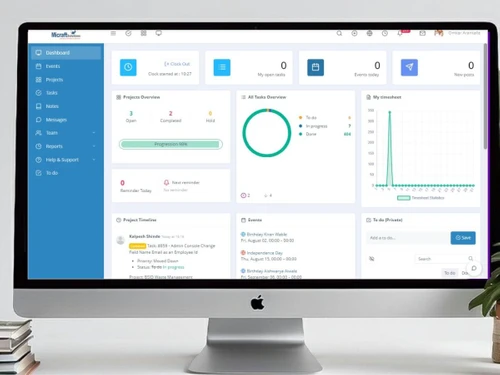
Micraft-Dashboard
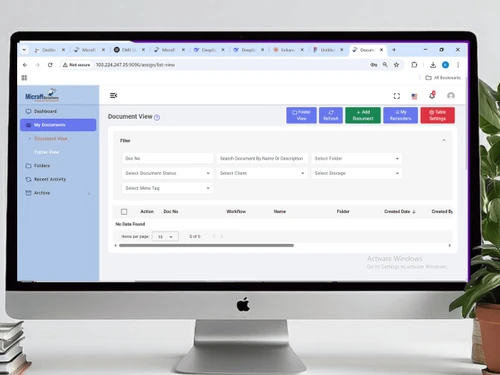
Micraft-dms
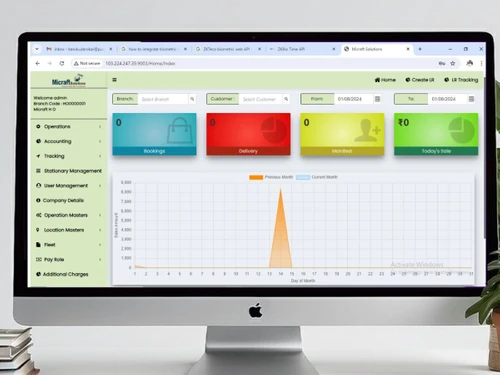
Micraft-tms

Micraft Document Management System

Brand: Micraft

  • 4.2

  • 6 Ratings

A complete productivity enhancing tool for business, the best Document Management System allows users to store files securely on a private cloud server or Local Server as per requirement. The software ensures security of sensitive data/information with implementing access controls which restricts ac...

See More

Have you used Micraft Document Management System before?

Share your insights for better experience

Add a Review

Price Available on Request

Questions about pricing or customization? We’re here to help, just a click away.

100% Genuine
Products
Best Price
Guaranteed
Safe & Secure
Payment
  • Description

  • Pricing

  • Features

  • Specification

  • Review

  • Compare

  • Alternatives

  • FAQ

Micraft Document Management System Software Overview

A complete productivity enhancing tool for business, the best Document Management System allows users to store files securely on a private cloud server or Local Server as per requirement. The software ensures security of sensitive data/information with implementing access controls which restricts access to folders are based on role(s)/rights that the admin decides/assigns.The software provides document management System (DMS) to all industries like manufacturing industries, banking, health care, educational institutes, service sector, etc.

Product Features
Document management system acts as a file manager which can accommodate various types of high resolution documents, files, videos, audio files, images, etc. A user can manage storage of these files and decide where to store them, apply access controls, monitor activities and a lot more. It is a safe, secure and user friendly solution which can be used across industries to boost productivity. Below are the features offered by the software:

  • Stunning and intuitive user interface – It has looks and feels like that of Windows File Explorer and follows user interface guidelines. Users can easily manage their files with the comfortable and intuitive approach already known from the daily desktop working environment and minimize user learning curve.
  • View any document anywhere – Helps view and display (read-only) wide range of document file formats like MS Word, Excel, PowerPoint, Visio, Outlook, PDF, XPS and many more
  • High resolution document viewer - The Document Viewer supports High Resolution. Text, fonts and vector elements are preserved and rendered in high-res with no rasterization.
  • Play audio and video files like MP4, F4V, MOV, FLV, etc.
  • View image files - Image Viewer can display all common image formats including Photoshop – Jpeg, PNG, Bitmap, Tiff, WEBP, etc.
  • Browser Archive files - The contents of all common archive formats can be browsed just like regular folders like ZIP, RAR, GZ, 7Z, etc.
  • Advanced uploads – Users can upload multiple files at once and upload files by dragging and dropping them from computer. Upload files of unlimited size (e.g. a 10 GB huge file).
  • Advanced downloads – Users can download multiple files or even whole folders at once. When downloading a single file, pausing/resuming in the browser is possible so interrupted downloads can be completed. Download files of unlimited size (e.g. a 1 GB huge file).
  • Decide where to store files – Helps store files on the local server or on the network without changing your existing folder structures. Create root folders which point to existing paths and start serving files immediately
  • Share files with access control – Helps create user accounts and groups. Limit actions, disk usage and file types on folder basis for users or groups.
  • Allow public access - Allow users to create public links (direct URLs) for referencing the files in other systems, in documents or in emails.
  • Hassle free administration – Helps manage and configure all aspects of web file server with the web-based administration panel. Users can assign group managers and let them administrate members of their own group.
  • Monitor everything - Track and audit every action of the users with the event viewer. Receive and let the users receive email notifications in the event of actions.
  • Enable seamless access across devices - Lets user access web file server with their choice of a web browser on Windows or Mac or a mobile device. Also, a user doesn’t need to install any software like FTP clients.
Read more

Micraft Company Details

Founded Year:  2014

Micraft

Director/Founders Mark Jawad
Company Size 1-100

Micraft Document Management System Pricing & Plans

Looking for The Right Pricing?

Share your requirements and get a plan built around your business.

  • Define your business needs
  • Get customised pricing
  • Choose features that fit your workflow

Price Available on Request

Get personalised Micraft Document Management System pricing that fits your needs. Our team will connect with you.

Micraft Document Management System Features

  • icon_check Stunning and intuitive user interface
    It has looks and feels like that of Windows File Explorer and follows user interface guidelines. Users can easily manage their
  • icon_check View any document anywhere
    Helps view and display (read-only) wide range of document file formats like MS Word, Excel, PowerPoint, Visio, Outlook, PDF, XPS
  • icon_check High resolution document viewer
    The Document Viewer supports High Resolution. Text, fonts and vector elements are preserved and rendered in high-res with no
  • icon_check View image files
    Image Viewer can display all common image formats including Photoshop – Jpeg, PNG, Bitmap, Tiff, WEBP, etc.
  • icon_check Browser Archive files
    The contents of all common archive formats can be browsed just like regular folders like ZIP, RAR, GZ, 7Z, etc.
  • icon_check Advanced uploads
    Users can upload multiple files at once and upload files by dragging and dropping them from computer. Upload files of unlimited
  • icon_check Advanced downloads
    Users can download multiple files or even whole folders at once. When downloading a single file, pausing/resuming in the browser
  • icon_check Decide where to store files
    Helps store files on the local server or on the network without changing your existing folder structures. Create root folders
  • icon_check Share files with access control
    Helps create user accounts and groups. Limit actions, disk usage and file types on folder basis for users or groups.
  • icon_check Hassle free administration
    Helps manage and configure all aspects of web file server with the web-based administration panel. Users can assign group

Micraft Document Management System Specification

Supported Platforms
Windows Windows
Devices
Desktop Desktop
Deployment
Web-Based Web-Based
Suitable For
All Industries
Business Specific
All Businesses
Language
English

Explore the Best Alternative Solutions Similar to Your Business Size and Needs

Micraft Document Management System Review

4.2

Out of 5

img

Overall Rating

Based on
6 Verified Ratings

Rating Breakdown

  • Features 4
  • Value for Money 4.4
  • Ease of Use 4
  • Customer Support 4.4

88% Recommend this Product

Add Review

Techjockey Trusted Reviews from Verified Users

No reviews are currently available for Micraft Document Management System. Discover similar Document Management Software reviews

  • Greenbox

    4.8

    Whats great - It is so good for reviewing, approving, assigning, tracking, approving controlled documents. read more

  • i-doc

    4.5

    Whats great - Store a lot of substance crosswise over different document types Force request on information dependent on hierarchical m... read more

  • MSB Docs

    4.5

    Whats great - Three of the five recommended vendors were viable read more
Compare Micraft Document Management System With other Document Management Software

Products
Ratings
Pricing
Device Supported
Deployment
Supported Platforms
  • img

    Micraft Document Management System

  • 4.2

  • Price On Request

  • Desktop

    Mobile

  • Web based

    On Premises

  • Windows

    Mac OS

  • img

    docEdge DMS

  • 4.5

  • ₹ 750000

  • Desktop

    Mobile

  • Web based

    On Premises

  • Windows

    Mac OS

  • img

    Greenbox

  • 4.8

  • Price On Request

  • Desktop

    Mobile

  • Web based

    On Premises

  • Windows

    Mac OS

  • img

    Docuventa

  • 4.6

  • Price On Request

  • Desktop

    Mobile

  • Web based

    On Premises

  • Windows

    Mac OS

  • img

    FileGenix

  • 5

  • Price On Request

  • Desktop

    Mobile

  • Web based

    On Premises

  • Windows

    Mac OS

  • img

    FileHold

  • 4.3

  • Price On Request

  • Desktop

    Mobile

  • Web based

    On Premises

  • Windows

    Mac OS

  • img

    Krystal DMS

  • 5

  • ₹ 32400

  • Desktop

    Mobile

  • Web based

    On Premises

  • Windows

    Mac OS

  • img

    NetDocuments

  • 4.4

  • Price On Request

  • Desktop

    Mobile

  • Web based

    On Premises

  • Windows

    Mac OS

  • img

    iManage

  • 4.2

  • Price On Request

  • Desktop

    Mobile

  • Web based

    On Premises

  • Windows

    Mac OS

  • img

    Worldox

  • 4.2

  • Price On Request

  • Desktop

    Mobile

  • Web based

    On Premises

  • Windows

    Mac OS

(0) Product(s) selected

Micraft Document Management System Alternatives

See All Micraft Document Management System Alternatives

Available

Price on Request

Available

Price on Request
Available

Price on Request

Available

Price on Request
Available

Price on Request

Starting Price:

₹4,000 /Month
Articles for Micraft Document Management System

See All Related Articles

Which operating system does Micraft Document Management System support?

Micraft Document Management System Document Management Software is compatible with Windows operating systems.

Is there any Micraft Document Management System app?

Micraft Document Management System Document Management Software app is not available.

What is deployment type of Micraft Document Management System?

Micraft Document Management System Document Management Software supports Web-Based.

Who are the potential users of Micraft Document Management System?

Micraft Document Management System Document Management Software is typically used in All Industries.

Is there any free trial or demo for Micraft Document Management System?

Micraft Document Management System Document Management Software demo is available for free with Techjockey.com

Is Micraft Document Management System free?

Micraft Document Management System Document Management Software offers a free trial. However, the premium plan with advanced features available at Techjockey .

How can you download Micraft Document Management System?

For Micraft Document Management System Document Management Software installation, insert the given CD/USB flash storage in your system and open the Setup Wizard to get started.

How does Micraft Document Management System work?

Micraft Document Management System Document Management Software helps with Stunning and intuitive user interface,View any document anywhere,High resolution document viewer and View image files. It's a complete solution for Browser Archive files,Advanced uploads,Advanced downloads and Decide where to store files.

20,000+ Software Listed

Best Price Guranteed

Free Expert Consultation

2M+ Happy Customers

Terms and Condtions

close

Users with registered businesses can purchase goods from merchants on the platform to satisfy their business needs. Users are not permitted to utilize any products acquired through the platform for resale, advertising, business, or further distribution.

For each purchase made, users will receive a Tax Invoice (or 'GST invoice') that includes specific details such as:

  • the GSTIN of the user associated with their registered business, and

  • the specified Entity Name for their business.

It should be noted that not all products are eligible for GST Invoice. Only the products displayed by participating sellers with the 'GST-based Invoice Available' callout on the product description page would qualify.

Certain goods and services are not eligible to get a GST Invoice, including items with VAS, i.e., Value Added Services (e.g., Total Mobile Protection/Assured Buyback) and those involving an exchange offer at the time of purchase.

Users must ensure the accuracy of the GSTIN, and business entity name provided for the GST Invoice. Requests for corrections into GST Invoice would not be accommodated by Techjockey.com or any Seller, and any issues arising from user-provided information are the sole responsibility of users.

Techjockey.com is not liable for the GST Invoice or any associated input tax credit. To efficiently claim an input tax credit, users should select the registered place of business address as per the GST authority's data and follow the provisions of the GST Act and rules.

To claim an input tax credit, the delivery and billing addresses must match. Furthermore, input tax credits will not be granted if the delivery address and GSTIN on the invoice are from different states. In case of incorrect GST details provided during the order placement, the order will be canceled automatically.