linkedin
OpenText Capture logo
play OpenText™ Capture demo video
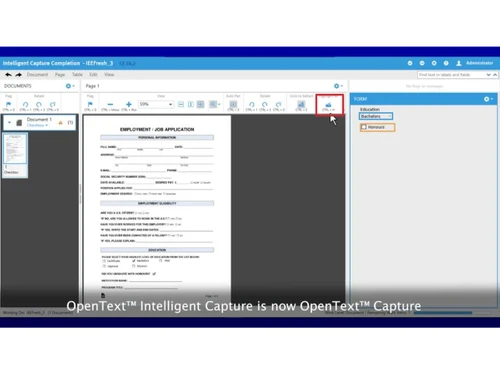
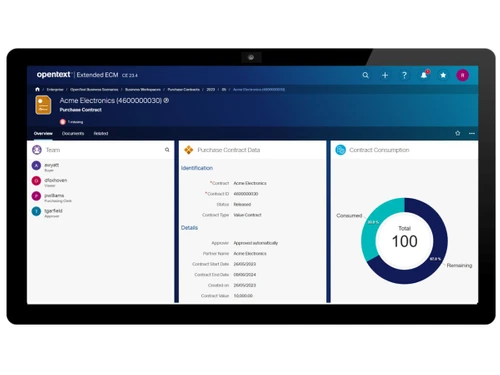
opentext capture-interface
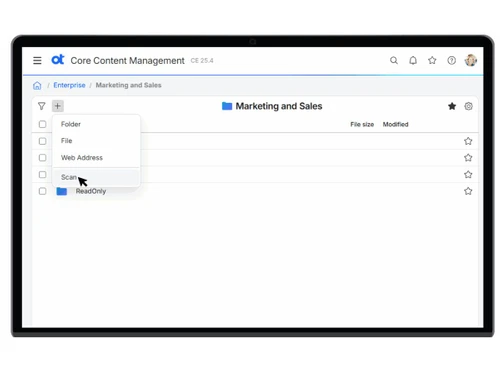
opentext capture-content

OpenText Capture

Brand: OpenText

  • No Ratings & Reviews

OpenText Capture is an AI-powered document management software that automates data extraction, classification, and processing from documents.

See More

Have you used OpenText Capture before?

Share your insights for better experience

Add a Review

Price Available on Request

Questions about pricing or customization? We’re here to help, just a click away.

100% Genuine
Products
Best Price
Guaranteed
Safe & Secure
Payment
  • Description

  • Pricing

  • Features

  • Specification

  • Review

  • FAQ

OpenText Capture Software Overview

What is OpenText Capture?

OpenText Capture is an intelligent document management software platform that uses AI and machine learning to automate the processing of paper, PDFs, and digital files. It is powerful business software designed to transform unstructured content into actionable data. Instead of manually typing information from invoices, forms, and contracts into systems, OpenText Capture automatically ingests documents from multiple channels-including scanners, email, fax, and mobile devices-classifies them by type, and extracts relevant data fields. It uses advanced OCR, machine learning, and large language models to understand document content, handle handwritten text, and extract complex table data with high accuracy.

The platform is built to handle high-volume enterprise requirements, processing millions of documents daily while seamlessly integrating with core business systems. As a comprehensive utility software solution, it validates extracted data against business rules and existing databases to ensure accuracy, then automatically routes documents into appropriate workflows for accounts payable, HR onboarding, or contract management. Available as cloud-native SaaS for reduced IT burden or on-premises deployment for maximum security, OpenText Capture helps organizations dramatically reduce manual data entry, minimize errors, accelerate processing cycles from days to hours, and maintain better document control for regulatory compliance.

Why Choose OpenText Capture?

  • Intelligent Document Processing: Uses machine learning, OCR, and large language models to understand document types and extract data.
  • Multi-Channel Input: Captures information from scanners, email, fax, mobile devices, and network folders.
  • Document Classification: Automatically identifies document types such as invoices, forms, and contracts using text analysis.
  • Advanced Data Extraction: Extracts structured and unstructured data including tables and handwritten text.
  • Data Validation: Compares extracted data against existing databases to ensure accuracy and completeness.
  • Seamless Integration: Connects directly with OpenText Documentum, SAP, Salesforce, and Microsoft SharePoint.

Benefits of OpenText Capture

  • Eliminates Manual Data Entry: Automates extraction from invoices, forms, and contracts saving countless hours.
  • Reduces Processing Errors: Minimizes mistakes associated with manual typing and transcription.
  • Accelerates Business Cycles: Cuts processing time from days to hours for faster decision-making.
  • Cuts Operational Costs: Reduces labor costs associated with paper-based document handling.
  • Enhances Compliance: Provides better document control and security for regulatory requirements.
  • Integrates with Core Systems: Seamlessly connects with ERP, CRM, and ECM platforms already in use.
  • Handles High Volumes: Scales to process millions of documents daily for enterprise needs.
  • Improves Data Accuracy: Validation rules ensure extracted information is complete and consistent.

OpenText Capture Pricing

OpenText Capture pricing is available on request at techjockey.com. The pricing model is based on different parameters, including extra features, deployment type, and the total number of users. For further queries related to the product, you can contact our product team and learn more about the pricing and offers.

Read more

OpenText Company Details

Founded Year:  1991

OpenText is a world leader in Information Management, helping companies securely capture, govern & exchange information on a global scale. OpenText solves digital business challenges for customers, ranging from small & mid-sized businesses to the largest and most complex organizations in the world.

Director/Founders Frank Tompa, Gaston Gonnet, Tim Bray
Company Size 1000+ Employees

OpenText Capture Pricing & Plans

Looking for The Right Pricing?

Share your requirements and get a plan built around your business.

  • Define your business needs
  • Get customised pricing
  • Choose features that fit your workflow

Price Available on Request

Get personalised OpenText Capture pricing that fits your needs. Our team will connect with you.

OpenText Capture Features

  • icon_check Document Ingestion
    Captures documents from paper, email, PDFs, images, and mobile devices, centralizing intake across multiple enterprise input
  • icon_check OCR (Optical Character Recognition)
    Converts scanned and image-based documents into machine-readable text using integrated OCR engines supporting global language
  • icon_check Document Classification
    Automatically identifies document types using text and graphical analysis models to enable accurate sorting and downstream
  • icon_check Data Extraction
    Extracts structured and unstructured data fields from documents using machine learning and recognition engines for downstream
  • icon_check Data Validation
    Validates extracted data against defined rules and formats to ensure accuracy before transferring content into enterprise
  • icon_check Configurable Capture Workflows
    Enables rule-based workflow configuration to define routing, processing, and handling of captured documents without requiring
  • icon_check Automated Information Routing
    Routes processed documents and extracted data automatically to target systems, improving processing efficiency and workflow
  • icon_check Multilingual Support
    Processes and extracts document data across more than 120 languages and regional formats for global enterprise capture operations
  • icon_check Data Transmission and Storage
    Ensures document data encryption in transit and at rest, maintaining confidentiality and integrity across distributed capture
  • icon_check Import/Export Management
    Exports captured data and documents to ECM, ERP, and business systems using standard interfaces and interoperability protocols
  • icon_check CaptureFlow Workflow Designer
    Provides a graphical interface for defining capture logic, document priorities, and routing rules without requiring scripting or
  • icon_check Document Normalization
    Prepares captured documents through preprocessing steps such as cleanup and enhancement to improve extraction and classification
  • icon_check Metadata Assignment
    Automatically assigns metadata attributes to captured documents to support indexing, retrieval, and enterprise content management
  • icon_check Document Transformation
    Transforms captured paper and digital documents into structured, searchable, and actionable digital formats for business process
OpenText Capture Demo Video play icon

Get OpenText Capture Demo

Watch the demo video to explore key features, real workflows, and how the software fits your business needs.

Understand
Key Features
Personal
Demo Insights
Interactive
Demo Support

OpenText Capture Specifications

Supported Platforms
Ubuntu Ubuntu Windows Windows MacOS MacOS Linux Linux
Devices
Desktop Desktop
Deployment
Cloud-Based Cloud-Based
Suitable For
All Industries
Business Specific
All Businesses
Business Size
Medium Business Enterprises SMBs MSMBs
Customer Support
Email Communities
Language
English
Integration
API Integration
Training Resources
Webinars Videos

OpenText Capture Review

Techjockey Trusted Reviews from Verified Users

No reviews are currently available for OpenText Capture. Discover similar Document Management Software reviews

  • Greenbox

    4.8

    Whats great - It is so good for reviewing, approving, assigning, tracking, approving controlled documents. read more
  • i-doc

    4.5

    Whats great - Store a lot of substance crosswise over different document types Force request on information dependent on hierarchical m... read more

  • MSB Docs

    4.5

    Whats great - Three of the five recommended vendors were viable read more
Articles for OpenText Capture

See All Related Articles

How much does OpenText Capture cost?

OpenText Capture pricing is available on request at Techjockey.com.

How does OpenText Capture work?

Documents are ingested via scanners, email, or mobile; AI classifies them by type, extracts relevant data fields, validates against business rules, and routes to workflows or systems like SAP and SharePoint.

Who uses OpenText Capture?

It is used by accounts payable, HR, legal, and operations teams in enterprises needing to automate high-volume document processing for invoices, contracts, and forms.

What document types can it process?

It processes invoices, purchase orders, contracts, forms, HR documents, and any paper or digital files requiring data extraction.

Does it integrate with SAP?

Yes, it seamlessly integrates with SAP, Salesforce, Microsoft SharePoint, and OpenText Documentum for direct data flow.

Can it extract handwritten text?

Yes, its advanced data extraction capabilities include handwritten text recognition for forms and documents.

20,000+ Software Listed

Best Price Guranteed

Free Expert Consultation

2M+ Happy Customers

Terms and Condtions

close

Users with registered businesses can purchase goods from merchants on the platform to satisfy their business needs. Users are not permitted to utilize any products acquired through the platform for resale, advertising, business, or further distribution.

For each purchase made, users will receive a Tax Invoice (or 'GST invoice') that includes specific details such as:

  • the GSTIN of the user associated with their registered business, and

  • the specified Entity Name for their business.

It should be noted that not all products are eligible for GST Invoice. Only the products displayed by participating sellers with the 'GST-based Invoice Available' callout on the product description page would qualify.

Certain goods and services are not eligible to get a GST Invoice, including items with VAS, i.e., Value Added Services (e.g., Total Mobile Protection/Assured Buyback) and those involving an exchange offer at the time of purchase.

Users must ensure the accuracy of the GSTIN, and business entity name provided for the GST Invoice. Requests for corrections into GST Invoice would not be accommodated by Techjockey.com or any Seller, and any issues arising from user-provided information are the sole responsibility of users.

Techjockey.com is not liable for the GST Invoice or any associated input tax credit. To efficiently claim an input tax credit, users should select the registered place of business address as per the GST authority's data and follow the provisions of the GST Act and rules.

To claim an input tax credit, the delivery and billing addresses must match. Furthermore, input tax credits will not be granted if the delivery address and GSTIN on the invoice are from different states. In case of incorrect GST details provided during the order placement, the order will be canceled automatically.