linkedin
ConVox logo
play ConVox - Monitoring Tools
convox ivr
convox inbound-call

ConVox

Brand: Deepija Telecom

  • 4.2

  • 6 Ratings

ConVox is a scalable cloud-based call center solution that helps businesses manage calls and customer interactions without requiring costly infrastructure.

See More

Have you used ConVox before?

Share your insights for better experience

Add a Review

Price Available on Request

Questions about pricing or customization? We’re here to help, just a click away.

100% Genuine
Products
Best Price
Guaranteed
Safe & Secure
Payment
  • Description

  • Pricing

  • Features

  • Specification

  • Review

  • Compare

  • Alternatives

ConVox Software Overview

What is ConVox?

ConVox is a sophisticated, cloud-based Virtual PBX (Private Branch Exchange) system designed to modernize and streamline business communication. It functions as a virtual receptionist, expertly managing all inbound calls without the need for expensive on-premise hardware or infrastructure. The platform provides businesses with a dedicated virtual number, ensuring that every incoming call is greeted professionally, routed efficiently to the correct department or individual, and managed seamlessly.

Engineered for scalability and reliability, ConVox enables calls to be forwarded to mobile extensions, guaranteeing uninterrupted connectivity with customers from anywhere, at any time. By hosting the entire telephony infrastructure on the cloud, it offers a cost-effective, feature-rich, and maintenance-free solution for businesses aiming to enhance operational efficiency and elevate customer engagement.

Why Choose ConVox?

  • High Availability and Uptime: The service operates from multiple interconnected data centers and works with various telecom operators. This redundancy ensures that if one provider experiences an issue, calls are automatically rerouted, guaranteeing maximum uptime and uninterrupted service.
  • Zero Capital Expenditure: As a fully hosted solution, ConVox eliminates the need for any investment in physical hardware or telephony infrastructure. This quick, easy, and affordable setup allows businesses to allocate resources to other critical areas.
  • Effortless Scalability: Business needs change, and ConVox is designed to adapt. The platform allows you to scale services up or down quickly based on demand, with a flexible pay-per-use pricing model that ensures you only pay for what you need.
  • Enhanced Security: Data protection is paramount. ConVox ensures secure and private connectivity across all locations and conducts regular Vulnerability Assessment & Penetration Testing (VAPT) to safeguard sensitive information.
  • Superior Performance: Unlike shared solutions, clients are provided with dedicated Virtual Machines (VMs). This prevents performance degradation from other users and ensures a consistently smooth and responsive experience.
  • Anywhere Access & Ease of Use: A user-friendly, DIY web panel allows for easy setup, configuration, and management of the system. Combined with a mobile application, it provides complete control and access from any location.

Advanced Features of ConVox

  • External CRM Integration: Seamlessly connect ConVox with your existing business tools. The platform offers native integrations with leading CRMs like Salesforce, LeadSquared, Zoho, MS Dynamics, and Freshdesk for a unified workflow.
  • Multi-Level IVR: Go beyond basic call routing. Create sophisticated interactive voice response menus with sub-IVRs under a main IVR to efficiently capture detailed user input and direct callers with precision.
  • Advanced MIS Reports: Leverage the power of data with detailed reports integrated directly with MS Power BI. Gain valuable insights into agent performance, call volumes, DID (Direct Inward Dialing) usage, and overall campaign effectiveness.
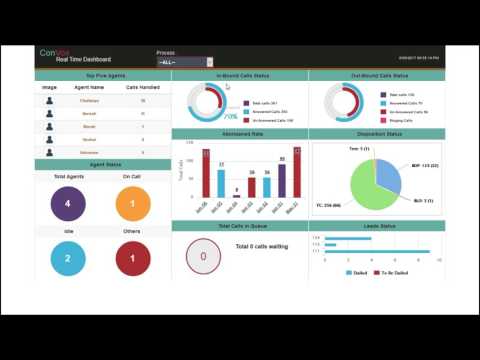
  • Live Monitoring Tools: Maintain complete operational oversight with real-time monitoring dashboards. Track the status of agents, servers, live calls, and active campaigns to make informed decisions on the fly.
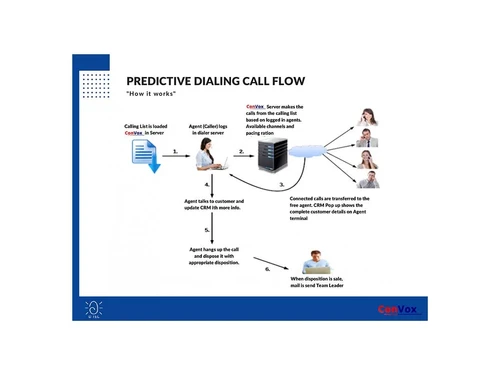
  • Disposition Management: Improve tracking and analysis by categorizing completed calls. Agents can apply disposition codes (e.g., "Sale Completed," "Follow-up Required") to each call for better reporting and workflow automation.
  • Mobile App Functionality: Empower your team with mobility. The dedicated mobile app allows extension users to make outbound calls through the ConVox system, maintaining a professional business presence even when they are away from their desks.

Key Capabilities of ConVox

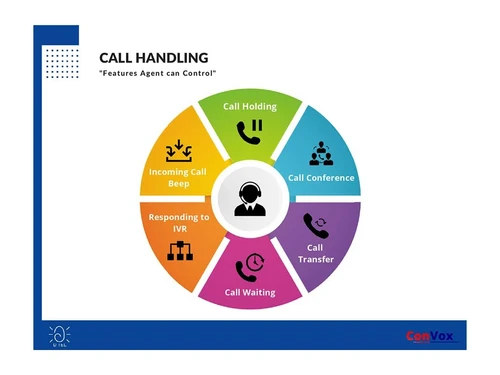
Intelligent Call Handling:

  • Single Virtual Number: Present a single, professional phone number for your entire business, which intelligently routes all incoming calls.
  • Call Forwarding & Routing: Customize how calls are distributed with sequential, round-robin, and parallel routing options to ensure every call is answered promptly.
  • Call Scheduler: Define rules to forward calls to specific mobile extensions based on the time of day and day of the week, perfect for managing after-hours support.
  • Missed Call Handling: Never lose a lead. The system automatically captures caller details even when all agents are busy, allowing for prompt follow-up.

Enhanced Communication & Quality Assurance:

  • 24/7 Live Answering: Ensure your business is always responsive with options for full-time, part-time, or after-hours call answering services.
  • 100% Call Recording: Automatically record all calls for quality assurance, training purposes, and compliance verification.
  • Voice Mail: Provide callers with the option to leave a detailed voice message when agents are unavailable, ensuring no opportunity is missed.
  • Notifications: Keep your team informed by setting up automatic SMS and email alerts for call extensions on important events like missed calls or new voicemails.

How to Use ConVox?

Through this web portal, administrators can easily perform key tasks:

  1. Configure Settings: Set up your single virtual number and define call routing rules (e.g., round-robin, sequential).
  2. Build IVR Menus: Design and update your multi-level IVR system to guide callers through different options.
  3. Manage Users: Add or remove agent extensions and assign them to specific call queues or departments.
  4. Monitor Performance: Access live dashboards and generate detailed MIS reports to track call metrics and agent productivity.
  5. Access Recordings: Listen to and download call recordings for quality and training purposes.

For remote teams and users on the go, the ConVox mobile application for Android and iOS extends functionality, allowing them to make and receive business calls directly from their smartphones.

ConVox Pricing

ConVox pricing details are available on request on techjockey.com.

The pricing model is based on different parameters, including extra features, deployment type, and the total number of users. For further queries related to the product, you can contact our product team and learn more about the pricing and offers.

Read more

Deepija Telecom Company Details

Founded Year:  2003

We are a premier provider of call center solutions, comes with a versatile range of customization as per business needs.

Director/Founders Deepak Agarwal
Company Size 1-100 Employees

ConVox Pricing & Plans

Looking for The Right Pricing?

Share your requirements and get a plan built around your business.

  • Define your business needs
  • Get customised pricing
  • Choose features that fit your workflow

Price Available on Request

Get personalised ConVox pricing that fits your needs. Our team will connect with you.

ConVox Features

  • icon_check Multi-Level IVR
  • icon_check Call Recording
  • icon_check MIS Reports
  • icon_check Monitoring Tools
  • icon_check Voice Mail
  • icon_check Call Forwarding
  • icon_check Missed Call Handling
  • icon_check Single Number
ConVox Demo Video play icon

Get ConVox Demo

Watch the demo video to explore key features, real workflows, and how the software fits your business needs.

Understand
Key Features
Personal
Demo Insights
Interactive
Demo Support

ConVox Specifications

Supported Platforms
Windows Windows Android Android
Devices
Desktop Desktop Mobile Mobile
Deployment
Cloud-Based Cloud-Based
Suitable For
All Industries
Business Specific
All Businesses
Business Size
Small Business Startups Medium Business SMBs SMEs
Customer Support
Phone Email Live Chat Communities Forums
Language
English
Training Resources
Live Online Webinars Documentation Videos

Explore the Best Alternative Solutions Similar to Your Business Size and Needs

ConVox Review

4.2

Out of 5

img

Overall Rating

Based on
6 Verified Ratings

Rating Breakdown

  • Features 4
  • Value for Money 4.5
  • Ease of Use 4
  • Customer Support 4.5

91% Recommend this Product

Add Review

Techjockey Trusted Reviews from Verified Users

No reviews are currently available for ConVox. Discover similar Call Center Software reviews

  • Acefone

    4.5

    Whats great - Many users appreciate Acefone’s customer service and responsiveness read more

  • DialDesk

    4.8

    Whats great - DialDesk supports all industry verticals, making it a versatile solution for various business needs. The 24/7 human support a... read more

  • Twilio

    4.6

    Whats great - I use Twilio to send text messages to my customers. The API is very easy to use, and I can send a text message to my customer... read more

Compare ConVox With other Call Center Software

Products
Ratings
Pricing
Device Supported
Deployment
Supported Platforms
  • img

    ConVox

  • 4.2

  • Price On Request

  • Desktop

    Mobile

  • Web based

    On Premises

  • Windows

    Mac OS

  • img

    Freshcaller

  • 4.0

  • ₹ 1199

  • Desktop

    Mobile

  • Web based

    On Premises

  • Windows

    Mac OS

  • img

    MyOperator

  • 4.3

  • ₹ 2499

  • Desktop

    Mobile

  • Web based

    On Premises

  • Windows

    Mac OS

  • img

    VoiceCallingAI

  • 5

  • Price On Request

  • Desktop

    Mobile

  • Web based

    On Premises

  • Windows

    Mac OS

  • img

    SanCCS

  • 5

  • ₹ 14990

  • Desktop

    Mobile

  • Web based

    On Premises

  • Windows

    Mac OS

  • img

    DialDesk

  • 4.7

  • ₹ 15000

  • Desktop

    Mobile

  • Web based

    On Premises

  • Windows

    Mac OS

  • img

    CallerDesk

  • 4.1

  • Price On Request

  • Desktop

    Mobile

  • Web based

    On Premises

  • Windows

    Mac OS

  • img

    Ringover

  • 4.3

  • Price On Request

  • Desktop

    Mobile

  • Web based

    On Premises

  • Windows

    Mac OS

  • img

    Acefone

  • 4.4

  • Price On Request

  • Desktop

    Mobile

  • Web based

    On Premises

  • Windows

    Mac OS

(0) Product(s) selected

ConVox Alternatives

See All ConVox Alternatives

Starting Price:

₹999 /Monthly

Starting Price:

$21 /Yearly

Starting Price:

€100 /Yearly

Available

Price on Request

Starting Price:

₹1,299 /Monthly

Starting Price:

$79 /Yearly

Starting Price:

$49 /Monthly

Available

Price on Request

Articles for ConVox

See All Related Articles

20,000+ Software Listed

Best Price Guranteed

Free Expert Consultation

2M+ Happy Customers

Terms and Condtions

close

Users with registered businesses can purchase goods from merchants on the platform to satisfy their business needs. Users are not permitted to utilize any products acquired through the platform for resale, advertising, business, or further distribution.

For each purchase made, users will receive a Tax Invoice (or 'GST invoice') that includes specific details such as:

  • the GSTIN of the user associated with their registered business, and

  • the specified Entity Name for their business.

It should be noted that not all products are eligible for GST Invoice. Only the products displayed by participating sellers with the 'GST-based Invoice Available' callout on the product description page would qualify.

Certain goods and services are not eligible to get a GST Invoice, including items with VAS, i.e., Value Added Services (e.g., Total Mobile Protection/Assured Buyback) and those involving an exchange offer at the time of purchase.

Users must ensure the accuracy of the GSTIN, and business entity name provided for the GST Invoice. Requests for corrections into GST Invoice would not be accommodated by Techjockey.com or any Seller, and any issues arising from user-provided information are the sole responsibility of users.

Techjockey.com is not liable for the GST Invoice or any associated input tax credit. To efficiently claim an input tax credit, users should select the registered place of business address as per the GST authority's data and follow the provisions of the GST Act and rules.

To claim an input tax credit, the delivery and billing addresses must match. Furthermore, input tax credits will not be granted if the delivery address and GSTIN on the invoice are from different states. In case of incorrect GST details provided during the order placement, the order will be canceled automatically.