linkedin
IceHrm logo
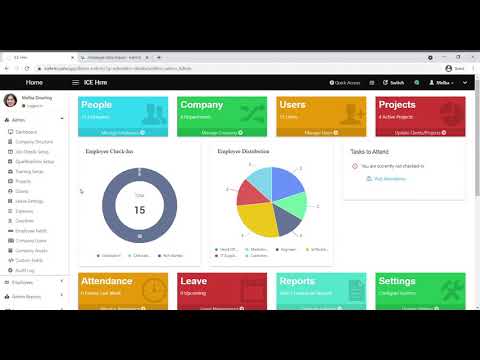
play IceHrm Overview
play Creating an HR form with IceHrm
play IceHrm Attendance Basic

IceHrm

Brand: Gamonoid

  • 4.2

  • 6 Ratings

IceHrm is a web-based solution for small and midsize organizations, enabling them to automate their leave management system, payroll processing, and expense management procedures as well. The recruitment management module within the software can be used to find the deserving candidate in a hassle-free manner. Further, enterprises can also generate customized forms within the system and forward th...

See More

Have you used IceHrm before?

Share your insights for better experience

Add a Review
Starting Price
$11

View plans

100% Genuine
Products
Best Price
Guaranteed
Safe & Secure
Payment
  • Description

  • Pricing

  • Features

  • Specification

  • Review

  • Compare

  • Alternatives

  • FAQ

Starting at $11

IceHrm Software Overview

What is IceHrm?

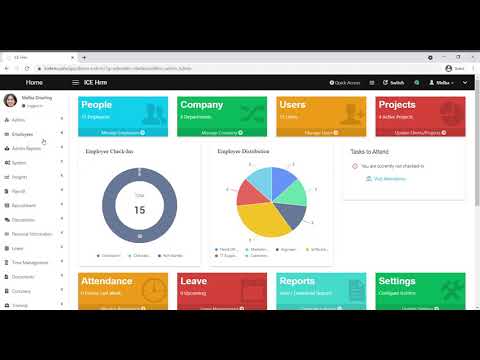
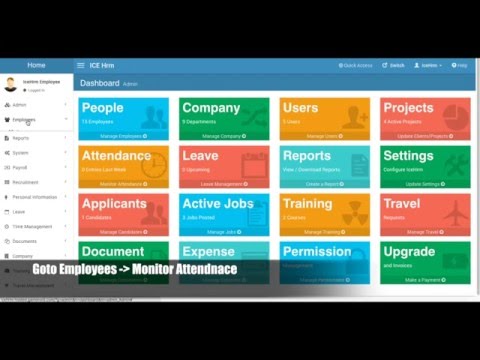
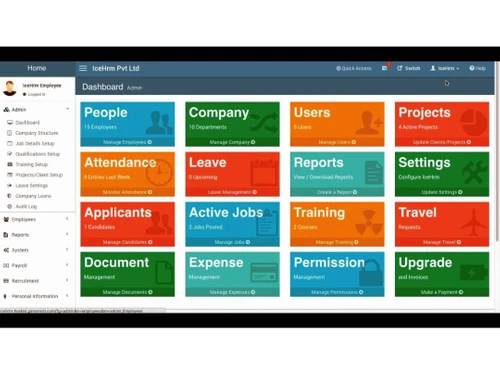
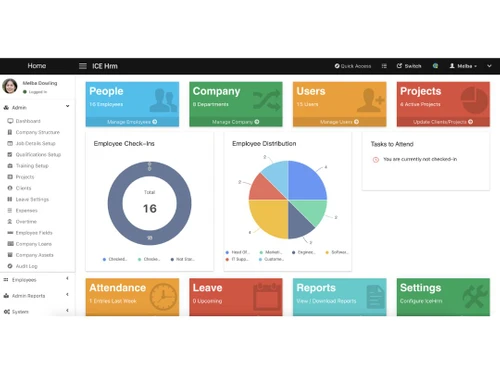
IceHrm is a web-based solution for small and midsize organizations, enabling them to automate their leave management system, payroll processing, and expense management procedures as well. The recruitment management module within the software can be used to find the deserving candidate in a hassle-free manner. Further, enterprises can also generate customized forms within the system and forward them to specific individuals to get them approved. Reviewing the performance of individual employees needs minimal effort with a 360-degree feedback module offered by the software. 

How does IceHrm help with leave management?

  1. Flexible leave policies- The Human Resource Management software can be used to generate multiple leave policies, as per the profiles of individual employees and their working styles. 
  2. Approval workflows- HRs can define multiple leave approval levels for individual employees. The generated request gets submitted to the immediate supervisors followed by others within the hierarchy for further approval. 
  3. Automated accrual of leave balances- The module lets the leaves get accrued on a daily basis within the leave period, rather than getting added to the leave balance at the beginning of the period. 

Pricing of IceHrm

The pricing of IceHrm is available on request. You can send us a callback request to get more information about the software. Our executives will get back to you as per date and time mentioned requested by you. 

Benefits of IceHrm

  1. Security- With IceHrm, organizations can save sensitive employee data within a centralized platform. Admins can assign access rights for authorized employees to ensure the proper security of all employee-related information.
  2. Effective leave request- The leave notification workflow offered by the software can be used to monitor different types of leaves like maternity, unpaid, annual, administrative and more. 
  3. Effortless job posting- The service helps in posting ads on job portals and other social media sites. Companies can use the in-built features offered by the software to generate job-related advertisements that match their business requirements.
Read more

Gamonoid Company Details

Founded Year:  2018

Manage your employees easily with a robust and efficient Human Resource Management System. IceHrm offers you a feature rich hosted solution and freedom with open source solution.

Director/Founders Thilina Hasantha
Company Size 1-100 Employees

IceHrm Pricing & Plans

Basic
Starting at $11
    • Monthly

      Monthly
      Monthly

Key Features

  • Unlimited Employees 1

  • Everything in IceHrm Free Plan

  • Recruitment

  • Applicant Tracking

  • Payroll Management

  • Support via Email and Zoom

  • Free Training for HR Managers

Unlimited
Starting at $199
    • Monthly

      Monthly
      Monthly

Key Features

  • Unlimited Employees

  • Everything in IceHrm Basic Plan

  • Preferred Hosting Location 2

  • Payroll Configuration Support

  • Paid Customizations 3

  • Application Configuration Support 4

  • Migration Support 5

IceHrm Features

  • icon_check Employee Management
    The software can be used to save and retrieve records related to employees. Organizations can define custom fields. IceHrm is
  • icon_check Leave Management
    Companies can formulate their own leave types making exceptions to individual employees and groups utilizing leave rules. The
  • icon_check Document Management
    All employee-related documents can be saved within the software’s database for easy access and enhanced security as well.
  • icon_check Time & Attendance Tracking
    The software can be used to record the employee’s clock-in and clock-out timings. It helps in comparing the attendance against
  • icon_check Expense Management
    Expense management gets a lot easier with high visibility. The approved expenses can be imported into the payroll which can be
  • icon_check Payroll Processing
    The software can be used to calculate multiple payroll-related deductions and generate payslips for individual employees enabling
  • icon_check Recruitment Management
    HRs can monitor the status of individual jobs, go through resumes, interview applicants and manage the deserving talents. They
  • icon_check Timesheets
    With IceHrm, managers can schedule work hours for individual employees and update the same on dedicated timesheets.
  • icon_check Employee Training
    Enterprises can manage multiple training courses for their staff and track their progress levels at regular intervals.
  • icon_check Performance Management
    With IceHRM, companies can conduct performance reviews of individual employees. Team members can offer anonymous feedback,
  • icon_check Reports
    Organisations get access to multiple reports as per their needs, including reports on cleared/pending bills, leaves, employees'
  • icon_check Email Support
    All payroll related data can be sent to the designated email IDs of individual employees.
IceHrm Demo Video play icon

Get IceHrm Demo

Watch the demo video to explore key features, real workflows, and how the software fits your business needs.

Understand
Key Features
Personal
Demo Insights
Interactive
Demo Support

IceHrm Specification

Supported Platforms
Windows Windows iOS iOS Android Android
Devices
Desktop Desktop Mobile Mobile
Deployment
Web-Based Web-Based
Suitable For
All Industries
Business Specific
All Businesses
Business Size
Small Business Startups Medium Business Enterprises
Customer Support
Live Chat Communities
Language
English
Training Resources
Videos

Explore the Best Alternative Solutions Similar to Your Business Size and Needs

IceHrm Review

4.2

Out of 5

img

Overall Rating

Based on
6 Verified Ratings

Rating Breakdown

  • Features 4
  • Value for Money 4.1
  • Ease of Use 4.5
  • Customer Support 4.3

95% Recommend this Product

Add Review

Techjockey Trusted Reviews from Verified Users

No reviews are currently available for IceHrm. Discover similar HR Software reviews

  • Zfour HRMS

    4.9

    Whats great - The service is professional, user-friendly, and genuinely helpful. Highly recommend to anyone looking for quality and trust. read more

  • HROne

    4.8

    Whats great - None read more

  • factoHR

    4.6

    Whats great - Get real-time HR insights! Data-driven reports help you make faster, smarter decisions for workforce management read more

Compare IceHrm With other HR Software

Products
Ratings
Pricing
Device Supported
Deployment
Supported Platforms
  • img

    IceHrm

  • 4.2

  • Price On Request

  • Desktop

    Mobile

  • Web based

    On Premises

  • Windows

    Mac OS

  • img

    Spine HR

  • 4.3

  • Price On Request

  • Desktop

    Mobile

  • Web based

    On Premises

  • Windows

    Mac OS

  • img

    ClusterHR

  • 5

  • ₹ 40

  • Desktop

    Mobile

  • Web based

    On Premises

  • Windows

    Mac OS

  • img

    Fix HR

  • 4.9

  • ₹ 600

  • Desktop

    Mobile

  • Web based

    On Premises

  • Windows

    Mac OS

  • img

    Zfour HRMS

  • 4.9

  • ₹ 45

  • Desktop

    Mobile

  • Web based

    On Premises

  • Windows

    Mac OS

  • img

    WeekMate

  • 4.7

  • ₹ 3999

  • Desktop

    Mobile

  • Web based

    On Premises

  • Windows

    Mac OS

  • img

    SignalHRM

  • 4.6

  • ₹ 648

  • Desktop

    Mobile

  • Web based

    On Premises

  • Windows

    Mac OS

  • img

    WoCo

  • 4.8

  • ₹ 50

  • Desktop

    Mobile

  • Web based

    On Premises

  • Windows

    Mac OS

  • img

    Presence360

  • 4.9

  • ₹ 2999

  • Desktop

    Mobile

  • Web based

    On Premises

  • Windows

    Mac OS

  • img

    TruHR

  • 4.9

  • ₹ 2200

  • Desktop

    Mobile

  • Web based

    On Premises

  • Windows

    Mac OS

  • img

    Keka HR

  • 4.4

  • Price On Request

  • Desktop

    Mobile

  • Web based

    On Premises

  • Windows

    Mac OS

(0) Product(s) selected

IceHrm Alternatives

See All IceHrm Alternatives

Starting Price:

₹600 /Month ₹900

SAVE UPTO 33%

Starting Price:

₹2,200 /Month

Starting Price:

₹49 /Month

Starting Price:

₹890 /Month
Starting Price:

₹1,499 /Month

Starting Price:

$49 /Month

Available

Price on Request

Starting Price:

₹5,000 /Month

Articles for IceHrm

See All Related Articles

How useful is IceHrm “switching employees” feature?

Managers or admins can log in on to the software. They can apply for leaves, update timesheets on behalf of other employees and add in attendance records as well.

How useful is the “leave groups” feature of IceHrm?

Organizations can list multiple employees within a single group and generate leave rules for them. HRs can assign certain leaves to specific members within the group.

Do you offer an online demo of IceHrm?

Yes, you can request an online demo of IceHrm. Our product experts will get back to you as per your convenient time schedule.

What type of payroll columns can be devised with IceHRM?

Enterprises can add in columns like basic salary, hourly pay, tax-based deductions, car allowance, monthly working hours and more.

Does IceHRM come with a dedicated mobile app?

Yes, IceHrrn has a dedicated mobile app compatible with Android and iOS devices.

20,000+ Software Listed

Best Price Guranteed

Free Expert Consultation

2M+ Happy Customers

Terms and Condtions

close

Users with registered businesses can purchase goods from merchants on the platform to satisfy their business needs. Users are not permitted to utilize any products acquired through the platform for resale, advertising, business, or further distribution.

For each purchase made, users will receive a Tax Invoice (or 'GST invoice') that includes specific details such as:

  • the GSTIN of the user associated with their registered business, and

  • the specified Entity Name for their business.

It should be noted that not all products are eligible for GST Invoice. Only the products displayed by participating sellers with the 'GST-based Invoice Available' callout on the product description page would qualify.

Certain goods and services are not eligible to get a GST Invoice, including items with VAS, i.e., Value Added Services (e.g., Total Mobile Protection/Assured Buyback) and those involving an exchange offer at the time of purchase.

Users must ensure the accuracy of the GSTIN, and business entity name provided for the GST Invoice. Requests for corrections into GST Invoice would not be accommodated by Techjockey.com or any Seller, and any issues arising from user-provided information are the sole responsibility of users.

Techjockey.com is not liable for the GST Invoice or any associated input tax credit. To efficiently claim an input tax credit, users should select the registered place of business address as per the GST authority's data and follow the provisions of the GST Act and rules.

To claim an input tax credit, the delivery and billing addresses must match. Furthermore, input tax credits will not be granted if the delivery address and GSTIN on the invoice are from different states. In case of incorrect GST details provided during the order placement, the order will be canceled automatically.