linkedin
Kayako logo
play Kayako's Scaling Your Customer Service with Top Notch Automation
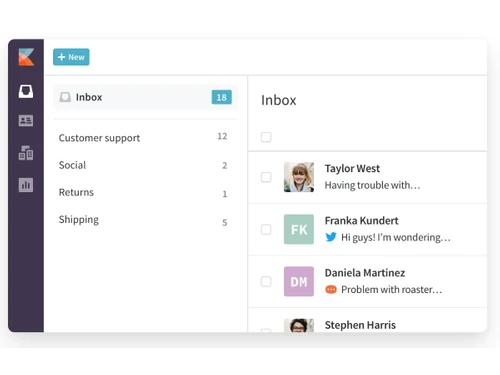
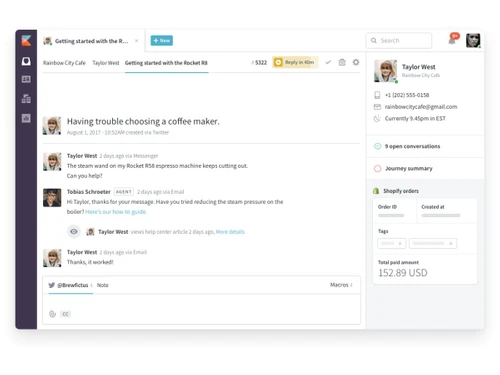
Kayako dashboard
Kayako inbox

Kayako

Brand: Kayako

  • 4.2

  • 6 Ratings

Kayako is an all-in-one customer support software designed to help businesses deliver exceptional service experiences. It enables organizations to provide personalized, timely, and efficient support across multiple communication channels. With its intuitive tools like live chat, collaboration, and i...

See More

Have you used Kayako before?

Share your insights for better experience

Add a Review

Price Available on Request

Questions about pricing or customization? We’re here to help, just a click away.

100% Genuine
Products
Best Price
Guaranteed
Safe & Secure
Payment
  • Description

  • Pricing

  • Features

  • Specification

  • Review

  • Compare

  • Alternatives

  • FAQ

Kayako Software Overview

What is Kayako?

Kayako is a versatile Business Software, including features that make it ideal as Hospitality Management Software and Help Desk Software. Built for businesses aiming to enhance their customer support process, it consolidates multiple communication channels into a single platform, enabling teams to manage support tickets, live chat, and emails effortlessly.

Designed to deliver proactive and personalized customer service, Kayako equips teams with tools like self-service portals, collaboration features, and social media integration. The software's intuitive dashboard helps agents resolve issues efficiently by maintaining a unified view of customer conversations. With Kayako, businesses can also streamline workflows through automation, improve response times, and reduce the operational burden on support teams. Whether it’s small-scale enterprises or large corporations, Kayako adapts to diverse requirements to ensure customer satisfaction and brand loyalty.

Why Choose Kayako Help Desk Software?

  • Unified Customer View: Provides a single platform to view and manage customer interactions, ensuring seamless communication.
  • Real-Time Live Chat: Enables instant responses, improving customer satisfaction and reducing resolution times.
  • Collaborative Support: Allows teams to work together efficiently, solving complex issues faster.
  • Self-Service Portals: Offers customers access to FAQs and guides, reducing dependency on support teams.
  • Social Media Integration: Connects customer support to social channels for broader engagement.
  • Automation Features: Automates ticket assignment and prioritization, saving time for support agents.
  • Flexible Integration: Easily integrates with third-party applications, enhancing system functionality.
  • Customizable Workflows: Tailors workflows to meet unique business needs for better efficiency.

Benefits of Kayako

  • Centralized Communication Platform: Manage all customer interactions, from emails to live chats, on a single platform for seamless communication. This improves efficiency and reduces the need for switching between tools.
  • Faster Customer Resolutions: With features like ticket tracking and real-time updates, resolve customer issues faster. This boosts customer satisfaction and builds trust in your support team.
  • Enhanced Team Collaboration: Collaboration tools allow teams to work together on customer queries effortlessly. This ensures that complex issues are resolved without any delays or miscommunication.
  • Improved Customer Self-Service: Self-service portals empower customers to find answers on their own. This reduces support workload while improving customer independence and satisfaction.
  • Integration with Multiple Tools: Kayako integrates with popular tools to streamline workflows across departments. This ensures all customer data is accessible and up-to-date across systems.
  • Customizable Support Experience: Tailor the software to match your business’s unique needs, offering a personalized experience for both your team and customers. This enhances brand loyalty and engagement.
  • Multi-Channel Support: Offer support through emails, live chats, and social media from one platform. This makes customer service accessible on the channels customers prefer.
  • Insightful Reporting and Analytics: Gain actionable insights through detailed analytics to improve your support process. These reports help in identifying bottlenecks and areas for improvement.

Pricing of Kayako

Kayako pricing is available on request at Techjockey.com.

The pricing model is based on different parameters, including extra features, deployment type, and the total number of users. For further queries related to the product, you can contact our product team and learn more about the pricing and offers.

Read more

Kayako Company Details

Founded Year:  2001

Grow your business with Kayako, the unified customer service platform.

Director/Founders Jamie Edwards, Varun Shoor
Company Size 101-500 Employees

Kayako Pricing & Plans

Looking for The Right Pricing?

Share your requirements and get a plan built around your business.

  • Define your business needs
  • Get customised pricing
  • Choose features that fit your workflow

Price Available on Request

Get personalised Kayako pricing that fits your needs. Our team will connect with you.

Kayako Features

  • icon_check Tour
    Provides a walkthrough of the system for easy onboarding and navigation.
  • icon_check SingleView
    Maintains a unified view of all customer interactions for seamless communication.
  • icon_check Live Chat
    Enables real-time engagement with customers for faster resolutions.
  • icon_check Collaboration
    Empowers teams to collaborate on tickets and share insights.
  • icon_check Self Service
    Offers a portal where customers can find answers to common queries.
  • icon_check Social
    Integrates social media platforms to extend customer service reach.
  • icon_check Integration
    Supports integration with various third-party tools to enhance functionality.
  • icon_check Walkthrough
    Guides users through the features, ensuring a smooth onboarding process.
Kayako Demo Video play icon

Get Kayako Demo

Watch the demo video to explore key features, real workflows, and how the software fits your business needs.

Understand
Key Features
Personal
Demo Insights
Interactive
Demo Support

Kayako Specifications

Supported Platforms
Windows Windows
Devices
Desktop Desktop
Deployment
Cloud-Based Cloud-Based
Suitable For
All Industries
Business Specific
All Businesses
Business Size
Small Business Startups Medium Business Enterprises SMBs SMEs MSMBs MSMEs
Language
English

Explore the Best Alternative Solutions Similar to Your Business Size and Needs

Kayako Review

4.2

Out of 5

img

Overall Rating

Based on
6 Verified Ratings

Rating Breakdown

  • Features 4.2
  • Value for Money 4.5
  • Ease of Use 3.8
  • Customer Support 4.4

96% Recommend this Product

Add Review

Techjockey Trusted Reviews from Verified Users

No reviews are currently available for Kayako. Discover similar Help Desk Software reviews

  • Support CRM

    4.9

    Whats great - Features, Ease of use, Simplicity and Comprehensive customer service management tools read more

  • Uvdesk

    4.4

    Whats great - Stable performance, consistent updates, marketplace extensions, and responsive support team. read more

  • iHelpdesk

    4.2

    Whats great - Reliable ticketing system, easy to use. read more

Compare Kayako With other Help Desk Software

Products
Ratings
Pricing
Device Supported
Deployment
Supported Platforms
  • img

    Kayako

  • 4.2

  • Price On Request

  • Desktop

    Mobile

  • Web based

    On Premises

  • Windows

    Mac OS

  • img

    Freshdesk

  • 4.7

  • ₹ 1799

  • Desktop

    Mobile

  • Web based

    On Premises

  • Windows

    Mac OS

  • img

    Nuevadesk

  • 4.2

  • Price On Request

  • Desktop

    Mobile

  • Web based

    On Premises

  • Windows

    Mac OS

  • img

    Support CRM

  • 4.8

  • ₹ 3750

  • Desktop

    Mobile

  • Web based

    On Premises

  • Windows

    Mac OS

  • img

    Spinso ServiceDesk

  • 4.2

  • Price On Request

  • Desktop

    Mobile

  • Web based

    On Premises

  • Windows

    Mac OS

  • img

    Zoho Desk

  • 4.0

  • ₹ 540

  • Desktop

    Mobile

  • Web based

    On Premises

  • Windows

    Mac OS

  • img

    Zendesk

  • 4.5

  • Price On Request

  • Desktop

    Mobile

  • Web based

    On Premises

  • Windows

    Mac OS

  • img

    TxHelpDesk

  • 5

  • ₹ 1250

  • Desktop

    Mobile

  • Web based

    On Premises

  • Windows

    Mac OS

  • img

    Stingo Helpdesk

  • 5

  • ₹ 599

  • Desktop

    Mobile

  • Web based

    On Premises

  • Windows

    Mac OS

  • img

    Vision Helpdesk

  • 4.3

  • Price On Request

  • Desktop

    Mobile

  • Web based

    On Premises

  • Windows

    Mac OS

  • img

    Desku

  • 4.1

  • Price On Request

  • Desktop

    Mobile

  • Web based

    On Premises

  • Windows

    Mac OS

(2) Product(s) selected

Kayako Alternatives

See All Kayako Alternatives

Starting Price:

$25 /Agent/Month

Starting Price:

$19 /Month

Available

Price on Request

Starting Price:

$29 /Month

Available

Price on Request

Starting Price:

₹15,600 /Lifetime

Starting Price:

$89 /Month

Starting Price:

$12 /Month

Articles for Kayako

See All Related Articles

How does Kayako improve customer service?

Kayako centralizes customer interactions, offers real-time chat, and provides tools like self-service portals and social media integration. These features help businesses deliver faster, personalized support.

Can Kayako integrate with other software?

Yes, Kayako supports integration with various third-party applications, such as CRMs, email marketing tools, and collaboration software.

Is Kayako suitable for small businesses?

Absolutely. Kayako is scalable and adaptable, making it an excellent choice for small businesses looking to streamline customer support.

Does Kayako offer live chat functionality?

Yes, Kayako includes a real-time live chat feature that allows businesses to engage with customers instantly.

How does Kayako handle team collaboration?

Kayako's collaboration tools enable team members to work together on tickets, share information, and resolve issues efficiently.

Is it easy to onboard new agents with Kayako?

Yes, Kayako provides guided tours and walkthroughs that simplify onboarding for new team members.

Does Kayako support multi-channel communication?

Yes, Kayako consolidates multiple communication channels like email, live chat, and social media into one platform.

What kind of reports can Kayako generate?

Kayako generates reports on customer interactions, agent performance, and ticket resolution times to help improve support strategies.

Can customers access self-help resources in Kayako?

Yes, Kayako offers self-service portals where customers can find answers to common queries and access FAQs.

Is Kayako cloud-based?

Yes, Kayako is a cloud-based solution, ensuring accessibility from anywhere and easy updates.

20,000+ Software Listed

Best Price Guranteed

Free Expert Consultation

2M+ Happy Customers

Terms and Condtions

close

Users with registered businesses can purchase goods from merchants on the platform to satisfy their business needs. Users are not permitted to utilize any products acquired through the platform for resale, advertising, business, or further distribution.

For each purchase made, users will receive a Tax Invoice (or 'GST invoice') that includes specific details such as:

  • the GSTIN of the user associated with their registered business, and

  • the specified Entity Name for their business.

It should be noted that not all products are eligible for GST Invoice. Only the products displayed by participating sellers with the 'GST-based Invoice Available' callout on the product description page would qualify.

Certain goods and services are not eligible to get a GST Invoice, including items with VAS, i.e., Value Added Services (e.g., Total Mobile Protection/Assured Buyback) and those involving an exchange offer at the time of purchase.

Users must ensure the accuracy of the GSTIN, and business entity name provided for the GST Invoice. Requests for corrections into GST Invoice would not be accommodated by Techjockey.com or any Seller, and any issues arising from user-provided information are the sole responsibility of users.

Techjockey.com is not liable for the GST Invoice or any associated input tax credit. To efficiently claim an input tax credit, users should select the registered place of business address as per the GST authority's data and follow the provisions of the GST Act and rules.

To claim an input tax credit, the delivery and billing addresses must match. Furthermore, input tax credits will not be granted if the delivery address and GSTIN on the invoice are from different states. In case of incorrect GST details provided during the order placement, the order will be canceled automatically.