linkedin
Eastern EM HRMS logo
play EM-HRMS Staffing Solution
EM HRMS 2
EM HRMS 3

Eastern EM HRMS

Brand: Eastern Infotech

  • 4.1

  • 5 Ratings

Eastern EM HRMS is a human resource management software developed for the smooth operation of Indian companies. The software has a beautifully designed user interface that helps manage your workforce efficiently. Organizations using Eastern EM HRMS can customize the software which allows them to keep or remove the modules as per their requirements. This HRMS software helps with several tasks such...

See More

Have you used Eastern EM HRMS before?

Share your insights for better experience

Add a Review

Price Available on Request

Questions about pricing or customization? We’re here to help, just a click away.

100% Genuine
Products
Best Price
Guaranteed
Safe & Secure
Payment
  • Description

  • Pricing

  • Features

  • Specification

  • Review

  • Compare

  • Alternatives

  • FAQ

Eastern EM HRMS Software Overview

What is Eastern EM HRMS?

Eastern EM HRMS is a human resource management software developed for the smooth operation of Indian companies. The software has a beautifully designed user interface that helps manage your workforce efficiently. Organizations using Eastern EM HRMS can customize the software which allows them to keep or remove the modules as per their requirements. This HRMS software helps with several tasks such as: 

  1. Recruitment tasks
  2. Employee onboarding
  3. Training & learning management
  4. Quality control at the workspace
  5. Process automation, among many others. 

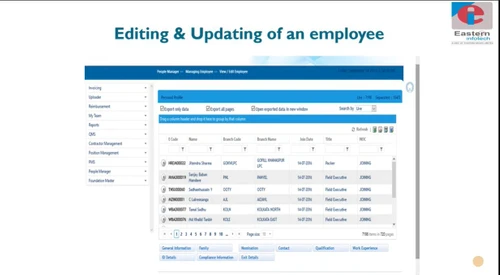
Eastern EM HRMS offers a fully featured and integrated solution for HR teams. The software offers problem solving capabilities, which allows HR teams to take up grievances from employees and act on it immediately. This human resource management system helps with the complete management of an employee lifecycle. Managers can analyze the productivity of employees based on different attributes and arrange training sessions for them accordingly. 

How Eastern EM HRMS addresses the pain points of HR teams? 

Eastern EM HRMS assists organizations with numerous tasks which are otherwise tedious and time-taking in nature. This HRM management software simplifies the entire recruitment and onboarding process for new joiners. Instead of making several entries, HR teams can import the data from finalized resumes for quick onboarding. It also provides HR teams with necessary tools for prior auditing of candidates’ documents and before their joining date. 

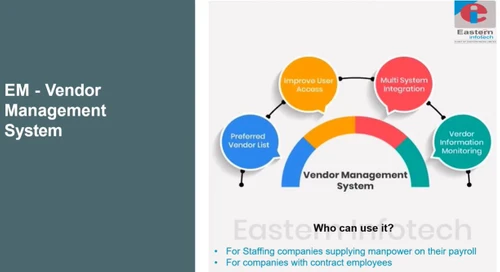
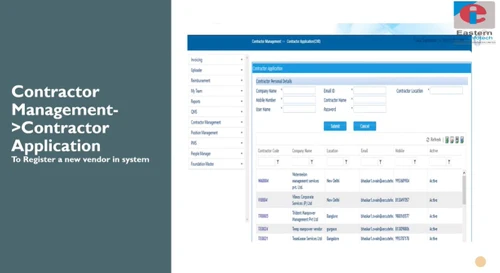
Another key area where Eastern EM HRMS helps is the management of vendors. The vendor management system module allows organization to improve communication with the suppliers. The HRIS software allows users to create a thorough list of vendors and manage interactions with them. It provides a single access point to monitor the all the vendor activities seamlessly. 

What are features offered by Eastern EM HRMS software? 

Here are some key features offered by Eastern EM HRMS: 

  1. Vendor management
  2. Quality assurance
  3. Recruitment management 
  4. Onboarding and employee training 
  5. Payroll and taxation 
  6. Attendance management
  7. Leave management 
  8. Claims, loans, and reimbursements

What is the price of Eastern EM HRMS human resources management system? 

Eastern EM HRMS price depends on the modules and customizations required for your HR management needs. Factors such as, modules required, size of the organization, etc. determine the final price of the software. You can request a call back to get more information regarding Eastern EM HRMS pricing. 

Read more

Eastern EM HRMS Pricing & Plans

Looking for The Right Pricing?

Share your requirements and get a plan built around your business.

  • Define your business needs
  • Get customised pricing
  • Choose features that fit your workflow

Price Available on Request

Get personalised Eastern EM HRMS pricing that fits your needs. Our team will connect with you.

Eastern EM HRMS Features

  • icon_check Employee Self Service
    This human resource management software provides a self-service portal for employees to report their daily work and apply for
  • icon_check Attendance Management
    The software provides real-time attendance management feature for organizations to record incoming and outgoing time of their
  • icon_check Leave Management
    Eastern EM HRMS software allows employees to check and apply for leaves and get it approved by their managers directly.
  • icon_check Recruitment Management
    HR teams can use the recruitment management module to sort and hire the best talent available in the market.
  • icon_check Client Management
    Organizations can use this HR management system to manage their clients and stay updated with regards to all the communication
  • icon_check Employee Lifecycle Management
    HR teams can manage an employee’s entire lifecycle and track all the information regarding them, from the hire to the exit. It
  • icon_check Project Management
    This HR management software allows organizations to enlist all the projects they are currently working on along with the
  • icon_check Payroll Management
    This HRMS software allows HR teams to calculate the payroll accurately by incorporating all the data for attendance, leaves,
  • icon_check Performance Appraisal
    Managers can assess the performance of their employees and give recommendation for appraisal through the software.
  • icon_check Shift Management
    Organizations can setup their shift-based working hours and allot employees in different shifts as per the requirement.
  • icon_check Asset Management
    Eastern EM HRMS helps companies to manage their fixed assets to manage its depreciation point.
  • icon_check Bonus, Loan & Advances Management
    All the benefits for employees such as Bonus, Loan, and Advances can be managed through this software.
  • icon_check Claim Management
    This HRMS software allows employees to file claims for expenses with travelling, dining, and other projects. They can also attach
  • icon_check Expense Management
    Companies can track and calculate all their expenditures and check where they can cut costs without compromising on the
  • icon_check Visitor Management
    This HRMS software also enables companies to monitor and provide access to visitors by recording their purpose for visitation.
  • icon_check Pay Slip
    HR teams can create a personalized pay slip for employees on a monthly basis.
  • icon_check MIS Reports
    Eastern EM HRMS generates comprehensive MIS reports to get detailed information regarding the workforce performance.
Eastern EM HRMS Demo Video play icon

Get Eastern EM HRMS Demo

Watch the demo video to explore key features, real workflows, and how the software fits your business needs.

Understand
Key Features
Personal
Demo Insights
Interactive
Demo Support

Eastern EM HRMS Specification

Supported Platforms
Windows Windows
Devices
Desktop Desktop
Deployment
Web-Based Web-Based
Suitable For
All Industries
Business Specific
All Businesses
Language
English

Explore the Best Alternative Solutions Similar to Your Business Size and Needs

Eastern EM HRMS Review

4.1

Out of 5

img

Overall Rating

Based on
5 Verified Ratings

Rating Breakdown

  • Features 4.1
  • Value for Money 3.9
  • Ease of Use 4.3
  • Customer Support 4.4

90% Recommend this Product

Add Review

Techjockey Trusted Reviews from Verified Users

No reviews are currently available for Eastern EM HRMS. Discover similar HR Software reviews

  • Zfour HRMS

    4.9

    Whats great - The service is professional, user-friendly, and genuinely helpful. Highly recommend to anyone looking for quality and trust. read more

  • HROne

    4.8

    Whats great - None read more

  • factoHR

    4.6

    Whats great - Get real-time HR insights! Data-driven reports help you make faster, smarter decisions for workforce management read more

Compare Eastern EM HRMS With other HR Software

Products
Ratings
Pricing
Device Supported
Deployment
Supported Platforms
  • img

    Eastern EM HRMS

  • 4.1

  • Price On Request

  • Desktop

    Mobile

  • Web based

    On Premises

  • Windows

    Mac OS

  • img

    Spine HR

  • 4.3

  • Price On Request

  • Desktop

    Mobile

  • Web based

    On Premises

  • Windows

    Mac OS

  • img

    ClusterHR

  • 5

  • ₹ 40

  • Desktop

    Mobile

  • Web based

    On Premises

  • Windows

    Mac OS

  • img

    Fix HR

  • 4.9

  • ₹ 600

  • Desktop

    Mobile

  • Web based

    On Premises

  • Windows

    Mac OS

  • img

    Zfour HRMS

  • 4.9

  • ₹ 45

  • Desktop

    Mobile

  • Web based

    On Premises

  • Windows

    Mac OS

  • img

    WeekMate

  • 4.7

  • ₹ 3999

  • Desktop

    Mobile

  • Web based

    On Premises

  • Windows

    Mac OS

  • img

    SignalHRM

  • 4.6

  • ₹ 648

  • Desktop

    Mobile

  • Web based

    On Premises

  • Windows

    Mac OS

  • img

    WoCo

  • 4.8

  • ₹ 50

  • Desktop

    Mobile

  • Web based

    On Premises

  • Windows

    Mac OS

  • img

    Presence360

  • 4.9

  • ₹ 2999

  • Desktop

    Mobile

  • Web based

    On Premises

  • Windows

    Mac OS

  • img

    TruHR

  • 4.9

  • ₹ 2200

  • Desktop

    Mobile

  • Web based

    On Premises

  • Windows

    Mac OS

  • img

    Keka HR

  • 4.4

  • Price On Request

  • Desktop

    Mobile

  • Web based

    On Premises

  • Windows

    Mac OS

(0) Product(s) selected

Eastern EM HRMS Alternatives

See All Eastern EM HRMS Alternatives

Starting Price:

₹600 /Month ₹900

SAVE UPTO 33%

Starting Price:

₹2,200 /Month

Starting Price:

₹49 /Month

Starting Price:

₹890 /Month
Starting Price:

₹1,499 /Month

Starting Price:

$49 /Month

Available

Price on Request

Starting Price:

₹5,000 /Month

Articles for Eastern EM HRMS

See All Related Articles

What to do in case a bug is encountered while using Eastern EM HRMS?

Users can report bugs through the software and get it rectified in no time.

How does Eastern EM HRMS conduct attendance?

Eastern EM HRMS can integrate with different types of face recognition and fingerprint devices to conduct error-free attendance.

What are the benefits of using automated deployment of Eastern EM HRMS?

Automated deployment helps with various tasks such as: 1. Artifact building 2. Runs unit tests 3. Monitors provisioning profiles and certificates

Can I Eastern EM HRMS use for smartphones?

Eastern EM HRMS provides an app for Android devices only.

Can I get a demo for Eastern EM HRMS?

Techjockey offers a demo before purchase for Eastern EM HRMS. This will help the interested buyers know more about its features.

20,000+ Software Listed

Best Price Guranteed

Free Expert Consultation

2M+ Happy Customers

Terms and Condtions

close

Users with registered businesses can purchase goods from merchants on the platform to satisfy their business needs. Users are not permitted to utilize any products acquired through the platform for resale, advertising, business, or further distribution.

For each purchase made, users will receive a Tax Invoice (or 'GST invoice') that includes specific details such as:

  • the GSTIN of the user associated with their registered business, and

  • the specified Entity Name for their business.

It should be noted that not all products are eligible for GST Invoice. Only the products displayed by participating sellers with the 'GST-based Invoice Available' callout on the product description page would qualify.

Certain goods and services are not eligible to get a GST Invoice, including items with VAS, i.e., Value Added Services (e.g., Total Mobile Protection/Assured Buyback) and those involving an exchange offer at the time of purchase.

Users must ensure the accuracy of the GSTIN, and business entity name provided for the GST Invoice. Requests for corrections into GST Invoice would not be accommodated by Techjockey.com or any Seller, and any issues arising from user-provided information are the sole responsibility of users.

Techjockey.com is not liable for the GST Invoice or any associated input tax credit. To efficiently claim an input tax credit, users should select the registered place of business address as per the GST authority's data and follow the provisions of the GST Act and rules.

To claim an input tax credit, the delivery and billing addresses must match. Furthermore, input tax credits will not be granted if the delivery address and GSTIN on the invoice are from different states. In case of incorrect GST details provided during the order placement, the order will be canceled automatically.